Skip to content
  • Categories
  • Recent
  • Tags
  • Popular
  • Users
  • Groups
  • Search
  • Get Qt Extensions
  • Unsolved
Collapse
Brand Logo
  1. Home
  2. Qt Development
  3. General and Desktop
  4. Create custom widget
Qt 6.11 is out! See what's new in the release blog

Create custom widget

Scheduled Pinned Locked Moved Solved General and Desktop
15 Posts 3 Posters 3.8k Views 2 Watching
  • Oldest to Newest
  • Newest to Oldest
  • Most Votes
Reply
  • Reply as topic
Log in to reply
This topic has been deleted. Only users with topic management privileges can see it.
  • H Offline
    H Offline
    hobbyProgrammer
    wrote on last edited by hobbyProgrammer
    #2

    134e73d1-7735-450e-b41b-b9888b297179-image.png

    Is this what you're looking for? if it is:

    1. put 2 labels above each other and select them both
    2. Ctrl+L (while the two labels are selected)
    3. Add a new label on the left and a button on the right
    4. select them all (all labels and button)
    5. Ctrl+H (while everything is selected)
    6. set the sizePolicy to preffered for everything
    7. resize the horizontal layout by selecting everything and use the corners to resize.

    Edit: I am so sorry, but I didn't see that it was about a widget instead of layout.

    1. Add a QWidget item
    2. Select the entire layout as created by the steps above
    3. Drag the layout into the QWidget
    4. Add spacers if needed
    5. Set the size policy and resize if needed.
    H 1 Reply Last reply
    2
    • H hobbyProgrammer

      134e73d1-7735-450e-b41b-b9888b297179-image.png

      Is this what you're looking for? if it is:

      1. put 2 labels above each other and select them both
      2. Ctrl+L (while the two labels are selected)
      3. Add a new label on the left and a button on the right
      4. select them all (all labels and button)
      5. Ctrl+H (while everything is selected)
      6. set the sizePolicy to preffered for everything
      7. resize the horizontal layout by selecting everything and use the corners to resize.

      Edit: I am so sorry, but I didn't see that it was about a widget instead of layout.

      1. Add a QWidget item
      2. Select the entire layout as created by the steps above
      3. Drag the layout into the QWidget
      4. Add spacers if needed
      5. Set the size policy and resize if needed.
      H Offline
      H Offline
      hobbyProgrammer
      wrote on last edited by
      #3
      This post is deleted!
      1 Reply Last reply
      0
      • mrjjM Offline
        mrjjM Offline
        mrjj
        Lifetime Qt Champion
        wrote on last edited by mrjj
        #4

        @t0msk said in Create custom widget:

        Is possible to create this widget using Qt Designer and then assign values to it dynamically?

        Yes. Just Create a new Widget with UI and .h and cpp file
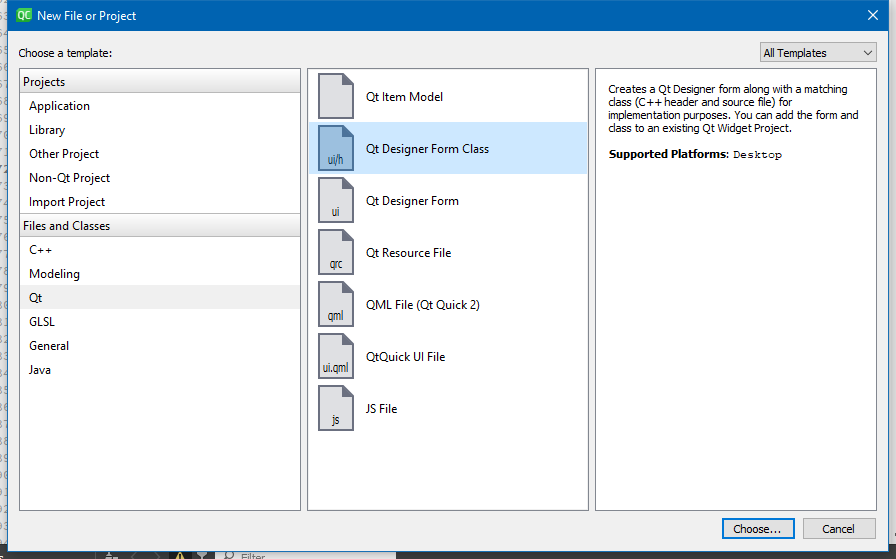
        alt text

        You can then use this from (other) code to make as many instances of the Widget as you want.
        say in a MainWindow and put them in a layout there.

        T 1 Reply Last reply
        0
        • mrjjM mrjj

          @t0msk said in Create custom widget:

          Is possible to create this widget using Qt Designer and then assign values to it dynamically?

          Yes. Just Create a new Widget with UI and .h and cpp file
          alt text

          You can then use this from (other) code to make as many instances of the Widget as you want.
          say in a MainWindow and put them in a layout there.

          T Offline
          T Offline
          t0msk
          wrote on last edited by
          #5

          @mrjj

          Yes this is it, and how can I spawn it? I mean what is code for spawing it as graphics object and inserting into layout?

          Student who loves C/C++

          mrjjM 1 Reply Last reply
          0
          • T t0msk

            @mrjj

            Yes this is it, and how can I spawn it? I mean what is code for spawing it as graphics object and inserting into layout?

            mrjjM Offline
            mrjjM Offline
            mrjj
            Lifetime Qt Champion
            wrote on last edited by
            #6

            @t0msk
            Hi

            Like any c++ class.

            #include "mywidget.h"

            MyWidget * instance = new MyWidget();
            ui->somelayout->addWidget(instance );

            T 1 Reply Last reply
            1
            • mrjjM mrjj

              @t0msk
              Hi

              Like any c++ class.

              #include "mywidget.h"

              MyWidget * instance = new MyWidget();
              ui->somelayout->addWidget(instance );

              T Offline
              T Offline
              t0msk
              wrote on last edited by
              #7

              @mrjj said in Create custom widget:

              @t0msk
              Hi

              Like any c++ class.

              #include "mywidget.h"

              MyWidget * instance = new MyWidget();
              ui->somelayout->addWidget(instance );

              Thank you :)

              Student who loves C/C++

              mrjjM 1 Reply Last reply
              0
              • T t0msk

                @mrjj said in Create custom widget:

                @t0msk
                Hi

                Like any c++ class.

                #include "mywidget.h"

                MyWidget * instance = new MyWidget();
                ui->somelayout->addWidget(instance );

                Thank you :)

                mrjjM Offline
                mrjjM Offline
                mrjj
                Lifetime Qt Champion
                wrote on last edited by
                #8

                @t0msk
                Just as a note :)
                If you really plan to use 100 instances of this, then maybe
                you should use a layout inside a QScrollArea so it allows scrolling.
                A layout alone. will not give scrollbars

                T 2 Replies Last reply
                1
                • mrjjM mrjj

                  @t0msk
                  Just as a note :)
                  If you really plan to use 100 instances of this, then maybe
                  you should use a layout inside a QScrollArea so it allows scrolling.
                  A layout alone. will not give scrollbars

                  T Offline
                  T Offline
                  t0msk
                  wrote on last edited by t0msk
                  #9

                  @mrjj said in Create custom widget:

                  @t0msk
                  Just as a note :)
                  If you really plan to use 100 instances of this, then maybe
                  you should use a layout inside a QScrollArea so it allows scrolling.
                  A layout alone. will not give scrollbars

                  Thanks :) Would be great if I could create folders in Forms directory :)

                  Student who loves C/C++

                  mrjjM 1 Reply Last reply
                  0
                  • mrjjM mrjj

                    @t0msk
                    Just as a note :)
                    If you really plan to use 100 instances of this, then maybe
                    you should use a layout inside a QScrollArea so it allows scrolling.
                    A layout alone. will not give scrollbars

                    T Offline
                    T Offline
                    t0msk
                    wrote on last edited by
                    #10

                    @mrjj Can I ask you about that scroll area?

                    I wanted to add widget into:

                    ui->scrollAreaWidgetContents
                    

                    But it doesn't have a addWidget method.

                    Student who loves C/C++

                    1 Reply Last reply
                    0
                    • T t0msk

                      @mrjj said in Create custom widget:

                      @t0msk
                      Just as a note :)
                      If you really plan to use 100 instances of this, then maybe
                      you should use a layout inside a QScrollArea so it allows scrolling.
                      A layout alone. will not give scrollbars

                      Thanks :) Would be great if I could create folders in Forms directory :)

                      mrjjM Offline
                      mrjjM Offline
                      mrjj
                      Lifetime Qt Champion
                      wrote on last edited by
                      #11

                      @t0msk
                      Hi
                      Well you can.
                      Remove the ui/cpp/h from project. (dont check the delete file checkbox)
                      In the .pro file
                      you can add
                      FORMS += Controls/theForm.ui

                      and you can put the ui file in the sub folder Controls
                      and then Add the UI to the project.

                      You might also need to change the
                      INCLUDES +=Controls/theForm.h
                      and
                      SOURCES +=Controls/theForm.cpp

                      for it to find the .cpp and .h

                      1 Reply Last reply
                      1
                      • mrjjM Offline
                        mrjjM Offline
                        mrjj
                        Lifetime Qt Champion
                        wrote on last edited by mrjj
                        #12

                        @t0msk said in Create custom widget:

                        ui->scrollAreaWidgetContents

                        Hi
                        Since you have ui. do the following.
                        Place any widget inside scroll area. (like button)
                        Right click besides this widget. (in scroll area)
                        Choose a layout in the layout menu.
                        Now delete this widget again. (the button)
                        The layout will stay!
                        Notice the name of the layout
                        then from code
                        ui->thenewlayoutname->addwidget(xx);

                        T 1 Reply Last reply
                        1
                        • mrjjM mrjj

                          @t0msk said in Create custom widget:

                          ui->scrollAreaWidgetContents

                          Hi
                          Since you have ui. do the following.
                          Place any widget inside scroll area. (like button)
                          Right click besides this widget. (in scroll area)
                          Choose a layout in the layout menu.
                          Now delete this widget again. (the button)
                          The layout will stay!
                          Notice the name of the layout
                          then from code
                          ui->thenewlayoutname->addwidget(xx);

                          T Offline
                          T Offline
                          t0msk
                          wrote on last edited by
                          #13

                          @mrjj

                          Yea, I have it like that:
                          Screenshot_20191015_230323.png
                          It is scrollAreaWidgetContents, but if I do ui->scrollAreaWidgetContents->Add it shows only AddAction.

                          Student who loves C/C++

                          mrjjM 1 Reply Last reply
                          0
                          • T t0msk

                            @mrjj

                            Yea, I have it like that:
                            Screenshot_20191015_230323.png
                            It is scrollAreaWidgetContents, but if I do ui->scrollAreaWidgetContents->Add it shows only AddAction.

                            mrjjM Offline
                            mrjjM Offline
                            mrjj
                            Lifetime Qt Champion
                            wrote on last edited by
                            #14

                            @t0msk
                            Hi
                            Look in the layout section of the properties.
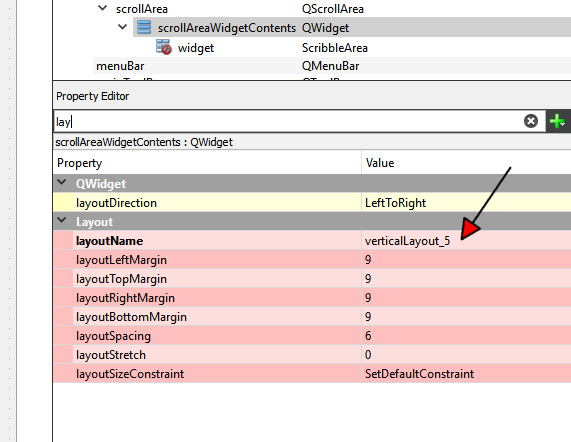
                            alt text
                            to see the name.

                            And yes, its slightly confusing as the structure is a bit flatten
                            so
                            its not
                            ui->scrollareaSomething->layout
                            but just
                            ui->verticalLayout_5->addwidget(xxx)

                            T 1 Reply Last reply
                            1
                            • mrjjM mrjj

                              @t0msk
                              Hi
                              Look in the layout section of the properties.
                              alt text
                              to see the name.

                              And yes, its slightly confusing as the structure is a bit flatten
                              so
                              its not
                              ui->scrollareaSomething->layout
                              but just
                              ui->verticalLayout_5->addwidget(xxx)

                              T Offline
                              T Offline
                              t0msk
                              wrote on last edited by
                              #15

                              @mrjj Again thank you very much!! :)

                              Student who loves C/C++

                              1 Reply Last reply
                              0

                              • Login

                              • Login or register to search.
                              • First post
                                Last post
                              0
                              • Categories
                              • Recent
                              • Tags
                              • Popular
                              • Users
                              • Groups
                              • Search
                              • Get Qt Extensions
                              • Unsolved