Skip to content
  • Categories
  • Recent
  • Tags
  • Popular
  • Users
  • Groups
  • Search
  • Get Qt Extensions
  • Unsolved
Collapse
Brand Logo
  1. Home
  2. Qt Development
  3. General and Desktop
  4. QScrollBar can't be styled anymore?
Qt 6.11 is out! See what's new in the release blog

QScrollBar can't be styled anymore?

Scheduled Pinned Locked Moved Solved General and Desktop
18 Posts 4 Posters 5.6k Views 3 Watching
  • Oldest to Newest
  • Newest to Oldest
  • Most Votes
Reply
  • Reply as topic
Log in to reply
This topic has been deleted. Only users with topic management privileges can see it.
  • mrjjM Offline
    mrjjM Offline
    mrjj
    Lifetime Qt Champion
    wrote on last edited by
    #7

    Hi
    To check if "Must be something else going on."
    I would place a QScrollbar on a from in the real project and
    give it a name, then use this name in the stylesheet as selector and
    see if it then works.

    T 1 Reply Last reply
    2
    • mrjjM mrjj

      Hi
      To check if "Must be something else going on."
      I would place a QScrollbar on a from in the real project and
      give it a name, then use this name in the stylesheet as selector and
      see if it then works.

      T Offline
      T Offline
      Tink
      wrote on last edited by
      #8

      @mrjj
      Hi, good idea.
      So i placed 2 QScrollBars in the project. One uses the objectname as the CSS selector and the other one uses the classname. They both display correctly.

      The malfunctioning scrollbars are those that belong to the QTextEdit and QListWidget.

      1 Reply Last reply
      0
      • mrjjM Offline
        mrjjM Offline
        mrjj
        Lifetime Qt Champion
        wrote on last edited by
        #9

        Hi
        Super.
        Ok so its not broken as such.
        Do you have stylesheets set on the QTextEdit and QListWidget
        directly or via the parent ?

        1 Reply Last reply
        0
        • T Offline
          T Offline
          Tink
          wrote on last edited by Tink
          #10

          Directly on the widgets. It used to work alright. And i can't think of anything i changed except upgrading.

          1 Reply Last reply
          0
          • mrjjM Offline
            mrjjM Offline
            mrjj
            Lifetime Qt Champion
            wrote on last edited by mrjj
            #11

            Hi
            Its must somehow be related to those stylesheets.
            I will try update to 5.13.0 and see if something happens.

            Update:
            Nope. Everything still works as expected on win/linux.

            What platform are you seeing this on?

            1 Reply Last reply
            0
            • T Offline
              T Offline
              Tink
              wrote on last edited by
              #12

              I'm on Arch Linux.
              Thanks for trying stuff btw :)

              1 Reply Last reply
              0
              • mrjjM Offline
                mrjjM Offline
                mrjj
                Lifetime Qt Champion
                wrote on last edited by
                #13

                Hi
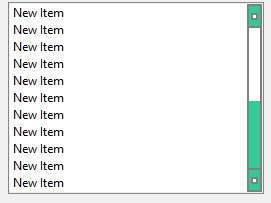
                Could you try the style sheet from the docs ?

                 QScrollBar:vertical {
                     border: 2px solid grey;
                     background: #32CC99;
                     width: 15px;
                     margin: 22px 0 22px 0;
                 }
                 QScrollBar::handle:vertical {
                     background: white;
                     min-height: 20px;
                 }
                 QScrollBar::add-line:vertical {
                     border: 2px solid grey;
                     background: #32CC99;
                     height: 20px;
                     subcontrol-position: bottom;
                     subcontrol-origin: margin;
                 }
                
                 QScrollBar::sub-line:vertical {
                     border: 2px solid grey;
                     background: #32CC99;
                     height: 20px;
                     subcontrol-position: top;
                     subcontrol-origin: margin;
                 }
                 QScrollBar::up-arrow:vertical, QScrollBar::down-arrow:vertical {
                     border: 2px solid grey;
                     width: 3px;
                     height: 3px;
                     background: white;
                 }
                
                 QScrollBar::add-page:vertical, QScrollBar::sub-page:vertical {
                     background: none;
                 }
                

                Directly on the ListWidget
                alt text

                1 Reply Last reply
                0
                • T Offline
                  T Offline
                  Tink
                  wrote on last edited by
                  #14

                  Hey, well the only good result i got was copying the example code onto a parent frame in Designer.
                  On the widget itself: doesn't work. And from code: doesn't work.
                  I'm using PyQt btw, perhaps that matters...?

                  mrjjM 1 Reply Last reply
                  0
                  • T Tink

                    Hey, well the only good result i got was copying the example code onto a parent frame in Designer.
                    On the widget itself: doesn't work. And from code: doesn't work.
                    I'm using PyQt btw, perhaps that matters...?

                    mrjjM Offline
                    mrjjM Offline
                    mrjj
                    Lifetime Qt Champion
                    wrote on last edited by
                    #15

                    @tink
                    hi
                    Ok. so stylesheet can work just not on the widget itself.
                    Im not sure using pyQt matters as its a language binding and
                    if something was up with newer Qt and the binding, one should think you would get other issues than just stylesheet and scrollbar.
                    I tried with the 5.13 on my main project using stylesheet heavily
                    including scrollbars to make them better for touch and all seem
                    to look and work as normally so im not sure what is going on.
                    Since a clean project work, i think it must be something locally in your actual project.
                    I would try to remove any style sheet on parents and only apply on listwidget too see if that then works.
                    Else it seems the best bet would be to downgrade and wait a bit before trying that verison again.

                    T 1 Reply Last reply
                    2
                    • mrjjM mrjj

                      @tink
                      hi
                      Ok. so stylesheet can work just not on the widget itself.
                      Im not sure using pyQt matters as its a language binding and
                      if something was up with newer Qt and the binding, one should think you would get other issues than just stylesheet and scrollbar.
                      I tried with the 5.13 on my main project using stylesheet heavily
                      including scrollbars to make them better for touch and all seem
                      to look and work as normally so im not sure what is going on.
                      Since a clean project work, i think it must be something locally in your actual project.
                      I would try to remove any style sheet on parents and only apply on listwidget too see if that then works.
                      Else it seems the best bet would be to downgrade and wait a bit before trying that verison again.

                      T Offline
                      T Offline
                      Tink
                      wrote on last edited by
                      #16

                      @mrjj
                      I'm trying different things with the css now like putting everything onto a parent. With no success...
                      Downgrading will probably break dependencies . I guess i will have to wait for a new version and see if that helps.

                      But now i sometimes see this error (after changing css):
                      qt.qpa.xcb: QXcbConnection: XCB error: 13 (BadGC), sequence: 492, resource id: 0, major code: 130 (Unknown), minor code: 3
                      Can that be related to my problem you think?

                      1 Reply Last reply
                      0
                      • T Offline
                        T Offline
                        Tink
                        wrote on last edited by Tink
                        #17

                        Alright... so.. this is weird but the problem is fixed now. I was checking every widget for stylesheets and found a QSplitter with a background color set (on QSplitter only), a couple of levels higher. I had set that bg clr just to have a visual hint in designer. After removing that stylesheet the listwidget and textedit are working fine again.
                        I don't understand why this is the case. But i'll take it!

                        If someone can explain what happened, would be awesome.

                        I have to conclude for now that cascading styles are not very reliable...

                        1 Reply Last reply
                        2
                        • mrjjM Offline
                          mrjjM Offline
                          mrjj
                          Lifetime Qt Champion
                          wrote on last edited by
                          #18

                          Hi
                          Not possible to explain/guess at without the exact stylesheets and locations.

                          However, its often easier to manage stylesheet
                          by using ONLY one sheet and set on the application.

                          That way its easier to control the cascading.
                          The rules with selectors are pretty complicated and its hard to get an overview
                          with many stylesheets.

                          1 Reply Last reply
                          3

                          • Login

                          • Login or register to search.
                          • First post
                            Last post
                          0
                          • Categories
                          • Recent
                          • Tags
                          • Popular
                          • Users
                          • Groups
                          • Search
                          • Get Qt Extensions
                          • Unsolved