
How to install Qt in windows 10?
-
@ sierdzio
I have create new project and dont write any thing in this project.Directly compile and run for know to qt is install properly or not..But this error is generate..
I want use 4.8.7 because i have one application that is supported 4.8.1..
So please help.I am also new on windows -
@ sierdzio
I have create new project and dont write any thing in this project.Directly compile and run for know to qt is install properly or not..But this error is generate..
I want use 4.8.7 because i have one application that is supported 4.8.1..
So please help.I am also new on windows@vaibs1224 Please show your complete compile output from a rebuild.
if it's to long for here, upload it to to a paste service and provide the link here.
Regards
-
I requested the compile output. Please do a rebuild and paste the output as text here.
Thanks!
-
Hi
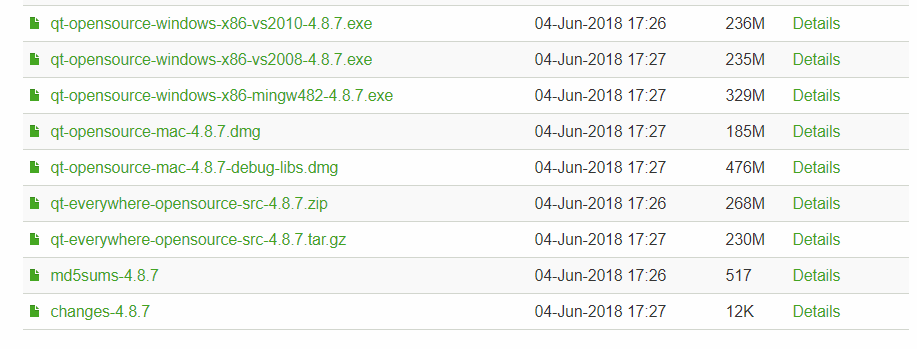
Are you saying it prints nothing in the (4) Compiler output ?I was wondering what compiler did you install the 4.8.7 Qt for ?
-
@mrjj
i have install qt-opensorce-window-x86-mingw482-4.8.7.exe
and Qtcreator 4 -> 4.4.1After run ->
14:17:03: Starting D:\gg\build-untitled1-4_8_7-Debug\debug\untitled1.exe ...
14:17:03: The program has unexpectedly finished.
14:17:03: The process was ended forcefully.
14:17:04: D:/gg/build-untitled1-4_8_7-Debug/debug/untitled1.exe crashed.
This output show in Application window
Thanks -
@mrjj
i have install qt-opensorce-window-x86-mingw482-4.8.7.exe
and Qtcreator 4 -> 4.4.1After run ->
14:17:03: Starting D:\gg\build-untitled1-4_8_7-Debug\debug\untitled1.exe ...
14:17:03: The program has unexpectedly finished.
14:17:03: The process was ended forcefully.
14:17:04: D:/gg/build-untitled1-4_8_7-Debug/debug/untitled1.exe crashed.
This output show in Application window
Thanks@vaibs1224 said in How to install Qt in windows 10?:
qt-opensorce-window-x86-mingw482-4.8.7.exe
Ok super. Downloading it now to a win 10 to see if a plain default GUI project
just crashes.Do you have other Qt version installed ?
-
@vaibs1224
Hi
You did also download the requested compiler and installed in the shown location?
also when you make the new project, does it show a 4.8.7 kit ?
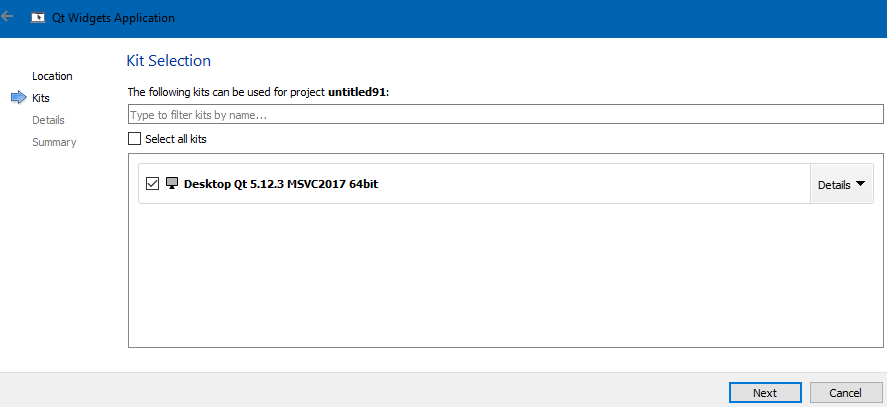
My Creator did not pick it up automatically.
-
@mrjj
Yes its show 4.8.7 kit
Now i am install qt 5.12.2 but after run application following error show in application window
06:48:39: Starting D:\practice\build-untitled-4_8_7-Debug\debug\untitled.exe ...
06:48:40: The program has unexpectedly finished.
06:48:40: The process was ended forcefully.
06:48:40: D:/practice/build-untitled-4_8_7-Debug/debug/untitled.exe crashed. -
@mrjj
Yes its show 4.8.7 kit
Now i am install qt 5.12.2 but after run application following error show in application window
06:48:39: Starting D:\practice\build-untitled-4_8_7-Debug\debug\untitled.exe ...
06:48:40: The program has unexpectedly finished.
06:48:40: The process was ended forcefully.
06:48:40: D:/practice/build-untitled-4_8_7-Debug/debug/untitled.exe crashed.@vaibs1224 so why don't you show your compile output? It's impossible that there is 'nothing'.
-
@mrjj
Yes its show 4.8.7 kit
Now i am install qt 5.12.2 but after run application following error show in application window
06:48:39: Starting D:\practice\build-untitled-4_8_7-Debug\debug\untitled.exe ...
06:48:40: The program has unexpectedly finished.
06:48:40: The process was ended forcefully.
06:48:40: D:/practice/build-untitled-4_8_7-Debug/debug/untitled.exe crashed.@vaibs1224 said in How to install Qt in windows 10?:
Now i am install qt 5.12.2 but after run application following error show in application window
06:48:39: Starting D:\practice\build-untitled-4_8_7-Debug\debug\untitled.exe ...You're still opening the binary compiled with Qt 4.8.7, you have likely not built it with 5.12.2.
-
@aheng
This is compiler output ..I have compile using 4.8.7..16:39:50: Running steps for project untitled2... 16:39:50: Configuration unchanged, skipping qmake step. 16:39:50: Starting: "C:\Qt1\Tools\mingw730_32\bin\mingw32-make.exe" -j4 C:/Qt1/Tools/mingw730_32/bin/mingw32-make -f Makefile.Debug mingw32-make[1]: Entering directory 'D:/practice/build-untitled2-4_8_7-Debug' c:\Qt\4.8.7\bin\uic.exe ..\untitled2\mainwindow.ui -o ui_mainwindow.h g++ -c -pipe -g -frtti -fexceptions -mthreads -Wall -Wextra -DUNICODE -DQT_DEPRECATED_WARNINGS -DQT_DLL -DQT_GUI_LIB -DQT_CORE_LIB -DQT_HAVE_MMX -DQT_HAVE_SSE -DQT_HAVE_MMXEXT -DQT_HAVE_SSE2 -DQT_THREAD_SUPPORT -DQT_NEEDS_QMAIN -I"c:\Qt\4.8.7\include\QtCore" -I"c:\Qt\4.8.7\include\QtGui" -I"c:\Qt\4.8.7\include" -I"c:\Qt\4.8.7\include\ActiveQt" -I"debug" -I"." -I"..\untitled2" -I"." -I"c:\Qt\4.8.7\mkspecs\win32-g++" -o debug\main.o ..\untitled2\main.cpp C:\Qt\4.8.7\bin\moc.exe -DUNICODE -DQT_DEPRECATED_WARNINGS -DQT_DLL -DQT_GUI_LIB -DQT_CORE_LIB -DQT_HAVE_MMX -DQT_HAVE_SSE -DQT_HAVE_MMXEXT -DQT_HAVE_SSE2 -DQT_THREAD_SUPPORT -DQT_NEEDS_QMAIN -I"c:\Qt\4.8.7\include\QtCore" -I"c:\Qt\4.8.7\include\QtGui" -I"c:\Qt\4.8.7\include" -I"c:\Qt\4.8.7\include\ActiveQt" -I"debug" -I"." -I"..\untitled2" -I"." -I"c:\Qt\4.8.7\mkspecs\win32-g++" -D__GNUC__ -DWIN32 ..\untitled2\mainwindow.h -o debug\moc_mainwindow.cpp g++ -c -pipe -g -frtti -fexceptions -mthreads -Wall -Wextra -DUNICODE -DQT_DEPRECATED_WARNINGS -DQT_DLL -DQT_GUI_LIB -DQT_CORE_LIB -DQT_HAVE_MMX -DQT_HAVE_SSE -DQT_HAVE_MMXEXT -DQT_HAVE_SSE2 -DQT_THREAD_SUPPORT -DQT_NEEDS_QMAIN -I"c:\Qt\4.8.7\include\QtCore" -I"c:\Qt\4.8.7\include\QtGui" -I"c:\Qt\4.8.7\include" -I"c:\Qt\4.8.7\include\ActiveQt" -I"debug" -I"." -I"..\untitled2" -I"." -I"c:\Qt\4.8.7\mkspecs\win32-g++" -o debug\mainwindow.o ..\untitled2\mainwindow.cpp g++ -c -pipe -g -frtti -fexceptions -mthreads -Wall -Wextra -DUNICODE -DQT_DEPRECATED_WARNINGS -DQT_DLL -DQT_GUI_LIB -DQT_CORE_LIB -DQT_HAVE_MMX -DQT_HAVE_SSE -DQT_HAVE_MMXEXT -DQT_HAVE_SSE2 -DQT_THREAD_SUPPORT -DQT_NEEDS_QMAIN -I"c:\Qt\4.8.7\include\QtCore" -I"c:\Qt\4.8.7\include\QtGui" -I"c:\Qt\4.8.7\include" -I"c:\Qt\4.8.7\include\ActiveQt" -I"debug" -I"." -I"..\untitled2" -I"." -I"c:\Qt\4.8.7\mkspecs\win32-g++" -o debug\moc_mainwindow.o debug\moc_mainwindow.cpp g++ -mthreads -Wl,-subsystem,windows -o debug\untitled2.exe debug/main.o debug/mainwindow.o debug/moc_mainwindow.o -L"c:\Qt\4.8.7\lib" -lmingw32 -lqtmaind -lQtGuid4 -lQtCored4 mingw32-make[1]: Leaving directory 'D:/practice/build-untitled2-4_8_7-Debug' 16:39:52: The process "C:\Qt1\Tools\mingw730_32\bin\mingw32-make.exe" exited normally. 16:39:52: Elapsed time: 00:02.[Edit aha_1980: Added code tags]
-
@aheng
This is compiler output ..I have compile using 4.8.7..16:39:50: Running steps for project untitled2... 16:39:50: Configuration unchanged, skipping qmake step. 16:39:50: Starting: "C:\Qt1\Tools\mingw730_32\bin\mingw32-make.exe" -j4 C:/Qt1/Tools/mingw730_32/bin/mingw32-make -f Makefile.Debug mingw32-make[1]: Entering directory 'D:/practice/build-untitled2-4_8_7-Debug' c:\Qt\4.8.7\bin\uic.exe ..\untitled2\mainwindow.ui -o ui_mainwindow.h g++ -c -pipe -g -frtti -fexceptions -mthreads -Wall -Wextra -DUNICODE -DQT_DEPRECATED_WARNINGS -DQT_DLL -DQT_GUI_LIB -DQT_CORE_LIB -DQT_HAVE_MMX -DQT_HAVE_SSE -DQT_HAVE_MMXEXT -DQT_HAVE_SSE2 -DQT_THREAD_SUPPORT -DQT_NEEDS_QMAIN -I"c:\Qt\4.8.7\include\QtCore" -I"c:\Qt\4.8.7\include\QtGui" -I"c:\Qt\4.8.7\include" -I"c:\Qt\4.8.7\include\ActiveQt" -I"debug" -I"." -I"..\untitled2" -I"." -I"c:\Qt\4.8.7\mkspecs\win32-g++" -o debug\main.o ..\untitled2\main.cpp C:\Qt\4.8.7\bin\moc.exe -DUNICODE -DQT_DEPRECATED_WARNINGS -DQT_DLL -DQT_GUI_LIB -DQT_CORE_LIB -DQT_HAVE_MMX -DQT_HAVE_SSE -DQT_HAVE_MMXEXT -DQT_HAVE_SSE2 -DQT_THREAD_SUPPORT -DQT_NEEDS_QMAIN -I"c:\Qt\4.8.7\include\QtCore" -I"c:\Qt\4.8.7\include\QtGui" -I"c:\Qt\4.8.7\include" -I"c:\Qt\4.8.7\include\ActiveQt" -I"debug" -I"." -I"..\untitled2" -I"." -I"c:\Qt\4.8.7\mkspecs\win32-g++" -D__GNUC__ -DWIN32 ..\untitled2\mainwindow.h -o debug\moc_mainwindow.cpp g++ -c -pipe -g -frtti -fexceptions -mthreads -Wall -Wextra -DUNICODE -DQT_DEPRECATED_WARNINGS -DQT_DLL -DQT_GUI_LIB -DQT_CORE_LIB -DQT_HAVE_MMX -DQT_HAVE_SSE -DQT_HAVE_MMXEXT -DQT_HAVE_SSE2 -DQT_THREAD_SUPPORT -DQT_NEEDS_QMAIN -I"c:\Qt\4.8.7\include\QtCore" -I"c:\Qt\4.8.7\include\QtGui" -I"c:\Qt\4.8.7\include" -I"c:\Qt\4.8.7\include\ActiveQt" -I"debug" -I"." -I"..\untitled2" -I"." -I"c:\Qt\4.8.7\mkspecs\win32-g++" -o debug\mainwindow.o ..\untitled2\mainwindow.cpp g++ -c -pipe -g -frtti -fexceptions -mthreads -Wall -Wextra -DUNICODE -DQT_DEPRECATED_WARNINGS -DQT_DLL -DQT_GUI_LIB -DQT_CORE_LIB -DQT_HAVE_MMX -DQT_HAVE_SSE -DQT_HAVE_MMXEXT -DQT_HAVE_SSE2 -DQT_THREAD_SUPPORT -DQT_NEEDS_QMAIN -I"c:\Qt\4.8.7\include\QtCore" -I"c:\Qt\4.8.7\include\QtGui" -I"c:\Qt\4.8.7\include" -I"c:\Qt\4.8.7\include\ActiveQt" -I"debug" -I"." -I"..\untitled2" -I"." -I"c:\Qt\4.8.7\mkspecs\win32-g++" -o debug\moc_mainwindow.o debug\moc_mainwindow.cpp g++ -mthreads -Wl,-subsystem,windows -o debug\untitled2.exe debug/main.o debug/mainwindow.o debug/moc_mainwindow.o -L"c:\Qt\4.8.7\lib" -lmingw32 -lqtmaind -lQtGuid4 -lQtCored4 mingw32-make[1]: Leaving directory 'D:/practice/build-untitled2-4_8_7-Debug' 16:39:52: The process "C:\Qt1\Tools\mingw730_32\bin\mingw32-make.exe" exited normally. 16:39:52: Elapsed time: 00:02.[Edit aha_1980: Added code tags]
@vaibs1224 said in How to install Qt in windows 10?:
C:/Qt1/Tools/mingw730_32/bin/mingw32-make
This is the wrong compiler. Install a suitable MinGW compiler as @mrjj pointed out above.
Regards


