Skip to content
  • Categories
  • Recent
  • Tags
  • Popular
  • Users
  • Groups
  • Search
  • Get Qt Extensions
  • Unsolved
Collapse
Brand Logo
  1. Home
  2. Qt Development
  3. General and Desktop
  4. Erase QGraphicsRectItem
Qt 6.11 is out! See what's new in the release blog

Erase QGraphicsRectItem

Scheduled Pinned Locked Moved Unsolved General and Desktop
12 Posts 2 Posters 1.4k Views 1 Watching
  • Oldest to Newest
  • Newest to Oldest
  • Most Votes
Reply
  • Reply as topic
Log in to reply
This topic has been deleted. Only users with topic management privileges can see it.
  • mrjjM Offline
    mrjjM Offline
    mrjj
    Lifetime Qt Champion
    wrote on last edited by
    #2

    Hi
    What do yo mean by erase it ? Not delete the item , but remove any "paint"?
    If you mean whatever you draw with QPainter, then you need to alter
    the paint function to draw empty rect to clear it.

    1 Reply Last reply
    0
    • K Offline
      K Offline
      Kaznachei
      wrote on last edited by
      #3

      Hello. I had to create bool-value and i called it "IN". I override hoverLeaveEvent and hoverEnterEvent like this

      void hoverLeaveEvent(QGraphicsSceneHoverEvent *event)
      {
      in = false;
      }

      void hoverEnterEvent(QGraphicsSceneHoverEvent *event)
      {
      in = true;
      }

      void paint(QPainter *painter, QStyleoOptionGraphicsItem option, QWidget widget = nullptr)
      {
      if (in)
      {
      // draw something
      }
      }

      it works but , as for me, it is bad way. Or not? Sometimes i ve got trouble. I ve got QGraphicsScene and custom GraphicsRectItem and when my button pressed hoverLeaveEvent and hoverEnterEvent doesnt work because of scene that grabbed mouse.

      1 Reply Last reply
      0
      • mrjjM Offline
        mrjjM Offline
        mrjj
        Lifetime Qt Champion
        wrote on last edited by
        #4

        Hi
        Well its not a bad way as such but if enter/leave is the only way its controlled
        then yes, it has issues with buttons as they grab the mouse.

        Im not sure what you use it for but if it should only be shown when you enter and
        "removed" when you leave, then i think you need to grab the mouse to be sure it happens.

        1 Reply Last reply
        0
        • K Offline
          K Offline
          Kaznachei
          wrote on last edited by
          #5

          I m not sure that can you understand you. Can you describe your idea by code ?

          1 Reply Last reply
          0
          • mrjjM Offline
            mrjjM Offline
            mrjj
            Lifetime Qt Champion
            wrote on last edited by
            #6

            Hi
            I mean try to call
            https://doc.qt.io/qt-5/qwidget.html#grabMouse in hoverEnterEvent
            and https://doc.qt.io/qt-5/qwidget.html#releaseMouse in hoverLeaveEvent
            to try to make sure you get the leave event to have it not draw anything.

            1 Reply Last reply
            0
            • K Offline
              K Offline
              Kaznachei
              wrote on last edited by
              #7

              I ve got custom GraphicsItem. Well

              virtual void hoverLeaveEvent(QGraphicsSceneHoverEvent *event)
              {
              ungrabMouse();
              Q_UNUSED(event);
              in = false;
              for(int i = 0; i < 4; ++i)
              update(targets[i]);
              }

              virtual void hoverEnterEvent(QGraphicsSceneHoverEvent *event)
              {
                  grabMouse();
                  Q_UNUSED(event);
                  in = true;
                  for(int i = 0; i < 4; ++i)
                      update(targets[i]);
              }
              
              
              void paint(QPainter *painter, const QStyleOptionGraphicsItem *option, QWidget *widget = nullptr)
              {
                  if (in)
                  {
                      if (Action::activeAction == Action::Text)
                      {
                          painter->setRenderHint(QPainter::SmoothPixmapTransform);
              
                          for(int  i = 0; i < 4; ++i)
                              painter->drawPixmap(targets[i],arrows.at(i),QRect(0,0,targets[i].width(),targets[i].height()));
              
                          QRectF rectText(indent,indent, proxy->rect().width()*proxy->scale(), proxy->rect().height()*proxy->scale());
                          painter->drawRoundRect(rectText);
                      }
              
                      else if (Action::activeAction == Action::Line)
                      {
                          painter->setPen(Qt::red);
                          painter->drawRect(rect());
                      }
                  }
              
              }
              

              when i my mouse inside of GraphicsItem then it grabs mouse but when i leave GraphicsItem it doesnt ungrabMouse. But if mouse leave window of my application then it ungrabs mouse.

              1 Reply Last reply
              0
              • mrjjM Offline
                mrjjM Offline
                mrjj
                Lifetime Qt Champion
                wrote on last edited by
                #8

                Hi
                So hoverLeaveEvent do not fire for your GraphicsItem, even you grab the mouse?

                1 Reply Last reply
                0
                • K Offline
                  K Offline
                  Kaznachei
                  wrote on last edited by Kaznachei
                  #9

                  When i clicked not on GraphicsItem and moved into GraphicsItem. hoverLeaveEvent and hoverEnterEvent doesnt work, but if i moving into GraphicsItem without pressing hoverLeaveEvent and hoverEnterEvent are working. This my code

                  virtual void hoverLeaveEvent(QGraphicsSceneHoverEvent *event)
                  {
                      Q_UNUSED(event);
                      in = false;
                      for(int i = 0; i < 4; ++i)
                          update(targets[i]);
                  }
                  
                  virtual void hoverEnterEvent(QGraphicsSceneHoverEvent *event)
                  {
                      Q_UNUSED(event);
                      in = true;
                      for(int i = 0; i < 4; ++i)
                          update(targets[i]);
                  }
                  
                  1 Reply Last reply
                  0
                  • mrjjM Offline
                    mrjjM Offline
                    mrjj
                    Lifetime Qt Champion
                    wrote on last edited by
                    #10

                    Hi
                    What do you click on first when it doesn't work ?

                    1 Reply Last reply
                    0
                    • K Offline
                      K Offline
                      Kaznachei
                      wrote on last edited by Kaznachei
                      #11

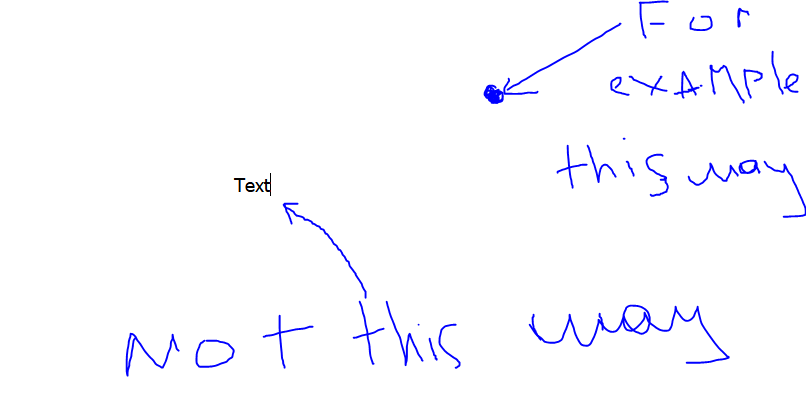
                      0_1556642662551_Снимок.PNG

                      I clicked on where the point( for example ) and move into Text ( It is GraphicsItem with QTextEdit ) then hoverEnterEvent doesnt work

                      mrjjM 1 Reply Last reply
                      0
                      • K Kaznachei

                        0_1556642662551_Снимок.PNG

                        I clicked on where the point( for example ) and move into Text ( It is GraphicsItem with QTextEdit ) then hoverEnterEvent doesnt work

                        mrjjM Offline
                        mrjjM Offline
                        mrjj
                        Lifetime Qt Champion
                        wrote on last edited by
                        #12

                        @Kaznachei
                        Hmm, i dont know why.
                        The TextEdit has the focus but that would not normally block enterEvent for other
                        Widgets but maybe its a side effect of mixing it with GraphicsItems.

                        1 Reply Last reply
                        0

                        • Login

                        • Login or register to search.
                        • First post
                          Last post
                        0
                        • Categories
                        • Recent
                        • Tags
                        • Popular
                        • Users
                        • Groups
                        • Search
                        • Get Qt Extensions
                        • Unsolved