
Skip to content
  • Categories
  • Recent
  • Tags
  • Popular
  • Users
  • Groups
  • Search
  • Get Qt Extensions
  • Unsolved
Collapse
Brand Logo
  1. Home
  2. Qt Development
  3. General and Desktop
  4. Dynamically rotate QTextEdit
Qt 6.11 is out! See what's new in the release blog

Dynamically rotate QTextEdit

Scheduled Pinned Locked Moved Unsolved General and Desktop
6 Posts 2 Posters 1.5k Views 1 Watching
  • Oldest to Newest
  • Newest to Oldest
  • Most Votes
Reply
  • Reply as topic
Log in to reply
This topic has been deleted. Only users with topic management privileges can see it.
  • K Offline
    K Offline
    Kaznachei
    wrote on last edited by
    #1

    I've got idea. When QTextEdit contains position of mouse i can rotate it by moving of mouse. I tried to rotate only text and resize QTextEdit but there are some problems. ```

    setFixedSize(1000,1000);
    QRect idealRect(0,0,document()->idealWidth(), fontMetrics().height()*toPlainText().split("\n").size());
    
    QTransform t;
    t.translate(idealRect.width()/2, idealRect.height()/2).rotate(-45).translate(-idealRect.width()/2, -idealRect.height()/2);
    
    idealRect = t.mapRect(idealRect);
    
    
    setFixedSize(idealRect.width(),idealRect.height());
    painter->begin(viewport());
    painter->setTransform(t);
    painter->drawText(0,idealRect.height()/2, toPlainText());
    painter->end();
    

    ``` ``

    Often shape larger then it should be or not all text inside QTextEdit. I wrote class TextEdit which inherits QTextEdit and overrided paintEvent. Maybe i must use another class to make rotation of widget&

    1 Reply Last reply
    0
    • mrjjM Offline
      mrjjM Offline
      mrjj
      Lifetime Qt Champion
      wrote on last edited by mrjj
      #2

      Hi and welcome to the forums.
      It would help if you first told us what the goal is.

      You want to draw some rotated text ?

      Or you want to make a widget that can rotate text with the mouse, like in a drawing program?

      And where will you use this text or widget ?

      1 Reply Last reply
      0
      • K Offline
        K Offline
        Kaznachei
        wrote on last edited by
        #3

        Thank you. I want to make opportunity to rotate text. If i could rotate widget i would like to rotate widget else rotate text. I do not want to rotate text by widget i want to rotate widget which contains string (QTextEdit). Can i do it?

        mrjjM 1 Reply Last reply
        0
        • K Kaznachei

          Thank you. I want to make opportunity to rotate text. If i could rotate widget i would like to rotate widget else rotate text. I do not want to rotate text by widget i want to rotate widget which contains string (QTextEdit). Can i do it?

          mrjjM Offline
          mrjjM Offline
          mrjj
          Lifetime Qt Champion
          wrote on last edited by
          #4

          @Kaznachei
          you mean so its still possible to type text into it ?
          While rotated ?

          1 Reply Last reply
          0
          • K Offline
            K Offline
            Kaznachei
            wrote on last edited by
            #5

            Yes. I can print something if it 82 degrees for example

            mrjjM 1 Reply Last reply
            0
            • K Kaznachei

              Yes. I can print something if it 82 degrees for example

              mrjjM Offline
              mrjjM Offline
              mrjj
              Lifetime Qt Champion
              wrote on last edited by
              #6

              @Kaznachei

              Hi
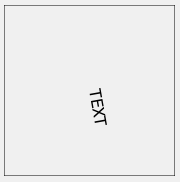
              Rotating the actual TextEdit is hard to do, but drawing the text rotated is possible.
              I found using a QPainterPath, gave the best results. (at least on windows)

               virtual void paintEvent(QPaintEvent *event) override
                  {
                      QPainter painter(this);
                      painter.setRenderHint( QPainter::Antialiasing, true );
                      painter.drawRect(rect());
                      QFont font;
              
                      font.setPointSize( 12 );
                      font.setStyleStrategy( QFont::StyleStrategy::PreferAntialias );
                      painter.setFont( font );
              
                      QRect m_window = QRect(- width() / 2, - height() / 2, width(), height());
                      painter.setWindow( m_window );
                      QRect m_viewport = QRect(0, 0, width(), height());
                      painter.setViewport( m_viewport );
                      // rotate
                      painter.rotate( 80 );
                      //draw text
                      QPainterPath glyphPath;
                      glyphPath.addText( 0, 0, painter.font(), "TEXT" );
                      painter.fillPath( glyphPath, painter.pen().color() );
              
                  }
              

              alt text

              1 Reply Last reply
              1

              • Login

              • Login or register to search.
              • First post
                Last post
              0
              • Categories
              • Recent
              • Tags
              • Popular
              • Users
              • Groups
              • Search
              • Get Qt Extensions
              • Unsolved