Skip to content
  • Categories
  • Recent
  • Tags
  • Popular
  • Users
  • Groups
  • Search
  • Get Qt Extensions
  • Unsolved
Collapse
Brand Logo
  1. Home
  2. Qt Development
  3. General and Desktop
  4. QLabel + QImage Error.
Qt 6.11 is out! See what's new in the release blog

QLabel + QImage Error.

Scheduled Pinned Locked Moved Unsolved General and Desktop
20 Posts 3 Posters 2.3k Views 1 Watching
  • Oldest to Newest
  • Newest to Oldest
  • Most Votes
Reply
  • Reply as topic
Log in to reply
This topic has been deleted. Only users with topic management privileges can see it.
  • mrjjM Offline
    mrjjM Offline
    mrjj
    Lifetime Qt Champion
    wrote on last edited by
    #10

    Hi
    Im not sure what tool that is. ?
    Seems not to be installed in my windows.

    P 1 Reply Last reply
    0
    • mrjjM mrjj

      Hi
      Im not sure what tool that is. ?
      Seems not to be installed in my windows.

      P Offline
      P Offline
      Pada_
      wrote on last edited by
      #11

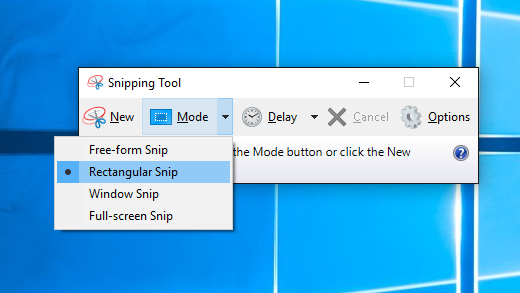
      @mrjj

      0_1554711475143_4014497_en_1.png

      use this tool.

      1 Reply Last reply
      0
      • mrjjM Offline
        mrjjM Offline
        mrjj
        Lifetime Qt Champion
        wrote on last edited by
        #12

        Ok.
        But i cant get to it to paste anything to a QGraphicsView .
        Nothing happens.
        Did you write some code to allow this ?

        P 1 Reply Last reply
        0
        • mrjjM mrjj

          Ok.
          But i cant get to it to paste anything to a QGraphicsView .
          Nothing happens.
          Did you write some code to allow this ?

          P Offline
          P Offline
          Pada_
          wrote on last edited by Pada_
          #13

          @mrjj

          QGraphicsView I'm working on it, so you can do it with Ctrl + V.

          In addition to QGraphicsView, the result is the same even if you create a new project and set the Image stored in the Clipboard in the QLabel.

          1. Capture the image with the capture tool and do not save it. Then click the right mouse button and click Copy. It will then enter the Clipboard.

          2. Run it as my source.

          3. Looking at the left corner or the corners of the image, you will see the RGB dots.

            QClipboard *clipboard = QApplication::clipboard();
            if(!clipboard)
            return;

          test source !

          #include "mainwindow.h"
          #include "ui_mainwindow.h"

          #include <QBuffer>
          #include <QClipboard>
          #include <QMimeData>

          MainWindow::MainWindow(QWidget *parent) :
          QMainWindow(parent),
          ui(new Ui::MainWindow)
          {
          ui->setupUi(this);

          QClipboard *clipboard = QApplication::clipboard();
          if(!clipboard)
              return;
          
          const QMimeData *mimeData = clipboard->mimeData();
          if(!mimeData)
              return;
          
          if(mimeData->hasImage())
          {
              QImage image = qvariant_cast<QImage> (mimeData->imageData());
              ui->label->setPixmap(QPixmap::fromImage(image));
          }
          

          }

          MainWindow::~MainWindow()
          {
          delete ui;
          }

          1 Reply Last reply
          0
          • mrjjM Offline
            mrjjM Offline
            mrjj
            Lifetime Qt Champion
            wrote on last edited by
            #14

            Hi
            Using your code and paste to QLabel did not show RGB dots
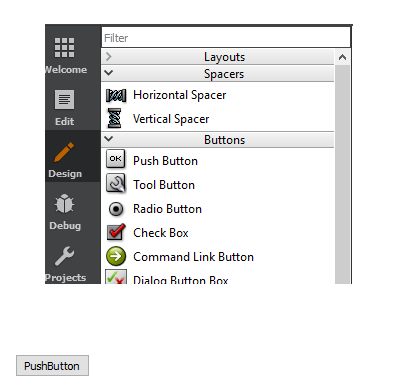
            alt text

            What Qt version are you using ?

            P 1 Reply Last reply
            0
            • mrjjM mrjj

              Hi
              Using your code and paste to QLabel did not show RGB dots
              alt text

              What Qt version are you using ?

              P Offline
              P Offline
              Pada_
              wrote on last edited by
              #15

              @mrjj

              I am using Qt5.4 version and Windows8 64Bit.

              The same phenomenon came out on Windows10 64Bit.

              I did it with the same source, but did not come out with RGB dots like the picture?

              Can I check the source?

              mrjjM 1 Reply Last reply
              0
              • P Pada_

                @mrjj

                I am using Qt5.4 version and Windows8 64Bit.

                The same phenomenon came out on Windows10 64Bit.

                I did it with the same source, but did not come out with RGB dots like the picture?

                Can I check the source?

                mrjjM Offline
                mrjjM Offline
                mrjj
                Lifetime Qt Champion
                wrote on last edited by
                #16

                @Pada_
                Which source ?
                I used your QClipboard *clipboard = QApplication::clipboard(); code and a blank project with QLabel.

                P 1 Reply Last reply
                0
                • mrjjM mrjj

                  @Pada_
                  Which source ?
                  I used your QClipboard *clipboard = QApplication::clipboard(); code and a blank project with QLabel.

                  P Offline
                  P Offline
                  Pada_
                  wrote on last edited by
                  #17

                  @mrjj

                  I also tested it with the source I wrote.

                  But it looks like a picture. I do not know where the problem is.

                  mrjjM 1 Reply Last reply
                  0
                  • P Pada_

                    @mrjj

                    I also tested it with the source I wrote.

                    But it looks like a picture. I do not know where the problem is.

                    mrjjM Offline
                    mrjjM Offline
                    mrjj
                    Lifetime Qt Champion
                    wrote on last edited by
                    #18

                    @Pada_
                    Are you saying the code you show here and QLablel works but
                    in real program it don't with QGraphicsView ?

                    Would it be possible to test with a newer Qt version ?
                    5.4 is pretty old.

                    P 1 Reply Last reply
                    0
                    • mrjjM mrjj

                      @Pada_
                      Are you saying the code you show here and QLablel works but
                      in real program it don't with QGraphicsView ?

                      Would it be possible to test with a newer Qt version ?
                      5.4 is pretty old.

                      P Offline
                      P Offline
                      Pada_
                      wrote on last edited by
                      #19

                      @mrjj

                      5.4 or later Qt can not be installed and used for convenience.

                      Have you tried mrjj in 5.4?

                      mrjjM 1 Reply Last reply
                      0
                      • P Pada_

                        @mrjj

                        5.4 or later Qt can not be installed and used for convenience.

                        Have you tried mrjj in 5.4?

                        mrjjM Offline
                        mrjjM Offline
                        mrjj
                        Lifetime Qt Champion
                        wrote on last edited by
                        #20

                        @Pada_
                        nope. i dont have 5.4.

                        1 Reply Last reply
                        0

                        • Login

                        • Login or register to search.
                        • First post
                          Last post
                        0
                        • Categories
                        • Recent
                        • Tags
                        • Popular
                        • Users
                        • Groups
                        • Search
                        • Get Qt Extensions
                        • Unsolved