
Skip to content
  • Categories
  • Recent
  • Tags
  • Popular
  • Users
  • Groups
  • Search
  • Get Qt Extensions
  • Unsolved
Collapse
Brand Logo
  1. Home
  2. Qt Development
  3. General and Desktop
  4. Why i can't change color of QString?
Qt 6.11 is out! See what's new in the release blog

Why i can't change color of QString?

Scheduled Pinned Locked Moved Unsolved General and Desktop
46 Posts 7 Posters 23.2k Views 2 Watching
  • Oldest to Newest
  • Newest to Oldest
  • Most Votes
Reply
  • Reply as topic
Log in to reply
This topic has been deleted. Only users with topic management privileges can see it.
  • mrjjM mrjj

    @Engelard
    Hi
    QComboBox does not draw html/rich text. ( like QTextBrowser )

    You can set text color with
    ui->comboBox->setItemData(0, QBrush(Qt::red), Qt::TextColorRole);
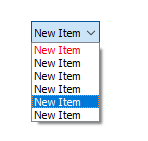
    alt text

    EngelardE Offline
    EngelardE Offline
    Engelard
    wrote on last edited by
    #6

    @mrjj Looks nice, but not working...(

    tempBx->setItemData(indx, QBrush(Qt::red), Qt::TextColorRole);
    
    mrjjM 1 Reply Last reply
    0
    • EngelardE Engelard

      @mrjj Looks nice, but not working...(

      tempBx->setItemData(indx, QBrush(Qt::red), Qt::TextColorRole);
      
      mrjjM Offline
      mrjjM Offline
      mrjj
      Lifetime Qt Champion
      wrote on last edited by
      #7

      @Engelard
      Maybe you have applied StyleSheet to it ?
      Also, item should be inserted first before you call setItemData.

      EngelardE 1 Reply Last reply
      0
      • mrjjM mrjj

        @Engelard
        Maybe you have applied StyleSheet to it ?
        Also, item should be inserted first before you call setItemData.

        EngelardE Offline
        EngelardE Offline
        Engelard
        wrote on last edited by Engelard
        #8

        @mrjj said in Why i can't change color of QString?:

        Maybe you have applied StyleSheet to it ?

        No, but i apply and reapply different models to it during runtime.

        @mrjj said in Why i can't change color of QString?:

        Also, item should be inserted first before you call setItemData.

        I did'nt get this one. What do you mean?

        mrjjM 1 Reply Last reply
        0
        • EngelardE Engelard

          @mrjj said in Why i can't change color of QString?:

          Maybe you have applied StyleSheet to it ?

          No, but i apply and reapply different models to it during runtime.

          @mrjj said in Why i can't change color of QString?:

          Also, item should be inserted first before you call setItemData.

          I did'nt get this one. What do you mean?

          mrjjM Offline
          mrjjM Offline
          mrjj
          Lifetime Qt Champion
          wrote on last edited by mrjj
          #9

          @Engelard
          Well if you insert the items from code, then you can first change the color after you insert item into
          combobox.
          If you made it with Designer, the item is already there.

          Try make clean new project. add combo to form , right click it and select "edit Items."
          Add some items and then add the color code and see if its still not working.

          Ah, if you change model, you will have to Color that index also.

          EngelardE 1 Reply Last reply
          2
          • mrjjM mrjj

            @Engelard
            Well if you insert the items from code, then you can first change the color after you insert item into
            combobox.
            If you made it with Designer, the item is already there.

            Try make clean new project. add combo to form , right click it and select "edit Items."
            Add some items and then add the color code and see if its still not working.

            Ah, if you change model, you will have to Color that index also.

            EngelardE Offline
            EngelardE Offline
            Engelard
            wrote on last edited by
            #10

            @mrjj said in Why i can't change color of QString?:

            Ah, if you change model, you will have to Color that index also.

            Tried that just after you post your example with setItemData.

            Now i try to figure out how use this not to comboBox, but to the model. But setItemData from model is much more complex( i can't get how 2nd argument should looks like).

            mrjjM 1 Reply Last reply
            0
            • EngelardE Engelard

              @mrjj said in Why i can't change color of QString?:

              Ah, if you change model, you will have to Color that index also.

              Tried that just after you post your example with setItemData.

              Now i try to figure out how use this not to comboBox, but to the model. But setItemData from model is much more complex( i can't get how 2nd argument should looks like).

              mrjjM Offline
              mrjjM Offline
              mrjj
              Lifetime Qt Champion
              wrote on last edited by mrjj
              #11

              @Engelard
              You have you own std. item models you use with it ?

              Anyway, this also seems to work
              auto model = ui->comboBox->model();
              model->setData( model->index(4, 0), QColor(255, 0, 0), Qt::TextColorRole );

              alt text

              EngelardE 1 Reply Last reply
              1
              • mrjjM mrjj

                @Engelard
                You have you own std. item models you use with it ?

                Anyway, this also seems to work
                auto model = ui->comboBox->model();
                model->setData( model->index(4, 0), QColor(255, 0, 0), Qt::TextColorRole );

                alt text

                EngelardE Offline
                EngelardE Offline
                Engelard
                wrote on last edited by Engelard
                #12

                @mrjj I did'nt quite understand your question, here is how whole code looks like:

                QComboBox *tempBx = ui->comboBox1;
                
                tempBx->setModel(new QStringListModel(someList));
                tempBx->setCurrentIndex(indx);
                tempBx->setItemData(indx, QColor(Qt::red), Qt::TextColorRole);
                

                Everything is working as it should, but not that part which should change colors..

                @mrjj said in Why i can't change color of QString?:

                model->setData( model->index(4, 0), QColor(255, 0, 0), Qt::TextColorRole );

                Ah it is setData, not item data. But also, no effect....

                raven-worxR 1 Reply Last reply
                0
                • mrjjM Offline
                  mrjjM Offline
                  mrjj
                  Lifetime Qt Champion
                  wrote on last edited by
                  #13

                  Hi
                  Tested with QStringListModel and you are right. It does not color it.
                  Same code with inserted items from Designer works.
                  So its seems it wont work with QStringListModel.

                  1 Reply Last reply
                  0
                  • EngelardE Engelard

                    @mrjj I did'nt quite understand your question, here is how whole code looks like:

                    QComboBox *tempBx = ui->comboBox1;
                    
                    tempBx->setModel(new QStringListModel(someList));
                    tempBx->setCurrentIndex(indx);
                    tempBx->setItemData(indx, QColor(Qt::red), Qt::TextColorRole);
                    

                    Everything is working as it should, but not that part which should change colors..

                    @mrjj said in Why i can't change color of QString?:

                    model->setData( model->index(4, 0), QColor(255, 0, 0), Qt::TextColorRole );

                    Ah it is setData, not item data. But also, no effect....

                    raven-worxR Offline
                    raven-worxR Offline
                    raven-worx
                    Moderators
                    wrote on last edited by raven-worx
                    #14

                    @Engelard
                    QStringListModel only supports DisplayRole and EditRole.

                    You can however quickly implement a simple QAbstractListModel and add support for multiple other roles (btw you should use Qt::ForegroundRole)

                    --- SUPPORT REQUESTS VIA CHAT WILL BE IGNORED ---
                    If you have a question please use the forum so others can benefit from the solution in the future

                    1 Reply Last reply
                    5
                    • mrjjM Offline
                      mrjjM Offline
                      mrjj
                      Lifetime Qt Champion
                      wrote on last edited by
                      #15

                      Hi
                      As @raven-worx says, a QAbstractListModel would be the cleanest solution.

                      You could also cheat and do.

                        QStringList StrList{"test" , "test2" , "test3" };
                      
                          QStandardItemModel *model = new QStandardItemModel (StrList.size(), 1);
                          for (int row = 0; row < StrList.size(); ++row) {
                              QStandardItem *item = new QStandardItem(QString("row %0").arg(row));
                              model->setItem(row, 0, item);
                          }
                      
                          ui->comboBox->setModel(model);
                      
                          model->setData( model->index(0, 0), QColor(255, 0, 0), Qt::TextColorRole );
                          model->setData( model->index(1, 0), QColor(0, 255, 0), Qt::TextColorRole );



                      alt text

                      1 Reply Last reply
                      6
                      • EngelardE Offline
                        EngelardE Offline
                        Engelard
                        wrote on last edited by Engelard
                        #16

                        Thanks @raven-worx && @mrjj for help. It is like 8-times more code now, i can't rly understand why it don't work with simple QStringListModel, but it is at least some success today.

                        It change color in list of ComboBox, but not in actual CB, in @mrjj screenshot such thing also present:
                        0_1553813858135_qttttt.jpg

                        P.S. in my initial priority was to display colored in mainWidget of ComboBox rather then in opened list.

                        1 Reply Last reply
                        0
                        • mrjjM Offline
                          mrjjM Offline
                          mrjj
                          Lifetime Qt Champion
                          wrote on last edited by
                          #17

                          Hi

                          • i can't rly understand why it don't work with simple QStringListModel

                          Well @raven-worx was kind enough to show the source
                          so we can see how QStringListModel works

                          QVariant QStringListModel::data(const QModelIndex &index, int role) const
                          {
                              if (index.row() < 0 || index.row() >= lst.size())
                                  return QVariant();
                          
                              if (role == Qt::DisplayRole || role == Qt::EditRole)
                                  return lst.at(index.row());
                          
                              return QVariant();
                          }


                          The data function of a model IS the place where it returns the data for the roles so we can see
                          it only really uses (role == Qt::DisplayRole || role == Qt::EditRole) and
                          we want it to also use Qt::ForegroundRole.

                          1 Reply Last reply
                          2
                          • VRoninV Offline
                            VRoninV Offline
                            VRonin
                            wrote on last edited by VRonin
                            #18

                            I made a proxy model to support roles in models that don't https://github.com/VSRonin/QtModelUtilities the class is called RoleMaskProxyModel. Here is an example that uses it to colour QStringListModel: https://github.com/VSRonin/QtModelUtilities/blob/1.0.0/examples/exam_RoleMaskProxyModel/exam_rolemaskhighlight.cpp

                            Hopefully I'll eventually find the time to complete adding that class to Qt: https://codereview.qt-project.org/#/c/245572/

                            "La mort n'est rien, mais vivre vaincu et sans gloire, c'est mourir tous les jours"
                            ~Napoleon Bonaparte

                            On a crusade to banish setIndexWidget() from the holy land of Qt

                            EngelardE 1 Reply Last reply
                            2
                            • VRoninV VRonin

                              I made a proxy model to support roles in models that don't https://github.com/VSRonin/QtModelUtilities the class is called RoleMaskProxyModel. Here is an example that uses it to colour QStringListModel: https://github.com/VSRonin/QtModelUtilities/blob/1.0.0/examples/exam_RoleMaskProxyModel/exam_rolemaskhighlight.cpp

                              Hopefully I'll eventually find the time to complete adding that class to Qt: https://codereview.qt-project.org/#/c/245572/

                              EngelardE Offline
                              EngelardE Offline
                              Engelard
                              wrote on last edited by Engelard
                              #19

                              @VRonin Looks very interesting.
                              I downloaded your rolemaskproxymodel and classes related to it(whole src directory), but when i tried to Run i got such strange stuff:

                              0_1553856387649_sdfsdf.jpg
                              Oh and don't look at first two errors, they unrelated completelly, it appears when i swap compiler to Release mode, did'nt figure out what it is yet.

                              1 Reply Last reply
                              0
                              • VRoninV Offline
                                VRoninV Offline
                                VRonin
                                wrote on last edited by VRonin
                                #20

                                If you just copy-paste the code you have to add DEFINES += MODELUTILITIES_STATIC to your .pro file

                                "La mort n'est rien, mais vivre vaincu et sans gloire, c'est mourir tous les jours"
                                ~Napoleon Bonaparte

                                On a crusade to banish setIndexWidget() from the holy land of Qt

                                EngelardE 1 Reply Last reply
                                1
                                • VRoninV VRonin

                                  If you just copy-paste the code you have to add DEFINES += MODELUTILITIES_STATIC to your .pro file

                                  EngelardE Offline
                                  EngelardE Offline
                                  Engelard
                                  wrote on last edited by
                                  #21

                                  @VRonin ye, first time tried to use someone elses code :D
                                  Now i downloaded whole stuff like a normal person. Look at my post with screenshot above.

                                  1 Reply Last reply
                                  0
                                  • VRoninV Offline
                                    VRoninV Offline
                                    VRonin
                                    wrote on last edited by VRonin
                                    #22

                                    Exact same answer.
                                    There's a section in the readme that explains how to use the library: https://vsronin.github.io/QtModelUtilities/md__i_n_s_t_a_l_l.html

                                    "La mort n'est rien, mais vivre vaincu et sans gloire, c'est mourir tous les jours"
                                    ~Napoleon Bonaparte

                                    On a crusade to banish setIndexWidget() from the holy land of Qt

                                    EngelardE 1 Reply Last reply
                                    1
                                    • VRoninV VRonin

                                      Exact same answer.
                                      There's a section in the readme that explains how to use the library: https://vsronin.github.io/QtModelUtilities/md__i_n_s_t_a_l_l.html

                                      EngelardE Offline
                                      EngelardE Offline
                                      Engelard
                                      wrote on last edited by
                                      #23

                                      @VRonin I added that macro to .pro file and nothing changed, same 4 errors.

                                      1 Reply Last reply
                                      0
                                      • VRoninV Offline
                                        VRoninV Offline
                                        VRonin
                                        wrote on last edited by
                                        #24

                                        You have to manually click on build-> rerun qmake every time you change something in the .pro file

                                        "La mort n'est rien, mais vivre vaincu et sans gloire, c'est mourir tous les jours"
                                        ~Napoleon Bonaparte

                                        On a crusade to banish setIndexWidget() from the holy land of Qt

                                        EngelardE 1 Reply Last reply
                                        1
                                        • VRoninV VRonin

                                          You have to manually click on build-> rerun qmake every time you change something in the .pro file

                                          EngelardE Offline
                                          EngelardE Offline
                                          Engelard
                                          wrote on last edited by
                                          #25

                                          @VRonin of course i did that. Still same 4 errors

                                          1 Reply Last reply
                                          0

                                          • Login

                                          • Login or register to search.
                                          • First post
                                            Last post
                                          0
                                          • Categories
                                          • Recent
                                          • Tags
                                          • Popular
                                          • Users
                                          • Groups
                                          • Search
                                          • Get Qt Extensions
                                          • Unsolved