Skip to content
  • Categories
  • Recent
  • Tags
  • Popular
  • Users
  • Groups
  • Search
  • Get Qt Extensions
  • Unsolved
Collapse
Brand Logo
  1. Home
  2. Qt Development
  3. General and Desktop
  4. Beautyfier error
Qt 6.11 is out! See what's new in the release blog

Beautyfier error

Scheduled Pinned Locked Moved Unsolved General and Desktop
19 Posts 2 Posters 6.5k Views 2 Watching
  • Oldest to Newest
  • Newest to Oldest
  • Most Votes
Reply
  • Reply as topic
Log in to reply
This topic has been deleted. Only users with topic management privileges can see it.
  • mrjjM Offline
    mrjjM Offline
    mrjj
    Lifetime Qt Champion
    wrote on last edited by mrjj
    #2

    Hi
    Did you give it a config/format file to work with ?
    (in Tools -> Options )
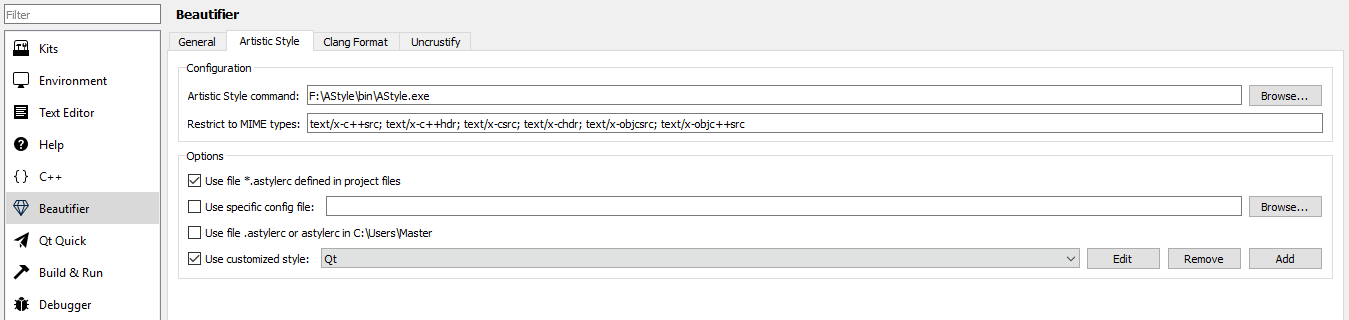
    alt text

    1 Reply Last reply
    1
    • G Offline
      G Offline
      gabor53
      wrote on last edited by
      #3

      Hi,
      Yes.

      mrjjM 1 Reply Last reply
      0
      • G gabor53

        Hi,
        Yes.

        mrjjM Offline
        mrjjM Offline
        mrjj
        Lifetime Qt Champion
        wrote on last edited by
        #4

        @gabor53
        maybe the format file have errors.
        try using Astyle from command prompt with your file and see

        G 1 Reply Last reply
        0
        • mrjjM mrjj

          @gabor53
          maybe the format file have errors.
          try using Astyle from command prompt with your file and see

          G Offline
          G Offline
          gabor53
          wrote on last edited by
          #5

          @mrjj
          It looks like this:
          0_1553028231367_53387934-68ce-46f0-8597-557171e78680-image.png

          1 Reply Last reply
          0
          • mrjjM Offline
            mrjjM Offline
            mrjj
            Lifetime Qt Champion
            wrote on last edited by mrjj
            #6

            and your .astylerc in the project folder is also there?
            Im asking as mostly seen this error when config cannot be found or parsed.

            G 1 Reply Last reply
            0
            • mrjjM mrjj

              and your .astylerc in the project folder is also there?
              Im asking as mostly seen this error when config cannot be found or parsed.

              G Offline
              G Offline
              gabor53
              wrote on last edited by
              #7

              @mrjj
              I can't find .astylerc anywhere.

              mrjjM 1 Reply Last reply
              0
              • G gabor53

                @mrjj
                I can't find .astylerc anywhere.

                mrjjM Offline
                mrjjM Offline
                mrjj
                Lifetime Qt Champion
                wrote on last edited by
                #8

                @gabor53
                But your settings say it should look for one in the project folder.

                Please check
                "Use customized style"

                so it will use that one.
                (since you did not add a config file to the project folder, it sounds like)

                G 1 Reply Last reply
                0
                • mrjjM mrjj

                  @gabor53
                  But your settings say it should look for one in the project folder.

                  Please check
                  "Use customized style"

                  so it will use that one.
                  (since you did not add a config file to the project folder, it sounds like)

                  G Offline
                  G Offline
                  gabor53
                  wrote on last edited by gabor53
                  #9

                  @mrjj
                  Here is what I have now:
                  0_1553115438641_2019-03-20.png

                  0_1553115619879_2019-03-20 (2).png

                  The customized style includes the following:
                  --indent-classes
                  --style=java / --style=attach / -A2
                  -s4 --indent=spaces=4
                  --attach-namespaces / -xn
                  --attach-classes / -xc
                  --attach-inlines / -xl
                  --attach-closing-while / -xV
                  --indent-classes / -C
                  --indent-switches / -S
                  --indent-cases / -K
                  --indent-namespaces / -N
                  --indent-after-parens / -xU
                  --indent-continuation=# / -xt#
                  --indent-labels / -L
                  --indent-preproc-block / -xW
                  --indent-col1-comments / -Y
                  --min-conditional-indent=# / -m#
                  --break-blocks=all / -F
                  --pad-oper / -p
                  --pad-comma / -xg
                  --pad-paren / -P
                  --delete-empty-lines / -xe
                  --align-pointer=type / -k1
                  --align-pointer=middle / -k2
                  --align-pointer=name / -k3
                  --align-reference=none / -W0
                  --align-reference=type / -W1
                  --align-reference=middle / -W2
                  --align-reference=name / -W3
                  --break-closing-braces / -y
                  --break-elseifs / -e
                  --break-one-line-headers / -xb
                  --add-braces / -j
                  --add-one-line-braces / -J
                  --break-return-type / -xB
                  --break-return-type-decl / -xD
                  --close-templates / -xy
                  --remove-comment-prefix / -xp

                  There is no error message just not doing anything.

                  Thank you for your help.

                  1 Reply Last reply
                  0
                  • mrjjM Offline
                    mrjjM Offline
                    mrjj
                    Lifetime Qt Champion
                    wrote on last edited by mrjj
                    #10

                    Hi
                    make sure you run it on a CPP/H file. not QML.
                    It wont format QML as far as i know.

                    G 1 Reply Last reply
                    0
                    • mrjjM mrjj

                      Hi
                      make sure you run it on a CPP/H file. not QML.
                      It wont format QML as far as i know.

                      G Offline
                      G Offline
                      gabor53
                      wrote on last edited by
                      #11

                      Hi @mrjj ,
                      When I try to run it on a cpp/h file I get the following error message:
                      Error in Beautifier: Failed to format: The command "C:\AStyle\bin\AStyle.exe" terminated with exit code 1..

                      Is there any beautifyer to format QML?
                      Thank you.

                      mrjjM 1 Reply Last reply
                      0
                      • G gabor53

                        Hi @mrjj ,
                        When I try to run it on a cpp/h file I get the following error message:
                        Error in Beautifier: Failed to format: The command "C:\AStyle\bin\AStyle.exe" terminated with exit code 1..

                        Is there any beautifyer to format QML?
                        Thank you.

                        mrjjM Offline
                        mrjjM Offline
                        mrjj
                        Lifetime Qt Champion
                        wrote on last edited by mrjj
                        #12

                        Hi
                        Not sure what it means by that.
                        Please try this config. and see.

                        --style=kr 
                        --indent=spaces=4 
                        --align-pointer=name 
                        --align-reference=name 
                        --convert-tabs 
                        --attach-namespaces
                        --max-code-length=100 
                        --max-instatement-indent=120 
                        --pad-header
                        --pad-oper
                        

                        I have not seen any external formatters for QML but I think the build in works pretty ok ?

                        G 1 Reply Last reply
                        0
                        • mrjjM mrjj

                          Hi
                          Not sure what it means by that.
                          Please try this config. and see.

                          --style=kr 
                          --indent=spaces=4 
                          --align-pointer=name 
                          --align-reference=name 
                          --convert-tabs 
                          --attach-namespaces
                          --max-code-length=100 
                          --max-instatement-indent=120 
                          --pad-header
                          --pad-oper
                          

                          I have not seen any external formatters for QML but I think the build in works pretty ok ?

                          G Offline
                          G Offline
                          gabor53
                          wrote on last edited by
                          #13

                          @mrjj
                          The built in QML formatter works great.
                          I entered the codes you recommended into Options - Beautifier - Artistic Style - Options - Use customized style - edit, but got the same error message
                          Error in Beautifier: Failed to format: The command "C:\AStyle\bin\AStyle.exe" terminated with exit code 1..

                          mrjjM 1 Reply Last reply
                          0
                          • G gabor53

                            @mrjj
                            The built in QML formatter works great.
                            I entered the codes you recommended into Options - Beautifier - Artistic Style - Options - Use customized style - edit, but got the same error message
                            Error in Beautifier: Failed to format: The command "C:\AStyle\bin\AStyle.exe" terminated with exit code 1..

                            mrjjM Offline
                            mrjjM Offline
                            mrjj
                            Lifetime Qt Champion
                            wrote on last edited by
                            #14

                            Hi
                            Ok, that is a bit odd.

                            If you open a command prompt and type (past)
                            C:\AStyle\bin\AStyle.exe
                            it does run the tool and it lists its options ?

                            G 1 Reply Last reply
                            0
                            • mrjjM mrjj

                              Hi
                              Ok, that is a bit odd.

                              If you open a command prompt and type (past)
                              C:\AStyle\bin\AStyle.exe
                              it does run the tool and it lists its options ?

                              G Offline
                              G Offline
                              gabor53
                              wrote on last edited by
                              #15

                              Hi @mrjj ,

                              The command generated the error message below:

                              C:\AStyle\bin\Atyle.exe : The term 'C:\AStyle\bin\Atyle.exe' is not recognized as the name of a cmdlet, function, script file, or operable program. Check the spelling of the name, or if a path was included, verify that the
                              path is correct and try again.
                              At line:1 char:1

                              • C:\AStyle\bin\Atyle.exe
                              •   + CategoryInfo          : ObjectNotFound: (C:\AStyle\bin\Atyle.exe:String) [], CommandNotFoundException
                                  + FullyQualifiedErrorId : CommandNotFoundException


                              Thank you for your help.

                              mrjjM 1 Reply Last reply
                              0
                              • G gabor53

                                Hi @mrjj ,

                                The command generated the error message below:

                                C:\AStyle\bin\Atyle.exe : The term 'C:\AStyle\bin\Atyle.exe' is not recognized as the name of a cmdlet, function, script file, or operable program. Check the spelling of the name, or if a path was included, verify that the
                                path is correct and try again.
                                At line:1 char:1

                                • C:\AStyle\bin\Atyle.exe
                                •   + CategoryInfo          : ObjectNotFound: (C:\AStyle\bin\Atyle.exe:String) [], CommandNotFoundException
                                    + FullyQualifiedErrorId : CommandNotFoundException


                                Thank you for your help.

                                mrjjM Offline
                                mrjjM Offline
                                mrjj
                                Lifetime Qt Champion
                                wrote on last edited by
                                #16

                                @gabor53
                                hi
                                you spelled it wrong
                                C:\AStyle\bin\Atyle.exe << missing an s

                                G 1 Reply Last reply
                                0
                                • mrjjM mrjj

                                  @gabor53
                                  hi
                                  you spelled it wrong
                                  C:\AStyle\bin\Atyle.exe << missing an s

                                  G Offline
                                  G Offline
                                  gabor53
                                  wrote on last edited by
                                  #17

                                  @mrjj
                                  C:>C:\AStyle\bin\AStyle.exe

                                  Absolutely nothing happened.

                                  mrjjM 1 Reply Last reply
                                  0
                                  • G gabor53

                                    @mrjj
                                    C:>C:\AStyle\bin\AStyle.exe

                                    Absolutely nothing happened.

                                    mrjjM Offline
                                    mrjjM Offline
                                    mrjj
                                    Lifetime Qt Champion
                                    wrote on last edited by
                                    #18

                                    @gabor53
                                    Hi
                                    C:\AStyle\bin\AStyle.exe -h
                                    and see if its alive

                                    G 1 Reply Last reply
                                    0
                                    • mrjjM mrjj

                                      @gabor53
                                      Hi
                                      C:\AStyle\bin\AStyle.exe -h
                                      and see if its alive

                                      G Offline
                                      G Offline
                                      gabor53
                                      wrote on last edited by
                                      #19

                                      Hi @mrjj,
                                      It is alive.

                                      1 Reply Last reply
                                      0

                                      • Login

                                      • Login or register to search.
                                      • First post
                                        Last post
                                      0
                                      • Categories
                                      • Recent
                                      • Tags
                                      • Popular
                                      • Users
                                      • Groups
                                      • Search
                                      • Get Qt Extensions
                                      • Unsolved