
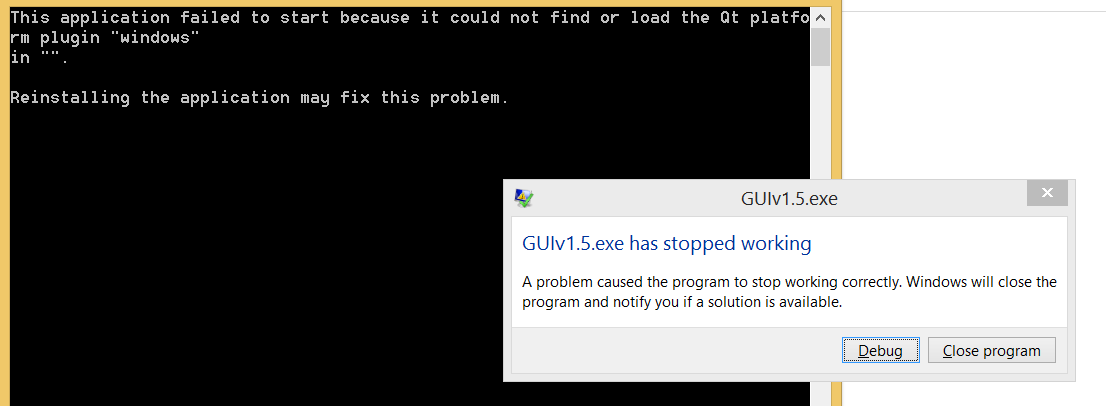
this application failed to start because it could not find or load the qt platform plugin "windows" in "".
-
Hello,
I'm not a software developer. As part of a project I'm devloping a Liquid dispensing machine. Which requires Gcodes to control it's movement. I was manually sending Gcodes to the machine to move it to required position and dispense liquid. To avoid manually entering gcode, I decided to write GUI. I have not written a software before, I only have intermediate knowledge in C. So I attended a UDEMY course on python and with the help of google and other sources I developed GUI using pyQT5. I use sublime text editor for developing python code and QT eidget for developing GUI. Python is installed by installing Anaconda. Written python code generate gcodes based on the parameter that I give. So far everything looks good. But when I tried to convert .py to .exe by referring some youtube videos using pyinstaller, it created .exe file, but when I tried to run it it gives me following error
I have searched same topics in this forum and these are the things I did so far.
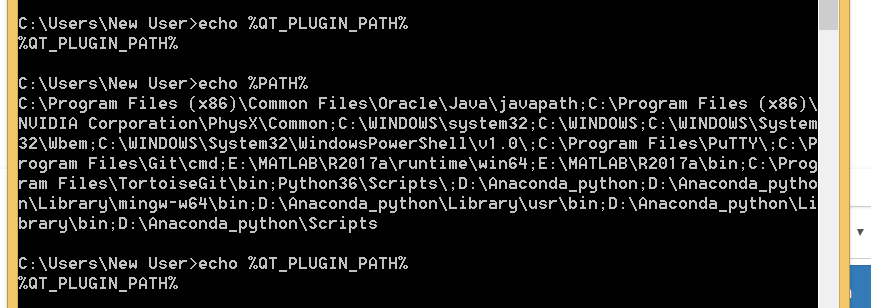
Python version : 3.6.5
-
Hello,
I'm not a software developer. As part of a project I'm devloping a Liquid dispensing machine. Which requires Gcodes to control it's movement. I was manually sending Gcodes to the machine to move it to required position and dispense liquid. To avoid manually entering gcode, I decided to write GUI. I have not written a software before, I only have intermediate knowledge in C. So I attended a UDEMY course on python and with the help of google and other sources I developed GUI using pyQT5. I use sublime text editor for developing python code and QT eidget for developing GUI. Python is installed by installing Anaconda. Written python code generate gcodes based on the parameter that I give. So far everything looks good. But when I tried to convert .py to .exe by referring some youtube videos using pyinstaller, it created .exe file, but when I tried to run it it gives me following error
I have searched same topics in this forum and these are the things I did so far.
Python version : 3.6.5
@Athul
even though you are using pyqt, the cause for the error message is always the same and has been asked a million times already. Basically its just a matter of copy the required libraries next to your application or set some env variables:
https://doc.qt.io/qt-5/windows-deployment.html
