
Skip to content
  • Categories
  • Recent
  • Tags
  • Popular
  • Users
  • Groups
  • Search
  • Get Qt Extensions
  • Unsolved
Collapse
Brand Logo
  1. Home
  2. Qt Development
  3. General and Desktop
  4. select multiple items(dragable and non-dragable) causing the non-dragable items to disappear
Qt 6.11 is out! See what's new in the release blog

select multiple items(dragable and non-dragable) causing the non-dragable items to disappear

Scheduled Pinned Locked Moved Unsolved General and Desktop
18 Posts 5 Posters 5.9k Views 3 Watching
  • Oldest to Newest
  • Newest to Oldest
  • Most Votes
Reply
  • Reply as topic
Log in to reply
This topic has been deleted. Only users with topic management privileges can see it.
  • D Darren

    I have two QListWidget. Some items within are dragable, some are non-dragable. The non-dragable items are non-selectable and non-enabled. However when I select multiple items(dragable and non-dragable) using the mouse( the list is set to selection mode: ExtendedSelection), the non-dragable items disappear totally. Is this a bug??

    CP71C Offline
    CP71C Offline
    CP71
    wrote on last edited by
    #7

    @Darren Hi
    I admit I didn't read the article for absence of time, I'm sorry, but I found this link:

    https://stackoverflow.com/questions/43283252/when-dragging-multiple-items-from-qlistwidget-non-draggable-items-get-removed

    I hope it help you

    D 1 Reply Last reply
    1
    • CP71C CP71

      @Darren Hi
      I admit I didn't read the article for absence of time, I'm sorry, but I found this link:

      https://stackoverflow.com/questions/43283252/when-dragging-multiple-items-from-qlistwidget-non-draggable-items-get-removed

      I hope it help you

      D Offline
      D Offline
      Darren
      wrote on last edited by
      #8

      @CP71 Thank you Cp71. I read this link previously but do not understand what they mean by creating QMimeData and QDrag objects in your source list widget's mouseMoveEvent.
      Secondly, is this a valid bug in QT? why aren't they solve this bug?

      CP71C 1 Reply Last reply
      0
      • D Darren

        @CP71 Thank you Cp71. I read this link previously but do not understand what they mean by creating QMimeData and QDrag objects in your source list widget's mouseMoveEvent.
        Secondly, is this a valid bug in QT? why aren't they solve this bug?

        CP71C Offline
        CP71C Offline
        CP71
        wrote on last edited by Christian Ehrlicher
        #9

        @Darren Hi,
        Sorry but I don’t understand, don’t worry, depend of my English isn’t good ;), if you didn't fix your problem or if fixed and are requiring further information (but I think you fixed your issue).

        The fix is the flag you pass at setDefaultDropAction function, Qt::MoveAction moves the items, Qt::CopyAction copies the items.

        I quickly read the article. About the QMineData and QDrag (if I don’t mistake, objects for data transfer via clipboard and drag and drop) mentioned in the article, I did not investigate in depth but I suppose writer says you that Qt manages them and you mustn't delete them.

        For me this isn’t a bug of Qt.

        Anyway I quickly created a simple example that is based on example in the link, I tried it and works well:

        MainWindow::MainWindow(QWidget *parent) :
            QMainWindow(parent),
            ui(new Ui::MainWindow)
        {
            ui->setupUi(this);
        
            ui->listWidget->setDragDropMode(QAbstractItemView::DragDrop);
        //    ui->listWidget->setDefaultDropAction(Qt::MoveAction);
            ui->listWidget->setDefaultDropAction(Qt::CopyAction);
            ui->listWidget->setSelectionMode(QAbstractItemView::ExtendedSelection);
        
        
            ui->listWidget_2->setDragDropMode(QAbstractItemView::DragDrop);
        //    ui->listWidget_2->setDefaultDropAction(Qt::MoveAction);
            ui->listWidget_2->setDefaultDropAction(Qt::CopyAction);
            ui->listWidget_2->setSelectionMode(QAbstractItemView::ExtendedSelection);
        
            fillListWidget(ui->listWidget, 8, "someItem");
            fillListWidget(ui->listWidget_2, 4, "anotherItem");
        }
        
        void MainWindow::fillListWidget(QListWidget *listWidget, int numItems, QString txt)
        {
            QString newTxt;
            for ( int i=0; i< numItems; i++ )
            {
                QListWidgetItem *item = new QListWidgetItem();
                newTxt = QString("%1_%2").arg(txt).arg(i);
        
                if ( i % 2 )
                {
                    item->setFlags(Qt::ItemIsSelectable | Qt::ItemIsEnabled);
                }
                else
                {
                    // If the item is draggable, indicate it with a *
                    newTxt += ' *';
                    item->setFlags(Qt::ItemIsSelectable | Qt::ItemIsEnabled | Qt::ItemIsDragEnabled );
                }
                item->setText(newTxt);
                listWidget->addItem(item);
            }
        }
        
        D 1 Reply Last reply
        1
        • CP71C CP71

          @Darren Hi,
          Sorry but I don’t understand, don’t worry, depend of my English isn’t good ;), if you didn't fix your problem or if fixed and are requiring further information (but I think you fixed your issue).

          The fix is the flag you pass at setDefaultDropAction function, Qt::MoveAction moves the items, Qt::CopyAction copies the items.

          I quickly read the article. About the QMineData and QDrag (if I don’t mistake, objects for data transfer via clipboard and drag and drop) mentioned in the article, I did not investigate in depth but I suppose writer says you that Qt manages them and you mustn't delete them.

          For me this isn’t a bug of Qt.

          Anyway I quickly created a simple example that is based on example in the link, I tried it and works well:

          MainWindow::MainWindow(QWidget *parent) :
              QMainWindow(parent),
              ui(new Ui::MainWindow)
          {
              ui->setupUi(this);
          
              ui->listWidget->setDragDropMode(QAbstractItemView::DragDrop);
          //    ui->listWidget->setDefaultDropAction(Qt::MoveAction);
              ui->listWidget->setDefaultDropAction(Qt::CopyAction);
              ui->listWidget->setSelectionMode(QAbstractItemView::ExtendedSelection);
          
          
              ui->listWidget_2->setDragDropMode(QAbstractItemView::DragDrop);
          //    ui->listWidget_2->setDefaultDropAction(Qt::MoveAction);
              ui->listWidget_2->setDefaultDropAction(Qt::CopyAction);
              ui->listWidget_2->setSelectionMode(QAbstractItemView::ExtendedSelection);
          
              fillListWidget(ui->listWidget, 8, "someItem");
              fillListWidget(ui->listWidget_2, 4, "anotherItem");
          }
          
          void MainWindow::fillListWidget(QListWidget *listWidget, int numItems, QString txt)
          {
              QString newTxt;
              for ( int i=0; i< numItems; i++ )
              {
                  QListWidgetItem *item = new QListWidgetItem();
                  newTxt = QString("%1_%2").arg(txt).arg(i);
          
                  if ( i % 2 )
                  {
                      item->setFlags(Qt::ItemIsSelectable | Qt::ItemIsEnabled);
                  }
                  else
                  {
                      // If the item is draggable, indicate it with a *
                      newTxt += ' *';
                      item->setFlags(Qt::ItemIsSelectable | Qt::ItemIsEnabled | Qt::ItemIsDragEnabled );
                  }
                  item->setText(newTxt);
                  listWidget->addItem(item);
              }
          }
          
          D Offline
          D Offline
          Darren
          wrote on last edited by
          #10

          @CP71 My application needs a MOVE action. Not a COPY action. If you try
          ui->listWidget_2->setDefaultDropAction(Qt::MoveAction)
          this will cause the non-dragable items to be DELETED.

          CP71C 1 Reply Last reply
          0
          • D Darren

            @CP71 My application needs a MOVE action. Not a COPY action. If you try
            ui->listWidget_2->setDefaultDropAction(Qt::MoveAction)
            this will cause the non-dragable items to be DELETED.

            CP71C Offline
            CP71C Offline
            CP71
            wrote on last edited by
            #11

            @Darren Hi
            Ok, now I understand your problem.
            Sorry.

            1 Reply Last reply
            0
            • Christian EhrlicherC Offline
              Christian EhrlicherC Offline
              Christian Ehrlicher
              Lifetime Qt Champion
              wrote on last edited by
              #12

              Please provide a simple, compilable example so we can take a deeper look on your problem.

              Qt Online Installer direct download: https://download.qt.io/official_releases/online_installers/
              Visit the Qt Academy at https://academy.qt.io/catalog

              1 Reply Last reply
              1
              • mrjjM Offline
                mrjjM Offline
                mrjj
                Lifetime Qt Champion
                wrote on last edited by mrjj
                #13

                Hi
                Using @CP71 (thanks :) code as base it was fast to make sample.
                It does seems it does not honor movable if multiple is selected
                and after the drop ( which only shows the correct ones) , it seems to delete/remove
                all of selection even some were not dropped. ( those without *)
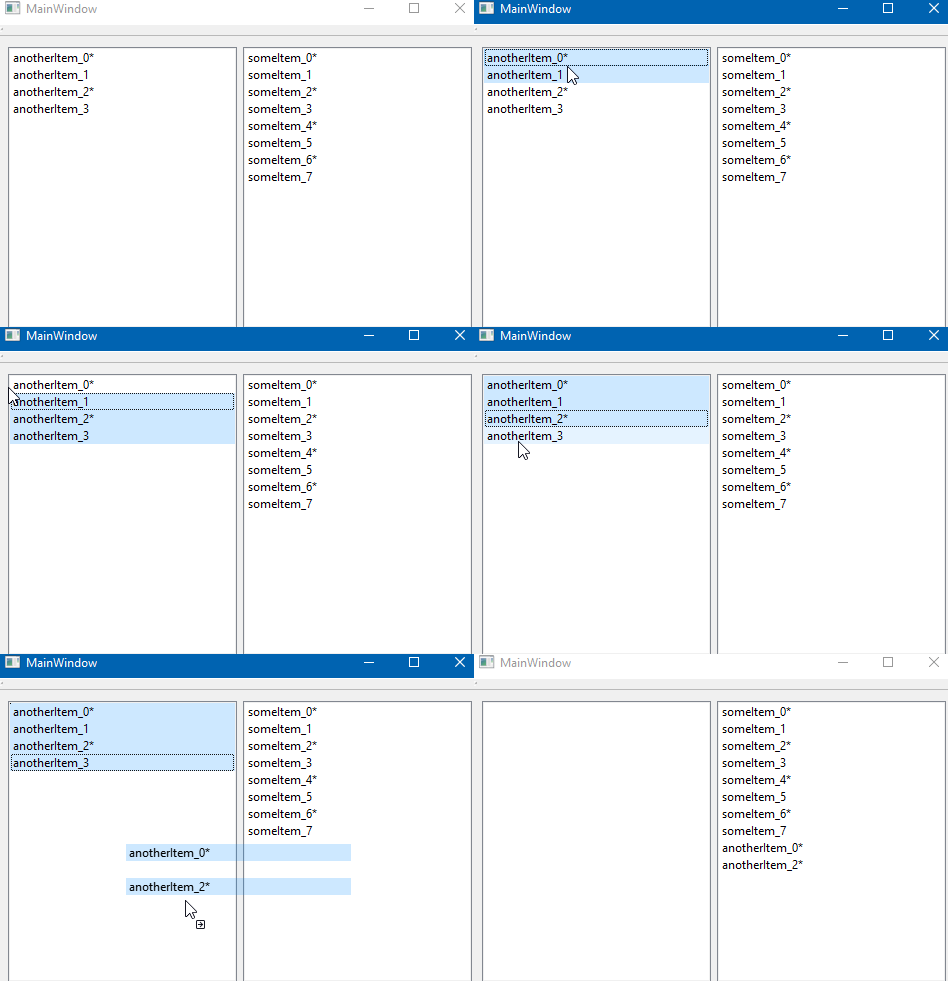
                alt text

                Read to run project
                https://www.dropbox.com/s/urt1pwfvqs3xmbj/DragDropFail.zip?dl=0

                (tested on win 10, Qt5.12)

                1 Reply Last reply
                2
                • Christian EhrlicherC Offline
                  Christian EhrlicherC Offline
                  Christian Ehrlicher
                  Lifetime Qt Champion
                  wrote on last edited by
                  #14

                  @mrjj : Thx for the reproducer. will take a look on soon.
                  Since there is no bugreport about this (at least I'm not aware of one) - can someone please create them :)

                  Qt Online Installer direct download: https://download.qt.io/official_releases/online_installers/
                  Visit the Qt Academy at https://academy.qt.io/catalog

                  1 Reply Last reply
                  1
                  • Christian EhrlicherC Offline
                    Christian EhrlicherC Offline
                    Christian Ehrlicher
                    Lifetime Qt Champion
                    wrote on last edited by
                    #15

                    Here a first shot: https://codereview.qt-project.org/251888
                    As a workaround you can override QAbstractItemView::startDrag() and adjust the selected items to only contain the ones which are also dragable.

                    Qt Online Installer direct download: https://download.qt.io/official_releases/online_installers/
                    Visit the Qt Academy at https://academy.qt.io/catalog

                    1 Reply Last reply
                    1
                    • mrjjM Offline
                      mrjjM Offline
                      mrjj
                      Lifetime Qt Champion
                      wrote on last edited by
                      #16

                      Hi
                      Damn, you are fast :)
                      Do we still need a bug report ?

                      Christian EhrlicherC 1 Reply Last reply
                      0
                      • mrjjM mrjj

                        Hi
                        Damn, you are fast :)
                        Do we still need a bug report ?

                        Christian EhrlicherC Offline
                        Christian EhrlicherC Offline
                        Christian Ehrlicher
                        Lifetime Qt Champion
                        wrote on last edited by
                        #17

                        @mrjj It would be nice to have a bug report to get an official bug so it can be better documented later on. I also need to create another testcase for QTreeView and esp. for QListView in icon mode since there is a special handling.

                        Qt Online Installer direct download: https://download.qt.io/official_releases/online_installers/
                        Visit the Qt Academy at https://academy.qt.io/catalog

                        mrjjM 1 Reply Last reply
                        2
                        • Christian EhrlicherC Christian Ehrlicher

                          @mrjj It would be nice to have a bug report to get an official bug so it can be better documented later on. I also need to create another testcase for QTreeView and esp. for QListView in icon mode since there is a special handling.

                          mrjjM Offline
                          mrjjM Offline
                          mrjj
                          Lifetime Qt Champion
                          wrote on last edited by
                          #18

                          @Christian-Ehrlicher
                          https://bugreports.qt.io/browse/QTBUG-73465
                          Please let me know if i need to change something.

                          1 Reply Last reply
                          3

                          • Login

                          • Login or register to search.
                          • First post
                            Last post
                          0
                          • Categories
                          • Recent
                          • Tags
                          • Popular
                          • Users
                          • Groups
                          • Search
                          • Get Qt Extensions
                          • Unsolved