
html in qtooltip::drawtext()
-
i have this code:
	connect(pBtn, &QPushButton::clicked, [=]
	{
		const static QString sToolTip("Use the following:\n<hr>\n"
			"...");
		QToolTip::showText(pBtn->mapToGlobal(QPoint(0, 0)), sToolTip, pBtn);
	});
seems like the
<hr>isn't recognized, it is just shown as<hr>in tooltip. -
According the documentation only richtext is supported.
-
Hi
I think its not considered html for the tooltip label.
try
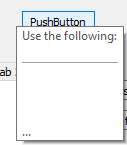
const static QString sToolTip("<html><head/><body><p>Use the following:</p><hr/><p><br/></p></body></html>"
-
what about a table? seems like setting border to it works, but i want the border to be thinner, but
border-collapse: collapse;doesn't work -
what about a table? seems like setting border to it works, but i want the border to be thinner, but
border-collapse: collapse;doesn't work@user4592357 said in html in qtooltip::drawtext():
border-collapse: collapse
I dont think that tag is supported.
Docs says
table Table Supports the following attributes: border, bgcolor (Qt color names or #RRGGBB), cellspacing, cellpadding, width (absolute or relative), and height.regarding border width. 1 seems to be the smallest supported and it looks like

-
would be nice if mine looked like that too.
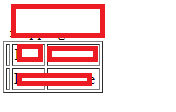
here's my code
		const QString sToolTip(
			"<html>"
			"<body>"
				"<table border=\"1\">"
					"<caption>Header<caption>"
					"<tr>"
						"<td>...</tr>"
				"</table>"
			"</body>"
			"</html>"
		);
now the look
-
Hi
But your lines are so thin :)My HTML ( drawn in word and just pasted and optimized but still most likely a bit verbose) update. cleaned up a bit.
<html><head/><body><table border="1" style=" margin-top:0px; margin-bottom:0px; margin-left:0px; margin-right:0px;" cellspacing="0" cellpadding="0"><tr><td width="130"><p><span style=" font-size:18pt;">aaaa</span></p></td><td width="130"/><td width="130"/><td width="130"/><td width="130"/></tr><tr><td><p><span style=" font-size:18pt;">bbbbb</span></p></td><td/><td/><td/><td/></tr></table></body></html> -
@mrjj
i'm on mobile now but will try that html.
another option i'm thinking of is showing a table widget. but i don't know at which position to show it (mouse click) and when and how to hide it?@user4592357
Recreating tooltip feature is not that trivial.
https://code.woboq.org/qt5/qtbase/src/widgets/kernel/qtooltip.cpp.html
However, one can use event filter to catch if click outside and hide it.Anyway, what is it you want to show in the tooltip ?
Small table or ?ps. does work in tooltip. But this is not really a standard UX thing.


