Skip to content
  • Categories
  • Recent
  • Tags
  • Popular
  • Users
  • Groups
  • Search
  • Get Qt Extensions
  • Unsolved
Collapse
Brand Logo
  1. Home
  2. Qt Development
  3. General and Desktop
  4. QT Creator Serial Port Plotter

QT Creator Serial Port Plotter

Scheduled Pinned Locked Moved Solved General and Desktop
24 Posts 5 Posters 7.5k Views 3 Watching
  • Oldest to Newest
  • Newest to Oldest
  • Most Votes
Reply
  • Reply as topic
Log in to reply
This topic has been deleted. Only users with topic management privileges can see it.
  • mrjjM mrjj

    @priscilla-v

    Hi
    Its controlled via the QCPAxisTicker
    Im not sure if you mean the Big Ticks or the Sub Ticks.
    There is lots of info here
    https://www.qcustomplot.com/index.php/tutorials/basicplotting

    Anyway for the big Ticks.
    if you add to
    void MainWindow::setupPlot()
    around line 220

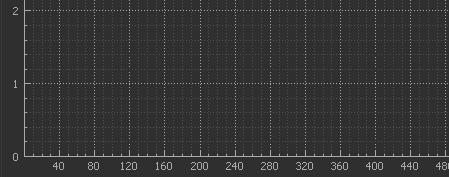
    QSharedPointer<QCPAxisTickerFixed> fixedTicker(new QCPAxisTickerFixed);
        ui->plot->xAxis->setTicker(fixedTicker);
        fixedTicker->setTickStep(40.0);
        fixedTicker->setScaleStrategy(QCPAxisTickerFixed::ssNone); 
    

    It looks like this
    alt text
    Which might be what you want.

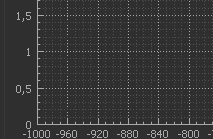
    • Y axis to be a square,
      Well that depends entirely on the y range and step versus the x
      alt text

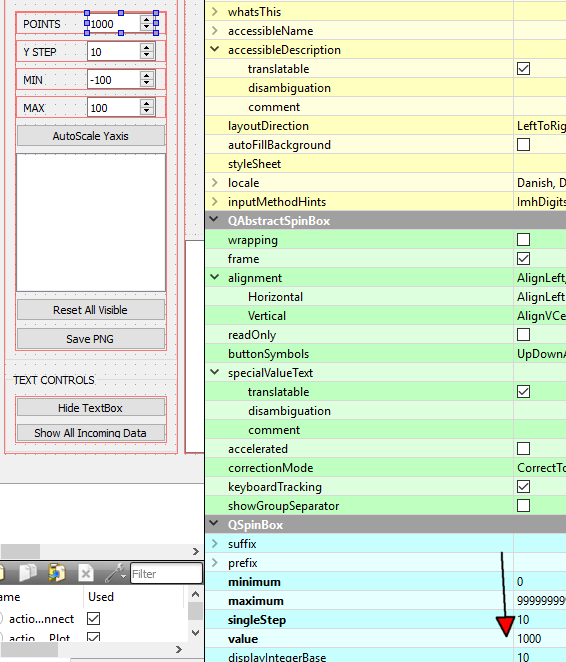
    • "Plot Controls" new default values.
      You can click on the UI file and alter them there
      alt text

    priscilla vP Offline
    priscilla vP Offline
    priscilla v
    wrote on last edited by
    #13

    @mrjj Thank you so much :D

    1 Reply Last reply
    0
    • priscilla vP Offline
      priscilla vP Offline
      priscilla v
      wrote on last edited by
      #14

      Hi, how would you get each frame of the small ones to measure 40 milliseconds? I was trying but I can not achieve it.

      0_1545612001544_Captura.PNG

      mrjjM 1 Reply Last reply
      0
      • priscilla vP priscilla v

        Hi, how would you get each frame of the small ones to measure 40 milliseconds? I was trying but I can not achieve it.

        0_1545612001544_Captura.PNG

        mrjjM Offline
        mrjjM Offline
        mrjj
        Lifetime Qt Champion
        wrote on last edited by
        #15

        @priscilla-v
        Hi
        Im not sure how to get change that.
        You could try ask here
        https://www.qcustomplot.com/index.php/support/forum/
        Its the actual plotter being used in the project.

        priscilla vP 2 Replies Last reply
        0
        • mrjjM mrjj

          @priscilla-v
          Hi
          Im not sure how to get change that.
          You could try ask here
          https://www.qcustomplot.com/index.php/support/forum/
          Its the actual plotter being used in the project.

          priscilla vP Offline
          priscilla vP Offline
          priscilla v
          wrote on last edited by priscilla v
          #16

          @mrjj
          Hi, I managed to change the little squares values to 40ms, which is what I needed, though it only look like this when I haven't clicked the Play button. I commented line 208, and add the code in line 210.

          0_1545872017777_Code_changed.PNG

          When clicked, it changes all the x-axis configuration.
          Do you know why is this happening?

          When I run the program

          0_1545871775695_before.PNG

          When I click play button

          0_1545871786170_After.PNG

          (I don't mind the numbers written in the scale like 0.25, 0.5 , 0.75 or 50, 100, 150 etc I just calculated that 20 of those I think they are called ticks is equivalent to 4 seconds, and each one has 5 subticks so, when i did the math realize that each subtick would be 40ms that way)

          1 Reply Last reply
          0
          • mrjjM mrjj

            @priscilla-v
            Hi
            Im not sure how to get change that.
            You could try ask here
            https://www.qcustomplot.com/index.php/support/forum/
            Its the actual plotter being used in the project.

            priscilla vP Offline
            priscilla vP Offline
            priscilla v
            wrote on last edited by
            #17

            @mrjj Excuse one more question, how could you achieve a 50 Hz low pass filter in this serial plotter software?

            mrjjM 1 Reply Last reply
            0
            • priscilla vP priscilla v

              @mrjj Excuse one more question, how could you achieve a 50 Hz low pass filter in this serial plotter software?

              mrjjM Offline
              mrjjM Offline
              mrjj
              Lifetime Qt Champion
              wrote on last edited by
              #18

              @priscilla-v
              Hi welcome back
              funny enough, its being discussed here
              https://forum.qt.io/topic/98570/implement-low-pass-filter
              for same program :)

              1 Reply Last reply
              1
              • priscilla vP Offline
                priscilla vP Offline
                priscilla v
                wrote on last edited by
                #19

                This is my ECG in a noise-free environment.

                0_1547678218132_3036.png

                When the charger is connected to the PC but not to the power outlet.
                0_1547678256288_14874.png

                When the PC is near any outlet.
                0_1547678293057_1483.png

                When the PC is connected to the electrical network.0_1547678317653_803.png

                I tried to use this piece of code but there was no change.

                0_1547678344924_Captura.PNG

                1 Reply Last reply
                0
                • mrjjM Offline
                  mrjjM Offline
                  mrjj
                  Lifetime Qt Champion
                  wrote on last edited by
                  #20

                  Hi
                  well it seems the code only
                  does an assignment to a double variable.
                  Where is the actual filter function ?

                  1 Reply Last reply
                  0
                  • priscilla vP Offline
                    priscilla vP Offline
                    priscilla v
                    wrote on last edited by
                    #21

                    It returns this error

                    0_1547679233571_Captura.PNG

                    1 Reply Last reply
                    0
                    • mrjjM Offline
                      mrjjM Offline
                      mrjj
                      Lifetime Qt Champion
                      wrote on last edited by
                      #22

                      Hi
                      oh, you have to move the function outside ( over ) the current function.
                      you define a function inside other function which it complains about.

                      1 Reply Last reply
                      2
                      • priscilla vP Offline
                        priscilla vP Offline
                        priscilla v
                        wrote on last edited by
                        #23

                        Thank you very much for all the help in this forum, it was very helpful. :)

                        ZgemboZ 1 Reply Last reply
                        0
                        • priscilla vP priscilla v

                          Thank you very much for all the help in this forum, it was very helpful. :)

                          ZgemboZ Offline
                          ZgemboZ Offline
                          Zgembo
                          wrote on last edited by
                          #24

                          @priscilla-v said in QT Creator Serial Port Plotter:

                          Thank you very much for all the help in this forum, it was very helpful. :)

                          Hi! Did you manage to make fixed tick and subtick count? I need to have ticks every 10mm and subticks every 2mm.

                          1 Reply Last reply
                          0

                          • Login

                          • Login or register to search.
                          • First post
                            Last post
                          0
                          • Categories
                          • Recent
                          • Tags
                          • Popular
                          • Users
                          • Groups
                          • Search
                          • Get Qt Extensions
                          • Unsolved