
need help in setting Build & Run option after importing an existing project
-
hi,
I am importing an existing project downloaded from github. But I could not understand how to set build and run options for that as I have installed several versions of Qt hence Qt creator shows all the available tools in "Auto-detected" but how to make a particulate compiler and qmake active?
I want to use MSVC 2017 compiler and its qmake. Please see below in snaps.


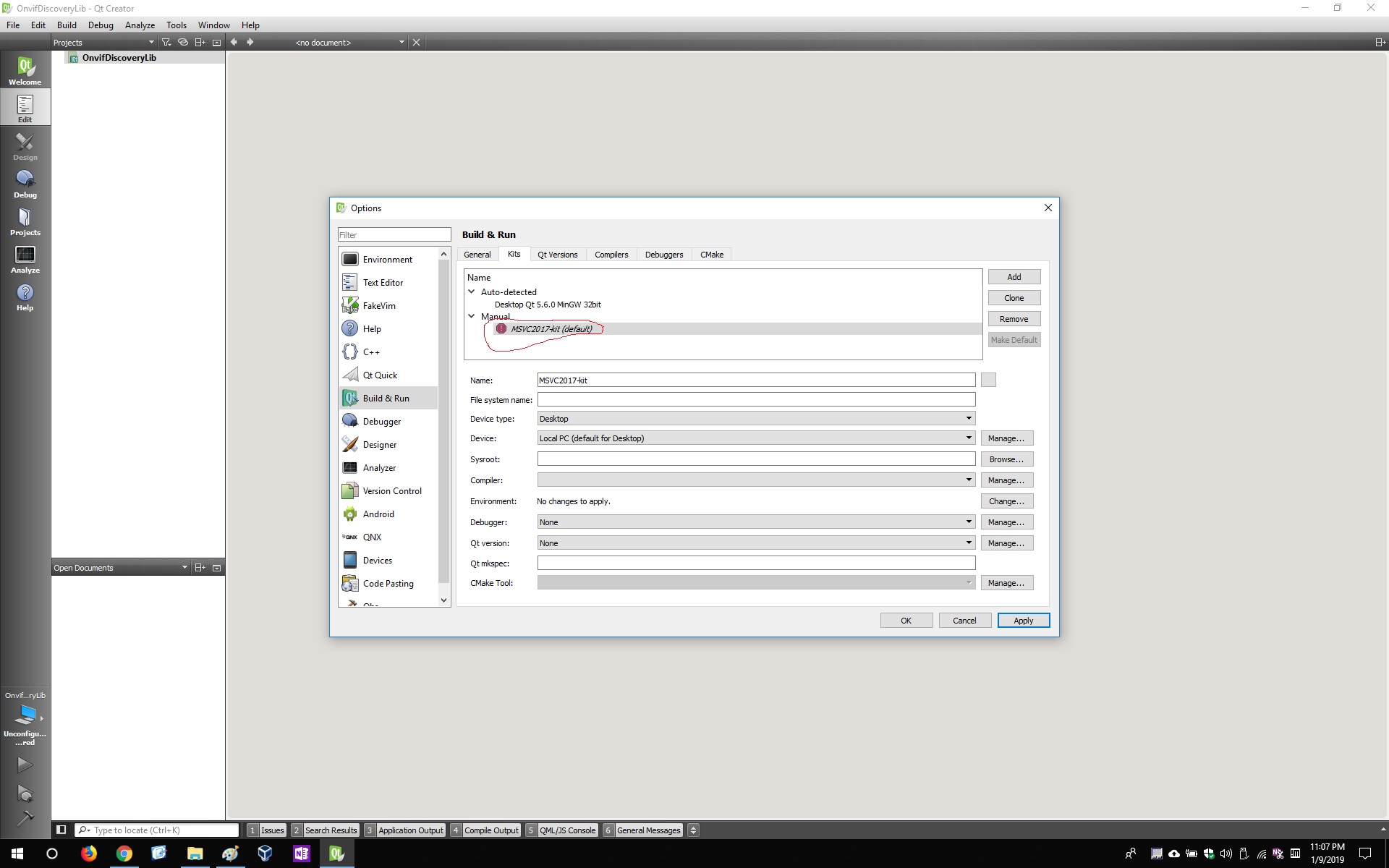
Thanks...
Hi @ravi2k18,
Creator needs to auto-detect the Visual Studio C++ compiler - you cannot set them up manually.
- Did you install Visual C++ to the default path?
- Is there a vcvars*.bat in the Visual Studio installation directory?
-
if we can not install manually then what is manual section in build & run ?
I have installed VS 2017 community version
C:\Program Files (x86)\Microsoft Visual Studio\2017\Community\Common7\Tools\vsdevcmd\extWhat do you mean by installing VS 2017 in default path ? what is default path in my case ?
I have qt installed in the below path
C:\Qt\Qt5.12.0 -
if we can not install manually then what is manual section in build & run ?
I have installed VS 2017 community version
C:\Program Files (x86)\Microsoft Visual Studio\2017\Community\Common7\Tools\vsdevcmd\extWhat do you mean by installing VS 2017 in default path ? what is default path in my case ?
I have qt installed in the below path
C:\Qt\Qt5.12.0 -
Did you install Visual C++ ?
I have installed VC++ using MS Visual studio 2015 iso download from Microsoft site.
Did you change the path during the Visual C++ installation ?
Yes. While installation I just used the non default path given belowC:\Program Files (x86)\Microsoft Visual Studio\2015 -
so I have installed VS 2015 with VC++ and tried to re import the code and configure the build and run settings as shown in below snaps. However still geting some build errors as given below.
C:/Qt/Qt5.12.0/5.12.0/msvc2017_64/mkspecs/features/toolchain.prf(173): 'getenv' is not a recognized replace function. C:/Qt/Qt5.12.0/5.12.0/msvc2017_64/mkspecs/features/toolchain.prf(175): 'getenv' is not a recognized replace function. C:/Qt/Qt5.12.0/5.12.0/msvc2017_64/mkspecs/features/toolchain.prf(196): system(execute) requires one or two arguments. Project ERROR: Cannot run compiler 'cl'. Output: =================== =================== Maybe you forgot to setup the environment? C:/Qt/Qt5.12.0/5.12.0/msvc2017_64/mkspecs/features/toolchain.prf(240): Variable QMAKE_CXX.COMPILER_MACROS is not defined. Project ERROR: msvc-version.conf loaded but QMAKE_MSC_VER isn't set Error while parsing file C:\Qt-Workspace\OnvifDiscoveryLib\OnvifDiscoveryLib.pro. Giving up. Warnings while parsing QML type information of C:/Qt/Qt5.12.0/5.12.0/msvc2017_64/qml: C:\Qt\Qt5.12.0\5.12.0\msvc2017_64\qml\builtins.qmltypes:1:24: Reading only version 1.1 parts. C:\Qt\Qt5.12.0\5.12.0\msvc2017_64\qml\builtins.qmltypes:10:5: Expected only Component and ModuleApi object definitions. C:/Qt/Qt5.12.0/5.12.0/msvc2017_64/mkspecs/features/toolchain.prf(173): 'getenv' is not a recognized replace function. C:/Qt/Qt5.12.0/5.12.0/msvc2017_64/mkspecs/features/toolchain.prf(175): 'getenv' is not a recognized replace function. C:/Qt/Qt5.12.0/5.12.0/msvc2017_64/mkspecs/features/toolchain.prf(196): system(execute) requires one or two arguments. Project ERROR: Cannot run compiler 'cl'. Output: =================== =================== Maybe you forgot to setup the environment? C:/Qt/Qt5.12.0/5.12.0/msvc2017_64/mkspecs/features/toolchain.prf(240): Variable QMAKE_CXX.COMPILER_MACROS is not defined. Project ERROR: msvc-version.conf loaded but QMAKE_MSC_VER isn't set Error while parsing file C:\Qt-Workspace\OnvifDiscoveryLib\OnvifDiscoveryLib.pro. Giving up.below is the snap of build and run


-
so I have installed VS 2015 with VC++ and tried to re import the code and configure the build and run settings as shown in below snaps. However still geting some build errors as given below.
C:/Qt/Qt5.12.0/5.12.0/msvc2017_64/mkspecs/features/toolchain.prf(173): 'getenv' is not a recognized replace function. C:/Qt/Qt5.12.0/5.12.0/msvc2017_64/mkspecs/features/toolchain.prf(175): 'getenv' is not a recognized replace function. C:/Qt/Qt5.12.0/5.12.0/msvc2017_64/mkspecs/features/toolchain.prf(196): system(execute) requires one or two arguments. Project ERROR: Cannot run compiler 'cl'. Output: =================== =================== Maybe you forgot to setup the environment? C:/Qt/Qt5.12.0/5.12.0/msvc2017_64/mkspecs/features/toolchain.prf(240): Variable QMAKE_CXX.COMPILER_MACROS is not defined. Project ERROR: msvc-version.conf loaded but QMAKE_MSC_VER isn't set Error while parsing file C:\Qt-Workspace\OnvifDiscoveryLib\OnvifDiscoveryLib.pro. Giving up. Warnings while parsing QML type information of C:/Qt/Qt5.12.0/5.12.0/msvc2017_64/qml: C:\Qt\Qt5.12.0\5.12.0\msvc2017_64\qml\builtins.qmltypes:1:24: Reading only version 1.1 parts. C:\Qt\Qt5.12.0\5.12.0\msvc2017_64\qml\builtins.qmltypes:10:5: Expected only Component and ModuleApi object definitions. C:/Qt/Qt5.12.0/5.12.0/msvc2017_64/mkspecs/features/toolchain.prf(173): 'getenv' is not a recognized replace function. C:/Qt/Qt5.12.0/5.12.0/msvc2017_64/mkspecs/features/toolchain.prf(175): 'getenv' is not a recognized replace function. C:/Qt/Qt5.12.0/5.12.0/msvc2017_64/mkspecs/features/toolchain.prf(196): system(execute) requires one or two arguments. Project ERROR: Cannot run compiler 'cl'. Output: =================== =================== Maybe you forgot to setup the environment? C:/Qt/Qt5.12.0/5.12.0/msvc2017_64/mkspecs/features/toolchain.prf(240): Variable QMAKE_CXX.COMPILER_MACROS is not defined. Project ERROR: msvc-version.conf loaded but QMAKE_MSC_VER isn't set Error while parsing file C:\Qt-Workspace\OnvifDiscoveryLib\OnvifDiscoveryLib.pro. Giving up.below is the snap of build and run
@ravi2k18 as said, you cannot set up the compiler manually. remove that one and use the auto-detected.
I'm on the mobile now and can hardly read your screen (most of the pic is uninteresting), so I cannot tell you if there is more wrong.
-
Now I am using automatic kit Desktop Qt 5.12.0 MSVC2017 64bit
however while building the project I am getting below err.File Makefile doesn't exist.why VC++ project will use Makefile here? when has *.pro file.
How can I fix this?Thanks....
-
Now I am using automatic kit Desktop Qt 5.12.0 MSVC2017 64bit
however while building the project I am getting below err.File Makefile doesn't exist.why VC++ project will use Makefile here? when has *.pro file.
How can I fix this?Thanks....
-
when i create new "hello world" project by using empty qmake project template, it runs successfully.
However when I try to import the same dir as existing project after deleting generated .pro.user, it gives me":-1: error: No rule to make target 'all'. Stop."any idea what I am doing wrong in importing the working exciting project here.
thanks...
-
when i create new "hello world" project by using empty qmake project template, it runs successfully.
However when I try to import the same dir as existing project after deleting generated .pro.user, it gives me":-1: error: No rule to make target 'all'. Stop."any idea what I am doing wrong in importing the working exciting project here.
thanks...
