Skip to content
  • Categories
  • Recent
  • Tags
  • Popular
  • Users
  • Groups
  • Search
  • Get Qt Extensions
  • Unsolved
Collapse
Brand Logo
  1. Home
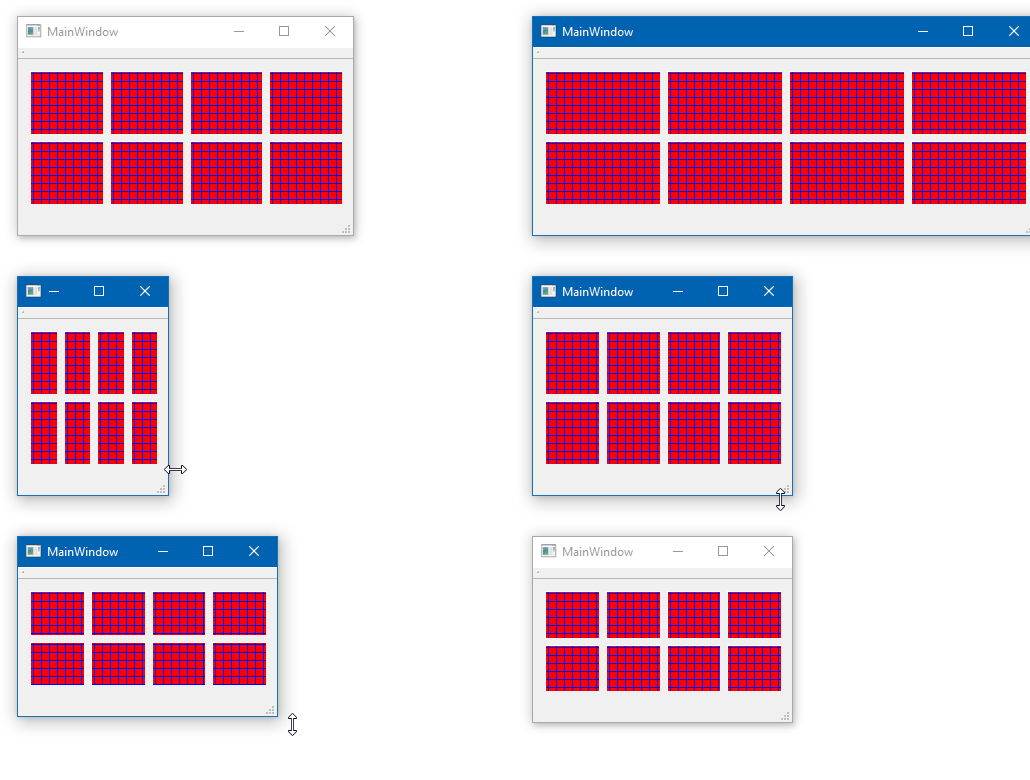
  2. Qt Development
  3. General and Desktop
  4. qtoolbutton/qpushbutton icon based on button's size

qtoolbutton/qpushbutton icon based on button's size

Scheduled Pinned Locked Moved Solved General and Desktop
21 Posts 2 Posters 12.3k Views 2 Watching
  • Oldest to Newest
  • Newest to Oldest
  • Most Votes
Reply
  • Reply as topic
Log in to reply
This topic has been deleted. Only users with topic management privileges can see it.
  • U Offline
    U Offline
    user4592357
    wrote on last edited by
    #5

    @mrjj

    yes i want the whole button to be the pattern, no matter what size the button is.
    this is what i have now: https://ibb.co/FWmbDZX

    mrjjM 1 Reply Last reply
    0
    • U user4592357

      @mrjj

      yes i want the whole button to be the pattern, no matter what size the button is.
      this is what i have now: https://ibb.co/FWmbDZX

      mrjjM Offline
      mrjjM Offline
      mrjj
      Lifetime Qt Champion
      wrote on last edited by mrjj
      #6

      @user4592357
      ah, im an idiot :)
      You said tool button.
      They come with fixed SizePoliy
      alt text
      Just change to Preferred and they take all space.

      1 Reply Last reply
      1
      • U Offline
        U Offline
        user4592357
        wrote on last edited by
        #7

        yes, that did. but now the "icons" aren't drawn on the buttons, but rather behind them (i could hardly see them, i saw a part of the icon behind the button).

        mrjjM 1 Reply Last reply
        0
        • U user4592357

          yes, that did. but now the "icons" aren't drawn on the buttons, but rather behind them (i could hardly see them, i saw a part of the icon behind the button).

          mrjjM Offline
          mrjjM Offline
          mrjj
          Lifetime Qt Champion
          wrote on last edited by
          #8

          @user4592357
          Can you show that effect ?
          It wont scale the icon, but keep the size to IconSize.
          Why dont just paint it directly ? ( inherit ToolButton and implement paintEvent )

          1 Reply Last reply
          0
          • mrjjM Offline
            mrjjM Offline
            mrjj
            Lifetime Qt Champion
            wrote on last edited by mrjj
            #9

            Hi
            Like
            alt text

            with a small custom class.
            Test project
            https://www.dropbox.com/s/62flul5h8aa5shj/PatternButton.zip?dl=0

            How do you determine the pattern it should use ?
            I just used variables inside, but if you generate the buttons you could just give
            as parameters.

            1 Reply Last reply
            2
            • U Offline
              U Offline
              user4592357
              wrote on last edited by user4592357
              #10

              oh, the problem was that i was calling QToolButton::paintEvent(event); in the end.
              without it the patterns are being drawn.
              but if i don't call it, well, my button isn't a button and cannot be pressed, etc.

              mrjjM 1 Reply Last reply
              0
              • U user4592357

                oh, the problem was that i was calling QToolButton::paintEvent(event); in the end.
                without it the patterns are being drawn.
                but if i don't call it, well, my button isn't a button and cannot be pressed, etc.

                mrjjM Offline
                mrjjM Offline
                mrjj
                Lifetime Qt Champion
                wrote on last edited by mrjj
                #11

                @user4592357
                If you dont call QToolButton::paintEvent(event), the button
                can still be pressed but it wont draw the effect.
                But will send signal though.

                You can just do it revers
                call QToolButton::paintEvent(event) in top
                then draw pattern with slightly smaller rect on top of what already drawn.
                (i assume you need no texts)

                1 Reply Last reply
                1
                • U Offline
                  U Offline
                  user4592357
                  wrote on last edited by
                  #12

                  @mrjj
                  i managed to do that but i want to remove all spaces between buttons.
                  i've set setContentsMargins(0, 0, 0, 0) and setSpacing(0) for the layout.
                  this is what i have now: https://ibb.co/qYCm8vR
                  can't i remove those spaces?

                  mrjjM 1 Reply Last reply
                  0
                  • U user4592357

                    @mrjj
                    i managed to do that but i want to remove all spaces between buttons.
                    i've set setContentsMargins(0, 0, 0, 0) and setSpacing(0) for the layout.
                    this is what i have now: https://ibb.co/qYCm8vR
                    can't i remove those spaces?

                    mrjjM Offline
                    mrjjM Offline
                    mrjj
                    Lifetime Qt Champion
                    wrote on last edited by
                    #13

                    @user4592357
                    Hi
                    The tool buttons seems to reserve some pixels so there will be a small space.
                    alt text

                    The lower ones are Frames and both layouts have same settings so its fair to say
                    its the closest you get with ToolButtons as seen in top.

                    1 Reply Last reply
                    0
                    • U Offline
                      U Offline
                      user4592357
                      wrote on last edited by
                      #14

                      @mrjj
                      hi,
                      when i add the buttons to a layout, they take up more space (just because it's available).
                      how can i make the buttons be in their minimum size in that layout?

                      p.s. this is what i have set for the button:

                      setMinimumSize(...);
                      setSizePolicy(QSizePolicy::Minimum, QSizePolicy::Minimum);
                      
                      mrjjM 1 Reply Last reply
                      0
                      • U user4592357

                        @mrjj
                        hi,
                        when i add the buttons to a layout, they take up more space (just because it's available).
                        how can i make the buttons be in their minimum size in that layout?

                        p.s. this is what i have set for the button:

                        setMinimumSize(...);
                        setSizePolicy(QSizePolicy::Minimum, QSizePolicy::Minimum);
                        
                        mrjjM Offline
                        mrjjM Offline
                        mrjj
                        Lifetime Qt Champion
                        wrote on last edited by
                        #15

                        @user4592357
                        But would would be the minimum ?
                        You can set setMaximumSize of them if you want to limit it to
                        certain size. like 64x64. else layout makes them use the extra space.

                        U 1 Reply Last reply
                        0
                        • mrjjM mrjj

                          @user4592357
                          But would would be the minimum ?
                          You can set setMaximumSize of them if you want to limit it to
                          certain size. like 64x64. else layout makes them use the extra space.

                          U Offline
                          U Offline
                          user4592357
                          wrote on last edited by user4592357
                          #16

                          @mrjj
                          no i don't want max size...
                          i thought i could add a spacer at column 0 and last column, and set stretch factor to those columns

                          mrjjM 1 Reply Last reply
                          0
                          • U user4592357

                            @mrjj
                            no i don't want max size...
                            i thought i could add a spacer at column 0 and last column, and set stretch factor to those columns

                            mrjjM Offline
                            mrjjM Offline
                            mrjj
                            Lifetime Qt Champion
                            wrote on last edited by mrjj
                            #17

                            @user4592357
                            im not sure i understand.
                            You do not want a max size for widgets but at same time they are not allowed to use
                            all the space ?
                            well yes spacers should compress to minimum

                            1 Reply Last reply
                            0
                            • U Offline
                              U Offline
                              user4592357
                              wrote on last edited by
                              #18

                              yes maybe that's weird but that's what i need.
                              when i added the spacer at col 0, and then the rest of the widgets, only the first widget got added.

                              mrjjM 1 Reply Last reply
                              0
                              • U user4592357

                                yes maybe that's weird but that's what i need.
                                when i added the spacer at col 0, and then the rest of the widgets, only the first widget got added.

                                mrjjM Offline
                                mrjjM Offline
                                mrjj
                                Lifetime Qt Champion
                                wrote on last edited by
                                #19

                                @user4592357
                                Im not sure what you mean . Adding cant fail due to spacer.
                                did you set Minimum on the widgets as else they get compressed totally.

                                alt text

                                with no Minimum set
                                alt text

                                1 Reply Last reply
                                0
                                • U Offline
                                  U Offline
                                  user4592357
                                  wrote on last edited by user4592357
                                  #20

                                  i added spacers at both ends of hbox layout, but now the whole container widget gets larger instead of the buttons getting smaller (since there is a spacer around them)...

                                  mrjjM 1 Reply Last reply
                                  0
                                  • U user4592357

                                    i added spacers at both ends of hbox layout, but now the whole container widget gets larger instead of the buttons getting smaller (since there is a spacer around them)...

                                    mrjjM Offline
                                    mrjjM Offline
                                    mrjj
                                    Lifetime Qt Champion
                                    wrote on last edited by
                                    #21

                                    @user4592357
                                    Hi
                                    Its impossible to guess at with no code or pictures.
                                    If i do the same with Horz layout i get this
                                    alt text

                                    1 Reply Last reply
                                    1

                                    • Login

                                    • Login or register to search.
                                    • First post
                                      Last post
                                    0
                                    • Categories
                                    • Recent
                                    • Tags
                                    • Popular
                                    • Users
                                    • Groups
                                    • Search
                                    • Get Qt Extensions
                                    • Unsolved