
Skip to content
  • Categories
  • Recent
  • Tags
  • Popular
  • Users
  • Groups
  • Search
  • Get Qt Extensions
  • Unsolved
Collapse
Brand Logo
  1. Home
  2. Qt Development
  3. QtWebEngine
  4. WebGL and keypress dumps in TextFields
Forum Updated to NodeBB v4.3 + New Features

WebGL and keypress dumps in TextFields

Scheduled Pinned Locked Moved Unsolved QtWebEngine
6 Posts 2 Posters 1.5k Views 2 Watching
  • Oldest to Newest
  • Newest to Oldest
  • Most Votes
Reply
  • Reply as topic
Log in to reply
This topic has been deleted. Only users with topic management privileges can see it.
  • R Offline
    R Offline
    Robin Glennie
    wrote on last edited by Robin Glennie
    #1

    Steps to reproduce:

    • Using QT Creator, run the New project Wizard to create a new QT Controls app containing a TextField
    • add "-platform webgl" as a runtime parameter
    • run the app and access it in a browser via localhost:8080
    • set focus to the TextField, and press an action key like "Capslock", "ScrollLock", "Pause|Break", "←↑→↓", etc

    Expected Results:

    • nothing happens

    Observed results:

    • the name of the key that was pressed is displayed in the TextField. I have observed this in Chrome and Firefox. It doesn't happen when I run the app natively.

    Assuming this is some sort of debug setting for the QT WebGL plugin, is there a way to turn it off? I think it's cute, but our Q/A department disagrees.

    raven-worxR 1 Reply Last reply
    0
    • R Robin Glennie

      Steps to reproduce:

      • Using QT Creator, run the New project Wizard to create a new QT Controls app containing a TextField
      • add "-platform webgl" as a runtime parameter
      • run the app and access it in a browser via localhost:8080
      • set focus to the TextField, and press an action key like "Capslock", "ScrollLock", "Pause|Break", "←↑→↓", etc

      Expected Results:

      • nothing happens

      Observed results:

      • the name of the key that was pressed is displayed in the TextField. I have observed this in Chrome and Firefox. It doesn't happen when I run the app natively.

      Assuming this is some sort of debug setting for the QT WebGL plugin, is there a way to turn it off? I think it's cute, but our Q/A department disagrees.

      raven-worxR Offline
      raven-worxR Offline
      raven-worx
      Moderators
      wrote on last edited by
      #2

      @Robin-Glennie
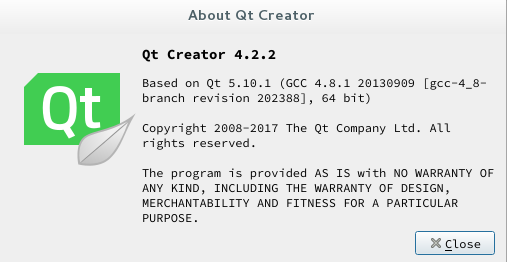
      what Qt version and platform?

      --- SUPPORT REQUESTS VIA CHAT WILL BE IGNORED ---
      If you have a question please use the forum so others can benefit from the solution in the future

      R 1 Reply Last reply
      0
      • raven-worxR raven-worx

        @Robin-Glennie
        what Qt version and platform?

        R Offline
        R Offline
        Robin Glennie
        wrote on last edited by
        #3

        @raven-worx Thanks for your quick response! Let me know if these screenshots don't cut the mustard....
        0_1540308242214_3782c63d-7705-41be-967f-9980aaed3298-image.png

        0_1540308279549_65e01e74-131a-4aa0-9cac-8dbc5f8916b0-image.png

        raven-worxR 1 Reply Last reply
        0
        • R Robin Glennie

          @raven-worx Thanks for your quick response! Let me know if these screenshots don't cut the mustard....

          0_1540308242214_3782c63d-7705-41be-967f-9980aaed3298-image.png

          0_1540308279549_65e01e74-131a-4aa0-9cac-8dbc5f8916b0-image.png

          raven-worxR Offline
          raven-worxR Offline
          raven-worx
          Moderators
          wrote on last edited by
          #4

          @Robin-Glennie
          the first screen is the version QtCreator is built against, not the version you are building your application against.

          --- SUPPORT REQUESTS VIA CHAT WILL BE IGNORED ---
          If you have a question please use the forum so others can benefit from the solution in the future

          R 1 Reply Last reply
          0
          • raven-worxR raven-worx

            @Robin-Glennie
            the first screen is the version QtCreator is built against, not the version you are building your application against.

            R Offline
            R Offline
            Robin Glennie
            wrote on last edited by
            #5

            Apologies!

            0_1540312022878_4018d9ec-15d0-4404-a73c-2df3dd62f321-image.png

            R 1 Reply Last reply
            0
            • R Robin Glennie

              Apologies!

              0_1540312022878_4018d9ec-15d0-4404-a73c-2df3dd62f321-image.png

              R Offline
              R Offline
              Robin Glennie
              wrote on last edited by
              #6

              This question can be ignored - with all the WebGL cosmetic problems and QML warnings/crashes we encountered after upgrading to QT 5.10.1 we have decided to roll back to 5.6.

              Thanks anyways!

              1 Reply Last reply
              0

              • Login

              • Login or register to search.
              • First post
                Last post
              0
              • Categories
              • Recent
              • Tags
              • Popular
              • Users
              • Groups
              • Search
              • Get Qt Extensions
              • Unsolved