
HAVING SOME BASIC QUERIES AS A BEGINNER
-
HI LeLev,
@LeLev
THANKS.. I AM CREATING THE QT WIDGETS APPLICATION , IN THAT ( .UI FORM ) , I AM CREATING SOME SIGNAL AND SLOTS IN THE UI FORM ITSELF... I AM ASKING ON THAT..ABOUT THE INTERACTION WITH THE BOARD, MAY BE LIKE SOME XILINX BOARD
<--USING CAPS LOCK IS ON IS MY STYLE-->
THANK YOU ONCE AGAIN..
-
HI LeLev,
@LeLev
THANKS.. I AM CREATING THE QT WIDGETS APPLICATION , IN THAT ( .UI FORM ) , I AM CREATING SOME SIGNAL AND SLOTS IN THE UI FORM ITSELF... I AM ASKING ON THAT..ABOUT THE INTERACTION WITH THE BOARD, MAY BE LIKE SOME XILINX BOARD
<--USING CAPS LOCK IS ON IS MY STYLE-->
THANK YOU ONCE AGAIN..
@LeLev meant that it is impolite to use always capital letters, because it is considered as shouting in Internet.
That is also the common understanding in Qt fora and our users don't take this lightly. Therefore, you better stop it and write as others do.
-
@LeLev meant that it is impolite to use always capital letters, because it is considered as shouting in Internet.
That is also the common understanding in Qt fora and our users don't take this lightly. Therefore, you better stop it and write as others do.
OK FINE..I AM NEW TO THIS FORUM, I THOUGHT IT WILL BE NOTICED SOON AND GET AN REPLY SOONER FOR MY PROBLEM..
ANYWAY I WILL TRY TO OFF CAPS LOCK..
I THOUGHT YOU ARE REPLYING FOR MY QUERIES..BUT YOU ARE REPORTING ABOUT MY WAY OF COMMUNICATION..
-
OK FINE..I AM NEW TO THIS FORUM, I THOUGHT IT WILL BE NOTICED SOON AND GET AN REPLY SOONER FOR MY PROBLEM..
ANYWAY I WILL TRY TO OFF CAPS LOCK..
I THOUGHT YOU ARE REPLYING FOR MY QUERIES..BUT YOU ARE REPORTING ABOUT MY WAY OF COMMUNICATION..
You should not expect answers if you don't stick to the rules. Your posts in uppercase are hard to read, so I gave up.
As a C++ programmer, you have to care about syntax, and correct case is essential. Please take the same care when communicating with others.
I apologize in advance for issues in my post, but I'm on the phone and things are a bit harder than on a real keyboard here.
Thanks for reading.
Regards -
You should not expect answers if you don't stick to the rules. Your posts in uppercase are hard to read, so I gave up.
As a C++ programmer, you have to care about syntax, and correct case is essential. Please take the same care when communicating with others.
I apologize in advance for issues in my post, but I'm on the phone and things are a bit harder than on a real keyboard here.
Thanks for reading.
Regardsmy apologize to you all,,
thank you,..
will not repeat the same..i respect you all.. here i came to learn some new things..
just i created the GUI ,, now i am looking on how to work on that regarding some functionality..
( like interface and interact with some mother board)
so i need some examples, so that i can refer all and work on my project..thank you,,
-
my apologize to you all,,
thank you,..
will not repeat the same..i respect you all.. here i came to learn some new things..
just i created the GUI ,, now i am looking on how to work on that regarding some functionality..
( like interface and interact with some mother board)
so i need some examples, so that i can refer all and work on my project..thank you,,
Probably best is when you start out with the different Qt examples. There are already a lot of different aspects in using Qt covered. This should give you an overview.
-
Hi
Regarding the UI.
If you use
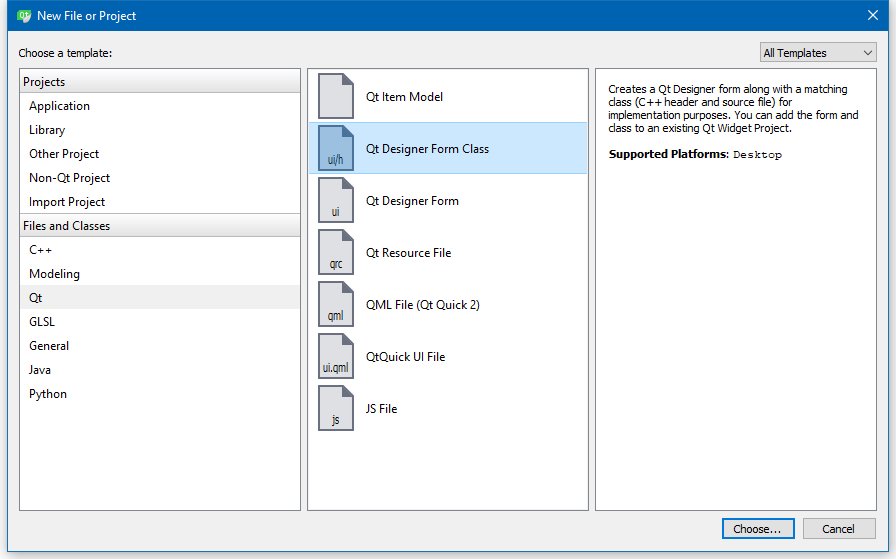
you get a class .cpp and .h that is ready to go.
Say you place an LineEdit on the new form UI
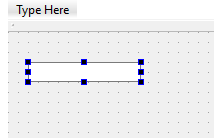
then in code you can access it via the UI struct
like
ui->lineEdit->setText("Hello");
for setting or reading its value.Say we add a QPushButton
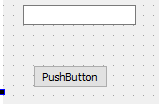
Then for it to do something, we need to hook up its signal to our own code/function
( this you do in constructor of main window, AFTER setupUI() )connect(ui->pushButton, &QPushButton::clicked, this, &MainWindow::pushButtonclicked );
then in your functions ( called a slot)
void MainWindow::pushButtonclicked() {
ui->lineEdit->setText("Hello"); // set text of the line edit
}
all is explained here.
http://doc.qt.io/qt-5/signalsandslots.htmlAs a side note. Caps wont work well anywhere and the key to get faster reply in this forum, is
a good question. Tell what you have done so far. What you see and what you expect to see/ happen.
Show code if you have any and be very concrete about which part is not working as expected.
Then people can fast help you archive what you want :) -
Probably best is when you start out with the different Qt examples. There are already a lot of different aspects in using Qt covered. This should give you an overview.
thank you.. i am refering that too..
-
Hi
Regarding the UI.
If you use
you get a class .cpp and .h that is ready to go.
Say you place an LineEdit on the new form UI
then in code you can access it via the UI struct
like
ui->lineEdit->setText("Hello");
for setting or reading its value.Say we add a QPushButton
Then for it to do something, we need to hook up its signal to our own code/function
( this you do in constructor of main window, AFTER setupUI() )connect(ui->pushButton, &QPushButton::clicked, this, &MainWindow::pushButtonclicked );
then in your functions ( called a slot)
void MainWindow::pushButtonclicked() {
ui->lineEdit->setText("Hello"); // set text of the line edit
}
all is explained here.
http://doc.qt.io/qt-5/signalsandslots.htmlAs a side note. Caps wont work well anywhere and the key to get faster reply in this forum, is
a good question. Tell what you have done so far. What you see and what you expect to see/ happen.
Show code if you have any and be very concrete about which part is not working as expected.
Then people can fast help you archive what you want :)@mrjj said in HAVING SOME BASIC QUERIES AS A BEGINNER:
connect(ui->pushButton, &QPushButton::clicked, this, &MainWindow::pushButtonclicked );
why we are using this line..?
without this line also it is working,@ button click some event should occur, that is based on signal and slot rit .?
i did that..now only i am writing the code.. just created the Gui only..
-
@mrjj said in HAVING SOME BASIC QUERIES AS A BEGINNER:
connect(ui->pushButton, &QPushButton::clicked, this, &MainWindow::pushButtonclicked );
why we are using this line..?
without this line also it is working,@ button click some event should occur, that is based on signal and slot rit .?
i did that..now only i am writing the code.. just created the Gui only..
@PraviN3738
Hi
That is a line to connect button signal to something. (user code)
While you can do that directly in Designer it's not good and will break easily
so it's truly recommended to do directly in the code for any real-life application.
But yes, only need when button should do something.
Just placing it on FORM also works. -
@PraviN3738
Hi
That is a line to connect button signal to something. (user code)
While you can do that directly in Designer it's not good and will break easily
so it's truly recommended to do directly in the code for any real-life application.
But yes, only need when button should do something.
Just placing it on FORM also works.@mrjj thank you,.

