
Any one success to run 3Dstudio sample provide by QT on windows under MSVC2017?
-
@Diracsbracket
filipdns d'ici environ 2 heuresHello,
thank you, I did it but same crash for all project with 3D studio presentation in it...
Hi @filipdns
Does this require a commercial Qt license?I just downloaded and installed 3DStudio 2.0 using the offline installer (it does simply not appear in my Qt Maintenance Tool).
However, I don't see any 3D Studio examples you shown in your picture.
MyD:\Qt\qt3dstudio-2.0.0\Tools\Qt3DStudio\examplesdirectory only contains a single example.Where did you get the above examples? And did you just copied them to Qt Creator's examples directory?
I copied both
QtStudio3DandQtStudio3D.2subfolders fromD:\Qt\qt3dstudio-2.0.0\Tools\Qt3DStudio\qml\to my Qt installation folder under:D:\Qt\5.11.0\msvc2017_64\qml\Then I tried one of the examples from https://git.qt.io/public-demos/qt3dstudio by loading its
.profile and addedD:\Qt\qt3dstudio-2.0.0\Tools\Qt3DStudio\bin\to the end of thePATHvariable in theRun Environmentfor the build.However, I get the error:
error: Unknown module(s) in QT: 3dstudioruntime2What am I missing? I saw in one of your other posts that maybe the
Boostlibrary is required? -
Hi @filipdns
Does this require a commercial Qt license?I just downloaded and installed 3DStudio 2.0 using the offline installer (it does simply not appear in my Qt Maintenance Tool).
However, I don't see any 3D Studio examples you shown in your picture.
MyD:\Qt\qt3dstudio-2.0.0\Tools\Qt3DStudio\examplesdirectory only contains a single example.Where did you get the above examples? And did you just copied them to Qt Creator's examples directory?
I copied both
QtStudio3DandQtStudio3D.2subfolders fromD:\Qt\qt3dstudio-2.0.0\Tools\Qt3DStudio\qml\to my Qt installation folder under:D:\Qt\5.11.0\msvc2017_64\qml\Then I tried one of the examples from https://git.qt.io/public-demos/qt3dstudio by loading its
.profile and addedD:\Qt\qt3dstudio-2.0.0\Tools\Qt3DStudio\bin\to the end of thePATHvariable in theRun Environmentfor the build.However, I get the error:
error: Unknown module(s) in QT: 3dstudioruntime2What am I missing? I saw in one of your other posts that maybe the
Boostlibrary is required?@Diracsbracket I had the same problem before and I revomed all qt and made fresh installation of QT 5.11.0 and 3d studio and 3d studio runtime (not 5.11.1 it's not include 3d studio)
-
I've just installed it using MaintenanceTool:
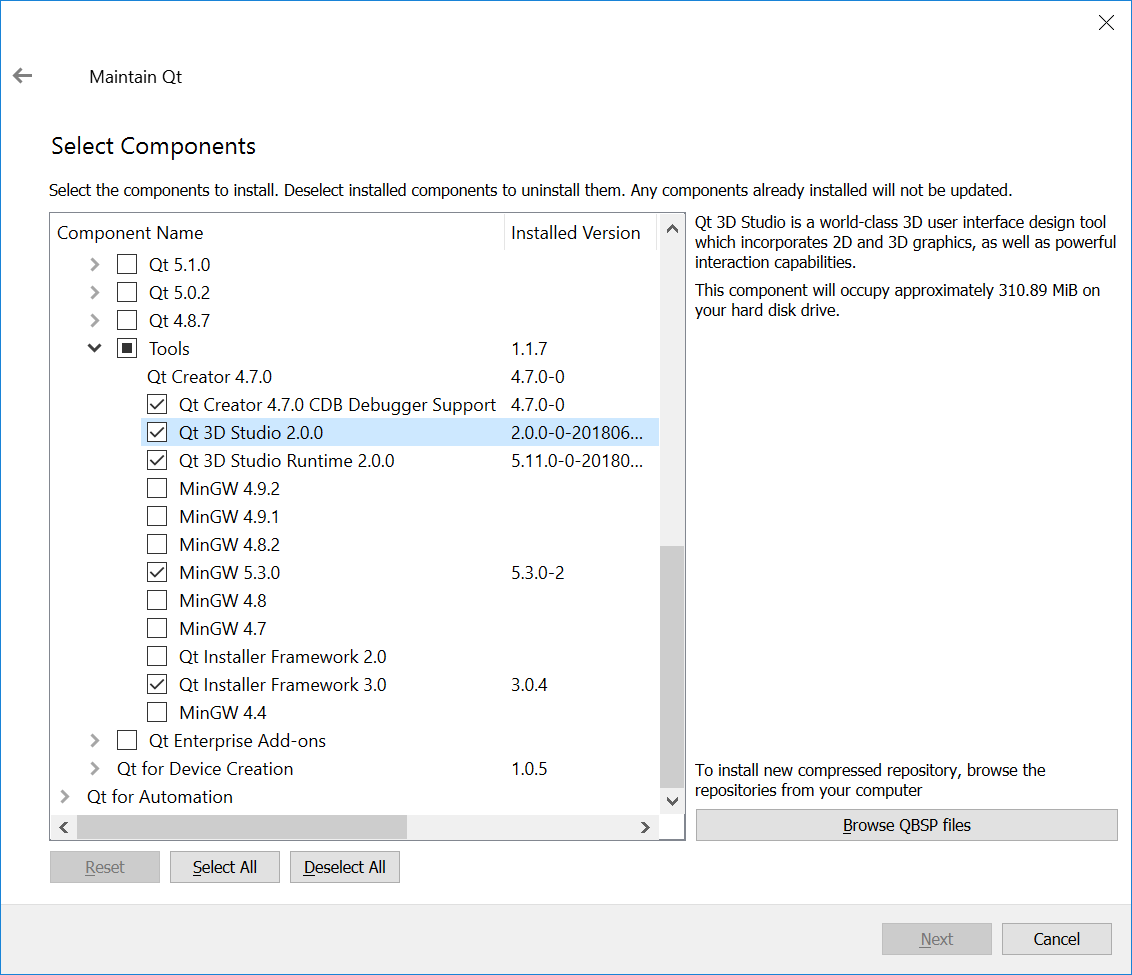
Not sure if a commercial license is required for that, the tool is Open Sourced after all (although, its runtime does require a commercial license in some cases).
Regarding the crashes - check the application output, what renderer / OpenGL vendor is used on your machine?
  renderer: ANGLE (Intel(R) HD Graphics 4600 Direct3D11 vs_5_0 ps_5_0)
  vendor: Google Inc.
  version: OpenGL ES 3.0 (ANGLE 2.1.0.8613f4946861)
If it's ANGLE, then documentation says the following:
Non-native implementations, like ANGLE or software implementations like Mesa's llvmpipe may work but are not tested and can fail in unexpected ways
I also do experience such crashes with 3D Studio examples, but as you can see I have ANGLE, so that is expected although a bit unfortunate.
-
I've just installed it using MaintenanceTool:
Not sure if a commercial license is required for that, the tool is Open Sourced after all (although, its runtime does require a commercial license in some cases).
Regarding the crashes - check the application output, what renderer / OpenGL vendor is used on your machine?
  renderer: ANGLE (Intel(R) HD Graphics 4600 Direct3D11 vs_5_0 ps_5_0)
  vendor: Google Inc.
  version: OpenGL ES 3.0 (ANGLE 2.1.0.8613f4946861)
If it's ANGLE, then documentation says the following:
Non-native implementations, like ANGLE or software implementations like Mesa's llvmpipe may work but are not tested and can fail in unexpected ways
I also do experience such crashes with 3D Studio examples, but as you can see I have ANGLE, so that is expected although a bit unfortunate.
Hello, yes QT just answers me and say remove angle but I'm with binary installation and I don't know how to do that...
-
But does your system have any other OpenGL implementation available at all?
-
But does your system have any other OpenGL implementation available at all?
-
I've just installed it using MaintenanceTool:
Not sure if a commercial license is required for that, the tool is Open Sourced after all (although, its runtime does require a commercial license in some cases).
Regarding the crashes - check the application output, what renderer / OpenGL vendor is used on your machine?
  renderer: ANGLE (Intel(R) HD Graphics 4600 Direct3D11 vs_5_0 ps_5_0)
  vendor: Google Inc.
  version: OpenGL ES 3.0 (ANGLE 2.1.0.8613f4946861)
If it's ANGLE, then documentation says the following:
Non-native implementations, like ANGLE or software implementations like Mesa's llvmpipe may work but are not tested and can fail in unexpected ways
I also do experience such crashes with 3D Studio examples, but as you can see I have ANGLE, so that is expected although a bit unfortunate.
@filipdns said in Any one success to run 3Dstudio sample provide by QT on windows under MSVC2017?:
made fresh installation of QT 5.11.0
@veryqtperson said in Any one success to run 3Dstudio sample provide by QT on windows under MSVC2017?:
've just installed it using MaintenanceTool:
After uinstalling Qt, I used the latest online installer, which indeed shows the 3D Studio and 3DStudio Runtime entries as installation options under
Toolsnow. These did not show up with my previous installer...After installing it, the examples seem to work fine on my side as well.
-
@veryqtperson I have GEforce GTX745 with openGL 4.0
Try to set
QT_OPENGL=desktop. If it helps (examples actually run and don't crash), then most probably you're using Qt Creator 4.7 and it has a related bug.At least, that was the issue in my case, now 3D Studio examples work on my laptop.
-
Try to set
QT_OPENGL=desktop. If it helps (examples actually run and don't crash), then most probably you're using Qt Creator 4.7 and it has a related bug.At least, that was the issue in my case, now 3D Studio examples work on my laptop.
-
@veryqtperson great that solve the issue thank a lot!!!!


