Skip to content
  • Categories
  • Recent
  • Tags
  • Popular
  • Users
  • Groups
  • Search
  • Get Qt Extensions
  • Unsolved
Collapse
Brand Logo
  1. Home
  2. Qt Development
  3. General and Desktop
  4. how to add children to the QTree Widget
Qt 6.11 is out! See what's new in the release blog

how to add children to the QTree Widget

Scheduled Pinned Locked Moved Solved General and Desktop
67 Posts 3 Posters 28.2k Views 1 Watching
  • Oldest to Newest
  • Newest to Oldest
  • Most Votes
Reply
  • Reply as topic
Log in to reply
This topic has been deleted. Only users with topic management privileges can see it.
  • mrjjM mrjj

    @ManiRon
    yes message print out the variable name $$UNAME ( what it contains)
    what is other doubt?

    ManiRonM Offline
    ManiRonM Offline
    ManiRon
    wrote on last edited by
    #23

    @mrjj ok where i can see this message sir?

    mrjjM 1 Reply Last reply
    0
    • ManiRonM ManiRon

      @mrjj ok where i can see this message sir?

      mrjjM Offline
      mrjjM Offline
      mrjj
      Lifetime Qt Champion
      wrote on last edited by mrjj
      #24

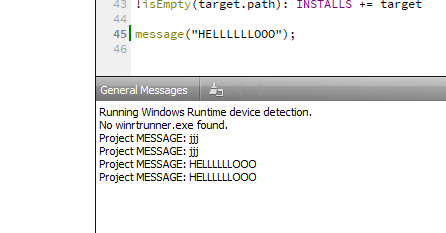
      @ManiRon
      in the Creator output pane.
      below where code is.
      alt text

      ManiRonM 1 Reply Last reply
      1
      • mrjjM mrjj

        @ManiRon
        yes message print out the variable name $$UNAME ( what it contains)
        what is other doubt?

        ManiRonM Offline
        ManiRonM Offline
        ManiRon
        wrote on last edited by
        #25

        @mrjj my anogther doubt is

        I am trying to view the data in a list . i have specified already

        1 Reply Last reply
        0
        • mrjjM mrjj

          @ManiRon
          in the Creator output pane.
          below where code is.
          alt text

          ManiRonM Offline
          ManiRonM Offline
          ManiRon
          wrote on last edited by ManiRon
          #26

          @mrjj

          And i have another doubt .
          I am trying to see the data which i have inserted into my QList . I can see the size but i cannot see the data.

          Code:

          QList<QString> m_Data;
          for(int i=1;i<3;i++)
          {
          Data = QString("SubItem"+QString::number(i));
          m_Data.append(Data.toLatin1().constData());
          QString H = m_Data.at(i); //trying to see data
          qDebug()<<"Data"<< m_Data.at(i);
          }

          while running the application crashesdonno why

          mrjjM 1 Reply Last reply
          0
          • ManiRonM ManiRon

            @mrjj

            And i have another doubt .
            I am trying to see the data which i have inserted into my QList . I can see the size but i cannot see the data.

            Code:

            QList<QString> m_Data;
            for(int i=1;i<3;i++)
            {
            Data = QString("SubItem"+QString::number(i));
            m_Data.append(Data.toLatin1().constData());
            QString H = m_Data.at(i); //trying to see data
            qDebug()<<"Data"<< m_Data.at(i);
            }

            while running the application crashesdonno why

            mrjjM Offline
            mrjjM Offline
            mrjj
            Lifetime Qt Champion
            wrote on last edited by mrjj
            #27

            @ManiRon
            Hi
            what you mean u can see the size but not the data?

            qDebug()<<"Data"<< m_Data.at(i); <<< u print index from 1,2,3
            but u call append so first call, there is data in zero
            but u print 1
            then next loop
            you print from 2, but only data in 0,1
            and so on.
            it starts in zero. so adjust the for loop.

            for(int i=0;i<2;i++)
            {
            Data = QString("SubItem"+QString::number(i+1));
            m_Data.append(Data.toLatin1().constData());
            qDebug()<<"Data"<< m_Data.at(i);  //trying to see data
            }
            
            ManiRonM 1 Reply Last reply
            1
            • mrjjM mrjj

              @ManiRon
              Hi
              what you mean u can see the size but not the data?

              qDebug()<<"Data"<< m_Data.at(i); <<< u print index from 1,2,3
              but u call append so first call, there is data in zero
              but u print 1
              then next loop
              you print from 2, but only data in 0,1
              and so on.
              it starts in zero. so adjust the for loop.

              for(int i=0;i<2;i++)
              {
              Data = QString("SubItem"+QString::number(i+1));
              m_Data.append(Data.toLatin1().constData());
              qDebug()<<"Data"<< m_Data.at(i);  //trying to see data
              }
              
              ManiRonM Offline
              ManiRonM Offline
              ManiRon
              wrote on last edited by
              #28

              @mrjj said in how to add children to the QTree Widget:

              but

              if i give

              int i = m_data.size();
              and print the i value , I can see the data size that which i have inserted in the list.

              But if i try to see the data

              QString H = m_data.at(i);
              and print the H value using qDebug i data is not coming and the application crashes

              mrjjM ManiRonM 2 Replies Last reply
              0
              • ManiRonM ManiRon

                @mrjj said in how to add children to the QTree Widget:

                but

                if i give

                int i = m_data.size();
                and print the i value , I can see the data size that which i have inserted in the list.

                But if i try to see the data

                QString H = m_data.at(i);
                and print the H value using qDebug i data is not coming and the application crashes

                mrjjM Offline
                mrjjM Offline
                mrjj
                Lifetime Qt Champion
                wrote on last edited by
                #29

                @ManiRon
                Yes, you access to high index.
                as u start with 1.
                and list start with zero.
                So that can crash.

                ManiRonM 2 Replies Last reply
                1
                • ManiRonM ManiRon

                  @mrjj said in how to add children to the QTree Widget:

                  but

                  if i give

                  int i = m_data.size();
                  and print the i value , I can see the data size that which i have inserted in the list.

                  But if i try to see the data

                  QString H = m_data.at(i);
                  and print the H value using qDebug i data is not coming and the application crashes

                  ManiRonM Offline
                  ManiRonM Offline
                  ManiRon
                  wrote on last edited by
                  #30
                  This post is deleted!
                  1 Reply Last reply
                  0
                  • mrjjM mrjj

                    @ManiRon
                    Yes, you access to high index.
                    as u start with 1.
                    and list start with zero.
                    So that can crash.

                    ManiRonM Offline
                    ManiRonM Offline
                    ManiRon
                    wrote on last edited by
                    #31

                    @mrjj but my size is two. I have inserted two data and i am trying to see the second data then it should work right?

                    ManiRonM 1 Reply Last reply
                    0
                    • ManiRonM ManiRon

                      @mrjj but my size is two. I have inserted two data and i am trying to see the second data then it should work right?

                      ManiRonM Offline
                      ManiRonM Offline
                      ManiRon
                      wrote on last edited by
                      #32

                      @ManiRon OK SIR IT WORKED

                      1 Reply Last reply
                      1
                      • mrjjM mrjj

                        @ManiRon
                        Yes, you access to high index.
                        as u start with 1.
                        and list start with zero.
                        So that can crash.

                        ManiRonM Offline
                        ManiRonM Offline
                        ManiRon
                        wrote on last edited by
                        #33

                        @mrjj

                        I have another doubt sir

                        mrjjM 1 Reply Last reply
                        0
                        • ManiRonM ManiRon

                          @mrjj

                          I have another doubt sir

                          mrjjM Offline
                          mrjjM Offline
                          mrjj
                          Lifetime Qt Champion
                          wrote on last edited by
                          #34

                          @ManiRon
                          super :)
                          ask away :)

                          ManiRonM 2 Replies Last reply
                          0
                          • mrjjM mrjj

                            @ManiRon
                            super :)
                            ask away :)

                            ManiRonM Offline
                            ManiRonM Offline
                            ManiRon
                            wrote on last edited by
                            #35

                            @mrjj 0_1536571284463_1.jpg

                            How to use this ? for this only i am trying

                            mrjjM 1 Reply Last reply
                            0
                            • mrjjM mrjj

                              @ManiRon
                              super :)
                              ask away :)

                              ManiRonM Offline
                              ManiRonM Offline
                              ManiRon
                              wrote on last edited by
                              #36

                              @mrjj What is my doubt is i want to add N number of children to a toplevelitem and one child to each child ? How can i add N Number of childern first

                              1 Reply Last reply
                              0
                              • ManiRonM ManiRon

                                @mrjj 0_1536571284463_1.jpg

                                How to use this ? for this only i am trying

                                mrjjM Offline
                                mrjjM Offline
                                mrjj
                                Lifetime Qt Champion
                                wrote on last edited by
                                #37

                                @ManiRon
                                Its a list of QTreeWidgetItems * ( pointers)
                                So you must add them to a QList then give QList to tree.
                                Its just a function to add multiple items at once.

                                
                                // top one
                                    QTreeWidgetItem *treeItemROOT = new QTreeWidgetItem(ui->treeWidget);
                                    treeItem->setText(0, name);
                                    treeItem->setText(1, description);
                                
                                // first child
                                    QTreeWidgetItem *treeItem = new QTreeWidgetItem();
                                    treeItem->setText(0, name);
                                    treeItem->setText(1, description);
                                
                                    treeItemROOT ->addChild(treeItem); // add child to the root
                                
                                ManiRonM 1 Reply Last reply
                                1
                                • mrjjM mrjj

                                  @ManiRon
                                  Its a list of QTreeWidgetItems * ( pointers)
                                  So you must add them to a QList then give QList to tree.
                                  Its just a function to add multiple items at once.

                                  
                                  // top one
                                      QTreeWidgetItem *treeItemROOT = new QTreeWidgetItem(ui->treeWidget);
                                      treeItem->setText(0, name);
                                      treeItem->setText(1, description);
                                  
                                  // first child
                                      QTreeWidgetItem *treeItem = new QTreeWidgetItem();
                                      treeItem->setText(0, name);
                                      treeItem->setText(1, description);
                                  
                                      treeItemROOT ->addChild(treeItem); // add child to the root
                                  
                                  ManiRonM Offline
                                  ManiRonM Offline
                                  ManiRon
                                  wrote on last edited by
                                  #38

                                  @mrjj said in how to add children to the QTree Widget:

                                  treeItem

                                  thats what can u give any example code for that "Its a list of QTreeWidgetItems * ( pointers)
                                  So you must add them to a QList then give QList to tree."

                                  mrjjM 1 Reply Last reply
                                  0
                                  • ManiRonM ManiRon

                                    @mrjj said in how to add children to the QTree Widget:

                                    treeItem

                                    thats what can u give any example code for that "Its a list of QTreeWidgetItems * ( pointers)
                                    So you must add them to a QList then give QList to tree."

                                    mrjjM Offline
                                    mrjjM Offline
                                    mrjj
                                    Lifetime Qt Champion
                                    wrote on last edited by
                                    #39

                                    @ManiRon
                                    QList<QTreeWidgetItem> mylist;
                                    mylist.append( new QTreeWidgetItem); // might want to set some text also
                                    ..
                                    ...
                                    call addChildren with mylist.

                                    However, it wont help you build the tree, just other way of adding more than one item at a time.

                                    ManiRonM 2 Replies Last reply
                                    1
                                    • mrjjM mrjj

                                      @ManiRon
                                      QList<QTreeWidgetItem> mylist;
                                      mylist.append( new QTreeWidgetItem); // might want to set some text also
                                      ..
                                      ...
                                      call addChildren with mylist.

                                      However, it wont help you build the tree, just other way of adding more than one item at a time.

                                      ManiRonM Offline
                                      ManiRonM Offline
                                      ManiRon
                                      wrote on last edited by
                                      #40

                                      @mrjj

                                      My idea was to insert a list of data as a children to a toplevelitem

                                      1 Reply Last reply
                                      0
                                      • mrjjM mrjj

                                        @ManiRon
                                        QList<QTreeWidgetItem> mylist;
                                        mylist.append( new QTreeWidgetItem); // might want to set some text also
                                        ..
                                        ...
                                        call addChildren with mylist.

                                        However, it wont help you build the tree, just other way of adding more than one item at a time.

                                        ManiRonM Offline
                                        ManiRonM Offline
                                        ManiRon
                                        wrote on last edited by
                                        #41

                                        @mrjj

                                        I gave like this QList<QTreeWidgetItem>m_Data;
                                        m_Data.append(new QTreeWidgetItem);

                                        it throwed error saying

                                        error: no matching function for call to 'QList<QTreeWidgetItem>::append(QTreeWidgetItem*)'
                                        m_Data.append(new QTreeWidgetItem);
                                        ^

                                        mrjjM 1 Reply Last reply
                                        0
                                        • ManiRonM ManiRon

                                          @mrjj

                                          I gave like this QList<QTreeWidgetItem>m_Data;
                                          m_Data.append(new QTreeWidgetItem);

                                          it throwed error saying

                                          error: no matching function for call to 'QList<QTreeWidgetItem>::append(QTreeWidgetItem*)'
                                          m_Data.append(new QTreeWidgetItem);
                                          ^

                                          mrjjM Offline
                                          mrjjM Offline
                                          mrjj
                                          Lifetime Qt Champion
                                          wrote on last edited by
                                          #42

                                          Hi
                                          List must be of pointers.
                                          QList<QTreeWidgetItem *>
                                          (u missed the *)

                                          ManiRonM 1 Reply Last reply
                                          1

                                          • Login

                                          • Login or register to search.
                                          • First post
                                            Last post
                                          0
                                          • Categories
                                          • Recent
                                          • Tags
                                          • Popular
                                          • Users
                                          • Groups
                                          • Search
                                          • Get Qt Extensions
                                          • Unsolved