Skip to content
  • Categories
  • Recent
  • Tags
  • Popular
  • Users
  • Groups
  • Search
  • Get Qt Extensions
  • Unsolved
Collapse
Brand Logo
  1. Home
  2. Qt Development
  3. General and Desktop
  4. qt creator open just .pro file
Forum Updated to NodeBB v4.3 + New Features

qt creator open just .pro file

Scheduled Pinned Locked Moved Solved General and Desktop
20 Posts 3 Posters 10.1k Views 2 Watching
  • Oldest to Newest
  • Newest to Oldest
  • Most Votes
Reply
  • Reply as topic
Log in to reply
This topic has been deleted. Only users with topic management privileges can see it.
  • M Offline
    M Offline
    mv-whw
    wrote on last edited by
    #5

    that worked, thanks.
    But I found a new issue: i can't build project, it's all grayed. It says unconfigured kit

    0_1533760084477_Zaslonska slika 2018-08-08 22-27-20.png

    mrjjM 1 Reply Last reply
    0
    • M mv-whw

      that worked, thanks.
      But I found a new issue: i can't build project, it's all grayed. It says unconfigured kit

      0_1533760084477_Zaslonska slika 2018-08-08 22-27-20.png

      mrjjM Offline
      mrjjM Offline
      mrjj
      Lifetime Qt Champion
      wrote on last edited by
      #6

      @mv-whw
      Ah. maybe a kit was not selected if it was existing project.
      Delete .pro.user file (in project folder) and open again.
      Should allow u to select compiler.

      1 Reply Last reply
      0
      • M Offline
        M Offline
        mv-whw
        wrote on last edited by
        #7

        i deleted .pro.user file and reopened project it opened this:
        0_1533760520642_Zaslonska slika 2018-08-08 22-33-35.png

        and when I click on options it's like:
        0_1533760620864_Zaslonska slika 2018-08-08 22-36-26.png

        and right now I don't know what to do. I created new project and still the same.

        mrjjM 1 Reply Last reply
        0
        • M mv-whw

          i deleted .pro.user file and reopened project it opened this:
          0_1533760520642_Zaslonska slika 2018-08-08 22-33-35.png

          and when I click on options it's like:
          0_1533760620864_Zaslonska slika 2018-08-08 22-36-26.png

          and right now I don't know what to do. I created new project and still the same.

          mrjjM Offline
          mrjjM Offline
          mrjj
          Lifetime Qt Champion
          wrote on last edited by
          #8

          @mv-whw
          What do you have under compilers ?
          also it talks about android kit, i assume its not that you are setting up
          but for Desktop ?

          1 Reply Last reply
          0
          • M Offline
            M Offline
            mv-whw
            wrote on last edited by
            #9

            under compilers is this:
            0_1533761119030_Zaslonska slika 2018-08-08 22-44-58.png

            right now I don't need android compilers because I don't know much jet of QML/C++ and I plan to learning in stages: first for desktop and then try for android.

            mrjjM 1 Reply Last reply
            0
            • M mv-whw

              under compilers is this:
              0_1533761119030_Zaslonska slika 2018-08-08 22-44-58.png

              right now I don't need android compilers because I don't know much jet of QML/C++ and I plan to learning in stages: first for desktop and then try for android.

              mrjjM Offline
              mrjjM Offline
              mrjj
              Lifetime Qt Champion
              wrote on last edited by
              #10

              @mv-whw
              Oh that was many
              Can you check if they point to the right places ?
              alt text

              1 Reply Last reply
              0
              • M Offline
                M Offline
                mv-whw
                wrote on last edited by
                #11

                all of them point to right places.

                mrjjM 1 Reply Last reply
                0
                • M mv-whw

                  all of them point to right places.

                  mrjjM Offline
                  mrjjM Offline
                  mrjj
                  Lifetime Qt Champion
                  wrote on last edited by
                  #12

                  @mv-whw
                  Hmm thats really odd then.
                  Can you try
                  sudo apt-get install qt5-default

                  1 Reply Last reply
                  0
                  • M Offline
                    M Offline
                    mv-whw
                    wrote on last edited by
                    #13

                    it's still the same

                    mrjjM 1 Reply Last reply
                    0
                    • M mv-whw

                      it's still the same

                      mrjjM Offline
                      mrjjM Offline
                      mrjj
                      Lifetime Qt Champion
                      wrote on last edited by
                      #14

                      @mv-whw
                      And you restarted Creator and try creating a new project ?

                      1 Reply Last reply
                      0
                      • M Offline
                        M Offline
                        mv-whw
                        wrote on last edited by
                        #15

                        I restarted Qt Creator even PC and it's still the same. says no kits been enabled for this project (completely new project).

                        mrjjM 1 Reply Last reply
                        0
                        • M mv-whw

                          I restarted Qt Creator even PC and it's still the same. says no kits been enabled for this project (completely new project).

                          mrjjM Offline
                          mrjjM Offline
                          mrjj
                          Lifetime Qt Champion
                          wrote on last edited by
                          #16

                          @mv-whw
                          Hmm. im out of guess then.
                          Normally it picks up right kits.
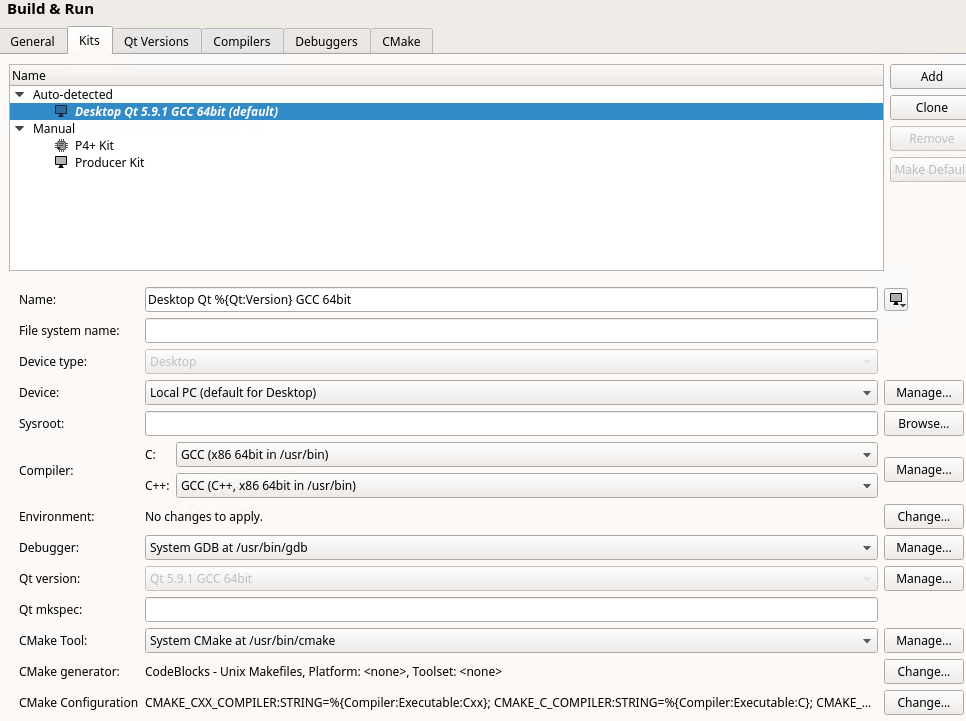
                          Does it have entries in the Desktop kits ?
                          alt text

                          1 Reply Last reply
                          1
                          • M Offline
                            M Offline
                            mv-whw
                            wrote on last edited by
                            #17

                            I figured out. Thanks I had to enabled it in Configure Project under "Build and Run" and add info about C++ compiler under "Kits"

                            mrjjM N 2 Replies Last reply
                            1
                            • M mv-whw

                              I figured out. Thanks I had to enabled it in Configure Project under "Build and Run" and add info about C++ compiler under "Kits"

                              mrjjM Offline
                              mrjjM Offline
                              mrjj
                              Lifetime Qt Champion
                              wrote on last edited by
                              #18

                              @mv-whw
                              \o/
                              Should have started with kits :)
                              Happy programming

                              1 Reply Last reply
                              0
                              • M mv-whw

                                I figured out. Thanks I had to enabled it in Configure Project under "Build and Run" and add info about C++ compiler under "Kits"

                                N Offline
                                N Offline
                                Nader Mourad
                                wrote on last edited by
                                #19

                                @mv-whw can you please demonstrate the updates you did at the compiler side and build and run side actually I am having the same problem installing qt on ubuntu I was desperately trying with different versions

                                1 Reply Last reply
                                0
                                • N Offline
                                  N Offline
                                  Nader Mourad
                                  wrote on last edited by
                                  #20

                                  Actually, the Ubuntu version I was using did not support the qt version. with Ubuntu 18.04.1 LTS and qt 5.11.0 using qt-unified-Linux-x64-3.0.5-online.run it did work I just needed as well to install a missing library using the following command on the terminal sudo apt-get install libglu1-mesa-dev
                                  good luck!!

                                  1 Reply Last reply
                                  1

                                  • Login

                                  • Login or register to search.
                                  • First post
                                    Last post
                                  0
                                  • Categories
                                  • Recent
                                  • Tags
                                  • Popular
                                  • Users
                                  • Groups
                                  • Search
                                  • Get Qt Extensions
                                  • Unsolved