
Skip to content
  • Categories
  • Recent
  • Tags
  • Popular
  • Users
  • Groups
  • Search
  • Get Qt Extensions
  • Unsolved
Collapse
Brand Logo
  1. Home
  2. Qt Development
  3. General and Desktop
  4. Why does not the icon appear on the button?

Why does not the icon appear on the button?

Scheduled Pinned Locked Moved Solved General and Desktop
6 Posts 2 Posters 763 Views 1 Watching
  • Oldest to Newest
  • Newest to Oldest
  • Most Votes
Reply
  • Reply as topic
Log in to reply
This topic has been deleted. Only users with topic management privileges can see it.
  • H Offline
    H Offline
    haifisch
    wrote on last edited by haifisch
    #1

    I do in QTableView, a button with the help of delegates, but why the icon on the button is not displayed.
    Code:

    ...
        //paint
        void ButtonDeleteColumnDelegate::paint(QPainter *painter, const QStyleOptionViewItem &option, const QModelIndex &index) const
        {
            QStyleOptionButton button;
            QRect r = option.rect;//getting the rect of the cell
            int x,y,w,h;
            x = r.left() + r.width() - 32;//the X coordinate
            y = r.top();//the Y coordinate
            w = 32;//button width
            h = 32;//button height
            button.rect = QRect(x,y,w,h);
            //button.text = "Удалить запись и файл";
    
            button.icon = QIcon(":/mapicons/deleting.png");;
            button.iconSize = QSize(32,32);
            button.state = QStyle::State_Enabled;
            QApplication::style()->drawControl( QStyle::CE_PushButton, &button, painter);
        }
        //updateGeometry
        bool ButtonDeleteColumnDelegate::editorEvent(QEvent *event, QAbstractItemModel *model, const QStyleOptionViewItem &option, const QModelIndex &index)
        {
            if( event->type() == QEvent::MouseButtonRelease )
            {
                QMouseEvent * e = (QMouseEvent *)event;
                int clickX = e->x();
                int clickY = e->y();
    
                QRect r = option.rect;//getting the rect of the cell
                int x,y,w,h;
                x = r.left() + r.width() - 32;//the X coordinate
                y = r.top();//the Y coordinate
                w = 32;//button width
                h = 32;//button height
    
                if( clickX > x && clickX < x + w )
                    if( clickY > y && clickY < y + h )
                    {
                        DialogDeleteROW->setWindowTitle(tr("Удалить запись и файл"));
    
                        Id = model->data(model->index(index.row(),0)).toString();
                        NameFile = model->data(model->index(index.row(),1)).toString();
                        if (DisplayMethod == "data") {
                            File = model->data(model->index(index.row(),2)).toString();
                        }
                        modelDeleteRow = model;
                        DeleteRow = index.row();
                        IdLineEdit->setText(model->data(model->index(index.row(),0)).toString());
                        FileNameLineEdit->setText(model->data(model->index(index.row(),1)).toString());
                        IdLineEdit->setEnabled(false);
                        FileNameLineEdit->setEnabled(false);
                        QLabel *FileNameLabel;
                        if (DisplayMethod == "data") {
                            FileNameLabel = new QLabel(tr("Название файла."));
                        } else if (DisplayMethod == "analysis") {
                            FileNameLabel = new QLabel(tr("Поле сведенья."));
                        }
                        layout->addWidget(IdLabel,0,0);
                        layout->addWidget(FileNameLabel,1,0);
                        layout->addWidget(IdLineEdit,0,1);
                        layout->addWidget(FileNameLineEdit,1,1);
    
                        connect(DeleteButton,SIGNAL(clicked(bool)),SLOT(DeleteFunction()));
                        layout->addWidget(DeleteButton,2,0,1,2);
                        DialogDeleteROW->setLayout(layout);
                        QRect screenGeometry = QApplication::desktop()->screenGeometry();
                        int x = (screenGeometry.width() - DialogDeleteROW->width()) / 2;
                        int y = (screenGeometry.height() - DialogDeleteROW->height()) / 2;
                        DialogDeleteROW->move(x,y);
                        DialogDeleteROW->show();
                    }
            }
    
            return true;
        }
        ...
    

    The pictures are Observation Log \ map icons \ deleting.png

    1 Reply Last reply
    0
    • mrjjM Offline
      mrjjM Offline
      mrjj
      Lifetime Qt Champion
      wrote on last edited by mrjj
      #2

      Hi
      If you go to resource file, find the icon and RIGHT click it.
      Does the path mathes the one in code ?
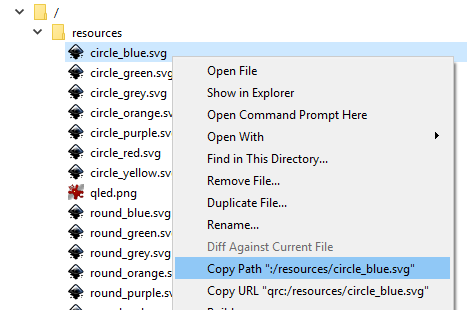
      alt text

      H 3 Replies Last reply
      2
      • mrjjM mrjj

        Hi
        If you go to resource file, find the icon and RIGHT click it.
        Does the path mathes the one in code ?

        alt text

        H Offline
        H Offline
        haifisch
        wrote on last edited by
        #3

        0_1530396306930_c5534d8e-52e6-46b1-8fe0-3603d53e9fce-image.png

        1 Reply Last reply
        0
        • mrjjM mrjj

          Hi
          If you go to resource file, find the icon and RIGHT click it.
          Does the path mathes the one in code ?

          alt text

          H Offline
          H Offline
          haifisch
          wrote on last edited by
          #4

          @mrjj I do not have this. How do I configure this option?

          1 Reply Last reply
          0
          • mrjjM mrjj

            Hi
            If you go to resource file, find the icon and RIGHT click it.
            Does the path mathes the one in code ?

            alt text

            H Offline
            H Offline
            haifisch
            wrote on last edited by
            #5

            @mrjj or put a standard icon ```
            QStyle::SP_TrashIcon

            1 Reply Last reply
            0
            • mrjjM Offline
              mrjjM Offline
              mrjj
              Lifetime Qt Champion
              wrote on last edited by
              #6

              Hi
              you have to put the icons in a resource file.
              It seems you have just added the images as "other files"
              For the ":/path/image.png" syntax to work, they must be in qresource file.
              http://www.bogotobogo.com/Qt/Qt5_Resource_Files.php

              1 Reply Last reply
              4

              • Login

              • Login or register to search.
              • First post
                Last post
              0
              • Categories
              • Recent
              • Tags
              • Popular
              • Users
              • Groups
              • Search
              • Get Qt Extensions
              • Unsolved