Skip to content
  • Categories
  • Recent
  • Tags
  • Popular
  • Users
  • Groups
  • Search
  • Get Qt Extensions
  • Unsolved
Collapse
Brand Logo
  1. Home
  2. Qt Development
  3. General and Desktop
  4. QScrollArea static background-image and QLabels
Qt 6.11 is out! See what's new in the release blog

QScrollArea static background-image and QLabels

Scheduled Pinned Locked Moved Solved General and Desktop
13 Posts 2 Posters 3.3k Views 1 Watching
  • Oldest to Newest
  • Newest to Oldest
  • Most Votes
Reply
  • Reply as topic
Log in to reply
This topic has been deleted. Only users with topic management privileges can see it.
  • mrjjM mrjj

    Hi
    QLabels are also QWidgets.
    You must specify better whom you want affected.
    Using QWidget as selector will take all.

    If you only have one scrollarea , maybe you can use use names ?

    You could also try
    QLabel{} in end of stylesheet.

    S Offline
    S Offline
    SHRED4RED
    wrote on last edited by
    #3

    @mrjj You are right. But I try used QWidget#scrollArea or QScrollArea#scrollArea - but nothing. there is no image at all.
    Note: I write style sheet in Design

    mrjjM 1 Reply Last reply
    0
    • S SHRED4RED

      @mrjj You are right. But I try used QWidget#scrollArea or QScrollArea#scrollArea - but nothing. there is no image at all.
      Note: I write style sheet in Design

      mrjjM Offline
      mrjjM Offline
      mrjj
      Lifetime Qt Champion
      wrote on last edited by
      #4

      @SHRED4RED

      You set stylesheet on ScrollArea or on mainwindow?

      try QLabel{} in end of stylesheet for fast test. might just work.

      S 1 Reply Last reply
      0
      • mrjjM mrjj

        @SHRED4RED

        You set stylesheet on ScrollArea or on mainwindow?

        try QLabel{} in end of stylesheet for fast test. might just work.

        S Offline
        S Offline
        SHRED4RED
        wrote on last edited by
        #5

        @mrjj I already tried.
        QWidget {...} Qlabel {empty or background-image: none}

        But widgetScrollAreaContents is parent for QLabels. And QLabel copy properties.

        set stelysheet on ScrollArea

        mrjjM 1 Reply Last reply
        1
        • S SHRED4RED

          @mrjj I already tried.
          QWidget {...} Qlabel {empty or background-image: none}

          But widgetScrollAreaContents is parent for QLabels. And QLabel copy properties.

          set stelysheet on ScrollArea

          mrjjM Offline
          mrjjM Offline
          mrjj
          Lifetime Qt Champion
          wrote on last edited by
          #6

          @SHRED4RED
          Yep, stylesheets are always cascading. and when selector is QWidget, all children
          are affected.

          If you set a background color QLabel last in sheet. does it show ?

          S 1 Reply Last reply
          0
          • mrjjM mrjj

            @SHRED4RED
            Yep, stylesheets are always cascading. and when selector is QWidget, all children
            are affected.

            If you set a background color QLabel last in sheet. does it show ?

            S Offline
            S Offline
            SHRED4RED
            wrote on last edited by
            #7

            @mrjj doesn't show it.

            Okey, mb you can explain me: when I use

            QWidget
            {
            ...
            }
            style sheet set for all widgets.

            but why when I use QScrollArea {...} picture doesn't show at all. Why?
            Which widget does set style sheet and show picture? I try QAbstractScrollArea - none, QAbstractScrollArea > QWidget - none, QAbstractScrollArea > QWidget > QWidget = widgetScrollAreaContents - is wrong for me, QAbstractScrollArea > QWidget > QWidget > QWidget = my labels . Okey, but where QWidget which show picture, when i use QWidget{...} because it execute good for me (static picture in area, but bad than Qlabel use properties too :( how i can find this a right QWidget? )

            mrjjM 1 Reply Last reply
            1
            • S SHRED4RED

              @mrjj doesn't show it.

              Okey, mb you can explain me: when I use

              QWidget
              {
              ...
              }
              style sheet set for all widgets.

              but why when I use QScrollArea {...} picture doesn't show at all. Why?
              Which widget does set style sheet and show picture? I try QAbstractScrollArea - none, QAbstractScrollArea > QWidget - none, QAbstractScrollArea > QWidget > QWidget = widgetScrollAreaContents - is wrong for me, QAbstractScrollArea > QWidget > QWidget > QWidget = my labels . Okey, but where QWidget which show picture, when i use QWidget{...} because it execute good for me (static picture in area, but bad than Qlabel use properties too :( how i can find this a right QWidget? )

              mrjjM Offline
              mrjjM Offline
              mrjj
              Lifetime Qt Champion
              wrote on last edited by
              #8

              Hi
              QScrollArea might not draw background at all.
              its scrollAreaWidgetContents you can see.
              #scrollAreaWidgetContents {
              background-color: rgb(255, 255, 0);
              }
              does set color.

              1 Reply Last reply
              0
              • mrjjM Offline
                mrjjM Offline
                mrjj
                Lifetime Qt Champion
                wrote on last edited by
                #9

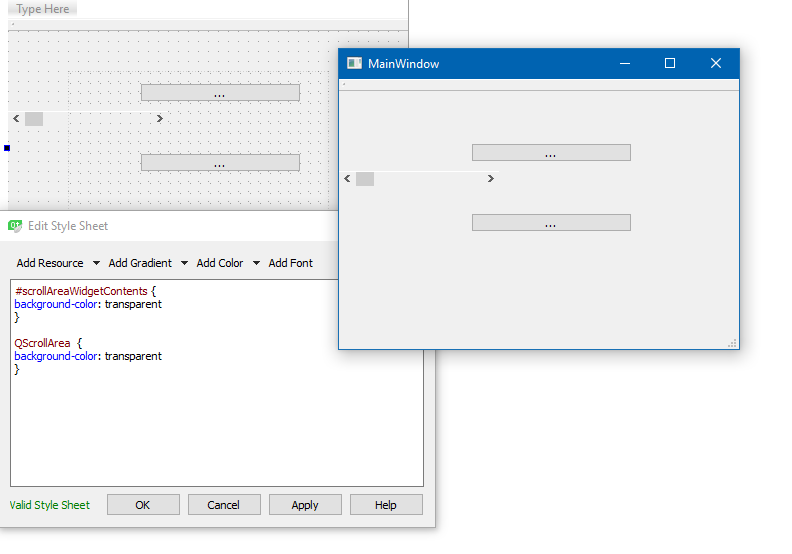
                Ok it does seem to clear background.
                alt text

                had to change QscrollArea to transparent to see through.
                But scrollAreaWidgetContents covers all area so its that you see.

                S 1 Reply Last reply
                0
                • mrjjM mrjj

                  Ok it does seem to clear background.
                  alt text

                  had to change QscrollArea to transparent to see through.
                  But scrollAreaWidgetContents covers all area so its that you see.

                  S Offline
                  S Offline
                  SHRED4RED
                  wrote on last edited by
                  #10

                  @mrjj sorry for my stupidity... Thank you so much

                  mrjjM 1 Reply Last reply
                  0
                  • S SHRED4RED

                    @mrjj sorry for my stupidity... Thank you so much

                    mrjjM Offline
                    mrjjM Offline
                    mrjj
                    Lifetime Qt Champion
                    wrote on last edited by
                    #11

                    @SHRED4RED
                    Its not stupid. :)
                    StyleSheets is a bit tricky and sometimes its not apparent whom draw what where.
                    Like Views have a viewport object and QScrollArea also have an internal helper widget.
                    and i really wish we could write
                    QWidget, !QLabel {
                    }
                    There is some negative/reverse selectors but did not work for me.

                    S 1 Reply Last reply
                    0
                    • mrjjM mrjj

                      @SHRED4RED
                      Its not stupid. :)
                      StyleSheets is a bit tricky and sometimes its not apparent whom draw what where.
                      Like Views have a viewport object and QScrollArea also have an internal helper widget.
                      and i really wish we could write
                      QWidget, !QLabel {
                      }
                      There is some negative/reverse selectors but did not work for me.

                      S Offline
                      S Offline
                      SHRED4RED
                      wrote on last edited by
                      #12

                      @mrjj You helped me a lot. Just scrollAreaWidgetContents didn't are transparent... But I didn't understand it . Thank you very much for your time and advice!!!

                      mrjjM 1 Reply Last reply
                      0
                      • S SHRED4RED

                        @mrjj You helped me a lot. Just scrollAreaWidgetContents didn't are transparent... But I didn't understand it . Thank you very much for your time and advice!!!

                        mrjjM Offline
                        mrjjM Offline
                        mrjj
                        Lifetime Qt Champion
                        wrote on last edited by mrjj
                        #13

                        @SHRED4RED
                        Np. that's why i hang out here.
                        Remember to mark it solved :)
                        (ps i bumped your reputation so you dont have to wait x mins to answer)

                        1 Reply Last reply
                        1

                        • Login

                        • Login or register to search.
                        • First post
                          Last post
                        0
                        • Categories
                        • Recent
                        • Tags
                        • Popular
                        • Users
                        • Groups
                        • Search
                        • Get Qt Extensions
                        • Unsolved