
Making QPushButtons span multiple columns in QGridLayout
-
@Gojir4 So in terms of adding a column, the only way I see that working is when I add another button to one of the rows at the end, then it auto-creates a column for every row( you can't just add extra columns only to one row). So let's say I do that anyway, for the last row I suppose then I could specify in the ui file a column span of 2 per button like I did previously in the <item ... >, but the for the other rows which only contain 3 buttons, the column span now has to change to 4/3 which again doesn't work...
With regards to solution number 2, I'm thinking this might be the only viable solution to get this working inside Qt Designer. I would need to break my current layout, resize my buttons manually the way I want and then re-arrange them in a grid again ( if I understood you correctly).
@Qtstarter121 said in Making QPushButtons span multiple columns in QGridLayout:
@Gojir4 So in terms of adding a column, the only way I see that working is when I add another button to one of the rows at the end, then it auto-creates a column for every row( you can't just add extra columns only to one row). So let's say I do that anyway, for the last row I suppose then I could specify in the ui file a column span of 2 per button like I did previously in the <item ... >, but the for the other rows which only contain 3 buttons, the column span now has to change to 4/3 which again doesn't work...
Is that possible to show us some drawing of what you are trying to achieve ? It will help a lot
Is it something like that ? (sorry I cannot post image)┌----┬-----┬----┐ ├----┴--┬--┴----┤ ├----┬--┴--┬----┤ └----┴-----┴----┘@Qtstarter121 said in Making QPushButtons span multiple columns in QGridLayout:
With regards to solution number 2, I'm thinking this might be the only viable solution to get this working inside Qt Designer. I would need to break my current layout, resize my buttons manually the way I want and then re-arrange them in a grid again ( if I understood you correctly).
Yes that's what I meant. but it seems it didn't work according to your reply to yourself :)
-
@Qtstarter121 said in Making QPushButtons span multiple columns in QGridLayout:
@Gojir4 So in terms of adding a column, the only way I see that working is when I add another button to one of the rows at the end, then it auto-creates a column for every row( you can't just add extra columns only to one row). So let's say I do that anyway, for the last row I suppose then I could specify in the ui file a column span of 2 per button like I did previously in the <item ... >, but the for the other rows which only contain 3 buttons, the column span now has to change to 4/3 which again doesn't work...
Is that possible to show us some drawing of what you are trying to achieve ? It will help a lot
Is it something like that ? (sorry I cannot post image)┌----┬-----┬----┐ ├----┴--┬--┴----┤ ├----┬--┴--┬----┤ └----┴-----┴----┘@Qtstarter121 said in Making QPushButtons span multiple columns in QGridLayout:
With regards to solution number 2, I'm thinking this might be the only viable solution to get this working inside Qt Designer. I would need to break my current layout, resize my buttons manually the way I want and then re-arrange them in a grid again ( if I understood you correctly).
Yes that's what I meant. but it seems it didn't work according to your reply to yourself :)
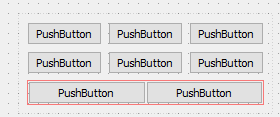
@Gojir4 I want something like this:

-
@Gojir4 I want something like this:
@Qtstarter121
Hi
You can use one of the red layouts from Layout section to the left. ( not right click)
-
@Gojir4 I want something like this:
@Qtstarter121 What about that ? This is what I tried to explain in one of my previous post.
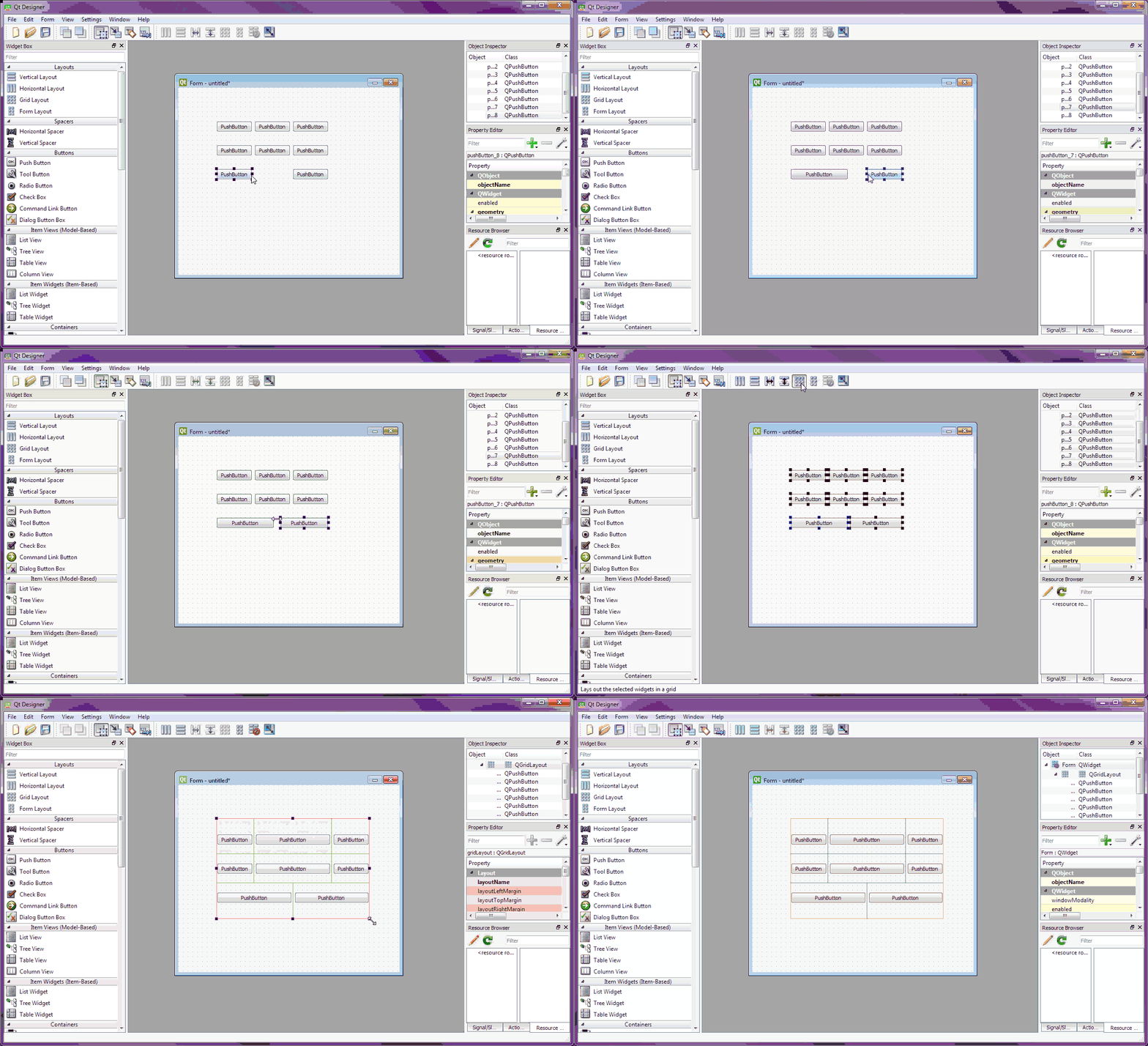
Sorry for quality of the gif, I'm not an expert in video conversion :)
-
@Qtstarter121 What about that ? This is what I tried to explain in one of my previous post.
Sorry for quality of the gif, I'm not an expert in video conversion :)
@Gojir4
Cool. I didn't know it would just allow it!
Ps. if u need gif anims, this just works
http://www.screentogif.com/ -
@Gojir4
Cool. I didn't know it would just allow it!
Ps. if u need gif anims, this just works
http://www.screentogif.com/ -
@Qtstarter121
Hi
You can use one of the red layouts from Layout section to the left. ( not right click)
@mrjj I did that, instead of selecting all buttons and right click then layout in grid, I instead dragged a Grid Layout from the left panel and tried inputting buttons one by one into the layout, but once I finish the first row, the layout is fixed to define 3 columns, so I still can't only have 2 columns in the last row... there will always be that one column to the right that is empty.

shaded region represents an empty cell that always exists no matter how I drag my buttons around.
-
@mrjj I did that, instead of selecting all buttons and right click then layout in grid, I instead dragged a Grid Layout from the left panel and tried inputting buttons one by one into the layout, but once I finish the first row, the layout is fixed to define 3 columns, so I still can't only have 2 columns in the last row... there will always be that one column to the right that is empty.
shaded region represents an empty cell that always exists no matter how I drag my buttons around.
@Qtstarter121
I i used both a GridLayout and a red layout i put as last row.
But it seems @Gojir4 made it do it without extra layout.
we just need him to tell what he clicks after selecting them all
as video is faster than my eye :) -
I'm confused as to what a "red layout" is. Isn't selecting a Grid Layout from the left panel, and selecting all buttons and right click-> Layout > Layout in Grid the same thing?
-
@Qtstarter121
I i used both a GridLayout and a red layout i put as last row.
But it seems @Gojir4 made it do it without extra layout.
we just need him to tell what he clicks after selecting them all
as video is faster than my eye :) -
@Qtstarter121 What about that ? This is what I tried to explain in one of my previous post.
Sorry for quality of the gif, I'm not an expert in video conversion :)
-
@Gojir4 I know this is a pretty late reply but I just wanted to say that this actually worked out for me. Thanks so much! The GIF animation was very helpful.
@Qtstarter121 Glad it helped !
Can you please set the thread as "Solved"
Thanks -
Sorry, I know it's like over a year later, but I have finally marked it as solved. Thanks for the help.


