
Skip to content
  • Categories
  • Recent
  • Tags
  • Popular
  • Users
  • Groups
  • Search
  • Get Qt Extensions
  • Unsolved
Collapse
Brand Logo
  1. Home
  2. Qt Development
  3. General and Desktop
  4. Change the spacing between the close button and the border
Qt 6.11 is out! See what's new in the release blog

Change the spacing between the close button and the border

Scheduled Pinned Locked Moved Solved General and Desktop
6 Posts 3 Posters 1.8k Views 1 Watching
  • Oldest to Newest
  • Newest to Oldest
  • Most Votes
Reply
  • Reply as topic
Log in to reply
This topic has been deleted. Only users with topic management privileges can see it.
  • M Offline
    M Offline
    Mr Gisa
    wrote on last edited by Mr Gisa
    #1

    How to increase the spacing between the close button and the border of the tab?
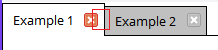
    0_1525158862894_4fe59b36-98e2-4880-a671-30bf2d62191c-image.png

    I'm using this example: https://gist.github.com/espdev/4f1565b18497a42d317cdf2531b7ef05

    But the close button is too close to the border of the tab for what I want to do, so I was wondering if it's possible to increase the spacing.

    JonBJ 1 Reply Last reply
    0
    • M Mr Gisa

      How to increase the spacing between the close button and the border of the tab?

      0_1525158862894_4fe59b36-98e2-4880-a671-30bf2d62191c-image.png

      I'm using this example: https://gist.github.com/espdev/4f1565b18497a42d317cdf2531b7ef05

      But the close button is too close to the border of the tab for what I want to do, so I was wondering if it's possible to increase the spacing.

      JonBJ Offline
      JonBJ Offline
      JonB
      wrote on last edited by
      #2

      @Mr-Gisa
      Dunno, but have you tried QTabBar::tab:right with margin-right or padding-right?

      1 Reply Last reply
      1
      • M Offline
        M Offline
        Mr Gisa
        wrote on last edited by
        #3

        @JonB said in Change the spacing between the close button and the border:

        TabBar::tab:right

        It doesn't work, unfortunately

        1 Reply Last reply
        0
        • M Offline
          M Offline
          Mr Gisa
          wrote on last edited by
          #4

          Anyone to help me with that?

          DiracsbracketD 1 Reply Last reply
          0
          • M Mr Gisa

            Anyone to help me with that?

            DiracsbracketD Offline
            DiracsbracketD Offline
            Diracsbracket
            wrote on last edited by Diracsbracket
            #5

            @Mr-Gisa said in Change the spacing between the close button and the border:

            Anyone to help me with that?

            This is apparently caused by the QTabBar::tab:top section of the stylesheet, which is really the only one relevant to your example: apparently, tab:right (and all the other orientations) does nothing because the right in there seems to refer to the tab location (at the top/bottom/left/right of the widget; in Qt Creator these are referred to North/South/West/East in the tabPosition property).

            If you remove the QTabBar::tab:top section altogether you get the original layout:
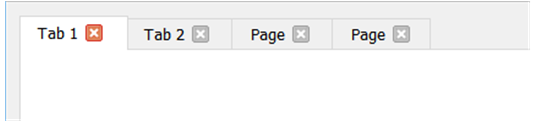
            0_1525359605357_40f3fdaa-0dfb-4413-ac0f-d71ff358f336-image.png

            The QTabBar::tab:top section as defined in the example css file, gives the small spacing you are unsatisfied with.

            This can be reproduced by the following minimal stylesheet:

                QString style = "\
                    QTabBar::tab:top {\
                        margin-right: -1px;\
                        padding: 5px 10px 5px 10px;\
                    }\
                    ";
            
                ui->tabWidget->setTabsClosable(true);
                ui->tabWidget->setStyleSheet(style);
            

            The result is:
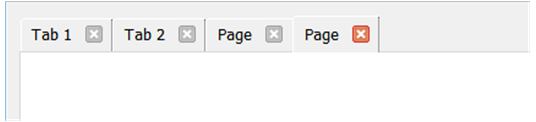
            0_1525359700900_94319133-0fa7-43d0-bb9b-18dffbf401eb-image.png

            If instead, I use:

                QString style = "\
                    QTabBar::tab:top {\
                        margin-right: -10px;\
                        margin-left: 10px;\
                        padding: 5px 20px 5px 20px;\
                    }\
                    QTabBar::tab:top:first {\
                        margin-left: 0px;\
                    }\
                    ";
            

            The result is like:
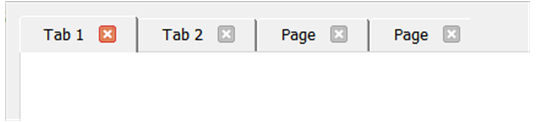
            0_1525361585298_5f245bc7-3831-4fe8-b162-548781a2c328-image.png

            So, playing with the settings in QTabBar::tab:top in addition to overriding certain of those settings for QTabBar::tab:top:first and/or QTabBar::tab:top:last (the first and last tabs), you can change the layout somewhat.

            1 Reply Last reply
            3
            • M Offline
              M Offline
              Mr Gisa
              wrote on last edited by
              #6

              Thank you very much. ♥

              1 Reply Last reply
              0

              • Login

              • Login or register to search.
              • First post
                Last post
              0
              • Categories
              • Recent
              • Tags
              • Popular
              • Users
              • Groups
              • Search
              • Get Qt Extensions
              • Unsolved