
Skip to content
  • Categories
  • Recent
  • Tags
  • Popular
  • Users
  • Groups
  • Search
  • Get Qt Extensions
  • Unsolved
Collapse
Brand Logo
  1. Home
  2. Qt Development
  3. General and Desktop
  4. How to align text in QTextEdit
Qt 6.11 is out! See what's new in the release blog

How to align text in QTextEdit

Scheduled Pinned Locked Moved Solved General and Desktop
5 Posts 3 Posters 22.9k Views 2 Watching
  • Oldest to Newest
  • Newest to Oldest
  • Most Votes
Reply
  • Reply as topic
Log in to reply
This topic has been deleted. Only users with topic management privileges can see it.
  • A Offline
    A Offline
    anuj nogja
    wrote on last edited by
    #1

    Hi,
    I want to align text present in QTextEdit.
    I tried some options present in net like " text-align:center" but they didn't work.

    Could you please help me on this...

    Regards,
    Anuj

    1 Reply Last reply
    0
    • mrjjM Offline
      mrjjM Offline
      mrjj
      Lifetime Qt Champion
      wrote on last edited by mrjj
      #2

      Hi
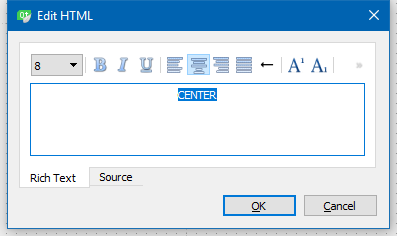
      You can always just right click a TextEdit in Designer and use its Edit HTML editor.
      It allows you to do basic things and get the html.

      <html><head/><body><p align="center"><span style=" font-size:8.25pt;">CENTER</span></p></body></html>
      

      alt text

      A 1 Reply Last reply
      4
      • Chris KawaC Online
        Chris KawaC Online
        Chris Kawa
        Lifetime Qt Champion
        wrote on last edited by Chris Kawa
        #3

        You can use setAlignment() method. Here's an example:

        QTextEdit te;
        
        te.append("This paragraph is left aligned");
        te.setAlignment(Qt::AlignLeft);
        
        te.append("This paragraph is right aligned");
        te.setAlignment(Qt::AlignRight);
        

        or you can use html:

        QTextEdit te;
        te.setHtml("<p align=\"left\">This paragraph is left aligned"
                   "<p align=\"right\">This paragraph is right aligned");
        

        or CSS:

        QTextEdit te;
        te.setHtml("<p style=\"text-align: left\">This paragraph is left aligned"
                   "<p style=\"text-align: right\">This paragraph is right aligned");
        
        A 1 Reply Last reply
        5
        • Chris KawaC Chris Kawa

          You can use setAlignment() method. Here's an example:

          QTextEdit te;
          
          te.append("This paragraph is left aligned");
          te.setAlignment(Qt::AlignLeft);
          
          te.append("This paragraph is right aligned");
          te.setAlignment(Qt::AlignRight);
          

          or you can use html:

          QTextEdit te;
          te.setHtml("<p align=\"left\">This paragraph is left aligned"
                     "<p align=\"right\">This paragraph is right aligned");
          

          or CSS:

          QTextEdit te;
          te.setHtml("<p style=\"text-align: left\">This paragraph is left aligned"
                     "<p style=\"text-align: right\">This paragraph is right aligned");
          
          A Offline
          A Offline
          anuj nogja
          wrote on last edited by
          #4

          @Chris-Kawa Thanks..it's working

          1 Reply Last reply
          1
          • mrjjM mrjj

            Hi
            You can always just right click a TextEdit in Designer and use its Edit HTML editor.
            It allows you to do basic things and get the html.

            <html><head/><body><p align="center"><span style=" font-size:8.25pt;">CENTER</span></p></body></html>
            

            alt text

            A Offline
            A Offline
            anuj nogja
            wrote on last edited by
            #5

            @mrjj Thanks for providing solution....

            1 Reply Last reply
            1

            • Login

            • Login or register to search.
            • First post
              Last post
            0
            • Categories
            • Recent
            • Tags
            • Popular
            • Users
            • Groups
            • Search
            • Get Qt Extensions
            • Unsolved