
Skip to content
  • Categories
  • Recent
  • Tags
  • Popular
  • Users
  • Groups
  • Search
  • Get Qt Extensions
  • Unsolved
Collapse
Brand Logo
  1. Home
  2. Qt Development
  3. General and Desktop
  4. ScrollArea question

ScrollArea question

Scheduled Pinned Locked Moved Solved General and Desktop
16 Posts 2 Posters 4.8k Views 2 Watching
  • Oldest to Newest
  • Newest to Oldest
  • Most Votes
Reply
  • Reply as topic
Log in to reply
This topic has been deleted. Only users with topic management privileges can see it.
  • mrjjM mrjj

    Hi
    scrollAreaWidgetContents is a widget Designer inserts so its ready for use.
    (its the widget that contains all the content for scrollarea. not scroll area directly.)
    To use your own, you can use
    http://doc.qt.io/qt-5/qscrollarea.html#setWidget
    Make sure to add layouts BEFORE calling setWidget as docs talks about.

    O Offline
    O Offline
    ofmrew
    wrote on last edited by
    #3

    @mrjj said in ScrollArea question:
    Make sure to add layouts BEFORE calling setWidget as docs talks about.

    What if you are using QtDesigner, do I add my widget, canvas, while in designer or after. The image above shows canvas that was added in designer. What is the correct way?

    ui->scrollArea->widget() returns QWidget(0x1cfb400, name="scrollAreaWidgetContents") it has two children, (QVBoxLayout(0x1cdfcf0, name = "verticalLayout_2"), MyCanvas(0x1ca8790, name = "canvas"))

    Is that what is expected?

    void QScrollArea::setWidget(QWidget *widget)
    {
        Q_D(QScrollArea);
        if (widget == d->widget || !widget)
            return;
    
        delete d->widget;
        d->widget = 0;
        d->hbar->setValue(0);
        d->vbar->setValue(0);
        if (widget->parentWidget() != d->viewport)
            widget->setParent(d->viewport);
        if (!widget->testAttribute(Qt::WA_Resized))
            widget->resize(widget->sizeHint());
        d->widget = widget;
        d->widget->setAutoFillBackground(true);
        widget->installEventFilter(this);
        d->widgetSize = QSize();
        d->updateScrollBars();
        d->widget->show();
    
    }
    

    Since d->widget is a private variable, I am not sure if in my case it is canvas or scrollAreaWidgetContents?

    1 Reply Last reply
    0
    • mrjjM Offline
      mrjjM Offline
      mrjj
      Lifetime Qt Champion
      wrote on last edited by
      #4

      Hi
      Do you want Canvas to BE the scrolling part of scrollArea or
      managed by the scrollArea? (meaning Canvas will scroll up and down etc)

      O 1 Reply Last reply
      0
      • mrjjM mrjj

        Hi
        Do you want Canvas to BE the scrolling part of scrollArea or
        managed by the scrollArea? (meaning Canvas will scroll up and down etc)

        O Offline
        O Offline
        ofmrew
        wrote on last edited by
        #5

        @mrjj Canvas is a widget I use for drawing and there is a pixmap (20,000x10,000) that I use for background. I want to pan and zoom over that pixmap using both the mouse and scrollbars and draw on the canvas.

        mrjjM 1 Reply Last reply
        0
        • O ofmrew

          @mrjj Canvas is a widget I use for drawing and there is a pixmap (20,000x10,000) that I use for background. I want to pan and zoom over that pixmap using both the mouse and scrollbars and draw on the canvas.

          mrjjM Offline
          mrjjM Offline
          mrjj
          Lifetime Qt Champion
          wrote on last edited by
          #6

          @ofmrew
          So you should be able to add layout to scrollAreaWidgetContents
          and insert Canvas to that layout and set its minimum size to match bitmap
          and then it should work.

          O 1 Reply Last reply
          0
          • mrjjM mrjj

            @ofmrew
            So you should be able to add layout to scrollAreaWidgetContents
            and insert Canvas to that layout and set its minimum size to match bitmap
            and then it should work.

            O Offline
            O Offline
            ofmrew
            wrote on last edited by
            #7

            @mrjj Let me see if I correctly understand the procedure: I must remove canvas from the form and the layout, then add the layout and then add canvas. Resize canvas to that of the pixmap. Setup the scrolling environment. Finally, use the position information in the viewport to do the drawing on canvas both from the pixmap and then my interactive graphics.

            1 Reply Last reply
            0
            • mrjjM Offline
              mrjjM Offline
              mrjj
              Lifetime Qt Champion
              wrote on last edited by
              #8

              Hi
              Test project using a customwidget Canvas with a paintEvent
              I promoted a plain widget in scroll area to Canvas;
              (it draws a rect in the corners)
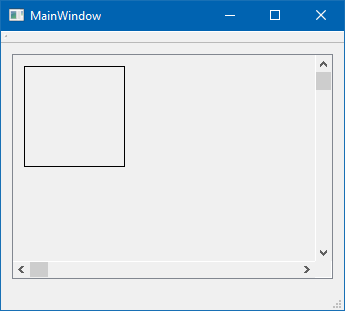
              alt text

              https://www.dropbox.com/s/8t62gm7cx4ufjyo/MyScrollingCanvas.zip?dl=0

              O 1 Reply Last reply
              0
              • mrjjM Offline
                mrjjM Offline
                mrjj
                Lifetime Qt Champion
                wrote on last edited by mrjj
                #9

                Hi
                Yes sounds correct.
                What i did was
                Place scroll area on form.
                Place plain widget on scroll area
                Right click scroll area, apply layout
                Promote plain widget to Canvas
                set minimumSize of widget to 20kx10k

                Note, the border seen is shot is the layouts content Margins which you can set to zero to get no border/margin.

                1 Reply Last reply
                0
                • mrjjM mrjj

                  Hi
                  Test project using a customwidget Canvas with a paintEvent
                  I promoted a plain widget in scroll area to Canvas;
                  (it draws a rect in the corners)
                  alt text

                  https://www.dropbox.com/s/8t62gm7cx4ufjyo/MyScrollingCanvas.zip?dl=0

                  O Offline
                  O Offline
                  ofmrew
                  wrote on last edited by
                  #10

                  @mrjj When I try building I get:

                  :-1: warning: File '../AScrollEx/MyScrollingCanvas.pro' has modification time 20561 s in the future
                  

                  Over 400 of the messages.

                  mrjjM 1 Reply Last reply
                  0
                  • O ofmrew

                    @mrjj When I try building I get:

                    :-1: warning: File '../AScrollEx/MyScrollingCanvas.pro' has modification time 20561 s in the future
                    

                    Over 400 of the messages.

                    mrjjM Offline
                    mrjjM Offline
                    mrjj
                    Lifetime Qt Champion
                    wrote on last edited by
                    #11

                    @ofmrew
                    Must be something with time stamp.
                    Make change to .pro file and save it.
                    Close Creator and open again.
                    Not seen that one before :)

                    O 1 Reply Last reply
                    0
                    • mrjjM mrjj

                      @ofmrew
                      Must be something with time stamp.
                      Make change to .pro file and save it.
                      Close Creator and open again.
                      Not seen that one before :)

                      O Offline
                      O Offline
                      ofmrew
                      wrote on last edited by
                      #12

                      @mrjj That worked. Thanks for the help.

                      O 1 Reply Last reply
                      1
                      • O ofmrew

                        @mrjj That worked. Thanks for the help.

                        O Offline
                        O Offline
                        ofmrew
                        wrote on last edited by
                        #13

                        @ofmrew One final question: Can a project be salvaged if the addition of layouts and widgets fails? I tried cutting all the widgets I added, but when I tried adding pushbuttons they were in a layout in the central widget. I could not find that layout to cut.

                        mrjjM 1 Reply Last reply
                        0
                        • O ofmrew

                          @ofmrew One final question: Can a project be salvaged if the addition of layouts and widgets fails? I tried cutting all the widgets I added, but when I tried adding pushbuttons they were in a layout in the central widget. I could not find that layout to cut.

                          mrjjM Offline
                          mrjjM Offline
                          mrjj
                          Lifetime Qt Champion
                          wrote on last edited by
                          #14

                          @ofmrew
                          Hi
                          In what way failed ?
                          You can drag any inserted widgets around and move to other layout etc.

                          O 1 Reply Last reply
                          0
                          • mrjjM mrjj

                            @ofmrew
                            Hi
                            In what way failed ?
                            You can drag any inserted widgets around and move to other layout etc.

                            O Offline
                            O Offline
                            ofmrew
                            wrote on last edited by
                            #15

                            @mrjj I just answered my question by attempting to get images to show. This is the Object Inspector after cutting all layouts and widgets:
                            alt text
                            Note the layout on the central widget. I added a pushbutton and it was laid out vertically. It was then that I tried a right click off the pushbutton, select layout and break. The layout was removed. Amazing what a good night of sleep will do for your thinking. Sorry for wasting your time. Thanks again for your help.

                            1 Reply Last reply
                            1
                            • O Offline
                              O Offline
                              ofmrew
                              wrote on last edited by
                              #16

                              One final point: most of my confusion stems from the fact that the documentation is from a pure C++ point of view, but QtDesigner does a lot of what the documentation states must be done behind the scene. Scroll area is very simple if you just do it and see what you get rather than trying to think too much. For example, all the scrollbar setup is done for you if you know to set the minimum size to that of the pixmap. It is almost as if you need two sets of documentation, one for pure C++ and one for QtCreator-C++; however, I know that it is extremely difficult to keep one set of documentation up to date, two might be impossible; I wish the documentation would include some QtCreator pointers.

                              1 Reply Last reply
                              0

                              • Login

                              • Login or register to search.
                              • First post
                                Last post
                              0
                              • Categories
                              • Recent
                              • Tags
                              • Popular
                              • Users
                              • Groups
                              • Search
                              • Get Qt Extensions
                              • Unsolved