Skip to content
  • Categories
  • Recent
  • Tags
  • Popular
  • Users
  • Groups
  • Search
  • Get Qt Extensions
  • Unsolved
Collapse
Brand Logo
  1. Home
  2. Qt Development
  3. QML and Qt Quick
  4. qt3dstudio mouse action inside plane or cube
Qt 6.11 is out! See what's new in the release blog

qt3dstudio mouse action inside plane or cube

Scheduled Pinned Locked Moved Unsolved QML and Qt Quick
15 Posts 3 Posters 4.5k Views 3 Watching
  • Oldest to Newest
  • Newest to Oldest
  • Most Votes
Reply
  • Reply as topic
Log in to reply
This topic has been deleted. Only users with topic management privileges can see it.
  • F filipdns

    Hello, I try to insert map in plane via Qt Quick and studio 1.0 as texture and the map is displayed in the plane as I need but the mouse doesn't do any action in it (zoom or move the map).

    I try to add mouse area in different place like in Item{}, in Studio3D{}, in Presentation{} but nothing change.

    Do you know what I have to do?

    Thank you very much :-)

    small_birdS Offline
    small_birdS Offline
    small_bird
    wrote on last edited by
    #2

    @filipdns Could you show me the shotcut of picture? Thanks a lot!

    F 1 Reply Last reply
    0
    • small_birdS small_bird

      @filipdns Could you show me the shotcut of picture? Thanks a lot!

      F Offline
      F Offline
      filipdns
      wrote on last edited by
      #3

      @small_bird hello, picture of what? ;-)

      small_birdS 2 Replies Last reply
      0
      • F filipdns

        @small_bird hello, picture of what? ;-)

        small_birdS Offline
        small_birdS Offline
        small_bird
        wrote on last edited by
        #4

        @filipdns of the phenomenon you described.

        1 Reply Last reply
        0
        • F filipdns

          @small_bird hello, picture of what? ;-)

          small_birdS Offline
          small_birdS Offline
          small_bird
          wrote on last edited by
          #5

          @filipdns China is at night,I will answer you tomorrow.

          1 Reply Last reply
          0
          • F Offline
            F Offline
            filipdns
            wrote on last edited by
            #6

            you will not see by picture, the problem is:

            if you put simple map on qml page, you can zoom or move the map with the mouse, but if the map is on face of cube, I can not having action on it from mouse

            mrjjM small_birdS 2 Replies Last reply
            0
            • F filipdns

              you will not see by picture, the problem is:

              if you put simple map on qml page, you can zoom or move the map with the mouse, but if the map is on face of cube, I can not having action on it from mouse

              mrjjM Offline
              mrjjM Offline
              mrjj
              Lifetime Qt Champion
              wrote on last edited by
              #7

              @filipdns

              I think it reduces to a textures and no longer support direct mouse actions.
              But I have no tested it so not 100% sure :)

              1 Reply Last reply
              0
              • F filipdns

                you will not see by picture, the problem is:

                if you put simple map on qml page, you can zoom or move the map with the mouse, but if the map is on face of cube, I can not having action on it from mouse

                small_birdS Offline
                small_birdS Offline
                small_bird
                wrote on last edited by
                #8

                @filipdns actually,you can do that using qt 3Dstudio

                1 Reply Last reply
                0
                • F Offline
                  F Offline
                  filipdns
                  wrote on last edited by
                  #9

                  how do you that?

                  small_birdS 1 Reply Last reply
                  0
                  • F filipdns

                    how do you that?

                    small_birdS Offline
                    small_birdS Offline
                    small_bird
                    wrote on last edited by
                    #10

                    @filipdns The object you export from blender could be spinned by mouse from outline in qt3dstudio.

                    F 1 Reply Last reply
                    0
                    • small_birdS small_bird

                      @filipdns The object you export from blender could be spinned by mouse from outline in qt3dstudio.

                      F Offline
                      F Offline
                      filipdns
                      wrote on last edited by
                      #11

                      @small_bird I'm very sorry, I don't know what you mean...

                      Do you have an example?

                      Thank you very much

                      small_birdS 1 Reply Last reply
                      0
                      • F filipdns

                        @small_bird I'm very sorry, I don't know what you mean...

                        Do you have an example?

                        Thank you very much

                        small_birdS Offline
                        small_birdS Offline
                        small_bird
                        wrote on last edited by small_bird
                        #12

                        @filipdns
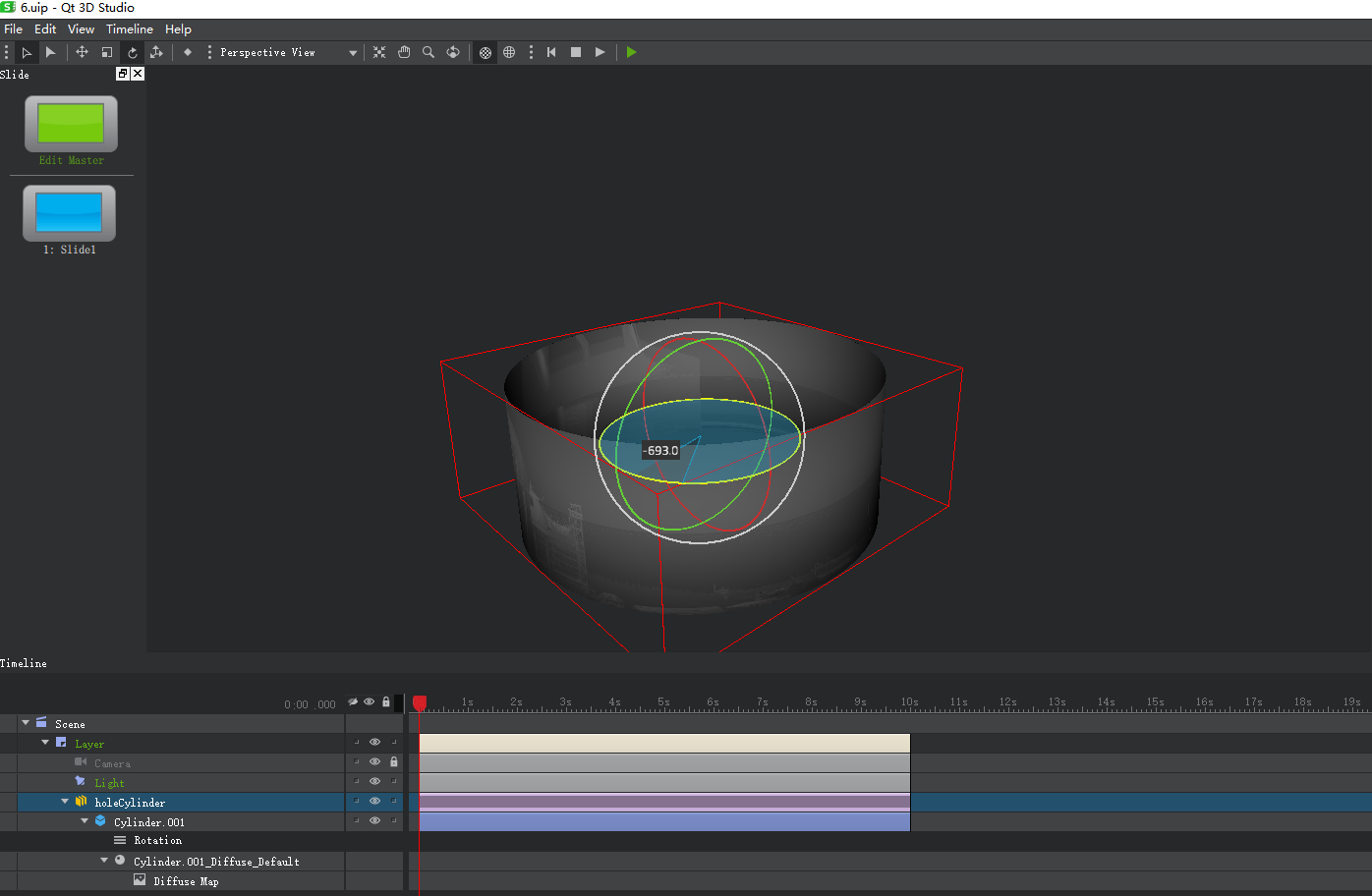
                        0_1516118793470_cylinder.PNG
                        Can you see the picture? The cylinder can be spun by mouse. Just export it to .uip file and then load using qml. You will get the effect. The cube is the same!

                        small_birdS 1 Reply Last reply
                        1
                        • small_birdS small_bird

                          @filipdns
                          0_1516118793470_cylinder.PNG
                          Can you see the picture? The cylinder can be spun by mouse. Just export it to .uip file and then load using qml. You will get the effect. The cube is the same!

                          small_birdS Offline
                          small_birdS Offline
                          small_bird
                          wrote on last edited by
                          #13

                          @filipdns Good night from China!

                          1 Reply Last reply
                          0
                          • F Offline
                            F Offline
                            filipdns
                            wrote on last edited by
                            #14

                            Hello, like that yes I can do, this is only animation recorded by studio, that not the question.

                            For navigation MAP I need to get action mouse in real time

                            small_birdS 1 Reply Last reply
                            0
                            • F filipdns

                              Hello, like that yes I can do, this is only animation recorded by studio, that not the question.

                              For navigation MAP I need to get action mouse in real time

                              small_birdS Offline
                              small_birdS Offline
                              small_bird
                              wrote on last edited by
                              #15

                              @filipdns

                              import QtQuick 2.8
                              import QtQuick.Window 2.2
                              import QtStudio3D 1.0
                              import QtQuick.Controls 2.1
                              import Qt3D.Render 2.0
                              
                              ApplicationWindow {
                                  visible: true
                                  width: 1280
                                  height: 768
                                  title: qsTr("Hello World")
                              
                                  property real rotationValue: 0;
                              
                                  Studio3D {
                                      id: studio3D
                                      anchors.fill: parent;
                                   
                                      MouseArea{
                                          anchors.fill: parent;
                                          onWheel: {
                                              var temp=wheel.angleDelta.y/120;
                                              if(temp<0){
                                                  temp=-temp;
                                                  for(var i=0;i<temp;++i){
                              
                                                      animationElement.setAttribute("rotation.z",rotationValue-=0.1);
                                                  }
                                              }
                                              else{
                                                  for(i=0;i<temp;++i){
                              
                                                      animationElement.setAttribute("rotation.z",rotationValue+=0.1);
                                                  }
                                              }
                                          }
                                      }
                                      Presentation {
                                          id:presentation;
                                          source: "qrc:/../../Desktop/rotateCylinder.uip"
                                          SceneElement {
                                              id: scene;
                                              elementPath: "Scene"
                                          }
                                          Element {
                                              id: textureElement;
                                              elementPath: "Scene.Layer.holeCylinder.Cylinder.M";
                                          }
                                          Element {
                                              id: animationElement;
                                              elementPath: "Scene.Layer.holeCylinder.Cylinder";
                                          }
                                      }
                                      ViewerSettings {
                                          scaleMode: ViewerSettings.ScaleModeFill;
                                          showRenderStats: true;
                                      }
                                      onRunningChanged: {
                                          console.log("Presentation ready!");
                                      }
                                  }
                              }
                              

                              See the code above, the texture can be rotated by mouse.

                              1 Reply Last reply
                              1

                              • Login

                              • Login or register to search.
                              • First post
                                Last post
                              0
                              • Categories
                              • Recent
                              • Tags
                              • Popular
                              • Users
                              • Groups
                              • Search
                              • Get Qt Extensions
                              • Unsolved