Skip to content
  • Categories
  • Recent
  • Tags
  • Popular
  • Users
  • Groups
  • Search
  • Get Qt Extensions
  • Unsolved
Collapse
Brand Logo
  1. Home
  2. Qt Development
  3. General and Desktop
  4. Snap7 and Qt ,PLC communication

Snap7 and Qt ,PLC communication

Scheduled Pinned Locked Moved Unsolved General and Desktop
37 Posts 6 Posters 12.7k Views 1 Watching
  • Oldest to Newest
  • Newest to Oldest
  • Most Votes
Reply
  • Reply as topic
Log in to reply
This topic has been deleted. Only users with topic management privileges can see it.
  • Z Offline
    Z Offline
    ZekDe
    wrote on last edited by
    #4

    Also is it enough just #include "snap7.h"

    1 Reply Last reply
    0
    • mrjjM Offline
      mrjjM Offline
      mrjj
      Lifetime Qt Champion
      wrote on last edited by
      #5

      Hi
      Just compile the DLLs with the Qt mingw version. Should work.
      Its not a good idea to use older mingw compiler than the one used to build the Qt dlls.
      You will just get issues with Qt.

      On https://sourceforge.net/projects/snap7/files/
      I dont see any mentioned of mingw. The download seems for VIsual Basic.

      • Also is it enough just #include "snap7.h"
        Yes when you have told it where to find it in the .pro file with INCLUDEPATH
      1 Reply Last reply
      4
      • Z Offline
        Z Offline
        ZekDe
        wrote on last edited by
        #6

        Okay ,I am downloading mingw 4.7 and to download the snap7 ,you must download 1.4.2 and you will see in build folder .dll and .lib for 32 or 64 bit

        mrjjM 1 Reply Last reply
        0
        • Z ZekDe

          Okay ,I am downloading mingw 4.7 and to download the snap7 ,you must download 1.4.2 and you will see in build folder .dll and .lib for 32 or 64 bit

          mrjjM Offline
          mrjjM Offline
          mrjj
          Lifetime Qt Champion
          wrote on last edited by
          #7

          @ZekDe
          Hi
          From where do u download mingw ?
          Its included in Qt. ??

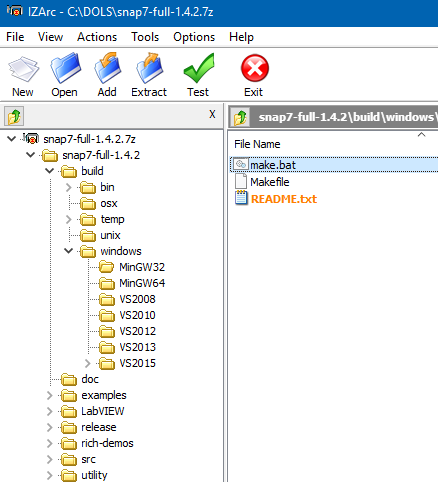
          anyway, it seems ready for mingw
          alt text

          so make sure to build right version 32/64 for the Qt you are using/downloaded.

          1 Reply Last reply
          2
          • Z Offline
            Z Offline
            ZekDe
            wrote on last edited by
            #8

            Hi,
            I'am downloading with maintanencetool

            mrjjM 1 Reply Last reply
            0
            • Z ZekDe

              Hi,
              I'am downloading with maintanencetool

              mrjjM Offline
              mrjjM Offline
              mrjj
              Lifetime Qt Champion
              wrote on last edited by
              #9

              @ZekDe
              Ok, hopefully its compatible with the Qt you are using.
              (Qt are DLLS and too old or too new version of mingw cannot use
              the prebuild Qt Dlls you have installed)

              What Qt version are you using ?
              (and what version of mingw came with it ?)

              1 Reply Last reply
              0
              • Z Offline
                Z Offline
                ZekDe
                wrote on last edited by
                #10

                Open source lastest version ,I don't remember I had to delete Qt because of my mistake,now I am reinstalling it.

                mrjjM 1 Reply Last reply
                0
                • Z ZekDe

                  Open source lastest version ,I don't remember I had to delete Qt because of my mistake,now I am reinstalling it.

                  mrjjM Offline
                  mrjjM Offline
                  mrjj
                  Lifetime Qt Champion
                  wrote on last edited by
                  #11

                  @ZekDe
                  Ok so you will be using the mingw that comes with Qt 5.1 ?

                  1 Reply Last reply
                  0
                  • Z Offline
                    Z Offline
                    ZekDe
                    wrote on last edited by
                    #12

                    I am downloading all mingw versions![alt text](0_1515853830620_b7bf5064-b84a-49f5-8f4d-b8646509ef11-image.png image url)

                    aha_1980A 1 Reply Last reply
                    0
                    • mrjjM Offline
                      mrjjM Offline
                      mrjj
                      Lifetime Qt Champion
                      wrote on last edited by
                      #13

                      :)
                      but why ???
                      The Qt 5.0.2 mingw Qt contains one.
                      There should be no need to add extra compilers from "tools" unless you expect the one
                      in Qt is too new for snap7

                      1 Reply Last reply
                      1
                      • Z ZekDe

                        I am downloading all mingw versions![alt text](0_1515853830620_b7bf5064-b84a-49f5-8f4d-b8646509ef11-image.png image url)

                        aha_1980A Offline
                        aha_1980A Offline
                        aha_1980
                        Lifetime Qt Champion
                        wrote on last edited by
                        #14

                        Hi @ZekDe,

                        personally I would not use MinGW 4.7 anymore. It's an old compiler. Also Qt 5.0 and 5.1 are very early 5.x versions, I would not use them for new development. You may encounter bugs that were already fixed in later versions (we have 5.10 now!)

                        If there is no Snap7 version compatible with a recent MinGW, I would try to compile the library myself.

                        It may be more work in the beginning, but that time will be saved in later development for sure.

                        Just my two cent.

                        Qt has to stay free or it will die.

                        1 Reply Last reply
                        2
                        • Z Offline
                          Z Offline
                          ZekDe
                          wrote on last edited by
                          #15

                          The reason that I install the all mingw because of if I need other one,is it wrong ? :), Also Maybe you saw the src folder n snap7 folder.Can I use these in my project ,in this case it is enough now.But When I try these .h and .c files ,I encountered some problems.What excatly I should do.Because this is important for my job

                          mrjjM 1 Reply Last reply
                          0
                          • Z ZekDe

                            The reason that I install the all mingw because of if I need other one,is it wrong ? :), Also Maybe you saw the src folder n snap7 folder.Can I use these in my project ,in this case it is enough now.But When I try these .h and .c files ,I encountered some problems.What excatly I should do.Because this is important for my job

                            mrjjM Offline
                            mrjjM Offline
                            mrjj
                            Lifetime Qt Champion
                            wrote on last edited by
                            #16

                            @ZekDe
                            Hi , yes you might be able to include the source files directly in the Qt app unless snap7 is
                            designed to be a lib. Installing multiple version of mingw will open up for a mess with paths etc.

                            If directly including them (and fixing the .pro file so it can find its headers) still produces errors, it might not
                            allow direct use and must be build as DLL.

                            1 Reply Last reply
                            0
                            • Z Offline
                              Z Offline
                              ZekDe
                              wrote on last edited by
                              #17

                              as a result,What is your offer now?

                              mrjjM 1 Reply Last reply
                              0
                              • Z ZekDe

                                as a result,What is your offer now?

                                mrjjM Offline
                                mrjjM Offline
                                mrjj
                                Lifetime Qt Champion
                                wrote on last edited by
                                #18

                                @ZekDe
                                Offer ?
                                All info is there. they even made .bat files to compile the DLL
                                so build it and link it to the Qt app.
                                It has clear build instruction.

                                1 Reply Last reply
                                1
                                • Z Offline
                                  Z Offline
                                  ZekDe
                                  wrote on last edited by
                                  #19

                                  I suppose I have lack of knowledge,I dont know about .bat file.How will I use it?What does it do

                                  mrjjM 1 Reply Last reply
                                  0
                                  • Z ZekDe

                                    I suppose I have lack of knowledge,I dont know about .bat file.How will I use it?What does it do

                                    mrjjM Offline
                                    mrjjM Offline
                                    mrjj
                                    Lifetime Qt Champion
                                    wrote on last edited by mrjj
                                    #20

                                    @ZekDe
                                    First read its build dosc.
                                    You might need to alter paths to where it looks for compiler
                                    Then open a Command prompt and run the bat file for
                                    mingw32 or 64 (depending on what u use)
                                    It should produce a DLL you can link to your app as described.

                                    1 Reply Last reply
                                    2
                                    • Z Offline
                                      Z Offline
                                      ZekDe
                                      wrote on last edited by
                                      #21

                                      Check me then if I understand right.
                                      1-->I will build a .dll using .bat according to mingw file path,I will chance in bat file.
                                      2-->I will put in my Qt app .dll, .lib and I include the snap7.lib in .pro file
                                      Then Qt will see both because of the .dll and .lib same folder.

                                      mrjjM 1 Reply Last reply
                                      0
                                      • Z Offline
                                        Z Offline
                                        ZekDe
                                        wrote on last edited by
                                        #22

                                        Okay I said wrong as far as I see.
                                        To build Snap7, open a command prompt into the working folder build\windows\MinGW32 and run "make all" (or "make clean" if you want to clean the project).
                                        How can I open a command promt in working folder ,it means a txt file?and then convert .bat.Still I am confused.How can I assembly all.I have Makefile,.bat,.lib..dll.I have new version Mingw this is why I need to change in .bat file.When I click this what will happen,will it produce a makefile? then How will I make out with them all in Qt

                                        1 Reply Last reply
                                        0
                                        • Z ZekDe

                                          Check me then if I understand right.
                                          1-->I will build a .dll using .bat according to mingw file path,I will chance in bat file.
                                          2-->I will put in my Qt app .dll, .lib and I include the snap7.lib in .pro file
                                          Then Qt will see both because of the .dll and .lib same folder.

                                          mrjjM Offline
                                          mrjjM Offline
                                          mrjj
                                          Lifetime Qt Champion
                                          wrote on last edited by
                                          #23

                                          @ZekDe
                                          Hi
                                          seems fine if 2:
                                          is
                                          INCLUDEPATH += /path/include ( points to where ever Snap7 .h file livrd
                                          LIBS += -L"c:/fullpath/lib" -lCatWhisperer

                                          and "c:/fullpath/lib" is corrected to point to the folder that contains the DLL you just build
                                          and CatWhisperer be replaced with actual filename

                                          1 Reply Last reply
                                          0

                                          • Login

                                          • Login or register to search.
                                          • First post
                                            Last post
                                          0
                                          • Categories
                                          • Recent
                                          • Tags
                                          • Popular
                                          • Users
                                          • Groups
                                          • Search
                                          • Get Qt Extensions
                                          • Unsolved