
Skip to content
  • Categories
  • Recent
  • Tags
  • Popular
  • Users
  • Groups
  • Search
  • Get Qt Extensions
  • Unsolved
Collapse
Brand Logo
  1. Home
  2. Qt Development
  3. Qt Creator and other tools
  4. Qt Creator launch: app not closing and/or "Press <RETURN> to close this window..." missing
Qt 6.11 is out! See what's new in the release blog

Qt Creator launch: app not closing and/or "Press <RETURN> to close this window..." missing

Scheduled Pinned Locked Moved Unsolved Qt Creator and other tools
21 Posts 4 Posters 17.1k Views 2 Watching
  • Oldest to Newest
  • Newest to Oldest
  • Most Votes
Reply
  • Reply as topic
Log in to reply
This topic has been deleted. Only users with topic management privileges can see it.
  • M Offline
    M Offline
    massimo.cristofolini
    wrote on last edited by
    #8

    Back to the topic after the winter break.

    I've reinstalled a fresh Qt develop environent on Windows. Awfully, the behavior is still the same. With MSVC compiler (and debugger), no "Press <RETURN> to close this window..." line.
    I've noticed that with MinGW I get the "Press <RETURN> to close this window..." line.

    Given the fact that MinGW is behaving as expected, the fact that the previous test on Linux worked was due to the compiler/debugger more than the Qt version (MinGW is a "Windowized g++")
    I suppose that the "CDB Debugger Support" componet installed with the new versions of Qt is screwing some things, and the "Press <RETURN> to close this window..." line won't be displayed no more.

    Is there anyone that can confirm this behavior?
    And anyone else that knows how to fix it? :)

    1 Reply Last reply
    0
    • mrjjM Offline
      mrjjM Offline
      mrjj
      Lifetime Qt Champion
      wrote on last edited by
      #9

      Hi
      Not sure if we think about the same command prompt, but ill just mentioned it anyway
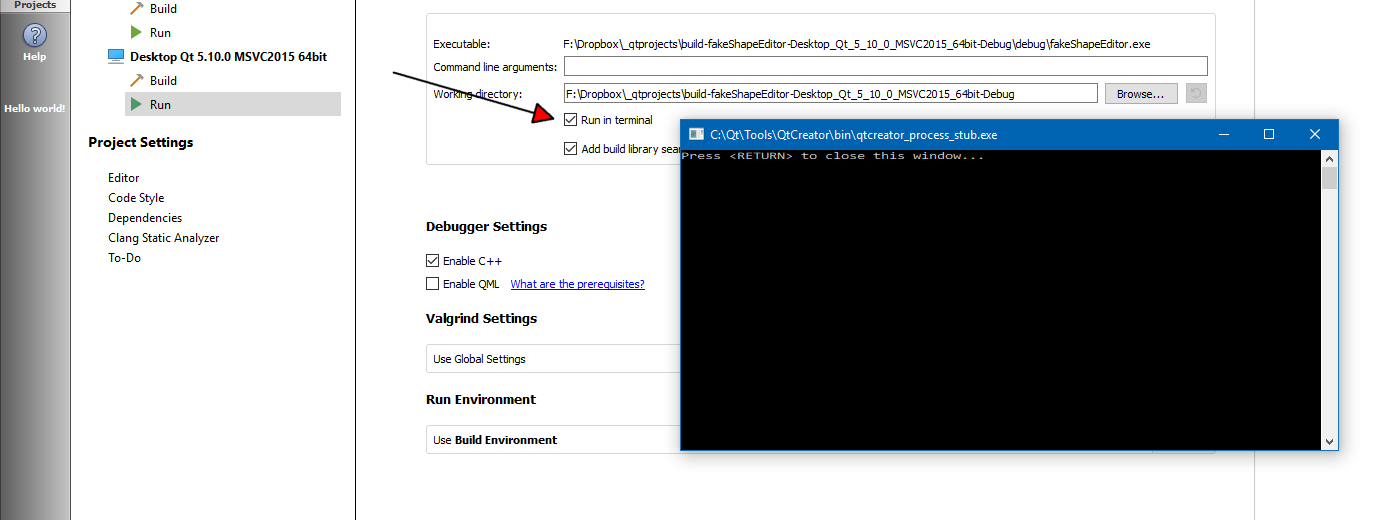
      alt text

      Try flipflop it.

      1 Reply Last reply
      2
      • M Offline
        M Offline
        massimo.cristofolini
        wrote on last edited by
        #10

        Yep, I'm talking about that command promt.
        The "Run in terminal" checkbox is checked. No better result by unchecking/rechecking/whatever.
        From your screenshot, it looks like you are using the last version of Qt libraries (Qt 5.10.0), but an old version of Qt Creator, am I right? As said in my first messages, with older version of Qt Creator (and Qt libs) everything behaved as expected.
        If someone can kindly test the last release of Qt+Qt Creator with MSVC compiler/debugger and report their results I'll be very thankful!

        mrjjM 1 Reply Last reply
        0
        • M massimo.cristofolini

          Yep, I'm talking about that command promt.
          The "Run in terminal" checkbox is checked. No better result by unchecking/rechecking/whatever.
          From your screenshot, it looks like you are using the last version of Qt libraries (Qt 5.10.0), but an old version of Qt Creator, am I right? As said in my first messages, with older version of Qt Creator (and Qt libs) everything behaved as expected.
          If someone can kindly test the last release of Qt+Qt Creator with MSVC compiler/debugger and report their results I'll be very thankful!

          mrjjM Offline
          mrjjM Offline
          mrjj
          Lifetime Qt Champion
          wrote on last edited by
          #11

          @massimo.cristofolini
          Hi
          its the Creator that comes with
          Qt5.10. Im just using the classic theme.
          Ill check exact version when possible.

          1 Reply Last reply
          0
          • M Offline
            M Offline
            massimo.cristofolini
            wrote on last edited by
            #12

            Fooled by the picture.
            Uhm... so it actually looks like I'm the only unlucky guy that's experiencing this behavior.
            Another test I can make is to install the last version of Qt on a clean Windows system. Will take a while...

            mrjjM 1 Reply Last reply
            0
            • M massimo.cristofolini

              Fooled by the picture.
              Uhm... so it actually looks like I'm the only unlucky guy that's experiencing this behavior.
              Another test I can make is to install the last version of Qt on a clean Windows system. Will take a while...

              mrjjM Offline
              mrjjM Offline
              mrjj
              Lifetime Qt Champion
              wrote on last edited by
              #13

              Hi
              If it works with mingw compiler, then it sounds like something with VS compiler ?

              M 1 Reply Last reply
              0
              • mrjjM mrjj

                Hi
                If it works with mingw compiler, then it sounds like something with VS compiler ?

                M Offline
                M Offline
                massimo.cristofolini
                wrote on last edited by
                #14

                @mrjj I agree. But since I've started experiencing this behavior just after Qt upgrade, on 2 systems, I have to say that both MSVC and Qt have something to do with it.

                1 Reply Last reply
                0
                • mrjjM Offline
                  mrjjM Offline
                  mrjj
                  Lifetime Qt Champion
                  wrote on last edited by
                  #15

                  Hi
                  Im on Creator 5.10 with vs 2015
                  Maybe delete .user file and set compiler again ?
                  Or test with default empty project and set Run in terminal.

                  1 Reply Last reply
                  0
                  • M Offline
                    M Offline
                    massimo.cristofolini
                    wrote on last edited by
                    #16

                    As said in the first post, this happens with the default and almost-default console project.
                    Tried to delete .user file of an existing project: no luck.
                    Tried creating a new project again: still no luck.

                    mrjjM 1 Reply Last reply
                    0
                    • M massimo.cristofolini

                      As said in the first post, this happens with the default and almost-default console project.
                      Tried to delete .user file of an existing project: no luck.
                      Tried creating a new project again: still no luck.

                      mrjjM Offline
                      mrjjM Offline
                      mrjj
                      Lifetime Qt Champion
                      wrote on last edited by
                      #17

                      @massimo.cristofolini

                      Ok. i really dont know how it can "fall off"
                      I have not heard about this before.

                      it DOES run the qcreator_process_stub.exe ?
                      (as seen in my image - caption)

                      M 1 Reply Last reply
                      1
                      • mrjjM mrjj

                        @massimo.cristofolini

                        Ok. i really dont know how it can "fall off"
                        I have not heard about this before.

                        it DOES run the qcreator_process_stub.exe ?
                        (as seen in my image - caption)

                        M Offline
                        M Offline
                        massimo.cristofolini
                        wrote on last edited by
                        #18

                        @mrjj Now THAT was the right question!
                        Running a MinGW project opens the executable in qcreator_process_stub.exe.
                        Running from a MSVC runs the actual executable (the window title is the executable full path).
                        The Run Settings for both configurations (MinGW and MSVC (x86 and x64)) looks identical to me; both have "Run in terminal" checked, ... Maybe I have to look in the Run Environment section, since both are set to "use Build Environment", but maybe the environment variables differ for the two configrurations.
                        Any other hint about where to look at?

                        mrjjM 1 Reply Last reply
                        0
                        • M massimo.cristofolini

                          @mrjj Now THAT was the right question!
                          Running a MinGW project opens the executable in qcreator_process_stub.exe.
                          Running from a MSVC runs the actual executable (the window title is the executable full path).
                          The Run Settings for both configurations (MinGW and MSVC (x86 and x64)) looks identical to me; both have "Run in terminal" checked, ... Maybe I have to look in the Run Environment section, since both are set to "use Build Environment", but maybe the environment variables differ for the two configrurations.
                          Any other hint about where to look at?

                          mrjjM Offline
                          mrjjM Offline
                          mrjj
                          Lifetime Qt Champion
                          wrote on last edited by
                          #19

                          @massimo.cristofolini

                          Hi. i didnt find anything else to check with this.
                          I find it odd if u delete .user file and select compiler how
                          "run in terminal" can do differently. very odd.

                          aha_1980A 1 Reply Last reply
                          0
                          • mrjjM mrjj

                            @massimo.cristofolini

                            Hi. i didnt find anything else to check with this.
                            I find it odd if u delete .user file and select compiler how
                            "run in terminal" can do differently. very odd.

                            aha_1980A Offline
                            aha_1980A Offline
                            aha_1980
                            Lifetime Qt Champion
                            wrote on last edited by
                            #20

                            @mrjj said:

                            Hi. i didnt find anything else to check with this.
                            I find it odd if u delete .user file and select compiler how
                            "run in terminal" can do differently. very odd.

                            Very odd could mean it's a bug. I didn't find something like this problem in the bug database yet.

                            @massimo-cristofolini: So you could report this issue at bugreports.qt.io

                            Qt has to stay free or it will die.

                            1 Reply Last reply
                            0
                            • M Offline
                              M Offline
                              massimo.cristofolini
                              wrote on last edited by
                              #21

                              Done
                              https://bugreports.qt.io/browse/QTCREATORBUG-19633

                              1 Reply Last reply
                              1

                              • Login

                              • Login or register to search.
                              • First post
                                Last post
                              0
                              • Categories
                              • Recent
                              • Tags
                              • Popular
                              • Users
                              • Groups
                              • Search
                              • Get Qt Extensions
                              • Unsolved