Skip to content
  • Categories
  • Recent
  • Tags
  • Popular
  • Users
  • Groups
  • Search
  • Get Qt Extensions
  • Unsolved
Collapse
Brand Logo
  1. Home
  2. Qt Development
  3. General and Desktop
  4. Break Layout broken ?
Qt 6.11 is out! See what's new in the release blog

Break Layout broken ?

Scheduled Pinned Locked Moved Unsolved General and Desktop
14 Posts 3 Posters 5.3k Views 2 Watching
  • Oldest to Newest
  • Newest to Oldest
  • Most Votes
Reply
  • Reply as topic
Log in to reply
This topic has been deleted. Only users with topic management privileges can see it.
  • D David King

    Hi mrjj,

    Thank you very much for your reply, much appreciated.

    Well, I'm really new to Qt, just a few days, so I can't really say about matters working differently in the past.

    I've only every seen the behaviour as described in my 2 posts to this thread.

    Sounds like I need to give boxgrids a try.

    I also have a related issue, per my 'Break Layout broken 2' post. Would you have any insights on that maybe ?

    Must admit, I find the Qt requirement to have to 'Break Layout' to add elements a bit frustration. But maybe layout managers in other products are similar.

    Best regards,

    David

    JKSHJ Offline
    JKSHJ Offline
    JKSH
    Moderators
    wrote on last edited by
    #5

    @David-King said in Break Layout broken ?:

    I find the Qt requirement to have to 'Break Layout' to add elements a bit frustration.

    You don't need to break a layout to add a new item.

    Just drag the new item onto your existing layout, and the item will be inserted into the layout.

    Qt Doc Search for browsers: forum.qt.io/topic/35616/web-browser-extension-for-improved-doc-searches

    D 1 Reply Last reply
    2
    • mrjjM Offline
      mrjjM Offline
      mrjj
      Lifetime Qt Champion
      wrote on last edited by mrjj
      #6

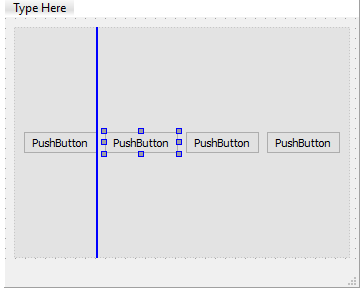
      adding to @JKSH , when dragging over a layout, it shows a blueline to
      show where it will be inserted if dropped.

      alt text

      1 Reply Last reply
      1
      • JKSHJ JKSH

        @David-King said in Break Layout broken ?:

        I find the Qt requirement to have to 'Break Layout' to add elements a bit frustration.

        You don't need to break a layout to add a new item.

        Just drag the new item onto your existing layout, and the item will be inserted into the layout.

        D Offline
        D Offline
        David King
        wrote on last edited by
        #7

        Ah, but only for 'leaf' items, within a layout.

        But which I mean, I can copy Widget 2, and paste onto Horz Layout fine:

        Horz Layout
        Widget 1
        Widget 2

        I then get:

        Horz Layout
        Widget 1
        Widget 2
        Widget 2_2

        But if I have eg the following, I can't copy Vert Layout, and paste onto Horz Layout:

        Horz Layout
        Vert Layout
        Widget 1
        Widget 2

        So I can't get the following.

        Horz Layout
        Vert Layout
        Widget 1
        Widget 2
        Vert Layout_2
        Widget 1_2
        Widget 2_2

        At least, not without doing a Break Layout on Horz Layout first, to give me:

        Vert Layout
        Widget 1
        Widget 2

        I can then copy-paste Vert Layout, to give me:

        Vert Layout_2
        Widget 1_2
        Widget 2_2

        I can then multi-select Vert Layout, and Vert Layout_2, and choose layout horizontally, to reinstate the layout.

        Problem is, after doing the above, my layout is broken, with all my Horz Layouts (I have 4 so far), laying on top of one other, all at the top of the QDialog.

        How do I know that Break Layout is needed in the scenario described ?

        Because Qt tells me so, via a dialogue it displays, saying that I need to do a Break Layout as described

        On my list, to give boxgrids a try, to see if I get better mileage with..

        Best regards,

        David

        1 Reply Last reply
        0
        • mrjjM Offline
          mrjjM Offline
          mrjj
          Lifetime Qt Champion
          wrote on last edited by
          #8

          Hi
          If you want to clone existing layouts ( to get more)
          Hold down CTRL and drag to clone the selection. (layout and all)

          1 Reply Last reply
          2
          • D Offline
            D Offline
            David King
            wrote on last edited by
            #9

            Ah, the forum has removed my indenting. Hope makes sense still. Intention was eg:

            Horz Layout
            indent Vert Layout
            indent indent Widget 1
            indent indent Widget 2

            Ie, nested layouts

            1 Reply Last reply
            0
            • mrjjM Offline
              mrjjM Offline
              mrjj
              Lifetime Qt Champion
              wrote on last edited by
              #10

              Hi
              You can drag the layouts with CTRL
              alt text

              1 Reply Last reply
              2
              • D Offline
                D Offline
                David King
                wrote on last edited by
                #11

                Yo !
                Thank you so much mrjj for CTRL drag !
                I had to be careful I dropped in the right place, but it worked :-)
                I'm sure CTRL drag mention is somewhere in the excellent Qt documentation

                mrjjM 1 Reply Last reply
                0
                • D David King

                  Yo !
                  Thank you so much mrjj for CTRL drag !
                  I had to be careful I dropped in the right place, but it worked :-)
                  I'm sure CTRL drag mention is somewhere in the excellent Qt documentation

                  mrjjM Offline
                  mrjjM Offline
                  mrjj
                  Lifetime Qt Champion
                  wrote on last edited by mrjj
                  #12

                  @David-King
                  One thing i was like 2 years to discover.
                  You can drag a selection from the Form to the Widget list.
                  And then you can have it there as template. ( in the left side list, bottom)

                  D 1 Reply Last reply
                  1
                  • mrjjM mrjj

                    @David-King
                    One thing i was like 2 years to discover.
                    You can drag a selection from the Form to the Widget list.
                    And then you can have it there as template. ( in the left side list, bottom)

                    D Offline
                    D Offline
                    David King
                    wrote on last edited by
                    #13

                    Thanks for the tip !

                    So is this post SOLVED I wonder ?
                    Well it's worked around, for sure, with CTRL-drag

                    Still seems buggish that the layout is broken by a Break Layout, then a reversing of that

                    mrjjM 1 Reply Last reply
                    0
                    • D David King

                      Thanks for the tip !

                      So is this post SOLVED I wonder ?
                      Well it's worked around, for sure, with CTRL-drag

                      Still seems buggish that the layout is broken by a Break Layout, then a reversing of that

                      mrjjM Offline
                      mrjjM Offline
                      mrjj
                      Lifetime Qt Champion
                      wrote on last edited by
                      #14

                      @David-King
                      Well, depending on what you put in layout and kind of stuff will happen
                      when you break it.
                      It could be a bug but it does sounds normal to me.
                      The red layouts might become the size of what ever is it them and its minimumsize etc.

                      1 Reply Last reply
                      0

                      • Login

                      • Login or register to search.
                      • First post
                        Last post
                      0
                      • Categories
                      • Recent
                      • Tags
                      • Popular
                      • Users
                      • Groups
                      • Search
                      • Get Qt Extensions
                      • Unsolved