Skip to content
  • Categories
  • Recent
  • Tags
  • Popular
  • Users
  • Groups
  • Search
  • Get Qt Extensions
  • Unsolved
Collapse
Brand Logo
  1. Home
  2. Qt Development
  3. General and Desktop
  4. Gk/GL.h not found
Qt 6.11 is out! See what's new in the release blog

Gk/GL.h not found

Scheduled Pinned Locked Moved Unsolved General and Desktop
13 Posts 4 Posters 4.1k Views 2 Watching
  • Oldest to Newest
  • Newest to Oldest
  • Most Votes
Reply
  • Reply as topic
Log in to reply
This topic has been deleted. Only users with topic management privileges can see it.
  • P Offline
    P Offline
    Pavanj
    wrote on last edited by
    #1

    Hi All,

    I am new to Qt.I installed Qt 5.9 in desktop with windows 7.I tried to run basic opengl example I got below error
    "gl/gl.h not found"

    I have installed visual studio 2017 express edition.

    Thanks
    Pavan

    1 Reply Last reply
    1
    • ? Offline
      ? Offline
      A Former User
      wrote on last edited by
      #2

      Hi! You also need to install the Windows SDK from Microsoft.

      P 1 Reply Last reply
      0
      • Pablo J. RoginaP Offline
        Pablo J. RoginaP Offline
        Pablo J. Rogina
        wrote on last edited by
        #3

        @Pavanj you may want to take a look at this answer.

        Upvote the answer(s) that helped you solve the issue
        Use "Topic Tools" button to mark your post as Solved
        Add screenshots via postimage.org
        Don't ask support requests via chat/PM. Please use the forum so others can benefit from the solution in the future

        P ? 2 Replies Last reply
        0
        • ? A Former User

          Hi! You also need to install the Windows SDK from Microsoft.

          P Offline
          P Offline
          Pavanj
          wrote on last edited by
          #4

          @Wieland Thanks for the info.
          Do I need to install windows SDK for visual studio 2017?

          ? 1 Reply Last reply
          0
          • Pablo J. RoginaP Pablo J. Rogina

            @Pavanj you may want to take a look at this answer.

            P Offline
            P Offline
            Pavanj
            wrote on last edited by
            #5

            @Pablo-J.-Rogina Thanks for the info I will check it

            1 Reply Last reply
            0
            • P Pavanj

              @Wieland Thanks for the info.
              Do I need to install windows SDK for visual studio 2017?

              ? Offline
              ? Offline
              A Former User
              wrote on last edited by
              #6

              @Pavanj You need the Windows SDK for Windows 7.

              P 1 Reply Last reply
              1
              • Pablo J. RoginaP Pablo J. Rogina

                @Pavanj you may want to take a look at this answer.

                ? Offline
                ? Offline
                A Former User
                wrote on last edited by
                #7

                @Pablo-J.-Rogina Thanks for the hint, but that topic on SO is about the GLUT library. The OP needs the OpenGL header files.

                1 Reply Last reply
                0
                • ? A Former User

                  @Pavanj You need the Windows SDK for Windows 7.

                  P Offline
                  P Offline
                  Pavanj
                  wrote on last edited by
                  #8

                  @Wieland I am able to install windows sdk for win7,but while compiling the qt 5.9 example I got the below error
                  ":-1: error: Failed to retrieve MSVC Environment from "C:\Program Files (x86)\Microsoft Visual Studio\2017\Community\VC\Auxiliary\Build\vcvarsall.bat":
                  'chcp' is not recognized as an internal or external command,
                  operable program or batch file."

                  1 Reply Last reply
                  0
                  • ? Offline
                    ? Offline
                    A Former User
                    wrote on last edited by
                    #9

                    On the windows command prompt, check if chcp can be located:

                    C:\Users\YourName> where chcp

                    If it can't be located, your PATH environment variable is broken.

                    P 1 Reply Last reply
                    1
                    • ? A Former User

                      On the windows command prompt, check if chcp can be located:

                      C:\Users\YourName> where chcp

                      If it can't be located, your PATH environment variable is broken.

                      P Offline
                      P Offline
                      Pavanj
                      wrote on last edited by Pavanj
                      #10

                      @Wieland After running the command I got the below message
                      "C:\Windows\System32\chcp.com" and I added the "%SystemRoot%\system32" to environment variable
                      'chcp' is not recognized as an internal or external command issue fixed but still getting below error message

                      ""C:\Qt\Qt5.9.0\5.9\msvc2017_64\include\QtGui\qopengl.h:139: error: C1083: Cannot open include file: 'GL/gl.h': No such file or directory

                      Is there any other things to be done to get rid of the problem?

                      1 Reply Last reply
                      0
                      • P Offline
                        P Offline
                        Pavanj
                        wrote on last edited by
                        #11

                        Hi All,

                        Let me know is there any work around for this problem?

                        Thanks,
                        Pavan

                        aha_1980A 1 Reply Last reply
                        0
                        • P Pavanj

                          Hi All,

                          Let me know is there any work around for this problem?

                          Thanks,
                          Pavan

                          aha_1980A Offline
                          aha_1980A Offline
                          aha_1980
                          Lifetime Qt Champion
                          wrote on last edited by
                          #12

                          Hi @Pavanj,

                          So do you now have the file GL/gl.h on your system? If yes, please post the path where the file is located.

                          Thanks.

                          Qt has to stay free or it will die.

                          1 Reply Last reply
                          0
                          • P Offline
                            P Offline
                            Pavanj
                            wrote on last edited by Pavanj
                            #13

                            Hi aha_1980,

                            Thanks for the replay
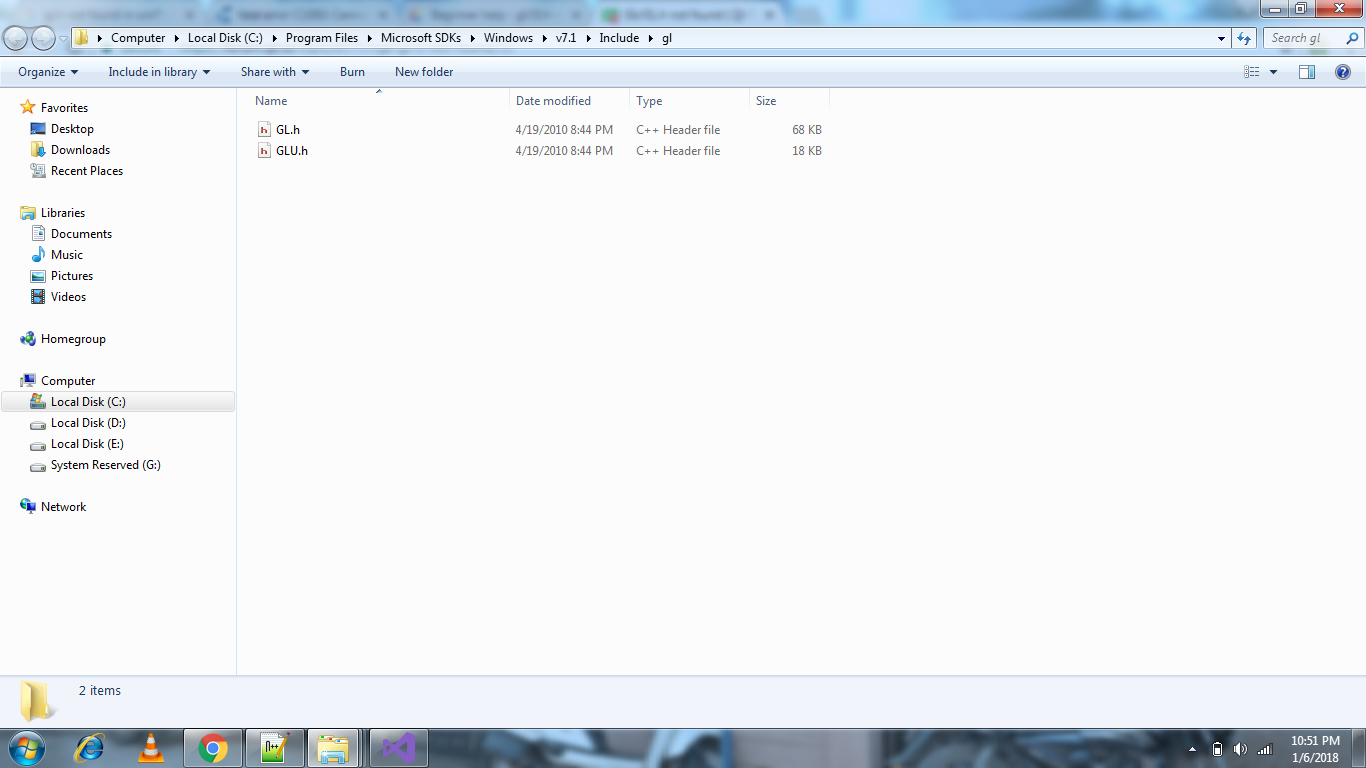
                            I am able to find the gl/gl.h in below folders

                            C:\Program Files\Microsoft SDKs\Windows\v7.1\Include\gl
                            C:\Program Files\Microsoft SDKs\Windows\v7.0\Include\gl
                            C:\Program Files\Microsoft SDKs\Windows\v6.0A\Include\gl

                            Attached image path for refernce0_1515259341981_gl_path.png
                            Thanks

                            1 Reply Last reply
                            0

                            • Login

                            • Login or register to search.
                            • First post
                              Last post
                            0
                            • Categories
                            • Recent
                            • Tags
                            • Popular
                            • Users
                            • Groups
                            • Search
                            • Get Qt Extensions
                            • Unsolved