
Qt 6.11 is out! See what's new in the release
blog
QPushButton.setStyleSheet("border:none;")
-
Hi
You can change it
http://doc.qt.io/qt-5/stylesheet-reference.html
http://doc.qt.io/qt-5/stylesheet-customizing.html#box-model
Also the icon size set the size of the icon. ( but NOT bigger than the actual bitmap)
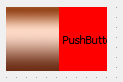
And yes, when you style a button, it will NOT draw as normally for the rest.
You must define full style for it.
Which means set a color for the pressed state if you still want that.QPushButton:pressed { background-color: rgb(118, 170, 50); }

