
Skip to content
  • Categories
  • Recent
  • Tags
  • Popular
  • Users
  • Groups
  • Search
  • Get Qt Extensions
  • Unsolved
Collapse
Brand Logo
  1. Home
  2. Qt Development
  3. General and Desktop
  4. Can't open selected file in windows explorer from application

Can't open selected file in windows explorer from application

Scheduled Pinned Locked Moved Solved General and Desktop
21 Posts 2 Posters 8.7k Views 1 Watching
  • Oldest to Newest
  • Newest to Oldest
  • Most Votes
Reply
  • Reply as topic
Log in to reply
This topic has been deleted. Only users with topic management privileges can see it.
  • mrjjM mrjj

    Hi
    For test, try disable any extra virus scanner you have installed.

    NiagarerN Offline
    NiagarerN Offline
    Niagarer
    wrote on last edited by
    #11

    @mrjj
    Good point,
    unfortunately doesn't help :/

    mrjjM 1 Reply Last reply
    0
    • NiagarerN Niagarer

      @mrjj
      Good point,
      unfortunately doesn't help :/

      mrjjM Offline
      mrjjM Offline
      mrjj
      Lifetime Qt Champion
      wrote on last edited by
      #12

      @Niagarer
      Would have been too easy. ;)

      did you try with quotes ?
      explorer.exe /select,"e:\test.txt"
      (in cmd)

      NiagarerN 1 Reply Last reply
      0
      • mrjjM mrjj

        @Niagarer
        Would have been too easy. ;)

        did you try with quotes ?
        explorer.exe /select,"e:\test.txt"
        (in cmd)

        NiagarerN Offline
        NiagarerN Offline
        Niagarer
        wrote on last edited by Niagarer
        #13

        @mrjj
        Yup, unfortunately also no solution... but then it does not open my documents folder, it just open the explorer
        Slowly but surely it start to get funny

        update
        When I try to select, it just opens the explorer, if not, it opens the documents folder

        1 Reply Last reply
        0
        • mrjjM Offline
          mrjjM Offline
          mrjj
          Lifetime Qt Champion
          wrote on last edited by
          #14

          well it does open docs here too if no /select
          if i do
          .. /select,"file that dont exists"
          it opens "This PC"

          NiagarerN 1 Reply Last reply
          0
          • mrjjM mrjj

            well it does open docs here too if no /select
            if i do
            .. /select,"file that dont exists"
            it opens "This PC"

            NiagarerN Offline
            NiagarerN Offline
            Niagarer
            wrote on last edited by Niagarer
            #15

            @mrjj
            yes, the weird thing is, that the explorer defiantely knows the file. I even can search in the explorer search line and it finds the file.
            But as you wrote, from cmd it can't find the file...
            I can navigate to the right folder on the G drive, it still can't find the file

            mrjjM 1 Reply Last reply
            0
            • NiagarerN Niagarer

              @mrjj
              yes, the weird thing is, that the explorer defiantely knows the file. I even can search in the explorer search line and it finds the file.
              But as you wrote, from cmd it can't find the file...
              I can navigate to the right folder on the G drive, it still can't find the file

              mrjjM Offline
              mrjjM Offline
              mrjj
              Lifetime Qt Champion
              wrote on last edited by
              #16

              @Niagarer
              But its only /select that is broken correct?
              if you do other commands it does work?
              like
              type e:\test.txt

              NiagarerN 1 Reply Last reply
              0
              • mrjjM mrjj

                @Niagarer
                But its only /select that is broken correct?
                if you do other commands it does work?
                like
                type e:\test.txt

                NiagarerN Offline
                NiagarerN Offline
                Niagarer
                wrote on last edited by Niagarer
                #17

                @mrjj
                No, I don't think so.
                All the following commands don't work:

                // here it says, it could find that file... it is definately there
                notepad G:/test.txt
                
                explorer G:/
                
                explorer /select G:/test.txt
                
                mrjjM 1 Reply Last reply
                0
                • NiagarerN Niagarer

                  @mrjj
                  No, I don't think so.
                  All the following commands don't work:

                  // here it says, it could find that file... it is definately there
                  notepad G:/test.txt
                  
                  explorer G:/
                  
                  explorer /select G:/test.txt
                  
                  mrjjM Offline
                  mrjjM Offline
                  mrjj
                  Lifetime Qt Champion
                  wrote on last edited by
                  #18

                  @Niagarer
                  and g:\ is just another hard drive or partition ?
                  Like c:\ ?

                  But it dont work at c:\ either so must be something broken in your windows.

                  1 Reply Last reply
                  0
                  • mrjjM Offline
                    mrjjM Offline
                    mrjj
                    Lifetime Qt Champion
                    wrote on last edited by mrjj
                    #19

                    Oh
                    in cmd
                    you must use \ that slash. not / .

                    Qt makes it possible to use / but windows dont know it natively.

                    NiagarerN 1 Reply Last reply
                    1
                    • mrjjM mrjj

                      Oh
                      in cmd
                      you must use \ that slash. not / .

                      Qt makes it possible to use / but windows dont know it natively.

                      NiagarerN Offline
                      NiagarerN Offline
                      Niagarer
                      wrote on last edited by Niagarer
                      #20

                      @mrjj
                      Ok, I got it. Yes G is just another drive and it didn't work on any drive because:
                      I also noticed this \ and / thing and this was one of my mistakes.
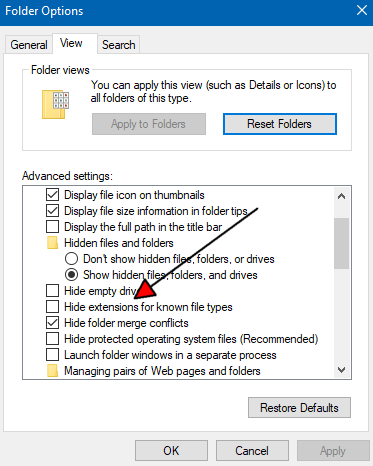
                      Another thing, why cmd could not find one of my test.txt files I tried to open was that I named it test.txt (so the actual file name was test.txt.txt as my browser told me <facepalm x3>).
                      And one last thing, that is no less stupid is, that I sent the path from another object and this object did not send the .txt ending. Baad day :D
                      And I copied the path of some text files from the explorer and tried these, but the \ made it not working.
                      I thought that

                      QDir::toNativeSeperators(pathIn);
                      

                      would fix \ to / (or \ on windows), but that seems to be wrong. It just takes normal paths with / and translates it to \ on windows http://doc.qt.io/qt-4.8/qdir.html#toNativeSeparators

                      Thank you very much for you help!

                      1 Reply Last reply
                      2
                      • mrjjM Offline
                        mrjjM Offline
                        mrjj
                        Lifetime Qt Champion
                        wrote on last edited by mrjj
                        #21

                        Ahh that is a classic :)))
                        I forgot about it.

                        alt text

                        Most stupid settings the history of windows as renaming the file will not actually work and you
                        get 2 x extension.
                        alt text

                        1 Reply Last reply
                        2

                        • Login

                        • Login or register to search.
                        • First post
                          Last post
                        0
                        • Categories
                        • Recent
                        • Tags
                        • Popular
                        • Users
                        • Groups
                        • Search
                        • Get Qt Extensions
                        • Unsolved