Skip to content
  • Categories
  • Recent
  • Tags
  • Popular
  • Users
  • Groups
  • Search
  • Get Qt
  • Unsolved
Collapse
Brand Logo
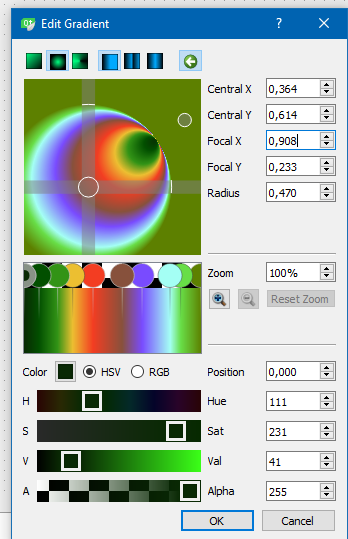
  1. Home
  2. Qt Development
  3. General and Desktop
  4. Draw stretched radial gradient
Qt 6.12 LTS is out! See what's new in the release blog

Draw stretched radial gradient

Scheduled Pinned Locked Moved Unsolved General and Desktop
12 Posts 2 Posters 5.2k Views 1 Watching
  • Oldest to Newest
  • Newest to Oldest
  • Most Votes
Reply
  • Reply as topic
Log in to reply
This topic has been deleted. Only users with topic management privileges can see it.
  • mrjjM mrjj

    Hi
    Im not sure gradient can do that if i understand correctly
    alt text

    NiagarerN Offline
    NiagarerN Offline
    Niagarer
    wrote on last edited by Niagarer
    #3

    @mrjj
    Oh. Hmm.
    Is there a similar and feasible solution for that? I just wanted to use a QGradient and then set the Brush of a painter to it.

    mrjjM 1 Reply Last reply
    0
    • NiagarerN Niagarer

      @mrjj
      Oh. Hmm.
      Is there a similar and feasible solution for that? I just wanted to use a QGradient and then set the Brush of a painter to it.

      mrjjM Offline
      mrjjM Offline
      mrjj
      Lifetime Qt Champion
      wrote on last edited by mrjj
      #4

      @Niagarer
      The one you showed are sort of screwed .
      you mean you want to have a elliptical instead of round, correct ?
      if yes, please see this sample
      http://doc.qt.io/qt-5/qtwidgets-painting-painterpaths-example.html

      you can use a path for that i think.

      NiagarerN 1 Reply Last reply
      0
      • mrjjM mrjj

        @Niagarer
        The one you showed are sort of screwed .
        you mean you want to have a elliptical instead of round, correct ?
        if yes, please see this sample
        http://doc.qt.io/qt-5/qtwidgets-painting-painterpaths-example.html

        you can use a path for that i think.

        NiagarerN Offline
        NiagarerN Offline
        Niagarer
        wrote on last edited by
        #5

        @mrjj
        Yes. Just like the right picture shows.

        mrjjM 1 Reply Last reply
        0
        • NiagarerN Niagarer

          @mrjj
          Yes. Just like the right picture shows.

          mrjjM Offline
          mrjjM Offline
          mrjj
          Lifetime Qt Champion
          wrote on last edited by
          #6

          @Niagarer
          so u need it also screwed and ellipse at same time ?
          You can try with
          http://doc.qt.io/qt-5/qtwidgets-painting-painterpaths-example.html

          NiagarerN 1 Reply Last reply
          0
          • mrjjM mrjj

            @Niagarer
            so u need it also screwed and ellipse at same time ?
            You can try with
            http://doc.qt.io/qt-5/qtwidgets-painting-painterpaths-example.html

            NiagarerN Offline
            NiagarerN Offline
            Niagarer
            wrote on last edited by Niagarer
            #7

            @mrjj
            But this example also shows only linear gradients, not like an ellipse:

            void RenderArea::paintEvent(QPaintEvent *)
            {
                QPainter painter(this);
                painter.setRenderHint(QPainter::Antialiasing);
            //! [8] //! [9]
                painter.scale(width() / 100.0, height() / 100.0);
                painter.translate(50.0, 50.0);
                painter.rotate(-rotationAngle);
                painter.translate(-50.0, -50.0);
            
            //! [9] //! [10]
                painter.setPen(QPen(penColor, penWidth, Qt::SolidLine, Qt::RoundCap, Qt::RoundJoin));
                QLinearGradient gradient(0, 0, 0, 100);
                gradient.setColorAt(0.0, fillColor1);
                gradient.setColorAt(1.0, fillColor2);
                painter.setBrush(gradient);
                painter.drawPath(path);
            }
            

            Is it possible to use a temporary painter, set the brush, scale the painter and use the scaled brush for my actual painter (or anything like that...)

            mrjjM 1 Reply Last reply
            0
            • NiagarerN Niagarer

              @mrjj
              But this example also shows only linear gradients, not like an ellipse:

              void RenderArea::paintEvent(QPaintEvent *)
              {
                  QPainter painter(this);
                  painter.setRenderHint(QPainter::Antialiasing);
              //! [8] //! [9]
                  painter.scale(width() / 100.0, height() / 100.0);
                  painter.translate(50.0, 50.0);
                  painter.rotate(-rotationAngle);
                  painter.translate(-50.0, -50.0);
              
              //! [9] //! [10]
                  painter.setPen(QPen(penColor, penWidth, Qt::SolidLine, Qt::RoundCap, Qt::RoundJoin));
                  QLinearGradient gradient(0, 0, 0, 100);
                  gradient.setColorAt(0.0, fillColor1);
                  gradient.setColorAt(1.0, fillColor2);
                  painter.setBrush(gradient);
                  painter.drawPath(path);
              }
              

              Is it possible to use a temporary painter, set the brush, scale the painter and use the scaled brush for my actual painter (or anything like that...)

              mrjjM Offline
              mrjjM Offline
              mrjj
              Lifetime Qt Champion
              wrote on last edited by
              #8

              @Niagarer
              yes i wanted you to play with paths and the QRadialGradient to see
              if it comes close enough to what you need.

              NiagarerN 2 Replies Last reply
              0
              • mrjjM mrjj

                @Niagarer
                yes i wanted you to play with paths and the QRadialGradient to see
                if it comes close enough to what you need.

                NiagarerN Offline
                NiagarerN Offline
                Niagarer
                wrote on last edited by
                #9
                This post is deleted!
                1 Reply Last reply
                0
                • mrjjM mrjj

                  @Niagarer
                  yes i wanted you to play with paths and the QRadialGradient to see
                  if it comes close enough to what you need.

                  NiagarerN Offline
                  NiagarerN Offline
                  Niagarer
                  wrote on last edited by Niagarer
                  #10

                  @mrjj
                  Ok, the result should look A BIT like this:
                  0_1506767624545_Qt 14.png
                  If it is not possible to rotate it without huge effort, I don't need it, but I would appreciate it.

                  1 Reply Last reply
                  0
                  • mrjjM Offline
                    mrjjM Offline
                    mrjj
                    Lifetime Qt Champion
                    wrote on last edited by mrjj
                    #11

                    Hi
                    It does look like the
                    alt text
                    from
                    http://doc.qt.io/qt-5/qtwidgets-painting-painterpaths-example.html
                    if you use a QRadialGradient instead.

                    But not sure it will looked stretched in same was the gfx but please try.

                    1 Reply Last reply
                    0
                    • mrjjM Offline
                      mrjjM Offline
                      mrjj
                      Lifetime Qt Champion
                      wrote on last edited by mrjj
                      #12

                      Hi
                      I was wrong. You dont need to use paths or any extra. it will scale to the area
                      and no longer be circular.

                      background-color: qradialgradient(spread:pad, cx:0.5, cy:0.5, radius:0.5, fx:0.5, fy:0.5, stop:0 rgba(9, 41, 4, 255), stop:0.085 rgba(2, 79, 0, 255), stop:0.19 rgba(50, 147, 22, 255), stop:0.275 rgba(236, 191, 49, 255), stop:0.39 rgba(243, 61, 34, 255), stop:0.555 rgba(135, 81, 60, 255), stop:0.667 rgba(121, 75, 255, 255), stop:0.825 rgba(164, 255, 244, 255), stop:0.885 rgba(104, 222, 71, 255), stop:1 rgba(93, 128, 0, 255));

                      

                      alt text

                      1 Reply Last reply
                      0

                      • Login

                      • Login or register to search.
                      • First post
                        Last post
                      0
                      • Categories
                      • Recent
                      • Tags
                      • Popular
                      • Users
                      • Groups
                      • Search
                      • Get Qt
                      • Unsolved