
Filtering in the QComboBox
-
I try to make a filtering in the popup list of QComboBox. Commonly is ready. But I have a crash during some consistency.
With the following error:
ASSERT failure in QVector<T>::remove: "index out of range", file ....\include/QtCore/../../src/corelib/tools/qvector.h, line 449How to replicate.
- Run application
- Type in the combobox 'zzz'
- Press Enter
- Type any key
mainwindow.h
#ifndef MAINWINDOW_H
#define MAINWINDOW_H

#include <QMainWindow>
#include <QStringListModel>
#include <QSortFilterProxyModel>
#include <QCompleter>
#include <QComboBox>


namespace Ui {
class MainWindow;
}


class MainWindow : public QMainWindow
{
    Q_OBJECT

public:
    explicit MainWindow(QWidget *parent = 0);
    ~MainWindow();

private:
    Ui::MainWindow *ui;
    QCompleter *completer;
    QSortFilterProxyModel *proxyModel;
    QStringListModel *stringListModel;

private slots:
    void setFilterWildcard(const QString& value);

};

#endif // MAINWINDOW_H
mainwindow.cpp
#include "mainwindow.h" #include "ui_mainwindow.h" #include <QLineEdit> MainWindow::MainWindow(QWidget *parent) : QMainWindow(parent), ui(new Ui::MainWindow) { ui->setupUi(this); ui->comboBox->setEditable(true); QStringList Items; Items << "hi" << "bye"; Items << "master" << "vessel"; Items << "gun" << "rifle"; Items << "handgun" << "atom"; Items << "hello" << "manual"; Items << "hillo" << "minual"; stringListModel = new QStringListModel(); stringListModel->setStringList(Items); proxyModel = new QSortFilterProxyModel; proxyModel->setSourceModel(stringListModel); proxyModel->setFilterCaseSensitivity(Qt::CaseInsensitive); ui->comboBox->setModel(proxyModel); auto completer = new QCompleter(this); completer->setCaseSensitivity(Qt::CaseInsensitive); completer->setModel(proxyModel); completer->setCompletionColumn(0); completer->setCompletionMode(QCompleter::UnfilteredPopupCompletion); ui->comboBox->setCompleter(completer); ui->comboBox->setCurrentIndex(-1); ui->comboBox->lineEdit()->setPlaceholderText("Some text"); connect(ui->comboBox, SIGNAL(editTextChanged(const QString&)), this, SLOT(setFilterWildcard(const QString&))); } void MainWindow::setFilterWildcard(const QString &value) { QStringList items = stringListModel->stringList(); QString item; foreach(item, items) { if (item.indexOf(value) > -1) { proxyModel->setFilterFixedString(value); return; } } } MainWindow::~MainWindow() { delete ui; } -
I try to make a filtering in the popup list of QComboBox. Commonly is ready. But I have a crash during some consistency.
With the following error:
ASSERT failure in QVector<T>::remove: "index out of range", file ....\include/QtCore/../../src/corelib/tools/qvector.h, line 449How to replicate.
- Run application
- Type in the combobox 'zzz'
- Press Enter
- Type any key
mainwindow.h
#ifndef MAINWINDOW_H
#define MAINWINDOW_H

#include <QMainWindow>
#include <QStringListModel>
#include <QSortFilterProxyModel>
#include <QCompleter>
#include <QComboBox>


namespace Ui {
class MainWindow;
}


class MainWindow : public QMainWindow
{
    Q_OBJECT

public:
    explicit MainWindow(QWidget *parent = 0);
    ~MainWindow();

private:
    Ui::MainWindow *ui;
    QCompleter *completer;
    QSortFilterProxyModel *proxyModel;
    QStringListModel *stringListModel;

private slots:
    void setFilterWildcard(const QString& value);

};

#endif // MAINWINDOW_H
mainwindow.cpp
#include "mainwindow.h" #include "ui_mainwindow.h" #include <QLineEdit> MainWindow::MainWindow(QWidget *parent) : QMainWindow(parent), ui(new Ui::MainWindow) { ui->setupUi(this); ui->comboBox->setEditable(true); QStringList Items; Items << "hi" << "bye"; Items << "master" << "vessel"; Items << "gun" << "rifle"; Items << "handgun" << "atom"; Items << "hello" << "manual"; Items << "hillo" << "minual"; stringListModel = new QStringListModel(); stringListModel->setStringList(Items); proxyModel = new QSortFilterProxyModel; proxyModel->setSourceModel(stringListModel); proxyModel->setFilterCaseSensitivity(Qt::CaseInsensitive); ui->comboBox->setModel(proxyModel); auto completer = new QCompleter(this); completer->setCaseSensitivity(Qt::CaseInsensitive); completer->setModel(proxyModel); completer->setCompletionColumn(0); completer->setCompletionMode(QCompleter::UnfilteredPopupCompletion); ui->comboBox->setCompleter(completer); ui->comboBox->setCurrentIndex(-1); ui->comboBox->lineEdit()->setPlaceholderText("Some text"); connect(ui->comboBox, SIGNAL(editTextChanged(const QString&)), this, SLOT(setFilterWildcard(const QString&))); } void MainWindow::setFilterWildcard(const QString &value) { QStringList items = stringListModel->stringList(); QString item; foreach(item, items) { if (item.indexOf(value) > -1) { proxyModel->setFilterFixedString(value); return; } } } MainWindow::~MainWindow() { delete ui; } -
@aliks-os
sorry a lit bit correction- Run application
- Type in the combobox 'zzz'
- Press Enter
3a) select 'zzz' - Type any key
Which OS are you on?
Out of curiosity I have created a new GUI app.
I had a freshly setup of Ubuntu 32 bit and an install of Qt 5.5.1 32 bit.
The MainWindow.cpp and include was changed to hold your code. For the MainWindow.ui I simply added a ComboBox with designer and left as is.By performing the steps as iniially given and also the corrected sequence, I do not get a crash.
However, I can provoke a crash with
1 Run application
2 Type in the combobox 'zzz'
3 Press Enter
4 Mark 'zzz' to overwrite
5 Type any key -
@koahnig said in Filtering in the QComboBox:
However, I can provoke a crash with
1 Run application
2 Type in the combobox 'zzz'
3 Press Enter
4 Mark 'zzz' to overwrite
5 Type any keyyes, you do all right. I am exactly get crash as you.
I am using Win10 -
Which OS are you on?
Out of curiosity I have created a new GUI app.
I had a freshly setup of Ubuntu 32 bit and an install of Qt 5.5.1 32 bit.
The MainWindow.cpp and include was changed to hold your code. For the MainWindow.ui I simply added a ComboBox with designer and left as is.By performing the steps as iniially given and also the corrected sequence, I do not get a crash.
However, I can provoke a crash with
1 Run application
2 Type in the combobox 'zzz'
3 Press Enter
4 Mark 'zzz' to overwrite
5 Type any key@koahnig
Hi
I did as you with default project.
Its does crash here on win 10 +Qt5.9 vs 2015
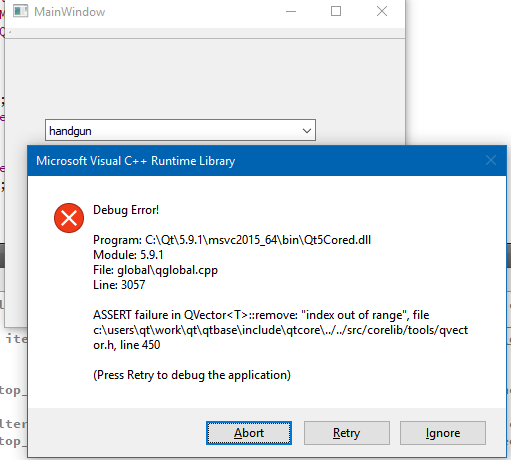
It seems to come from looping around in the list calling setFilterFixedString
However if i do.
void MainWindow::setFilterWildcard(const QString& value) {
  QStringList items = stringListModel->stringList();
 if (items.indexOf(value) > -1 )
    proxyModel->setFilterFixedString(value);
}
I cannot get it to crash anymore. Maybe it dont do exactly the same.
-
@koahnig
Hi
I did as you with default project.
Its does crash here on win 10 +Qt5.9 vs 2015
It seems to come from looping around in the list calling setFilterFixedString
However if i do.
void MainWindow::setFilterWildcard(const QString& value) {
  QStringList items = stringListModel->stringList();
 if (items.indexOf(value) > -1 )
    proxyModel->setFilterFixedString(value);
}
I cannot get it to crash anymore. Maybe it dont do exactly the same.
