
Application can't start because could not find or load Qt
-
HI, hmmm lots of stuff in your PATH but nothing that directly explains those errors, you could try tracing by opening a CMD window and type:
SET QT_DEBUG_PLUGINS=1and then start for example Qt Creator from that CMD window.To see the output, download and start DbgView from Sysinternals
-
C:\Program Files\Common Files\Intel\WirelessCommon;C:\Program Files\OpenNI\Bin64;C:\Octave\Octave-4.2.1\bin;C:\Program Files\Git LFS;C:\Program Files\Git\cmd;C:\AMD APP SDK\3.0\bin\x86_64;C
:\AMD APP SDK\3.0\bin\x86;C:\opencv\opencv-3.2.0\build\x64\vc14\bin;C:\windows\System32\WindowsPowerShell\v1.0;C:\Program Files\TortoiseGit\bin;C:\Program File
s (x86)\Windows Kits\8.1\Windows Performance Toolkit;C:\CMake\bin;c:\Program Files (x86)\Microsoft Visual Studio 12.0\Common7\IDE;C:\Drivers\3020 drivers\Vide
o_AMD_Win_A00_Setup_P5FCH_ZPE\Bin;C:\Flashtool\x10flasher_lib\winjre32\bin;C:\Flashtool\x10flasher_lib\winjre64\bin;C:\Freescale\IAR\arm\bin;C:\Freescale\IAR\co
mmon\bin;C:\Freescale\IAR_7.30.4\arm\bin;C:\MinGW\mingw32\bin;C:\Program Files\iPod\bin;C:\Program Files (x86)\Firebird\Firebird_2_5\bin;C:\Program Files (x86)
Git\bin;C:\Program Files (x86)\Microsoft Visual Studio 10.0\VC\bin;C:\Program Files (x86)\Microsoft Visual Studio 8\VB\Bin;C:\Program Files (x86)\Microsoft Visu
al Studio 8\VSTA\Bin;C:\Program Files (x86)\National Instruments\NI-488.2\Bin;C:\Program Files (x86)\Windows Kits\8.0\bin;C:\Program Files (x86)\Windows Kits\8.
1\bin;C:\Windows\System32\cvirte\bin;C:\Windows\SysWOW64\cvirte\bin;C:\Program Files (x86)\Midnight Commander;c:\Program Files\CMake\bin;C:\Program Files\Intel
\WiFi\bin;C:\Program Files\Common Files\Intel\WirelessCommon;C:\Program Files (x86)\ARM\Mali Developer Tools\Mali OpenGL ES Emulator 3.0.1.g72cc2;C:\Program F
iles\Docker Toolbox -
I did
C:\Qt\Tools\QtCreator\bin>SET QT_DEBUG_PLUGINS=1
C:\Qt\Tools\QtCreator\bin>qtcreator.exebut immediately I have
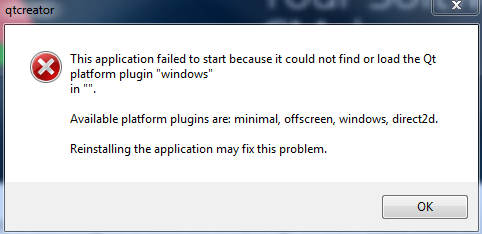
-
00000001 0.00000000 [13380] QFactoryLoader::QFactoryLoader() checking directory path "C:/Anaconda3/Library/plugins/platforms" ...
00000002 0.00033949 [13380] QFactoryLoader::QFactoryLoader() looking at "C:/Anaconda3/Library/plugins/platforms/qminimal.dll"
00000003 0.00069911 [13380] Found metadata in lib C:/Anaconda3/Library/plugins/platforms/qminimal.dll, metadata=
00000004 0.00069911 [13380] {
00000005 0.00069911 [13380] "IID": "org.qt-project.Qt.QPA.QPlatformIntegrationFactoryInterface.5.3",
00000006 0.00069911 [13380] "MetaData": {
00000007 0.00069911 [13380] "Keys": [
00000008 0.00069911 [13380] "minimal"
00000009 0.00069911 [13380] ]
00000010 0.00069911 [13380] },
00000011 0.00069911 [13380] "className": "QMinimalIntegrationPlugin",
00000012 0.00069911 [13380] "debug": false,
00000013 0.00069911 [13380] "version": 329218
00000014 0.00069911 [13380] }
00000015 0.00069911 [13380]
00000016 0.00069911 [13380]
00000017 0.00076898 [13380] Got keys from plugin meta data ("minimal")
00000018 0.00079503 [13380] QFactoryLoader::QFactoryLoader() looking at "C:/Anaconda3/Library/plugins/platforms/qoffscreen.dll"
00000019 0.00113926 [13380] Found metadata in lib C:/Anaconda3/Library/plugins/platforms/qoffscreen.dll, metadata=
00000020 0.00113926 [13380] {
00000021 0.00113926 [13380] "IID": "org.qt-project.Qt.QPA.QPlatformIntegrationFactoryInterface.5.3",
00000022 0.00113926 [13380] "MetaData": {
00000023 0.00113926 [13380] "Keys": [
00000024 0.00113926 [13380] "offscreen"
00000025 0.00113926 [13380] ]
00000026 0.00113926 [13380] },
00000027 0.00113926 [13380] "className": "QOffscreenIntegrationPlugin",
00000028 0.00113926 [13380] "debug": false,
00000029 0.00113926 [13380] "version": 329218
00000030 0.00113926 [13380] }
00000031 0.00113926 [13380]
00000032 0.00113926 [13380]
00000033 0.00124190 [13380] Got keys from plugin meta data ("offscreen")
00000034 0.00127032 [13380] QFactoryLoader::QFactoryLoader() looking at "C:/Anaconda3/Library/plugins/platforms/qwindows.dll"
00000035 0.00161020 [13380] Found metadata in lib C:/Anaconda3/Library/plugins/platforms/qwindows.dll, metadata=
00000036 0.00161020 [13380] {
00000037 0.00161020 [13380] "IID": "org.qt-project.Qt.QPA.QPlatformIntegrationFactoryInterface.5.3",
00000038 0.00161020 [13380] "MetaData": {
00000039 0.00161020 [13380] "Keys": [
00000040 0.00161020 [13380] "windows"
00000041 0.00161020 [13380] ]
00000042 0.00161020 [13380] },
00000043 0.00161020 [13380] "className": "QWindowsIntegrationPlugin",
00000044 0.00161020 [13380] "debug": false,
00000045 0.00161020 [13380] "version": 329218
00000046 0.00161020 [13380] }
00000047 0.00161020 [13380]
00000048 0.00161020 [13380]
00000049 0.00166705 [13380] Got keys from plugin meta data ("windows")
00000050 0.00169192 [13380] QFactoryLoader::QFactoryLoader() checking directory path "C:/Qt/Tools/QtCreator/bin/plugins/platforms" ...
00000051 0.00195364 [13380] QFactoryLoader::QFactoryLoader() looking at "C:/Qt/Tools/QtCreator/bin/plugins/platforms/qdirect2d.dll"
00000052 0.00237997 [13380] Found metadata in lib C:/Qt/Tools/QtCreator/bin/plugins/platforms/qdirect2d.dll, metadata=
00000053 0.00237997 [13380] {
00000054 0.00237997 [13380] "IID": "org.qt-project.Qt.QPA.QPlatformIntegrationFactoryInterface.5.3",
00000055 0.00237997 [13380] "MetaData": {
00000056 0.00237997 [13380] "Keys": [
00000057 0.00237997 [13380] "direct2d"
00000058 0.00237997 [13380] ]
00000059 0.00237997 [13380] },
00000060 0.00237997 [13380] "className": "QWindowsDirect2DIntegrationPlugin",
00000061 0.00237997 [13380] "debug": false,
00000062 0.00237997 [13380] "version": 329985
00000063 0.00237997 [13380] }
00000064 0.00237997 [13380]
00000065 0.00237997 [13380]
00000066 0.00243879 [13380] Got keys from plugin meta data ("direct2d")
00000067 0.00246524 [13380] QFactoryLoader::QFactoryLoader() looking at "C:/Qt/Tools/QtCreator/bin/plugins/platforms/qminimal.dll"
00000068 0.00287263 [13380] Found metadata in lib C:/Qt/Tools/QtCreator/bin/plugins/platforms/qminimal.dll, metadata=
00000069 0.00287263 [13380] {
00000070 0.00287263 [13380] "IID": "org.qt-project.Qt.QPA.QPlatformIntegrationFactoryInterface.5.3",
00000071 0.00287263 [13380] "MetaData": {
00000072 0.00287263 [13380] "Keys": [
00000073 0.00287263 [13380] "minimal"
00000074 0.00287263 [13380] ]
00000075 0.00287263 [13380] },
00000076 0.00287263 [13380] "className": "QMinimalIntegrationPlugin",
00000077 0.00287263 [13380] "debug": false,
00000078 0.00287263 [13380] "version": 329985
00000079 0.00287263 [13380] }
00000080 0.00287263 [13380]
00000081 0.00287263 [13380]
00000082 0.00292908 [13380] Got keys from plugin meta data ("minimal")
00000083 0.00295592 [13380] QFactoryLoader::QFactoryLoader() looking at "C:/Qt/Tools/QtCreator/bin/plugins/platforms/qoffscreen.dll"
00000084 0.00334238 [13380] Found metadata in lib C:/Qt/Tools/QtCreator/bin/plugins/platforms/qoffscreen.dll, metadata=
00000085 0.00334238 [13380] {
00000086 0.00334238 [13380] "IID": "org.qt-project.Qt.QPA.QPlatformIntegrationFactoryInterface.5.3",
00000087 0.00334238 [13380] "MetaData": {
00000088 0.00334238 [13380] "Keys": [
00000089 0.00334238 [13380] "offscreen"
00000090 0.00334238 [13380] ]
00000091 0.00334238 [13380] },
00000092 0.00334238 [13380] "className": "QOffscreenIntegrationPlugin",
00000093 0.00334238 [13380] "debug": false,
00000094 0.00334238 [13380] "version": 329985
00000095 0.00334238 [13380] }
00000096 0.00334238 [13380]
00000097 0.00334238 [13380]
00000098 0.00339883 [13380] Got keys from plugin meta data ("offscreen")
00000099 0.00342449 [13380] QFactoryLoader::QFactoryLoader() looking at "C:/Qt/Tools/QtCreator/bin/plugins/platforms/qwindows.dll"
00000100 0.00384412 [13380] Found metadata in lib C:/Qt/Tools/QtCreator/bin/plugins/platforms/qwindows.dll, metadata=
00000101 0.00384412 [13380] {
00000102 0.00384412 [13380] "IID": "org.qt-project.Qt.QPA.QPlatformIntegrationFactoryInterface.5.3",
00000103 0.00384412 [13380] "MetaData": {
00000104 0.00384412 [13380] "Keys": [
00000105 0.00384412 [13380] "windows"
00000106 0.00384412 [13380] ]
00000107 0.00384412 [13380] },
00000108 0.00384412 [13380] "className": "QWindowsIntegrationPlugin",
00000109 0.00384412 [13380] "debug": false,
00000110 0.00384412 [13380] "version": 329985
00000111 0.00384412 [13380] }
00000112 0.00384412 [13380]
00000113 0.00384412 [13380]
00000114 0.00390767 [13380] Got keys from plugin meta data ("windows")
00000115 0.00393333 [13380] QFactoryLoader::QFactoryLoader() checking directory path "C:/Qt/Tools/QtCreator/bin/platforms" ...
00000116 0.00458270 [13380] Cannot load library C:\Anaconda3\Library\plugins\platforms\qwindows.dll: %1 is not a valid Win32 application.
00000117 0.00461191 [13380] QLibraryPrivate::loadPlugin failed on "C:/Anaconda3/Library/plugins/platforms/qwindows.dll" : "Cannot load library C:\Anaconda3\Library\plugins\platforms\qwindows.dll: %1 is not a valid Win32 application." -
@peter_cz said in Application can't start because could not find or load Qt:
"C:/Anaconda3
is that from running Creator ?
Seems that it loads Dlls from C:/Anaconda3 which is seems wrong.
Mine loads from its installation folder. -
in the case of CMake:
00000001 0.00000000 [14796] QFactoryLoader::QFactoryLoader() checking directory path "C:/Anaconda3/Library/plugins/platforms" ...
00000002 0.00030001 [14796] QFactoryLoader::QFactoryLoader() looking at "C:/Anaconda3/Library/plugins/platforms/qminimal.dll"
00000003 0.00062292 [14796] Found metadata in lib C:/Anaconda3/Library/plugins/platforms/qminimal.dll, metadata=
00000004 0.00062292 [14796] {
00000005 0.00062292 [14796] "IID": "org.qt-project.Qt.QPA.QPlatformIntegrationFactoryInterface.5.3",
00000006 0.00062292 [14796] "MetaData": {
00000007 0.00062292 [14796] "Keys": [
00000008 0.00062292 [14796] "minimal"
00000009 0.00062292 [14796] ]
00000010 0.00062292 [14796] },
00000011 0.00062292 [14796] "className": "QMinimalIntegrationPlugin",
00000012 0.00062292 [14796] "debug": false,
00000013 0.00062292 [14796] "version": 329218
00000014 0.00062292 [14796] }
00000015 0.00062292 [14796]
00000016 0.00062292 [14796]
00000017 0.00066990 [14796] Got keys from plugin meta data ("minimal")
00000018 0.00068529 [14796] QFactoryLoader::QFactoryLoader() looking at "C:/Anaconda3/Library/plugins/platforms/qoffscreen.dll"
00000019 0.00099952 [14796] Found metadata in lib C:/Anaconda3/Library/plugins/platforms/qoffscreen.dll, metadata=
00000020 0.00099952 [14796] {
00000021 0.00099952 [14796] "IID": "org.qt-project.Qt.QPA.QPlatformIntegrationFactoryInterface.5.3",
00000022 0.00099952 [14796] "MetaData": {
00000023 0.00099952 [14796] "Keys": [
00000024 0.00099952 [14796] "offscreen"
00000025 0.00099952 [14796] ]
00000026 0.00099952 [14796] },
00000027 0.00099952 [14796] "className": "QOffscreenIntegrationPlugin",
00000028 0.00099952 [14796] "debug": false,
00000029 0.00099952 [14796] "version": 329218
00000030 0.00099952 [14796] }
00000031 0.00099952 [14796]
00000032 0.00099952 [14796]
00000033 0.00112781 [14796] Got keys from plugin meta data ("offscreen")
00000034 0.00114321 [14796] QFactoryLoader::QFactoryLoader() looking at "C:/Anaconda3/Library/plugins/platforms/qwindows.dll"
00000035 0.00144283 [14796] Found metadata in lib C:/Anaconda3/Library/plugins/platforms/qwindows.dll, metadata=
00000036 0.00144283 [14796] {
00000037 0.00144283 [14796] "IID": "org.qt-project.Qt.QPA.QPlatformIntegrationFactoryInterface.5.3",
00000038 0.00144283 [14796] "MetaData": {
00000039 0.00144283 [14796] "Keys": [
00000040 0.00144283 [14796] "windows"
00000041 0.00144283 [14796] ]
00000042 0.00144283 [14796] },
00000043 0.00144283 [14796] "className": "QWindowsIntegrationPlugin",
00000044 0.00144283 [14796] "debug": false,
00000045 0.00144283 [14796] "version": 329218
00000046 0.00144283 [14796] }
00000047 0.00144283 [14796]
00000048 0.00144283 [14796]
00000049 0.00148151 [14796] Got keys from plugin meta data ("windows")
00000050 0.00149533 [14796] QFactoryLoader::QFactoryLoader() checking directory path "C:/CMake/plugins/platforms" ...
00000051 0.00173494 [14796] QFactoryLoader::QFactoryLoader() looking at "C:/CMake/plugins/platforms/qwindows.dll"
00000052 0.00200180 [14796] Found metadata in lib C:/CMake/plugins/platforms/qwindows.dll, metadata=
00000053 0.00200180 [14796] {
00000054 0.00200180 [14796] "IID": "org.qt-project.Qt.QPA.QPlatformIntegrationFactoryInterface.5.3",
00000055 0.00200180 [14796] "MetaData": {
00000056 0.00200180 [14796] "Keys": [
00000057 0.00200180 [14796] "windows"
00000058 0.00200180 [14796] ]
00000059 0.00200180 [14796] },
00000060 0.00200180 [14796] "className": "QWindowsIntegrationPlugin",
00000061 0.00200180 [14796] "debug": false,
00000062 0.00200180 [14796] "version": 329216
00000063 0.00200180 [14796] }
00000064 0.00200180 [14796]
00000065 0.00200180 [14796]
00000066 0.00205154 [14796] Got keys from plugin meta data ("windows")
00000067 0.00206535 [14796] QFactoryLoader::QFactoryLoader() checking directory path "C:/CMake/bin/platforms" ...
00000068 0.00412439 [14796] loaded library "C:/Anaconda3/Library/plugins/platforms/qwindows.dll"
00000069 0.00413781 [14796] QLibraryPrivate::loadPlugin failed on "C:/Anaconda3/Library/plugins/platforms/qwindows.dll" : "Cannot load library C:\Anaconda3\Library\plugins\platforms\qwindows.dll: The specified module could not be found."
00000070 4.94922733 [14796] This application failed to start because it could not find or load the Qt platform plugin "windows"
00000071 4.94922733 [14796] in "".
00000072 4.94922733 [14796]
00000073 4.94922733 [14796] Available platform plugins are: minimal, offscreen, windows, windows.
00000074 4.94922733 [14796]
00000075 4.94922733 [14796] Reinstalling the application may fix this problem. -
Hi
If you rename C:/Anaconda3 , will Creator then start ? -
Yes, you right - it's from Qt Creator (second DbgView from CMake) but don't know why it loads Anaconda3???
I have both system installed Anaconda2 and Anaconda3.@peter_cz
well my guess is there is a path to it. and Windows
gets that path first when trying to load the (Qt) Dlls.
But i did not see the C:/Anaconda3/ in your path dump ?Can you for fast test rename the folder and see if Creator then starts ?
-
@peter_cz
Super:)
Please check as @hskoglund suggest.
It must have set some Qt settings to point to that folder. -
@hskoglund said in Application can't start because could not find or load Qt:
QT_PLUGIN_PATH
Yup , I see it in Enviromental Variables:
QT_PLUGIN_PATH=c:\Anaconda3\Library\plugins\
-
Probably the QT_PLUGIN_PATH setting is needed for Anaconda3 to run, but it needs to be removed for the other guys to be healthy.
So, what you can do is to remove the QT_PLUGIN_PATH, open a CMD window and type
control sysdm.cpl
Then select the 3rd tab *Advanced" and click on the 4th (lowest) button (should be named "Environment variables" or something similar) Another dialog box opens which will allow you to remove QT_PLUGIN_PATH.Then if you want to run Anaconda 3, you can open a CMD window and type
set QT_PLUGIN_PATH=c:\Anaconda3\Library\plugins\and then start Anaconda 3 from that CMD window. That way the setting will affect only that CMD window and not the other Qt guys :-)

