Skip to content
  • Categories
  • Recent
  • Tags
  • Popular
  • Users
  • Groups
  • Search
  • Get Qt
  • Unsolved
Collapse
qtws26_logo

The Qt Event of the Year: Qt World Summit 2026

Save Your Spot >
Brand Logo
  1. Home
  2. Qt Development
  3. General and Desktop
  4. Problems in practicing and running an example
Qt 6.12 LTS is out! See what's new in the release blog

Problems in practicing and running an example

Scheduled Pinned Locked Moved Solved General and Desktop
31 Posts 3 Posters 15.1k Views 2 Watching
  • Oldest to Newest
  • Newest to Oldest
  • Most Votes
Reply
  • Reply as topic
Log in to reply
This topic has been deleted. Only users with topic management privileges can see it.
  • ? Offline
    ? Offline
    A Former User
    wrote on last edited by
    #2

    The Main.qml isnt in your Project Structure. That means you didnt add the File to the .pro File. After adding you need to run qmake again.

    1 Reply Last reply
    1
    • tomyT Offline
      tomyT Offline
      tomy
      wrote on last edited by
      #3

      @Fuel said in Problems in practicing and running an example:

      The Main.qml isnt in your Project Structure. That means you didnt add the File to the .pro File. After adding you need to run qmake again.

      By right-clicking on Main in Projects view I tried to add that Main.qml file but I couldn't! How to add it please?
      And what is the right method of doing such a example from the beginning please?

      1 Reply Last reply
      0
      • tomyT Offline
        tomyT Offline
        tomy
        wrote on last edited by
        #4

        How would you do that example by yourself if you were me please?

        1 Reply Last reply
        0
        • mrjjM Offline
          mrjjM Offline
          mrjj
          Lifetime Qt Champion
          wrote on last edited by mrjj
          #5

          Hi
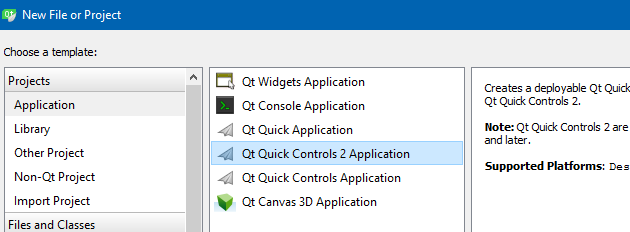
          Did you make a QML project ?
          alt text

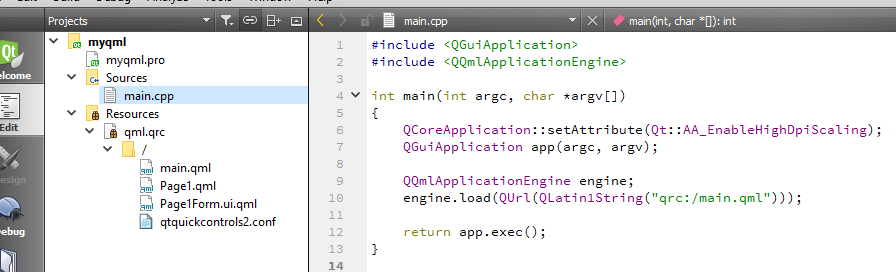
          You should have the following in main.cpp

          #include <QGuiApplication>
          #include <QQmlApplicationEngine>

          int main(int argc, char *argv[])
          {
          QCoreApplication::setAttribute(Qt::AA_EnableHighDpiScaling);
          QGuiApplication app(argc, argv);

          QQmlApplicationEngine engine;
          engine.load(QUrl(QLatin1String("qrc:/main.qml")));
          
          return app.exec();
          

          }

          alt text

          1 Reply Last reply
          2
          • tomyT Offline
            tomyT Offline
            tomy
            wrote on last edited by
            #6

            Thank you. I did like what you said.
            Here are my files:
            Main.cpp, Mai.qml, Page1.qml and Page1.form.ui.qml.

            I get these errors which belong to (the path of) images I think:

            qrc:/main.qml:5:1: QML Image: Protocol "c" is unknown
            qrc:/main.qml:9:4: QML Image: Protocol "c" is unknown
            qrc:/main.qml:16:4: QML Image: Protocol "c" is unknown

            mrjjM 1 Reply Last reply
            0
            • tomyT tomy

              Thank you. I did like what you said.
              Here are my files:
              Main.cpp, Mai.qml, Page1.qml and Page1.form.ui.qml.

              I get these errors which belong to (the path of) images I think:

              qrc:/main.qml:5:1: QML Image: Protocol "c" is unknown
              qrc:/main.qml:9:4: QML Image: Protocol "c" is unknown
              qrc:/main.qml:16:4: QML Image: Protocol "c" is unknown

              mrjjM Offline
              mrjjM Offline
              mrjj
              Lifetime Qt Champion
              wrote on last edited by mrjj
              #7

              @tomy said in Problems in practicing and running an example:

              qrc:/main.qml:5:1: QML Image: Protocol "c" is unknown

              its error inside file. something is not right there.
              I think they image paths are invalid
              https://stackoverflow.com/questions/17610949/protocol-c-is-unknown-error-in-qml
              You shall use URL syntax.
              or even better. use qres file and the :/file syntax

              1 Reply Last reply
              1
              • tomyT Offline
                tomyT Offline
                tomy
                wrote on last edited by
                #8

                I tested all three options.
                The first mode faced errors.
                The second one and third one showed nothing although had no issues!
                What is the problem please?

                mrjjM 1 Reply Last reply
                0
                • tomyT tomy

                  I tested all three options.
                  The first mode faced errors.
                  The second one and third one showed nothing although had no issues!
                  What is the problem please?

                  mrjjM Offline
                  mrjjM Offline
                  mrjj
                  Lifetime Qt Champion
                  wrote on last edited by
                  #9

                  @tomy
                  In all cases you user the same path c:/xxxx, so i think paths are the issue.

                  1 Reply Last reply
                  0
                  • tomyT Offline
                    tomyT Offline
                    tomy
                    wrote on last edited by
                    #10

                    All images are in the same folder on my Desktop, in this address:
                    C:\Users\Abbasi\Desktop\images

                    So how should I give the paths of images to the code please?

                    mrjjM 1 Reply Last reply
                    0
                    • tomyT tomy

                      All images are in the same folder on my Desktop, in this address:
                      C:\Users\Abbasi\Desktop\images

                      So how should I give the paths of images to the code please?

                      mrjjM Offline
                      mrjjM Offline
                      mrjj
                      Lifetime Qt Champion
                      wrote on last edited by mrjj
                      #11

                      @tomy
                      Hi
                      I would move the images to an image folder under the project.
                      Then i would use a qres file and the ":/" syntax
                      (like here engine.load(QUrl(QLatin1String("qrc:/main.qml")));)

                      https://www.youtube.com/watch?v=sWIQIi4lg58
                      http://www.bogotobogo.com/Qt/Qt5_Resource_Files.php

                      You can right click an image when inside the qres file and get path there.

                      1 Reply Last reply
                      0
                      • tomyT Offline
                        tomyT Offline
                        tomy
                        wrote on last edited by tomy
                        #12

                        Hi,

                        The purpose is to add a folder (or some files) to the project as resources to use them easier, yeah? OK, I did these:

                        According to the tuts, I created a Resource file named MyRes like this.
                        Please note that the Path there is the same path as the project (Main).

                        I use /MyFiles as the Prefix and add all 4 files, the images (from the image folder on the Desktop).
                        When adding the files, this message is appeared for all four files. I don't know what to do here.

                        mrjjM 1 Reply Last reply
                        0
                        • tomyT tomy

                          Hi,

                          The purpose is to add a folder (or some files) to the project as resources to use them easier, yeah? OK, I did these:

                          According to the tuts, I created a Resource file named MyRes like this.
                          Please note that the Path there is the same path as the project (Main).

                          I use /MyFiles as the Prefix and add all 4 files, the images (from the image folder on the Desktop).
                          When adding the files, this message is appeared for all four files. I don't know what to do here.

                          mrjjM Offline
                          mrjjM Offline
                          mrjj
                          Lifetime Qt Champion
                          wrote on last edited by
                          #13

                          @tomy
                          Hi
                          Can you right click myres.qrc and choose "Add existing files" , then
                          select the images. ?

                          1 Reply Last reply
                          0
                          • tomyT Offline
                            tomyT Offline
                            tomy
                            wrote on last edited by
                            #14

                            Yes,

                            And it resulted in this!

                            mrjjM 1 Reply Last reply
                            0
                            • tomyT tomy

                              Yes,

                              And it resulted in this!

                              mrjjM Offline
                              mrjjM Offline
                              mrjj
                              Lifetime Qt Champion
                              wrote on last edited by mrjj
                              #15

                              @tomy

                              That is why i wanted you to move the images to under the project.
                              The :/Myfile path is not correct. the files are not there...

                              Anyway, now right click each image and you can copy correct path to use.

                              1 Reply Last reply
                              0
                              • tomyT Offline
                                tomyT Offline
                                tomy
                                wrote on last edited by
                                #16

                                The program runs without error but show nothing! Does it work for you please?
                                What is the problem of this part if it's correct?

                                You say that you would move the images to an image folder under the project. But how? If you mean using those two tuts, I tried and also posted the error I faced at that time. The current style of adding the path of images (as shown in the screenshot) is rather ugly I think moving the images into a folder under the project would be nicer and better.

                                mrjjM 1 Reply Last reply
                                0
                                • tomyT tomy

                                  The program runs without error but show nothing! Does it work for you please?
                                  What is the problem of this part if it's correct?

                                  You say that you would move the images to an image folder under the project. But how? If you mean using those two tuts, I tried and also posted the error I faced at that time. The current style of adding the path of images (as shown in the screenshot) is rather ugly I think moving the images into a folder under the project would be nicer and better.

                                  mrjjM Offline
                                  mrjjM Offline
                                  mrjj
                                  Lifetime Qt Champion
                                  wrote on last edited by
                                  #17

                                  @tomy
                                  Just use the normal explorer to move the files under the project
                                  Try to use the qrc:/ syntax then. Since its compiled into the
                                  .exe i assumed :/ would work.

                                  tomyT 1 Reply Last reply
                                  0
                                  • mrjjM mrjj

                                    @tomy
                                    Just use the normal explorer to move the files under the project
                                    Try to use the qrc:/ syntax then. Since its compiled into the
                                    .exe i assumed :/ would work.

                                    tomyT Offline
                                    tomyT Offline
                                    tomy
                                    wrote on last edited by tomy
                                    #18

                                    Just use the normal explorer to move the files under the project

                                    What is this please?

                                    This time I tried the following but no success again.

                                    I copied the images folder into the project folder and used an images.qrc file like this and ran the app using that prefix name. It says it cannot open the files! What is the problem this time?
                                    Where did I go wrong?

                                    1 Reply Last reply
                                    0
                                    • tomyT Offline
                                      tomyT Offline
                                      tomy
                                      wrote on last edited by
                                      #19

                                      Tried again using a new project named Main3 as below, copying the image folder into the project folder.
                                      Here is the content of the files:
                                      main3.pro
                                      main.cpp
                                      images.qrc
                                      main.qml
                                      page1.qml
                                      Page1Form.ui.qml
                                      qtquickcontrols2.conf

                                      The program runs:
                                      Issues window shows nothing.
                                      Application Output shows this:
                                      Starting C:\Users\Abbasi\Documents\QML\Main3\Main3\build-Main3-Desktop_Qt_5_9_0_MinGW_32bit-Debug\debug\Main3.exe...
                                      QML debugging is enabled. Only use this in a safe environment.

                                      Compile Output shows:
                                      12:35:55: Elapsed time: 00:00.

                                      And General Messages shows nothing.

                                      The app shows nothing as the output.
                                      What is the problem? Why can't I run this example successfully?
                                      Why everything with Qt is that complicated and confusing?

                                      mrjjM 1 Reply Last reply
                                      0
                                      • tomyT tomy

                                        Tried again using a new project named Main3 as below, copying the image folder into the project folder.
                                        Here is the content of the files:
                                        main3.pro
                                        main.cpp
                                        images.qrc
                                        main.qml
                                        page1.qml
                                        Page1Form.ui.qml
                                        qtquickcontrols2.conf

                                        The program runs:
                                        Issues window shows nothing.
                                        Application Output shows this:
                                        Starting C:\Users\Abbasi\Documents\QML\Main3\Main3\build-Main3-Desktop_Qt_5_9_0_MinGW_32bit-Debug\debug\Main3.exe...
                                        QML debugging is enabled. Only use this in a safe environment.

                                        Compile Output shows:
                                        12:35:55: Elapsed time: 00:00.

                                        And General Messages shows nothing.

                                        The app shows nothing as the output.
                                        What is the problem? Why can't I run this example successfully?
                                        Why everything with Qt is that complicated and confusing?

                                        mrjjM Offline
                                        mrjjM Offline
                                        mrjj
                                        Lifetime Qt Champion
                                        wrote on last edited by mrjj
                                        #20

                                        @tomy
                                        You are still having issues with the paths/syntax
                                        The path you use is invalid
                                        Should have the form
                                        qrc:/images/filename.png

                                        Use the right click menu to make sure its correct.

                                        1 Reply Last reply
                                        0
                                        • tomyT Offline
                                          tomyT Offline
                                          tomy
                                          wrote on last edited by
                                          #21

                                          I used, no changes in result! :(

                                          mrjjM 1 Reply Last reply
                                          0

                                          • Login

                                          • Login or register to search.
                                          • First post
                                            Last post
                                          0
                                          • Categories
                                          • Recent
                                          • Tags
                                          • Popular
                                          • Users
                                          • Groups
                                          • Search
                                          • Get Qt
                                          • Unsolved