
QPainter howto draw Table
-
Hi
You can do it like this ( among many ways)
Credits to @Ni.Sumi Sumi for base functionvoid MainWindow::on_pushButton_released() { PrintWidget(ui->tableWidget); } void MainWindow::PrintWidget(QWidget* widget) { QPixmap pix(widget->size()); QPainter painter(&pix); widget->render(&painter); painter.end(); QPrinter printer(QPrinter::HighResolution); printer.setOrientation(QPrinter::Landscape); printer.setOutputFormat(QPrinter::PdfFormat); printer.setPaperSize(QPrinter::A4); printer.setOutputFileName("test.pdf"); // will be in build folder painter.begin(&printer); double xscale = printer.pageRect().width() / double(pix.width()); double yscale = printer.pageRect().height() / double(pix.height()); double scale = qMin(xscale, yscale); painter.translate(printer.paperRect().x() + printer.pageRect().width() / 2, printer.paperRect().y() + printer.pageRect().height() / 2); painter.scale(scale, scale); painter.translate(-widget->width() / 2, -widget->height() / 2); painter.drawPixmap(0, 0, pix); painter.end(); }Just disable the pdf part to have it on paper.
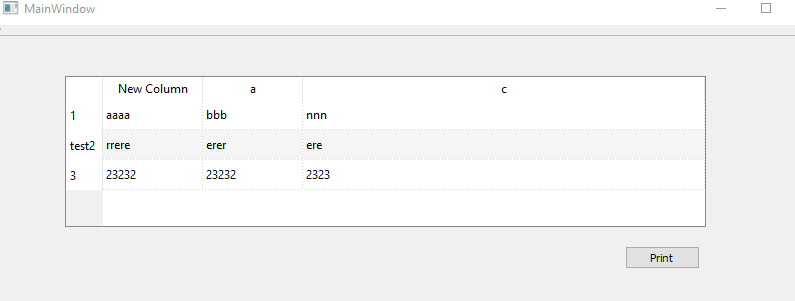
Screen:
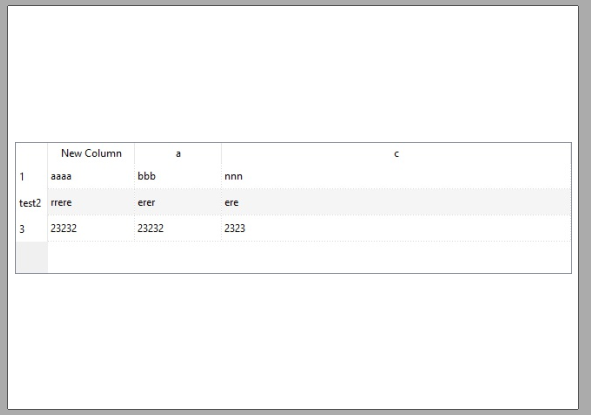
output:
Test project
https://www.dropbox.com/s/kvgo5fissc9i9t0/printtable.zip?dl=0 -
Hi
You can do it like this ( among many ways)
Credits to @Ni.Sumi Sumi for base functionvoid MainWindow::on_pushButton_released() { PrintWidget(ui->tableWidget); } void MainWindow::PrintWidget(QWidget* widget) { QPixmap pix(widget->size()); QPainter painter(&pix); widget->render(&painter); painter.end(); QPrinter printer(QPrinter::HighResolution); printer.setOrientation(QPrinter::Landscape); printer.setOutputFormat(QPrinter::PdfFormat); printer.setPaperSize(QPrinter::A4); printer.setOutputFileName("test.pdf"); // will be in build folder painter.begin(&printer); double xscale = printer.pageRect().width() / double(pix.width()); double yscale = printer.pageRect().height() / double(pix.height()); double scale = qMin(xscale, yscale); painter.translate(printer.paperRect().x() + printer.pageRect().width() / 2, printer.paperRect().y() + printer.pageRect().height() / 2); painter.scale(scale, scale); painter.translate(-widget->width() / 2, -widget->height() / 2); painter.drawPixmap(0, 0, pix); painter.end(); }Just disable the pdf part to have it on paper.
Screen:
output:
Test project
https://www.dropbox.com/s/kvgo5fissc9i9t0/printtable.zip?dl=0@mrjj said in QPainter howto draw Table:
painter.begin(&printer);
double xscale = printer.pageRect().width() / double(pix.width());
double yscale = printer.pageRect().height() / double(pix.height());
double scale = qMin(xscale, yscale);
painter.translate(printer.paperRect().x() + printer.pageRect().width() / 2,
printer.paperRect().y() + printer.pageRect().height() / 2);
painter.scale(scale, scale);
painter.translate(-widget->width() / 2, -widget->height() / 2);
painter.drawPixmap(0, 0, pix);
painter.end();i got :

code :
QTableWidget * test = new QTableWidget(this); int row = 0; for(MAPEmployeesTable::const_iterator it = mEmployeesTable->begin(); it != mEmployeesTable->end(); ++it){ test->setRowCount(row+1); test->setItem(row,0,new QTableWidgetItem(it->second.getName())); test->setItem(row,1,new QTableWidgetItem(it->second.getBsalary())); test->setItem(row,2,new QTableWidgetItem(it->second.getAccommBonus())); test->setItem(row,3,new QTableWidgetItem(it->second.getDiscriminBonus())); test->setItem(row,4,new QTableWidgetItem(it->second.getDelegatBonus())); test->setItem(row,5,new QTableWidgetItem(it->second.getTeachingBonus())); test->setItem(row,6,new QTableWidgetItem(it->second.getReward())); test->setItem(row,7,new QTableWidgetItem(it->second.getNOWBonus())); row++; } QPrinter printer(QPrinter::HighResolution); printer.setOutputFileName("print.pdf"); printer.setOrientation(QPrinter::Landscape); printer.setOutputFormat(QPrinter::PdfFormat); printer.setPageSize(QPrinter::A4); QPixmap pix(test->size()); QPainter painter(&pix); test->render(&painter); painter.end(); painter.begin(&printer); double xscale = printer.pageRect().width() / double(pix.width()); double yscale = printer.pageRect().height() / double(pix.height()); double scale = qMin(xscale, yscale); painter.translate(printer.paperRect().x() + printer.pageRect().width() / 2, printer.paperRect().y() + printer.pageRect().height() / 2); painter.scale(scale, scale); painter.translate(-test->width() / 2, -test->height() / 2); painter.drawPixmap(0, 0, pix); painter.end(); delete test; -
well it will have a default size then.
And it seems it has scrollbars too.
try to resize it to have the needed width. -
well it will have a default size then.
And it seems it has scrollbars too.
try to resize it to have the needed width.@mrjj there will be another problem , so as u can see the render fucntion it's not take the table items..etc it just take a screenshot for the table
i don't want the header & scroolbar , also when i've more then 10 rows ( then i will have a scroolbar ) the render is only take screenshot for what is visible ( maybe only first 5 rows ) , i will have table with over 1k rows so it should be in every page maybe there 20 or 30 based on paper height , it's there any another class can do same this ?also if i make it by HTML code is't ok ? ( while i think this is very stupid method)
-
http://www.qtrpt.tk/?page=doc_qtrpt.php#usinginproject
that's is what i was looking for :)
thx all for help -
Oh you have 1000 rows. Yes then report generator is surely the way to go as it would have been a huge image to show all them at once :)

