Skip to content
  • Categories
  • Recent
  • Tags
  • Popular
  • Users
  • Groups
  • Search
  • Get Qt Extensions
  • Unsolved
Collapse
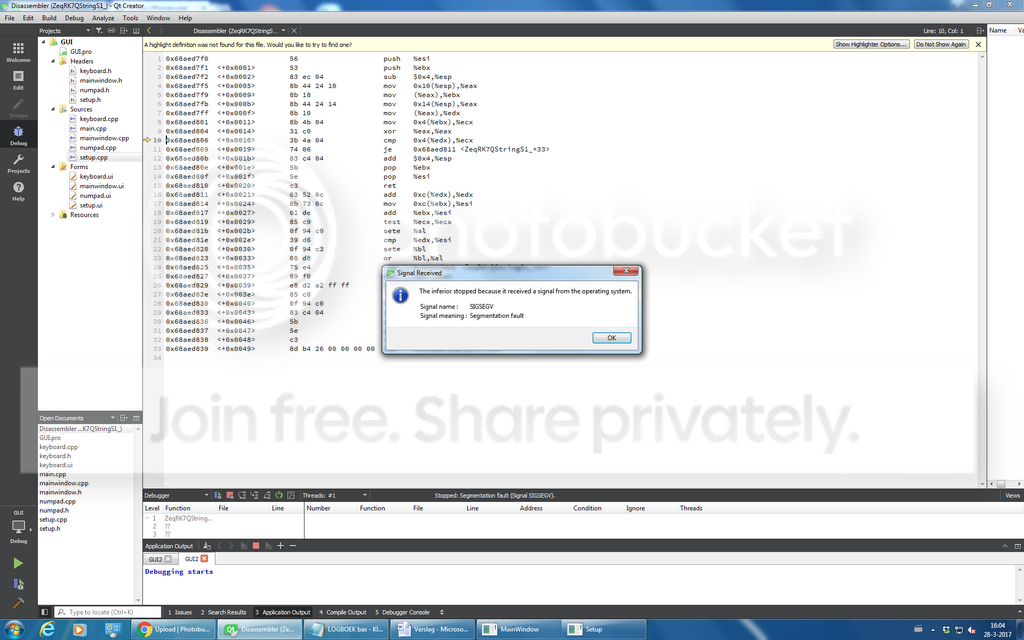
Brand Logo
  1. Home
  2. Qt Development
  3. General and Desktop
  4. Question about Qcombo box < crash issue
Qt 6.11 is out! See what's new in the release blog

Question about Qcombo box < crash issue

Scheduled Pinned Locked Moved Solved General and Desktop
26 Posts 5 Posters 10.9k Views 2 Watching
  • Oldest to Newest
  • Newest to Oldest
  • Most Votes
Reply
  • Reply as topic
Log in to reply
This topic has been deleted. Only users with topic management privileges can see it.
  • B Offline
    B Offline
    bask185
    wrote on last edited by
    #1

    I have made a menu window with which I can input settings for the serial port it looks like
    0_1490621080549_upload-87248ba9-2548-4e14-a2c9-bdd10cb1adbf

    The thing works but I want a small upgrade. Under the 'serial port' textlabel I want to display the description of the device, in my current case a ch340 serial ttl converter. I copy pasted most of this code of the terminal example app and made some alterations.

    I use this code:

    void Setup::on_serialPortBox_activated(const QString &arg1)
    {
        z = ui->serialPortBox->currentIndex(); //<< works!
        QStringList list = ui->serialPortBox->itemData(z).toStringList(); // crashes application
        ui->descriptionLabel->setText(list[z]);// << works
    }
    

    This code gets activated when I select a serial port (when I use the combo box) but the middle line of code crashes my program when I use the combo box. I'd like know why it happens and how I can fix it.

    M 1 Reply Last reply
    0
    • B Offline
      B Offline
      bask185
      wrote on last edited by
      #20

      @VRonin I was looking on the QStringList page ...

      I was doing that in an other function

      for (QSerialPortInfo &info : infos) {
              QStringList list;
      
              list << info.portName();
              ui->serialPortBox->addItem(list.first(), list);
          }
      

      So I was stuffing port names in the combo box, but not the description because that is not what I want. The descriptions are to be printed under the combobox in a text label.

      So that function made me thinking, I made a new private QStringList variable called 'list2' and in the same function in which I fill the combobox I also fill 'list2' with dem descriptions

      for (QSerialPortInfo &info : infos) {
              QStringList list;
      
              list << info.portName();
              list2 << info.description(); // < new line
              ui->serialPortBox->addItem(list.first(), list);
          }
      

      so now I only had to do.

      void Setup::on_serialPortBox_activated(const QString &arg1)
      {
          z = ui->serialPortBox->currentIndex();
      
          ui->descriptionLabel->setText(list2[z]);
      }
      

      And voila:
      USB 2.0

      1 Reply Last reply
      1
      • mrjjM Offline
        mrjjM Offline
        mrjj
        Lifetime Qt Champion
        wrote on last edited by
        #2

        maybe
        ui->serialPortBox->itemData(z)
        return QVariant::Invalid ?

        1 Reply Last reply
        3
        • B bask185

          I have made a menu window with which I can input settings for the serial port it looks like
          0_1490621080549_upload-87248ba9-2548-4e14-a2c9-bdd10cb1adbf

          The thing works but I want a small upgrade. Under the 'serial port' textlabel I want to display the description of the device, in my current case a ch340 serial ttl converter. I copy pasted most of this code of the terminal example app and made some alterations.

          I use this code:

          void Setup::on_serialPortBox_activated(const QString &arg1)
          {
              z = ui->serialPortBox->currentIndex(); //<< works!
              QStringList list = ui->serialPortBox->itemData(z).toStringList(); // crashes application
              ui->descriptionLabel->setText(list[z]);// << works
          }
          

          This code gets activated when I select a serial port (when I use the combo box) but the middle line of code crashes my program when I use the combo box. I'd like know why it happens and how I can fix it.

          M Offline
          M Offline
          mchinand
          wrote on last edited by mchinand
          #3

          How do you set the item data for each item in the QComboBox? Does each item in the QComboBox have its own description text? If so, why isn't each item's data just a string and your code like this:

          QString list = ui->serialPortBox->itemData(z).toString();
          ui->descriptionLabel->setText(list);
          

          I'm also confused how the last line is working if your program is crashing before it.

          1 Reply Last reply
          0
          • VRoninV Offline
            VRoninV Offline
            VRonin
            wrote on last edited by VRonin
            #4
            • check that z is within range
            • Are you setting a model in the combobox? I suspect the segfault comes from there, can you post stack trace?

            "La mort n'est rien, mais vivre vaincu et sans gloire, c'est mourir tous les jours"
            ~Napoleon Bonaparte

            On a crusade to banish setIndexWidget() from the holy land of Qt

            1 Reply Last reply
            0
            • B Offline
              B Offline
              bask185
              wrote on last edited by
              #5

              I thought I posted the following yesterday.. but I did not.
              @mrjj said in Question about Qcombo box < crash issue:

              ui->serialPortBox->itemData(z)
              return QVariant::Invalid

              almost the solution ;) instead of the description I am getting the name of the port back.

              0_1490683288537_upload-7cd88127-57fd-4b40-997c-80b0d4dd1eee

              @mchinand said in Question about Qcombo box < crash issue:

              How do you set the item data for each item in the QComboBox? Does each item in the QComboBox have its own description text?

              ui->baudRateBox->addItem(QStringLiteral("9600"), QSerialPort::Baud9600);
                  ui->baudRateBox->addItem(QStringLiteral("19200"), QSerialPort::Baud19200);
                  ui->baudRateBox->addItem(QStringLiteral("38400"), QSerialPort::Baud38400);
                  ui->baudRateBox->addItem(QStringLiteral("115200"), QSerialPort::Baud115200);
                  ui->baudRateBox->setCurrentIndex(3);
              

              In the example software the following code is used:

               QStringList list = ui->serialPortInfoListBox->itemData(idx).toStringList();
                  ui->descriptionLabel->setText(tr("Description: %1").arg(list.count() > 1 ? list.at(1) : tr(blankString)));
              

              But the example uses for functions than I need, so to keep it simple I do not copy paste..everything. Anyways I could net get this code to work :(

              @VRonin said in Question about Qcombo box < crash issue:

              • check that z is within range
              • Are you setting a model in the combobox? I suspect the segfault comes from there, can you post stack trace?

              Z is in range (gives me back 0-2) and I do not know what a stack trace is -.- "?

              mrjjM VRoninV M 3 Replies Last reply
              0
              • B bask185

                I thought I posted the following yesterday.. but I did not.
                @mrjj said in Question about Qcombo box < crash issue:

                ui->serialPortBox->itemData(z)
                return QVariant::Invalid

                almost the solution ;) instead of the description I am getting the name of the port back.

                0_1490683288537_upload-7cd88127-57fd-4b40-997c-80b0d4dd1eee

                @mchinand said in Question about Qcombo box < crash issue:

                How do you set the item data for each item in the QComboBox? Does each item in the QComboBox have its own description text?

                ui->baudRateBox->addItem(QStringLiteral("9600"), QSerialPort::Baud9600);
                    ui->baudRateBox->addItem(QStringLiteral("19200"), QSerialPort::Baud19200);
                    ui->baudRateBox->addItem(QStringLiteral("38400"), QSerialPort::Baud38400);
                    ui->baudRateBox->addItem(QStringLiteral("115200"), QSerialPort::Baud115200);
                    ui->baudRateBox->setCurrentIndex(3);
                

                In the example software the following code is used:

                 QStringList list = ui->serialPortInfoListBox->itemData(idx).toStringList();
                    ui->descriptionLabel->setText(tr("Description: %1").arg(list.count() > 1 ? list.at(1) : tr(blankString)));
                

                But the example uses for functions than I need, so to keep it simple I do not copy paste..everything. Anyways I could net get this code to work :(

                @VRonin said in Question about Qcombo box < crash issue:

                • check that z is within range
                • Are you setting a model in the combobox? I suspect the segfault comes from there, can you post stack trace?

                Z is in range (gives me back 0-2) and I do not know what a stack trace is -.- "?

                mrjjM Offline
                mrjjM Offline
                mrjj
                Lifetime Qt Champion
                wrote on last edited by
                #6

                @bask185 said in Question about Qcombo box < crash issue:

                Just to be 100% clear

                if you use
                QStringList list = ui->serialPortBox->itemData(z).toStringList(); // crashes application

                then you MUST also have
                ui->serialPortInfoListBox->itemData(idx).toStringList();

                else there is no list to take out.

                1 Reply Last reply
                0
                • B bask185

                  I thought I posted the following yesterday.. but I did not.
                  @mrjj said in Question about Qcombo box < crash issue:

                  ui->serialPortBox->itemData(z)
                  return QVariant::Invalid

                  almost the solution ;) instead of the description I am getting the name of the port back.

                  0_1490683288537_upload-7cd88127-57fd-4b40-997c-80b0d4dd1eee

                  @mchinand said in Question about Qcombo box < crash issue:

                  How do you set the item data for each item in the QComboBox? Does each item in the QComboBox have its own description text?

                  ui->baudRateBox->addItem(QStringLiteral("9600"), QSerialPort::Baud9600);
                      ui->baudRateBox->addItem(QStringLiteral("19200"), QSerialPort::Baud19200);
                      ui->baudRateBox->addItem(QStringLiteral("38400"), QSerialPort::Baud38400);
                      ui->baudRateBox->addItem(QStringLiteral("115200"), QSerialPort::Baud115200);
                      ui->baudRateBox->setCurrentIndex(3);
                  

                  In the example software the following code is used:

                   QStringList list = ui->serialPortInfoListBox->itemData(idx).toStringList();
                      ui->descriptionLabel->setText(tr("Description: %1").arg(list.count() > 1 ? list.at(1) : tr(blankString)));
                  

                  But the example uses for functions than I need, so to keep it simple I do not copy paste..everything. Anyways I could net get this code to work :(

                  @VRonin said in Question about Qcombo box < crash issue:

                  • check that z is within range
                  • Are you setting a model in the combobox? I suspect the segfault comes from there, can you post stack trace?

                  Z is in range (gives me back 0-2) and I do not know what a stack trace is -.- "?

                  VRoninV Offline
                  VRoninV Offline
                  VRonin
                  wrote on last edited by
                  #7

                  @bask185 said in Question about Qcombo box < crash issue:

                  I do not know what a stack trace is -.- "

                  Qt Creator: http://doc.qt.io/qtcreator/creator-debug-mode.html#viewing-call-stack-trace
                  Visual Studio: https://msdn.microsoft.com/en-gb/library/windows/hardware/hh439516(v=vs.85).aspx
                  XCode: http://stackoverflow.com/a/26341275

                  "La mort n'est rien, mais vivre vaincu et sans gloire, c'est mourir tous les jours"
                  ~Napoleon Bonaparte

                  On a crusade to banish setIndexWidget() from the holy land of Qt

                  B 1 Reply Last reply
                  2
                  • VRoninV VRonin

                    @bask185 said in Question about Qcombo box < crash issue:

                    I do not know what a stack trace is -.- "

                    Qt Creator: http://doc.qt.io/qtcreator/creator-debug-mode.html#viewing-call-stack-trace
                    Visual Studio: https://msdn.microsoft.com/en-gb/library/windows/hardware/hh439516(v=vs.85).aspx
                    XCode: http://stackoverflow.com/a/26341275

                    B Offline
                    B Offline
                    bask185
                    wrote on last edited by
                    #8

                    @VRonin
                    0_1490697979258_upload-795465d9-64bc-48b4-92e9-46009f42632b

                    1 Reply Last reply
                    0
                    • VRoninV Offline
                      VRoninV Offline
                      VRonin
                      wrote on last edited by VRonin
                      #9

                      I'll reuse @Wieland standard reply: "The image-upload feature on our forum is broken, you might see the picture but other users don't. Please upload your image to a image hoster of your choice (e.g. postimage.org) and embed the pic here with the following markup: ![alternate text](image-url). See also How to insert image on this forum and Hitchhiker's Visual Guide to the Qt Forum."

                      "La mort n'est rien, mais vivre vaincu et sans gloire, c'est mourir tous les jours"
                      ~Napoleon Bonaparte

                      On a crusade to banish setIndexWidget() from the holy land of Qt

                      B 1 Reply Last reply
                      1
                      • VRoninV VRonin

                        I'll reuse @Wieland standard reply: "The image-upload feature on our forum is broken, you might see the picture but other users don't. Please upload your image to a image hoster of your choice (e.g. postimage.org) and embed the pic here with the following markup: ![alternate text](image-url). See also How to insert image on this forum and Hitchhiker's Visual Guide to the Qt Forum."

                        B Offline
                        B Offline
                        bask185
                        wrote on last edited by
                        #10

                        @VRonin I'm sorry, didn't know that.
                        alt text

                        1 Reply Last reply
                        0
                        • VRoninV Offline
                          VRoninV Offline
                          VRonin
                          wrote on last edited by
                          #11

                          That's the assembly, what we are after is the content of the table at the bottom left just below "Debbugger" with headers "Level", "Function","File","Line"

                          "La mort n'est rien, mais vivre vaincu et sans gloire, c'est mourir tous les jours"
                          ~Napoleon Bonaparte

                          On a crusade to banish setIndexWidget() from the holy land of Qt

                          B 1 Reply Last reply
                          0
                          • VRoninV VRonin

                            That's the assembly, what we are after is the content of the table at the bottom left just below "Debbugger" with headers "Level", "Function","File","Line"

                            B Offline
                            B Offline
                            bask185
                            wrote on last edited by
                            #12

                            @VRonin this is the only information I can find, is this of any help??

                            1 ZeqRK7QStringS1_   0x68aed806 
                            2 ??                 0x2d630a0  
                            3 ??
                            
                            1 Reply Last reply
                            0
                            • B bask185

                              I thought I posted the following yesterday.. but I did not.
                              @mrjj said in Question about Qcombo box < crash issue:

                              ui->serialPortBox->itemData(z)
                              return QVariant::Invalid

                              almost the solution ;) instead of the description I am getting the name of the port back.

                              0_1490683288537_upload-7cd88127-57fd-4b40-997c-80b0d4dd1eee

                              @mchinand said in Question about Qcombo box < crash issue:

                              How do you set the item data for each item in the QComboBox? Does each item in the QComboBox have its own description text?

                              ui->baudRateBox->addItem(QStringLiteral("9600"), QSerialPort::Baud9600);
                                  ui->baudRateBox->addItem(QStringLiteral("19200"), QSerialPort::Baud19200);
                                  ui->baudRateBox->addItem(QStringLiteral("38400"), QSerialPort::Baud38400);
                                  ui->baudRateBox->addItem(QStringLiteral("115200"), QSerialPort::Baud115200);
                                  ui->baudRateBox->setCurrentIndex(3);
                              

                              In the example software the following code is used:

                               QStringList list = ui->serialPortInfoListBox->itemData(idx).toStringList();
                                  ui->descriptionLabel->setText(tr("Description: %1").arg(list.count() > 1 ? list.at(1) : tr(blankString)));
                              

                              But the example uses for functions than I need, so to keep it simple I do not copy paste..everything. Anyways I could net get this code to work :(

                              @VRonin said in Question about Qcombo box < crash issue:

                              • check that z is within range
                              • Are you setting a model in the combobox? I suspect the segfault comes from there, can you post stack trace?

                              Z is in range (gives me back 0-2) and I do not know what a stack trace is -.- "?

                              M Offline
                              M Offline
                              mchinand
                              wrote on last edited by mchinand
                              #13

                              This addItem code is for a different QComboBox then in your original post (baudRateBox instead of serialPortBox). What is the addItem code for serialPortBox? The second parameter of addItem() is the UserRole data that will be retrieved by itemData() (by default, you can select a different role if you want, however).

                              1 Reply Last reply
                              1
                              • B Offline
                                B Offline
                                bask185
                                wrote on last edited by
                                #14

                                I have more combo boxes, it was just an example of how I put things in them

                                A 1 Reply Last reply
                                0
                                • B bask185

                                  I have more combo boxes, it was just an example of how I put things in them

                                  A Offline
                                  A Offline
                                  ambershark
                                  wrote on last edited by
                                  #15

                                  @bask185 You need to build and run the debug version in order to get the stack trace with detailed information. If you do this and then post that information we can tell you where your crash is.

                                  Based on the release stack trace you are crashing in QString. We don't know where yet but if you repost the debug build stack trace we will. It should tell us line and file.

                                  My L-GPL'd C++ Logger github.com/ambershark-mike/sharklog

                                  1 Reply Last reply
                                  2
                                  • B Offline
                                    B Offline
                                    bask185
                                    wrote on last edited by
                                    #16

                                    ASSERT failure in QList<T>::operator[]: "index out of range", file ../../../Qt5.7.0/5.7/gcc_64/include/QtCore/qlist.h, line 545

                                    index out of range issue it seems, I verified that z is always within the range (0-2)

                                    1   __GI_raise                                                                                                                 raise.c       54  0x7ffff5b81428 
                                    2   __GI_abort                                                                                                                 abort.c       89  0x7ffff5b8302a 
                                    3   QMessageLogger::fatal(const char *, ...) const                                                                                               0x7ffff653ff4e 
                                    4   qt_assert_x(const char *, const char *, const char *, int)                                                                                   0x7ffff653b821 
                                    5   QList<QString>::operator[]                           // << this the one                                                        qlist.h       545 0x427f8d       
                                    6   Setup::on_serialPortBox_activated                                                                                          setup.cpp     115 0x424c04       
                                    7   Setup::qt_static_metacall                                                                                                  moc_setup.cpp 116 0x4297aa       
                                    8   Setup::qt_metacall                                                                                                         moc_setup.cpp 183 0x4299ee       
                                    9   QMetaObject::activate(QObject *, int, int, void * *)                                                                                         0x7ffff6746700 
                                    10  QComboBox::activated(QString const&)                                                                                                         0x7ffff77d4c65 
                                    11  ??                                                                                                                                           0x7ffff77d6126 
                                    12  ??                                                                                                                                           0x7ffff77d88e9 
                                    13  ??                                                                                                                                           0x7ffff77de91d 
                                    14  QMetaObject::activate(QObject *, int, int, void * *)                                                                                         0x7ffff6746056 
                                    15  ??                                                                                                                                           0x7ffff77d528b 
                                    16  QCoreApplicationPrivate::sendThroughObjectEventFilters(QObject *, QEvent *)                                                                  0x7ffff671e853 
                                    17  QApplicationPrivate::notify_helper(QObject *, QEvent *)                                                                                      0x7ffff76dc505 
                                    18  QApplication::notify(QObject *, QEvent *)                                                                                                    0x7ffff76e3808 
                                    19  QCoreApplication::notifyInternal2(QObject *, QEvent *)                                                                                       0x7ffff671eae0 
                                    20  QApplicationPrivate::sendMouseEvent(QWidget *, QMouseEvent *, QWidget *, QWidget *, QWidget * *, QPointer<QWidget>&, bool)                   0x7ffff76e27bf 
                                    ... <More>                                                                                                                                                      
                                    
                                    
                                    VRoninV 1 Reply Last reply
                                    0
                                    • B bask185

                                      ASSERT failure in QList<T>::operator[]: "index out of range", file ../../../Qt5.7.0/5.7/gcc_64/include/QtCore/qlist.h, line 545

                                      index out of range issue it seems, I verified that z is always within the range (0-2)

                                      1   __GI_raise                                                                                                                 raise.c       54  0x7ffff5b81428 
                                      2   __GI_abort                                                                                                                 abort.c       89  0x7ffff5b8302a 
                                      3   QMessageLogger::fatal(const char *, ...) const                                                                                               0x7ffff653ff4e 
                                      4   qt_assert_x(const char *, const char *, const char *, int)                                                                                   0x7ffff653b821 
                                      5   QList<QString>::operator[]                           // << this the one                                                        qlist.h       545 0x427f8d       
                                      6   Setup::on_serialPortBox_activated                                                                                          setup.cpp     115 0x424c04       
                                      7   Setup::qt_static_metacall                                                                                                  moc_setup.cpp 116 0x4297aa       
                                      8   Setup::qt_metacall                                                                                                         moc_setup.cpp 183 0x4299ee       
                                      9   QMetaObject::activate(QObject *, int, int, void * *)                                                                                         0x7ffff6746700 
                                      10  QComboBox::activated(QString const&)                                                                                                         0x7ffff77d4c65 
                                      11  ??                                                                                                                                           0x7ffff77d6126 
                                      12  ??                                                                                                                                           0x7ffff77d88e9 
                                      13  ??                                                                                                                                           0x7ffff77de91d 
                                      14  QMetaObject::activate(QObject *, int, int, void * *)                                                                                         0x7ffff6746056 
                                      15  ??                                                                                                                                           0x7ffff77d528b 
                                      16  QCoreApplicationPrivate::sendThroughObjectEventFilters(QObject *, QEvent *)                                                                  0x7ffff671e853 
                                      17  QApplicationPrivate::notify_helper(QObject *, QEvent *)                                                                                      0x7ffff76dc505 
                                      18  QApplication::notify(QObject *, QEvent *)                                                                                                    0x7ffff76e3808 
                                      19  QCoreApplication::notifyInternal2(QObject *, QEvent *)                                                                                       0x7ffff671eae0 
                                      20  QApplicationPrivate::sendMouseEvent(QWidget *, QMouseEvent *, QWidget *, QWidget *, QWidget * *, QPointer<QWidget>&, bool)                   0x7ffff76e27bf 
                                      ... <More>                                                                                                                                                      
                                      
                                      
                                      VRoninV Offline
                                      VRoninV Offline
                                      VRonin
                                      wrote on last edited by VRonin
                                      #17

                                      problem looks to be in: ui->descriptionLabel->setText(list[z]); almost surely because list is empty as I never saw you setting the user role to a QStringList anywhere in your code

                                      "La mort n'est rien, mais vivre vaincu et sans gloire, c'est mourir tous les jours"
                                      ~Napoleon Bonaparte

                                      On a crusade to banish setIndexWidget() from the holy land of Qt

                                      B 1 Reply Last reply
                                      2
                                      • VRoninV VRonin

                                        problem looks to be in: ui->descriptionLabel->setText(list[z]); almost surely because list is empty as I never saw you setting the user role to a QStringList anywhere in your code

                                        B Offline
                                        B Offline
                                        bask185
                                        wrote on last edited by
                                        #18

                                        @VRonin that is probably because I cannot find the words 'user' or 'role' anywhere on the doc.qt page and I don't understand how I can succesfully use a QStringClass for my purpose.

                                        @all Nobody knows how I can display the description of my serial port???

                                        VRoninV 1 Reply Last reply
                                        0
                                        • B bask185

                                          @VRonin that is probably because I cannot find the words 'user' or 'role' anywhere on the doc.qt page and I don't understand how I can succesfully use a QStringClass for my purpose.

                                          @all Nobody knows how I can display the description of my serial port???

                                          VRoninV Offline
                                          VRoninV Offline
                                          VRonin
                                          wrote on last edited by
                                          #19

                                          @bask185 said in Question about Qcombo box < crash issue:

                                          I cannot find the words 'user' or 'role' anywhere on the doc.qt page

                                          😕 http://doc.qt.io/qt-5/qcombobox.html#insertItem

                                          Nobody knows how I can display the description of my serial port???

                                          we do and we tried to explain you how. you have to save it in the data of the combobox

                                          "La mort n'est rien, mais vivre vaincu et sans gloire, c'est mourir tous les jours"
                                          ~Napoleon Bonaparte

                                          On a crusade to banish setIndexWidget() from the holy land of Qt

                                          1 Reply Last reply
                                          3
                                          • B Offline
                                            B Offline
                                            bask185
                                            wrote on last edited by
                                            #20

                                            @VRonin I was looking on the QStringList page ...

                                            I was doing that in an other function

                                            for (QSerialPortInfo &info : infos) {
                                                    QStringList list;
                                            
                                                    list << info.portName();
                                                    ui->serialPortBox->addItem(list.first(), list);
                                                }
                                            

                                            So I was stuffing port names in the combo box, but not the description because that is not what I want. The descriptions are to be printed under the combobox in a text label.

                                            So that function made me thinking, I made a new private QStringList variable called 'list2' and in the same function in which I fill the combobox I also fill 'list2' with dem descriptions

                                            for (QSerialPortInfo &info : infos) {
                                                    QStringList list;
                                            
                                                    list << info.portName();
                                                    list2 << info.description(); // < new line
                                                    ui->serialPortBox->addItem(list.first(), list);
                                                }
                                            

                                            so now I only had to do.

                                            void Setup::on_serialPortBox_activated(const QString &arg1)
                                            {
                                                z = ui->serialPortBox->currentIndex();
                                            
                                                ui->descriptionLabel->setText(list2[z]);
                                            }
                                            

                                            And voila:
                                            USB 2.0

                                            1 Reply Last reply
                                            1

                                            • Login

                                            • Login or register to search.
                                            • First post
                                              Last post
                                            0
                                            • Categories
                                            • Recent
                                            • Tags
                                            • Popular
                                            • Users
                                            • Groups
                                            • Search
                                            • Get Qt Extensions
                                            • Unsolved