
Skip to content
  • Categories
  • Recent
  • Tags
  • Popular
  • Users
  • Groups
  • Search
  • Get Qt Extensions
  • Unsolved
Collapse
Brand Logo
  1. Home
  2. Qt Development
  3. General and Desktop
  4. Windows: some QRC resources are inaccessible when using Qt 5.8, works fine with 5.7
Qt 6.11 is out! See what's new in the release blog

Windows: some QRC resources are inaccessible when using Qt 5.8, works fine with 5.7

Scheduled Pinned Locked Moved Solved General and Desktop
17 Posts 3 Posters 3.8k Views 2 Watching
  • Oldest to Newest
  • Newest to Oldest
  • Most Votes
Reply
  • Reply as topic
Log in to reply
This topic has been deleted. Only users with topic management privileges can see it.
  • V Violet Giraffe

    Yes, I've actually started without an alias and only added it later. it makes no difference.

    mrjjM Offline
    mrjjM Offline
    mrjj
    Lifetime Qt Champion
    wrote on last edited by
    #7

    @Violet-Giraffe
    Hmm.
    Installed 5.8 (just for u ;)
    and funny enough it works?
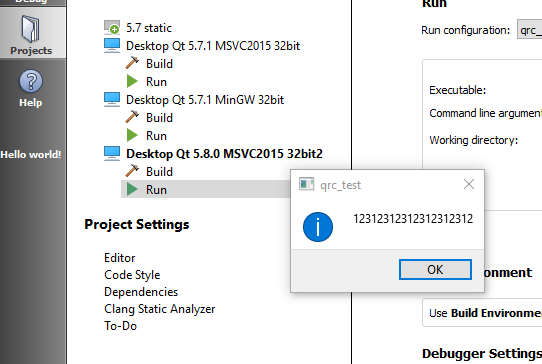
    alt text

    V 1 Reply Last reply
    0
    • mrjjM mrjj

      @Violet-Giraffe
      Hmm.
      Installed 5.8 (just for u ;)
      and funny enough it works?
      alt text

      V Offline
      V Offline
      Violet Giraffe
      wrote on last edited by
      #8

      @mrjj
      Meh. That feeling when you're disappointed the bug doesn't occur :)
      Works on my home PC, too. But not the office one. Guess I'll use debugger to dive into Qt sources tomorrow. Fun!

      mrjjM 1 Reply Last reply
      0
      • V Violet Giraffe

        @mrjj
        Meh. That feeling when you're disappointed the bug doesn't occur :)
        Works on my home PC, too. But not the office one. Guess I'll use debugger to dive into Qt sources tomorrow. Fun!

        mrjjM Offline
        mrjjM Offline
        mrjj
        Lifetime Qt Champion
        wrote on last edited by
        #9

        @Violet-Giraffe
        Yes Its a ambivalent moment.
        I also wish it was just a normal bug as that's easier to explain that what
        on earth could be a difference.

        Maybe virus scanner locks the file the moment it tried to compile it :)

        I was wondering. If you compile on Home machine and run on work.
        Can it load it then?

        1 Reply Last reply
        1
        • V Offline
          V Offline
          Violet Giraffe
          wrote on last edited by
          #10

          Good idea.
          There's no AV scanner on either of the PCs (I know you didn't mean it literally, but still).
          Also, I've inspected the generated qrc_*.cpp files obtained by Qt 5.7 and 5.8. There are no differences in the data chunks. Both cpp files do include all the files as expected.

          mrjjM 1 Reply Last reply
          0
          • V Violet Giraffe

            Good idea.
            There's no AV scanner on either of the PCs (I know you didn't mean it literally, but still).
            Also, I've inspected the generated qrc_*.cpp files obtained by Qt 5.7 and 5.8. There are no differences in the data chunks. Both cpp files do include all the files as expected.

            mrjjM Offline
            mrjjM Offline
            mrjj
            Lifetime Qt Champion
            wrote on last edited by
            #11

            @Violet-Giraffe
            Well my old version of avast would silently block the exe so from that i learned that
            its not to be ruled out completely ;)

            So if we assume that the resource is indeed compiled in, then it seems impossible
            it can fall off, so i wonder if QString QIODevice::errorString() const could tell something (when it fails)

            1 Reply Last reply
            1
            • V Offline
              V Offline
              Violet Giraffe
              wrote on last edited by
              #12

              Found the reason for this behavior. If the program was built using Qt 5.8 toolset, it must run with Qt 5.8 DLLs. So happened that I was running my Qt 5.8-built binary against Qt 5.7 (due to PATH settings), and that is the situation in which resource loading fails at runtime. Otherwise the application behaves perfectly normal so it was hard to spot I'm doing something wrong.

              mrjjM 1 Reply Last reply
              0
              • V Violet Giraffe

                Found the reason for this behavior. If the program was built using Qt 5.8 toolset, it must run with Qt 5.8 DLLs. So happened that I was running my Qt 5.8-built binary against Qt 5.7 (due to PATH settings), and that is the situation in which resource loading fails at runtime. Otherwise the application behaves perfectly normal so it was hard to spot I'm doing something wrong.

                mrjjM Offline
                mrjjM Offline
                mrjj
                Lifetime Qt Champion
                wrote on last edited by
                #13

                @Violet-Giraffe
                Wow
                Good found.
                Did not think of that scenario.
                Would expect it to blow up a bit more - but it makes sense when you say it
                Besides the QApplication, the QFile is one the first Qt class to be used at start up.

                1 Reply Last reply
                0
                • V Offline
                  V Offline
                  Violet Giraffe
                  wrote on last edited by
                  #14

                  Well, Qt is (usually) binary-compatible between versions, so while normal operation in this case is not guaranteed, it is probable.

                  1 Reply Last reply
                  0
                  • V Offline
                    V Offline
                    Violet Giraffe
                    wrote on last edited by
                    #15

                    On that note: is it possible to query the version of Qt library at runtime? I. e. the version of the Qt DLLs, not the headers I used during compilation? I want to add an assert() to my programs :)

                    1 Reply Last reply
                    0
                    • hskoglundH Offline
                      hskoglundH Offline
                      hskoglund
                      wrote on last edited by
                      #16

                      Hi, you can use qVersion(), like this:

                      qDebug() << qVersion();
                      
                      V 1 Reply Last reply
                      3
                      • hskoglundH hskoglund

                        Hi, you can use qVersion(), like this:

                        qDebug() << qVersion();
                        
                        V Offline
                        V Offline
                        Violet Giraffe
                        wrote on last edited by
                        #17

                        @hskoglund said in Windows: some QRC resources are inaccessible when using Qt 5.8, works fine with 5.7:

                        Hi, you can use qVersion(), like this:

                        qDebug() << qVersion();
                        

                        Very nice, thank you, that does exactly what I need!

                        1 Reply Last reply
                        0

                        • Login

                        • Login or register to search.
                        • First post
                          Last post
                        0
                        • Categories
                        • Recent
                        • Tags
                        • Popular
                        • Users
                        • Groups
                        • Search
                        • Get Qt Extensions
                        • Unsolved