Skip to content
  • Categories
  • Recent
  • Tags
  • Popular
  • Users
  • Groups
  • Search
  • Get Qt Extensions
  • Unsolved
Collapse
Brand Logo
  1. Home
  2. Qt Development
  3. General and Desktop
  4. PDF output from QPrinter cuts last letter of words if the html characters are generated with cyrillic support

PDF output from QPrinter cuts last letter of words if the html characters are generated with cyrillic support

Scheduled Pinned Locked Moved Solved General and Desktop
19 Posts 2 Posters 5.1k Views 1 Watching
  • Oldest to Newest
  • Newest to Oldest
  • Most Votes
Reply
  • Reply as topic
Log in to reply
This topic has been deleted. Only users with topic management privileges can see it.
  • mrjjM mrjj

    @mardzo
    Ah, that sounds like thats the issue and it then will "page break" in other places as
    expected.
    Im wondering if the HTML code contains anything
    "fixed size"-ish that dont scale so well between screen and printer DPI.

    M Offline
    M Offline
    mardzo
    wrote on last edited by mardzo
    #9

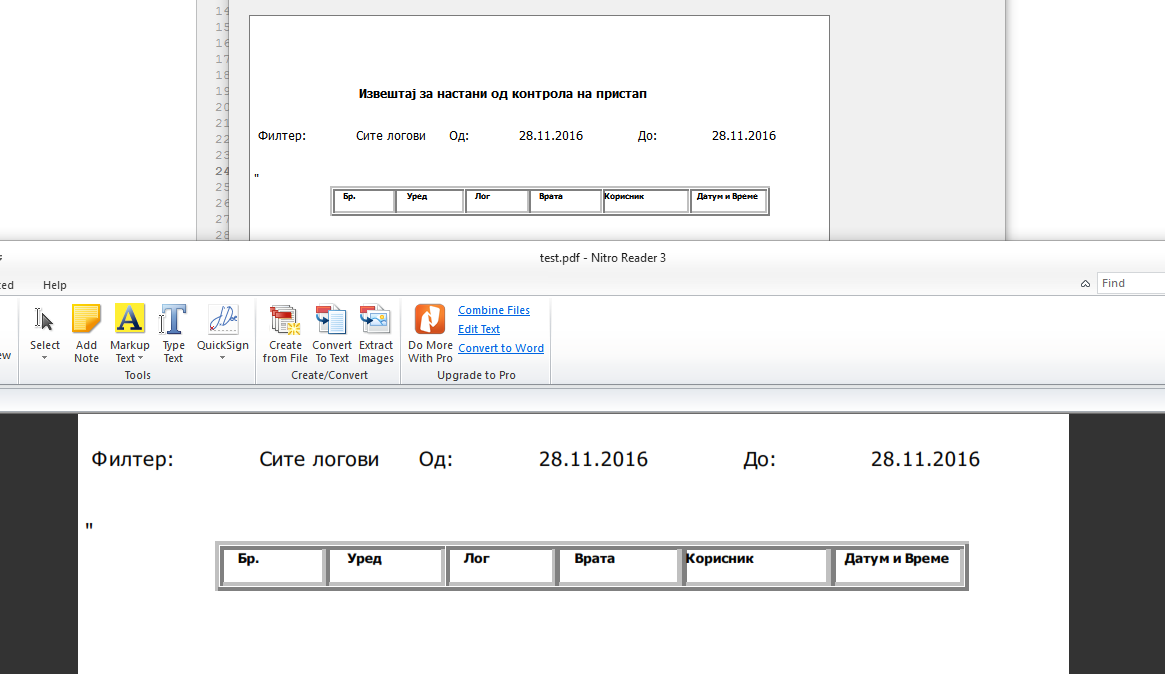
    @mrjj well the html table has a fixed width=440 and style = "margin-top:50px; margin-right:20px; " Im a bit new at QT and i dont understand how the latin letters are displayed correctly and cyrillic at the end of a word are the only one that are cut off

    mrjjM 1 Reply Last reply
    0
    • M mardzo

      @mrjj well the html table has a fixed width=440 and style = "margin-top:50px; margin-right:20px; " Im a bit new at QT and i dont understand how the latin letters are displayed correctly and cyrillic at the end of a word are the only one that are cut off

      mrjjM Offline
      mrjjM Offline
      mrjj
      Lifetime Qt Champion
      wrote on last edited by
      #10

      @mardzo
      Yes that is a bit odd. But cyrillic is another font, i assume?
      So it could react differently being upscaled/created for the printer context.
      A printer has many more DPI than the screen so some scaling is involved as else
      it would just be ultra tiny. ( when printed)
      Could also be a bug in the font handling so the actual size of the cyrillic is reported incorrectly.

      Is it possivble to get the actual HTML that you print?
      ( so I can try it)

      M 1 Reply Last reply
      0
      • mrjjM mrjj

        @mardzo
        Yes that is a bit odd. But cyrillic is another font, i assume?
        So it could react differently being upscaled/created for the printer context.
        A printer has many more DPI than the screen so some scaling is involved as else
        it would just be ultra tiny. ( when printed)
        Could also be a bug in the font handling so the actual size of the cyrillic is reported incorrectly.

        Is it possivble to get the actual HTML that you print?
        ( so I can try it)

        M Offline
        M Offline
        mardzo
        wrote on last edited by mardzo
        #11

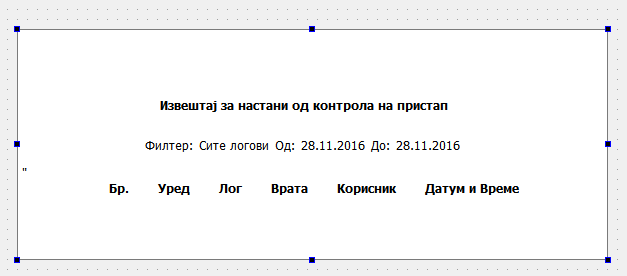
        @mrjj I create it dynamically so i cant send it all. I tried so save it all in a txt file, but the cyrilic characters are replaced with ??????. here is a small snippet with cyrilic characters in it. Im sorry for the bad formatting

        <!DOCTYPE html PUBLIC "-//W3C//DTD HTML 4.0//EN" "http://www.w3.org/TR/REC-html40/strict.dtd">
        <html>
        <head>
          <meta http-equiv="Content-Type" content="text/html; charset=UTF-8">
          <meta name="qrichtext" content="1">
           <title>QTextEdit Example</title>
                <style type="text/css">p, li { white-space: pre-wrap; } </style>
        </head>
        <body style=" font-family:Tahoma; font-size:9pt; font-weight:300; font-style:normal;">
        	<table align=center style = "margin-top:50px;  margin-right:20px; ">
          		<tr><th><h2>Извештај за настани од контрола на пристап</h2></th>	    </tr> 
             </table>
        	<table align=center style='margin-top:10px;  margin-right:20px; '>
           		<tr>
                	<td>Филтер:</td>
                    <td>Сите логови</td>
                    <td>Од:</td>
                    <td>28.11.2016</td>                          
                    <td>До:</td> 				
                    <td>28.11.2016</td>
                </tr>
           </table>"
           <table style = 'text-align: left; padding: 1px; background-color: #fff; font-size:6pt;'
                              border=2  align=center cellspacing=1 width=440 > 
           		<tr> 
                	<th>Бр.</th> 
                	<th>Уред</th> 
               		 <th>Лог</th> 
                	 <th>Врата</th> 
                	 <th>Корисник</th> 
                     <th>Датум и Време</th> 
                </tr>
            </table>
        </body>
        </html>
        1 Reply Last reply
        0
        • mrjjM Offline
          mrjjM Offline
          mrjj
          Lifetime Qt Champion
          wrote on last edited by
          #12

          Hi
          Super.
          I get this
          alt text

          Is that ok test case?

          M 1 Reply Last reply
          0
          • mrjjM mrjj

            Hi
            Super.
            I get this
            alt text

            Is that ok test case?

            M Offline
            M Offline
            mardzo
            wrote on last edited by mardzo
            #13

            @mrjj yes, this is okay but what happens when you try to set style="font-size : 6pt;" on the table and export it as pdf? Does it cut the last letter of the cyrillic words? I edited the previously posted html

            1 Reply Last reply
            0
            • mrjjM Offline
              mrjjM Offline
              mrjj
              Lifetime Qt Champion
              wrote on last edited by
              #14

              Hi
              Super.
              style="font-size : 6pt;"
              As set stylesheet on it or?

              I will retry with the new html.

              M 1 Reply Last reply
              0
              • mrjjM mrjj

                Hi
                Super.
                style="font-size : 6pt;"
                As set stylesheet on it or?

                I will retry with the new html.

                M Offline
                M Offline
                mardzo
                wrote on last edited by
                #15

                @mrjj yes, try with the exact new html i posted

                mrjjM 1 Reply Last reply
                0
                • M mardzo

                  @mrjj yes, try with the exact new html i posted

                  mrjjM Offline
                  mrjjM Offline
                  mrjj
                  Lifetime Qt Champion
                  wrote on last edited by
                  #16

                  @mardzo
                  Hmm seems to be 1-1 one
                  alt text

                  Can we try reverse and see if u get same?
                  https://www.dropbox.com/s/kxu7drheoulah3p/myTextEdit.zip?dl=0

                  M 1 Reply Last reply
                  1
                  • mrjjM mrjj

                    @mardzo
                    Hmm seems to be 1-1 one
                    alt text

                    Can we try reverse and see if u get same?
                    https://www.dropbox.com/s/kxu7drheoulah3p/myTextEdit.zip?dl=0

                    M Offline
                    M Offline
                    mardzo
                    wrote on last edited by
                    #17

                    @mrjj yes your project works fine i have tried it and got a good pdf :). But did u notice that when u input the html in the qtextedit in the ui it alters the html adding spans. paragrarphs etc.? Do u suggest for me to change my html table based on the changes the QT Designer made to it?

                    1 Reply Last reply
                    0
                    • M Offline
                      M Offline
                      mardzo
                      wrote on last edited by
                      #18

                      Bloody hell! I figured it out. The only thing i needed to do was to put <span></span> inside the table cells. Thanks @mrjj for your help.

                      mrjjM 1 Reply Last reply
                      2
                      • M mardzo

                        Bloody hell! I figured it out. The only thing i needed to do was to put <span></span> inside the table cells. Thanks @mrjj for your help.

                        mrjjM Offline
                        mrjjM Offline
                        mrjj
                        Lifetime Qt Champion
                        wrote on last edited by
                        #19

                        @mardzo
                        Super. Good work. Well i was wondering what the difference was between screen
                        and pdf and you found it :)

                        1 Reply Last reply
                        0

                        • Login

                        • Login or register to search.
                        • First post
                          Last post
                        0
                        • Categories
                        • Recent
                        • Tags
                        • Popular
                        • Users
                        • Groups
                        • Search
                        • Get Qt Extensions
                        • Unsolved