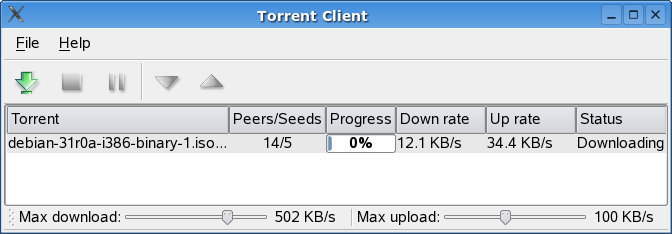
Custom list view
-
The delegate I guess :) ( or whole concept of a "downloding" row)
as you need to use a delegate to make such custom list. -
How to create a custom list view like this:

I can't find anything on the internet showing something similar to that.
@Defohin
i suggest not using a listview for this. Since IMO it is just unnecessary overhead.Instead i suggest you use a QScrollArea with a QVBoxLayout (stretch at the end) in it, containing all the item widgets.
If you need the selection this could also simply be "simulated" with other techniques.
-
@Defohin
i suggest not using a listview for this. Since IMO it is just unnecessary overhead.Instead i suggest you use a QScrollArea with a QVBoxLayout (stretch at the end) in it, containing all the item widgets.
If you need the selection this could also simply be "simulated" with other techniques.
@mrjj Is the delegate responsible for drawing the things on the view? For example, in the image I shared you can see a thumbnail, is the delegate responsible for drawing that?
@raven-worx Don't you think that using widgets,
QScrollAreaandQVBoxLayoutis going to be worse? I'm going to be using database, adding and removing data, probably dragging and dropping, organizing the list, etc. -
A custom delegate on a QListView is definitely the way to go.
@Defohin said in Custom list view:
Is the delegate responsible for drawing the things on the view?
The delegate is responsible for painting items within the view via the paint method
-
@mrjj Is the delegate responsible for drawing the things on the view? For example, in the image I shared you can see a thumbnail, is the delegate responsible for drawing that?
@raven-worx Don't you think that using widgets,
QScrollAreaandQVBoxLayoutis going to be worse? I'm going to be using database, adding and removing data, probably dragging and dropping, organizing the list, etc.@Defohin said in Custom list view:
@mrjj Is the delegate responsible for drawing the things on the view? For example, in the image I shared you can see a thumbnail, is the delegate responsible for drawing that?
yes. The delegate arguments the view and you alter how it draw stuff that way. OR to provide new editor for
some cells.
http://www.informit.com/articles/article.aspx?p=1405547&seqNum=4I agree with @raven-worx that if you can cheat and just
just a QWidget as a "row"and stuff your widgets there. It would be much faster to make it
and as long you dont need 1000000 of them. it will perform ok.
I would maybe looking into a TableWidget with one column and setCellWidget
if that would give me selection and drag and drop for free. (not tested) -
@mrjj Is the delegate responsible for drawing the things on the view? For example, in the image I shared you can see a thumbnail, is the delegate responsible for drawing that?
@raven-worx Don't you think that using widgets,
QScrollAreaandQVBoxLayoutis going to be worse? I'm going to be using database, adding and removing data, probably dragging and dropping, organizing the list, etc.@Defohin said in Custom list view:
Don't you think that using widgets, QScrollArea and QVBoxLayout is going to be worse?
no, otherwise i wouldn't suggest it ;)
I'm going to be using database, adding and removing data, probably dragging and dropping, organizing the list, etc.
It depends. If you use a lot of features from the model/view framework and gain benefit from it, you of course can also go this way.
Nevertheless, i just suggested. In the end both approaches are possible/valid to go. -
@Defohin said in Custom list view:
@mrjj Is the delegate responsible for drawing the things on the view? For example, in the image I shared you can see a thumbnail, is the delegate responsible for drawing that?
yes. The delegate arguments the view and you alter how it draw stuff that way. OR to provide new editor for
some cells.
http://www.informit.com/articles/article.aspx?p=1405547&seqNum=4I agree with @raven-worx that if you can cheat and just
just a QWidget as a "row"and stuff your widgets there. It would be much faster to make it
and as long you dont need 1000000 of them. it will perform ok.
I would maybe looking into a TableWidget with one column and setCellWidget
if that would give me selection and drag and drop for free. (not tested)@mrjj said in Custom list view:
I would maybe looking into a TableWidget with one column and setCellWidget
if that would give me selection and drag and drop for free. (not tested)if the widget doesn't consume the mouse-events and propagates them up to the viewport it should work.
Starting the drag has also be implemented, or otherwise the drag-image will be the empty cell instead.--- SUPPORT REQUESTS VIA CHAT WILL BE IGNORED ---
If you have a question please use the forum so others can benefit from the solution in the future -
@mrjj said in Custom list view:
I would maybe looking into a TableWidget with one column and setCellWidget
if that would give me selection and drag and drop for free. (not tested)if the widget doesn't consume the mouse-events and propagates them up to the viewport it should work.
Starting the drag has also be implemented, or otherwise the drag-image will be the empty cell instead.@raven-worx
It eats them :) (check box did)
For dragging it uses the items text so that look odd :)
So im not sure it gives much over a
QScrollArea with a QVBoxLayout as you suggest.
You would still need event filter (or way, mouse pass though/ignore)
to make row select on clicking on any widget in the "row"
and still need to startDrag if you want the look of the actual row.
So not so much "free" as I thought. :)