
How do I fire events from a QAxServer executable?
-
@hskoglund Well I stopped using testcon and I'm now able to fire my events and catch them with the VB client.
I still have a couple question, hope you can help!
-
When calling
CreateObject("MyApp.MyComController")from VB it returns quite early. Lots of my subobject are still un-initialized (looks like I'm still in the middle of my main).
How do I deal with this? -
I'm exposing two object to the OLE layer, one is a subclass of QGraphicsView. From the documentation it should shows as an ActiveX control:
If the object returned is a QWidget it will be exposed as an ActiveX control, otherwise the returned object will be exposed as a simple COM object.
How can I integrate this control in my VB app? It is not listed in the Toolbox > COM components -
-
Hi:
-
I'm thinking it's because you're doing OLE between 2 apps, the OLE traffic will be asynchronous, so VB will not wait for your app to finish processing.
-
To qualify as an ActiveX control (i.e. a control that you can paste on your VB form) I'm pretty sure it has to be a .dll, not an .exe.
-
-
Thank you, although I'm left without solution on those 2 questions :(
-
Hmmm, problem #1 I think you can solve by introducing additional handshaking, like setting a property "InitDone" to true when all your subobjects are up and running, and having VB wait for that.
But anyway, both issues I think will vanish if you switch from building an .exe to a .dll.
An ActiveX control normally does not have any other UI or functionality besides being an embedded control in someone else's program, so perhaps your shoehorning too much into your app. I mean trying both to be a normal app with a GUI and at the same time being an ActiveX control. Perhaps you could refactor out the OLE stuff into a ActiveX control .dll and use it from your normal app as well? Just my 2 cents :-) -
Finally found that the early return (problem #1) was due to the way QSplashScreen works.
Since you have to call qApp->processEvents() to refresh the display, the event loop was processing the request for creating the OLE objects much earlier than expected. -
Hi:
-
I'm thinking it's because you're doing OLE between 2 apps, the OLE traffic will be asynchronous, so VB will not wait for your app to finish processing.
-
To qualify as an ActiveX control (i.e. a control that you can paste on your VB form) I'm pretty sure it has to be a .dll, not an .exe.
@hskoglund said in How do I fire events from a QAxServer executable? (I'm totally lost):
- To qualify as an ActiveX control (i.e. a control that you can paste on your VB form) I'm pretty sure it has to be a .dll, not an .exe.
Do you think that if my server (exe) exposes a QWidget, it won't be possible to use it as a Control in VB (I don't care about drag and drop, what I wonder is if it will be impossible to insert the widget in a VB Form)
-
-
Hi, well the simpleax.exe example above works in VB and it exposes its widgets, so it should work for you as well. And when I tested it from my simple Widgets app above, I had simpleax.exe's widgets running inside my app's form (you see the window title: MainWindow).
However when I tested simpleax.exe from VB, I couldn't paste its widgets onto VB's form, only create that additional window instance with the title simpleax.exe.
When I looked at the existing COM components already listed I see half of them are .ocx and the half are .dlls. But actually there are 2 instances of .exe files present: both for Outlook.exe:
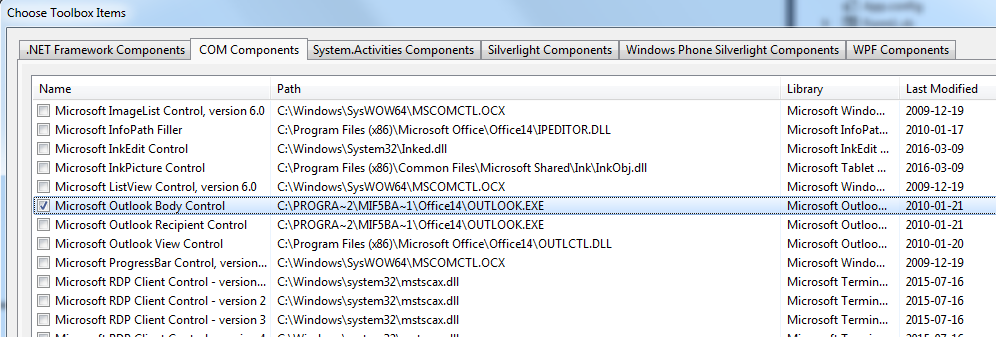
So that means it should be possible :-)
-
So, from VB you can't have simpleax widget in your own Form (event calling it programatically, no drag and drop) is that what you mean?
But with C++ QAXWidget, you can embed it in your app GUI? -
Yes that's about it.
In VB, if I don't issue the x.show() statement at startup, then no simpleax widgets will be visible, and when I do the x.show() they are visible alright, but in their own, separate form.
In Qt, I dont' need to do any ui->axwidget()->show(), simpleax's widgets will show themselves anyway, and in Qt's window. In other words, Qt eats VB's lunch here :-)So is this anomaly due to VB's inability to handle in-form .exe files, or due to Qt not adhering to some ancient Microsoft OLE specification? My guess is that in-form .exe files are sort of verboten (i.e. alternative 2) and Qt manages to sneak around it..
-
Dear @hskoglund , do you have any idea how to use custom types in the OLE client?
For instance QRect is declared by default in any tlb created with ActiveQt. However when trying to retrieve properties with this type from VB, I get this error:The specified record cannot be mapped to a managed value class.
