Skip to content
  • Categories
  • Recent
  • Tags
  • Popular
  • Users
  • Groups
  • Search
  • Get Qt Extensions
  • Unsolved
Collapse
Brand Logo
  1. Home
  2. Qt Development
  3. General and Desktop
  4. Console don't work in Windows 10

Console don't work in Windows 10

Scheduled Pinned Locked Moved Solved General and Desktop
11 Posts 3 Posters 2.9k Views 1 Watching
  • Oldest to Newest
  • Newest to Oldest
  • Most Votes
Reply
  • Reply as topic
Log in to reply
This topic has been deleted. Only users with topic management privileges can see it.
  • AndreyZA AndreyZ

    Hi!
    I create MiniGW project

    #include <stdio.h>

    int main(int argc, char *argv[])
    {
    printf("Hello World!\n");
    return 0;
    }

    but after run only black screen.
    Please help, how work with console?

    Joel BodenmannJ Offline
    Joel BodenmannJ Offline
    Joel Bodenmann
    wrote on last edited by Joel Bodenmann
    #2

    Hi & welcome!

    What you are showing has nothing to do with Qt. You are not using the Qt library by any means in that code.
    The most minimal Hello World application using Qt would looks like this:

    #include <QCoreApplication>
    #include <QDebug>
    
    int main(int argc, char* argv[])
    {
        QCoreApplication a(argc, argv);
    
        qDebug() << "Hello World";
    
        return a.exec();
    }
    

    You can use the "Qt Console Application" template in the QtCreator (when creating a new project) to get started. It will setup everything correctly for you.
    Note that there are two possibilities: Either your code will run in the "Console" that is built-in the QtCreator or it will launch an external (system native) terminal application. This depends on the Run in terminal option in the project settings and the *.pro file: CONFIG += console

    Industrial process automation software: https://simulton.com
    Embedded Graphics & GUI library: https://ugfx.io

    1 Reply Last reply
    3
    • AndreyZA Offline
      AndreyZA Offline
      AndreyZ
      wrote on last edited by
      #3

      Thank you very much! But need "clean C" for education.

      mrjjM 1 Reply Last reply
      0
      • AndreyZA AndreyZ

        Thank you very much! But need "clean C" for education.

        mrjjM Offline
        mrjjM Offline
        mrjj
        Lifetime Qt Champion
        wrote on last edited by
        #4

        @AndreyZ

        Hi
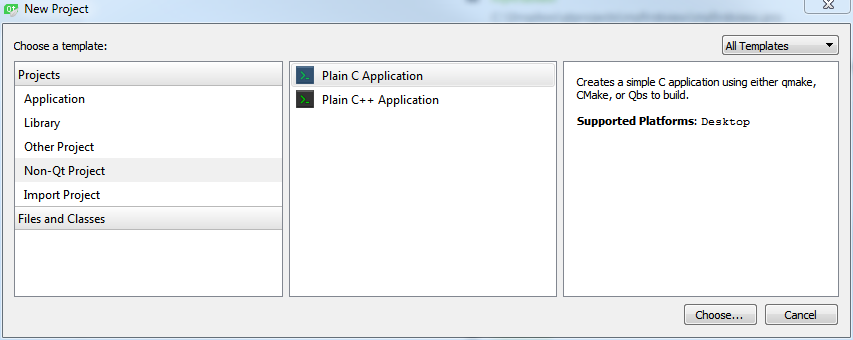
        Creator can also give that

        1 Reply Last reply
        2
        • AndreyZA Offline
          AndreyZA Offline
          AndreyZ
          wrote on last edited by
          #5

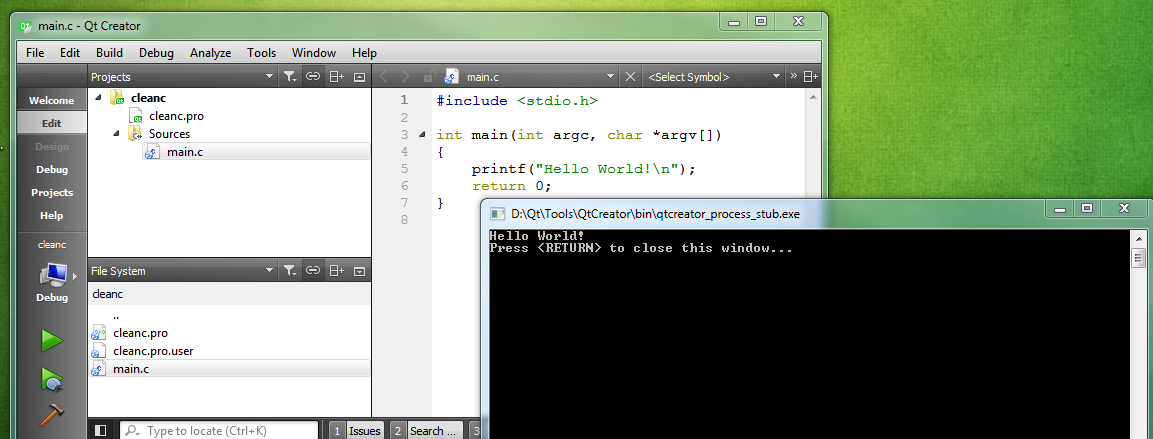
          I'm doing the same thing, but qtcreator_process_stub but nothing is displayed. qtcreator_process_stub.exe freeze.
          But to reinstall Windows 10, everything worked!

          mrjjM 1 Reply Last reply
          0
          • AndreyZA AndreyZ

            I'm doing the same thing, but qtcreator_process_stub but nothing is displayed. qtcreator_process_stub.exe freeze.
            But to reinstall Windows 10, everything worked!

            mrjjM Offline
            mrjjM Offline
            mrjj
            Lifetime Qt Champion
            wrote on last edited by
            #6

            @AndreyZ

            so you reinstalled win 10 and now it works or it dont works or ?

            1 Reply Last reply
            0
            • AndreyZA Offline
              AndreyZA Offline
              AndreyZ
              wrote on last edited by
              #7

              Don't work!
              I install 8.1 and some too.
              I'm doing the same thing(CleanC).
              Run and in Output Window QT, i see "Starts D:\QTProject\build-untitled15-Desktop_Qt_5_7_0_MinGW_32bit-Debug\debug\untitled15.exe...".
              On screen black freeze "qtcreator_process_stub.exe."
              I don't know what do...

              mrjjM 1 Reply Last reply
              0
              • AndreyZA AndreyZ

                Don't work!
                I install 8.1 and some too.
                I'm doing the same thing(CleanC).
                Run and in Output Window QT, i see "Starts D:\QTProject\build-untitled15-Desktop_Qt_5_7_0_MinGW_32bit-Debug\debug\untitled15.exe...".
                On screen black freeze "qtcreator_process_stub.exe."
                I don't know what do...

                mrjjM Offline
                mrjjM Offline
                mrjj
                Lifetime Qt Champion
                wrote on last edited by
                #8

                @AndreyZ

                hi
                try to disable any virus scanners.

                1 Reply Last reply
                1
                • AndreyZA Offline
                  AndreyZA Offline
                  AndreyZ
                  wrote on last edited by
                  #9

                  It's helped. Thank you very much!

                  mrjjM 1 Reply Last reply
                  1
                  • AndreyZA AndreyZ

                    It's helped. Thank you very much!

                    mrjjM Offline
                    mrjjM Offline
                    mrjj
                    Lifetime Qt Champion
                    wrote on last edited by
                    #10

                    @AndreyZ
                    oh, super
                    Can i ask name of it?
                    Often it has been Avast :)

                    1 Reply Last reply
                    0
                    • AndreyZA Offline
                      AndreyZA Offline
                      AndreyZ
                      wrote on last edited by
                      #11

                      Yes. It is Avast )

                      1 Reply Last reply
                      1

                      • Login

                      • Login or register to search.
                      • First post
                        Last post
                      0
                      • Categories
                      • Recent
                      • Tags
                      • Popular
                      • Users
                      • Groups
                      • Search
                      • Get Qt Extensions
                      • Unsolved