
Cannot add plugin into QtDesigner
-
Hi mrjj !
Thanks for your response !
I'll try to compile those DLL with msvc, i will let you know if it works.
The thing is my widget is pretty "heavy", it uses databases, animations, big images... a lot of things and it will be use in other projects in the future so I don't think that the promote feature is useful -
so, one day has passed and I can't compile with msvc... Qt can't find the compiler but I have installed it...
@-AVM Which library ? The .pro file of the example should be complete, no ?
-
@Amott
Hi
Just to be sure.
Did u also run the maintenance tool and selected
the correct Qt for Visual Studio XXX version ?
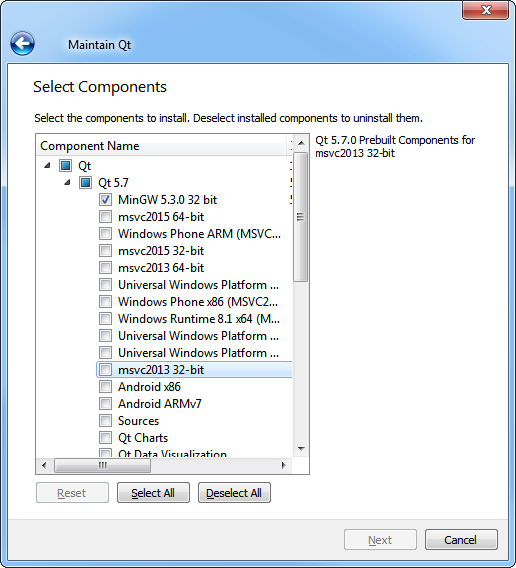
In the picture i have 5.7 installed for the mingw compiler.
And nothing for VS. -
You don't need to blindly test every MSVC version. Open QtCreator and click "About -> Qt Creator". The version used is displayed there e.g.
Qt Creator 4.0.2 Based on Qt 5.7.0 (MSVC 2013, 32 bit). That's the only version that will work and the plugin needs to be compiled in release mode.As for obtaining MSVC - Installing Qt package for MSVC does not install MSVC itself! You need to download it from Microsoft's site.
-
You don't need to blindly test every MSVC version. Open QtCreator and click "About -> Qt Creator". The version used is displayed there e.g.
Qt Creator 4.0.2 Based on Qt 5.7.0 (MSVC 2013, 32 bit). That's the only version that will work and the plugin needs to be compiled in release mode.As for obtaining MSVC - Installing Qt package for MSVC does not install MSVC itself! You need to download it from Microsoft's site.
@Chris-Kawa Yes, I have this version. Yesterday I downloaded msvc 2013 and 2015 from Microsoft's site but it said that a version is already installed
-
I finally found a solution : I have uninstalled and reinstalled QtCreator.
So now I can compile the example in msvc2015 in 32 and 64bit, I did it in release and place the generated DLL into
C:\Qt\Tools\QtCreator\bin\plugins\designer
but I still have the same error : worldtimeclockplugin.dll : %1 is not a valid Win32 application -
I finally found a solution : I have uninstalled and reinstalled QtCreator.
So now I can compile the example in msvc2015 in 32 and 64bit, I did it in release and place the generated DLL into
C:\Qt\Tools\QtCreator\bin\plugins\designer
but I still have the same error : worldtimeclockplugin.dll : %1 is not a valid Win32 application@Amott said:
So now I can compile the example in msvc2015
You need the same version of MSVC that was used to build Qt Creator.
In Qt Creator, click "Help" -> "About Qt Creator...". If it says "MSVC 2013", then you must use MSVC 2013. MSVC 2015 is not compatible.


