
QComboxBox different sizes for button and popup
-
Hi guys !
I looking for some help about the QComboBox Widget.
I'm trying to build a QComboBox with checkboxes (to allow user to select multiple option easily) and in order to save some space on my user interface, I would like to fix the size of the button, and to allow the popup to expand to fit the size of its contents.
The code I have for now is :
 QComboBox * combo;
 QStandardItem *  item1, * item2;

combo = new QComboBox(ui->tabWidget->widget(0));

this->model = new QStandardItemModel;
item1 = new QStandardItem;
item2 = new QStandardItem;

this->model->insertRow(0, item1);

item1->setText("test");
item1->setFlags(Qt::ItemIsUserCheckable | Qt::ItemIsEnabled);
item1->setData(Qt::Unchecked, Qt::CheckStateRole);


item2->setText("test2 long text aha ah ");
item2->setFlags(Qt::ItemIsUserCheckable | Qt::ItemIsEnabled);
item2->setData(Qt::Unchecked, Qt::CheckStateRole);
this->model->insertRow(1, item2);


combo->setModel(this->model);

combo->view()->setTextElideMode(Qt::ElideNone);
combo->setSizePolicy(QSizePolicy::Fixed, QSizePolicy::Expanding);
combo->setMaximumWidth(50);

combo->show();
This does the job, except for the size of the popup list.
So with this code I have a 50 pixels wide button, but I have no clue on how I can make the popup to expand (I tried to access it by calling combo->view() but without any success).
If someone know how to do this, I would really appreciate some help :)
Thanks in advance !!
Pablo@pablolito
Are you looking for this http://doc.qt.io/qt-4.8/qcombobox.html#showPopup ? -
Actually yes ! thanks a lot ! But I still have a little work to do to get the result I want I guess.
In the showPopup() method I did a :
view()->setSizeAdjustPolicy(QAbstractScrollArea::AdjustToContents);
view()->setMinimumWidth(150);
QComboBox::showPopup();
But I think the setSizeAdjustPolicy() call is not taken into account because the SetMinimumWidth is mandatory if I want the popup list to be resized. is this because of the setMaximumWidth(50); I do previously ?
Also, if possible I looking to have an automatic resize (150 px is just an example, I would like the popup to fit its content size).
Do you know how can I achieve this ?
-
Actually yes ! thanks a lot ! But I still have a little work to do to get the result I want I guess.
In the showPopup() method I did a :
view()->setSizeAdjustPolicy(QAbstractScrollArea::AdjustToContents);
view()->setMinimumWidth(150);
QComboBox::showPopup();
But I think the setSizeAdjustPolicy() call is not taken into account because the SetMinimumWidth is mandatory if I want the popup list to be resized. is this because of the setMaximumWidth(50); I do previously ?
Also, if possible I looking to have an automatic resize (150 px is just an example, I would like the popup to fit its content size).
Do you know how can I achieve this ?
-
@pablolito
Can you just test withcombo->showPopup();without setting any size . -
In this case the button take the size of the popup list, even when the popup is hidden.
@pablolito
I did not get exactly what problem you are facing .can you explain your screenshot or so? -
Okay.
I modified a little the code, here is what I have now:
CheckBoxList::CheckBoxList( QMap<uint32_t, QString> values, QWidget * parent):
    QComboBox(parent)
{
    QMapIterator<uint32_t, QString> it(values);

    QStandardItem *  item1, * item2;

    this->model = new QStandardItemModel;
    item1 = new QStandardItem;
    item2 = new QStandardItem;

    this->model->insertRow(0, item1);

    item1->setText("test");
    item1->setFlags(Qt::ItemIsUserCheckable | Qt::ItemIsEnabled);
    item1->setData(Qt::Unchecked, Qt::CheckStateRole);


    item2->setText("test2 long text aha ah ");
    item2->setFlags(Qt::ItemIsUserCheckable | Qt::ItemIsEnabled);
    item2->setData(Qt::Unchecked, Qt::CheckStateRole);
    this->model->insertRow(1, item2);


    this->setModel(this->model);

    this->view()->setTextElideMode(Qt::ElideNone);
    this->setSizePolicy(QSizePolicy::Fixed, QSizePolicy::Expanding);
    this->setMaximumWidth(50);
    setModel(this->model);
}

void CheckBoxList::showPopup()
    {
        view()->setSizeAdjustPolicy(QAbstractScrollArea::AdjustToContents);
        view()->setMinimumWidth(150);
        QComboBox::showPopup();

    }

void CheckBoxList::paintEvent(QPaintEvent *)
    {
        QStylePainter painter(this);
        painter.setPen(palette().color(QPalette::Text));

        // draw the combobox frame, focusrect and selected etc.
        QStyleOptionComboBox opt;
        initStyleOption(&opt);

        // if no display text been set , use "..." as default
        if(m_DisplayText.isNull())
            opt.currentText = "...";
        else
            opt.currentText = m_DisplayText;
        painter.drawComplexControl(QStyle::CC_ComboBox, opt);

        // draw the icon and text
        painter.drawControl(QStyle::CE_ComboBoxLabel, opt);
    }
This code give me this result :

This is what I want : a button which is 50px wide and a popup which is wide enough to display all the items. But for now the popup list is 150px wide (fixed) and I would like to have the width to fit the content of the list.
Is it clearer ?
-
Okay.
I modified a little the code, here is what I have now:
CheckBoxList::CheckBoxList( QMap<uint32_t, QString> values, QWidget * parent):
    QComboBox(parent)
{
    QMapIterator<uint32_t, QString> it(values);

    QStandardItem *  item1, * item2;

    this->model = new QStandardItemModel;
    item1 = new QStandardItem;
    item2 = new QStandardItem;

    this->model->insertRow(0, item1);

    item1->setText("test");
    item1->setFlags(Qt::ItemIsUserCheckable | Qt::ItemIsEnabled);
    item1->setData(Qt::Unchecked, Qt::CheckStateRole);


    item2->setText("test2 long text aha ah ");
    item2->setFlags(Qt::ItemIsUserCheckable | Qt::ItemIsEnabled);
    item2->setData(Qt::Unchecked, Qt::CheckStateRole);
    this->model->insertRow(1, item2);


    this->setModel(this->model);

    this->view()->setTextElideMode(Qt::ElideNone);
    this->setSizePolicy(QSizePolicy::Fixed, QSizePolicy::Expanding);
    this->setMaximumWidth(50);
    setModel(this->model);
}

void CheckBoxList::showPopup()
    {
        view()->setSizeAdjustPolicy(QAbstractScrollArea::AdjustToContents);
        view()->setMinimumWidth(150);
        QComboBox::showPopup();

    }

void CheckBoxList::paintEvent(QPaintEvent *)
    {
        QStylePainter painter(this);
        painter.setPen(palette().color(QPalette::Text));

        // draw the combobox frame, focusrect and selected etc.
        QStyleOptionComboBox opt;
        initStyleOption(&opt);

        // if no display text been set , use "..." as default
        if(m_DisplayText.isNull())
            opt.currentText = "...";
        else
            opt.currentText = m_DisplayText;
        painter.drawComplexControl(QStyle::CC_ComboBox, opt);

        // draw the icon and text
        painter.drawControl(QStyle::CE_ComboBoxLabel, opt);
    }
This code give me this result :
This is what I want : a button which is 50px wide and a popup which is wide enough to display all the items. But for now the popup list is 150px wide (fixed) and I would like to have the width to fit the content of the list.
Is it clearer ?
@pablolito
You can try with http://doc.qt.io/qt-4.8/qsizepolicy.html#setHorizontalPolicy setting toQSizePolicy::MinimumExpanding.--Alles ist gut.
-
@pablolito
You can try with http://doc.qt.io/qt-4.8/qsizepolicy.html#setHorizontalPolicy setting toQSizePolicy::MinimumExpanding. -
view()->setSizePolicy(QSizePolicy::MinimumExpanding, QSizePolicy::Preferred);Does the trick :
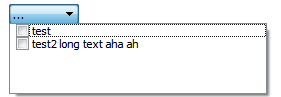
But the list is a bit too wide and a bit too long... But it wiil be enough for now !
Thanks a lot
@pablolito
this should do the calculation you want:void MyComboBox::showPopup() { //calculate width of all items int width = 0; const int iconWidth = this->iconSize().width() + 4; const QFontMetrics &fontMetrics = this->fontMetrics(); for( int i = 0; i < this->count(); ++i ) { const int textWidth = fontMetrics.width(this->itemText(i)); if (this->itemIcon(i).isNull()) width = (qMax(width, textWidth)); else width = (qMax(width, textWidth + iconWidth)); } QStyleOptionComboBox opt; this->initStyleOption(&opt); QSize tmpSize(width, 0); tmpSize = this->style()->sizeFromContents(QStyle::CT_ComboBox, &opt, tmpSize, this); // add width of scrollbar int scrollBarWidth = 0; if( QAbstractScrollArea* scrollArea = qobject_cast<QAbstractScrollArea*>(this->view()) ) { QScrollBar* vScrollBar = scrollArea->verticalScrollBar(); vScrollBar->ensurePolished(); QStyleOptionSlider option; option.initFrom(vScrollBar); option.subControls = QStyle::SC_None; option.activeSubControls = QStyle::SC_None; option.orientation = Qt::Vertical; option.minimum = vScrollBar->minimum();; option.maximum = vScrollBar->maximum(); option.sliderPosition = vScrollBar->sliderPosition(); option.sliderValue = vScrollBar->value(); option.singleStep = vScrollBar->singleStep(); option.pageStep = vScrollBar->pageStep(); option.upsideDown = vScrollBar->invertedAppearance(); scrollBarWidth = vScrollBar->style()->pixelMetric( QStyle::PM_ScrollBarExtent, &option, vScrollBar ); } // set the width to the popup this->view()->window()->setFixedWidth( qMax(this->width(),tmpSize.width()+scrollBarWidth) ); QComboBox::showPopup(); } -
view()->setSizePolicy(QSizePolicy::MinimumExpanding, QSizePolicy::Preferred);Does the trick :
But the list is a bit too wide and a bit too long... But it wiil be enough for now !
Thanks a lot
@pablolito said:
QSizePolicy::MinimumExpanding, QSizePolicy::Preferred
Even i have tried in win7 for long text . does not work here .
item2->setText("test2 long text aha 123456789012345678901234567890"); ui->comboBox->view()->setSizePolicy(QSizePolicy::MinimumExpanding, QSizePolicy::Preferred); -
@pablolito
this should do the calculation you want:void MyComboBox::showPopup() { //calculate width of all items int width = 0; const int iconWidth = this->iconSize().width() + 4; const QFontMetrics &fontMetrics = this->fontMetrics(); for( int i = 0; i < this->count(); ++i ) { const int textWidth = fontMetrics.width(this->itemText(i)); if (this->itemIcon(i).isNull()) width = (qMax(width, textWidth)); else width = (qMax(width, textWidth + iconWidth)); } QStyleOptionComboBox opt; this->initStyleOption(&opt); QSize tmpSize(width, 0); tmpSize = this->style()->sizeFromContents(QStyle::CT_ComboBox, &opt, tmpSize, this); // add width of scrollbar int scrollBarWidth = 0; if( QAbstractScrollArea* scrollArea = qobject_cast<QAbstractScrollArea*>(this->view()) ) { QScrollBar* vScrollBar = scrollArea->verticalScrollBar(); vScrollBar->ensurePolished(); QStyleOptionSlider option; option.initFrom(vScrollBar); option.subControls = QStyle::SC_None; option.activeSubControls = QStyle::SC_None; option.orientation = Qt::Vertical; option.minimum = vScrollBar->minimum();; option.maximum = vScrollBar->maximum(); option.sliderPosition = vScrollBar->sliderPosition(); option.sliderValue = vScrollBar->value(); option.singleStep = vScrollBar->singleStep(); option.pageStep = vScrollBar->pageStep(); option.upsideDown = vScrollBar->invertedAppearance(); scrollBarWidth = vScrollBar->style()->pixelMetric( QStyle::PM_ScrollBarExtent, &option, vScrollBar ); } // set the width to the popup this->view()->window()->setFixedWidth( qMax(this->width(),tmpSize.width()+scrollBarWidth) ); QComboBox::showPopup(); }@raven-worx
Thanks a lot !This does exactly what I want !


