Skip to content
  • Categories
  • Recent
  • Tags
  • Popular
  • Users
  • Groups
  • Search
  • Get Qt
  • Unsolved
Collapse
Brand Logo
  1. Home
  2. Qt Development
  3. QML and Qt Quick
  4. [Solved] Making a swipeable panel with buttons on top
Qt 6.12 LTS is out! See what's new in the release blog

[Solved] Making a swipeable panel with buttons on top

Scheduled Pinned Locked Moved QML and Qt Quick
19 Posts 4 Posters 11.2k Views 2 Watching
  • Oldest to Newest
  • Newest to Oldest
  • Most Votes
Reply
  • Reply as topic
Log in to reply
This topic has been deleted. Only users with topic management privileges can see it.
  • benlauB Offline
    benlauB Offline
    benlau
    Qt Champions 2016
    wrote on last edited by
    #5

    oh, I just find that MouseArea has "drag.filterChildren" property. That is prefect. Your solution works! Thank you!

    vishnuV 1 Reply Last reply
    0
    • benlauB benlau

      oh, I just find that MouseArea has "drag.filterChildren" property. That is prefect. Your solution works! Thank you!

      vishnuV Offline
      vishnuV Offline
      vishnu
      wrote on last edited by
      #6

      @benlau
      If you don't mind can you please post the working piece of code? Thanks

      1 Reply Last reply
      0
      • Hamed.MasafiH Offline
        Hamed.MasafiH Offline
        Hamed.Masafi
        wrote on last edited by
        #7

        Take a look to this sample code
        http://www.4shared.com/zip/FcvUAuCVba/SideMenu.html

        Remote object sharing (OO RPC)
        http://forum.qt.io/topic/60680/remote-object-sharing-oo-rpc-solved

        Advanced, Powerful and easy to use ORM for Qt5
        https://forum.qt.io/topic/67417/advanced-powerful-and-easy-to-use-orm-for-qt5

        vishnuV 1 Reply Last reply
        0
        • Hamed.MasafiH Hamed.Masafi

          Take a look to this sample code
          http://www.4shared.com/zip/FcvUAuCVba/SideMenu.html

          vishnuV Offline
          vishnuV Offline
          vishnu
          wrote on last edited by
          #8

          @BlackDal
          Thanks a lot Man!!! But it is littlebit different from the requirement
          alt text.
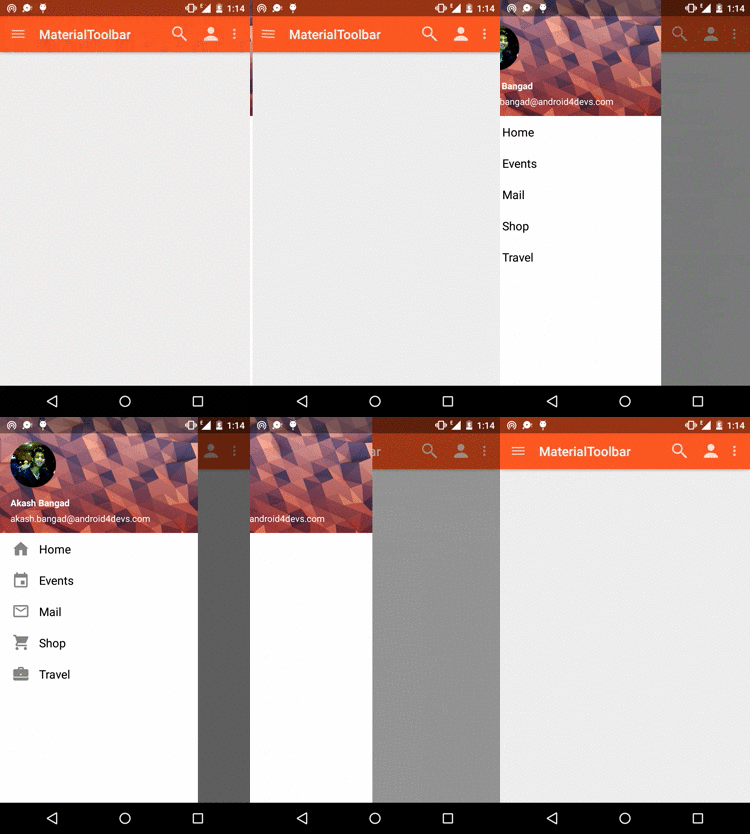
          In your example 1)It is not hiding completely. 2) It is based on the button pressed events. How can i make them based on swipe events? thanks a lot. @benlau Please post the piece of code if you don'T mind Thanks.

          benlauB Hamed.MasafiH 2 Replies Last reply
          0
          • vishnuV vishnu

            @BlackDal
            Thanks a lot Man!!! But it is littlebit different from the requirement
            alt text.
            In your example 1)It is not hiding completely. 2) It is based on the button pressed events. How can i make them based on swipe events? thanks a lot. @benlau Please post the piece of code if you don'T mind Thanks.

            benlauB Offline
            benlauB Offline
            benlau
            Qt Champions 2016
            wrote on last edited by
            #9

            @vishnu Done

            https://github.com/benlau/quickandroid/blob/DEV/examples/quickandroidexample/bottomsheet/BottomSheetDemo.qml

            vishnuV 1 Reply Last reply
            0
            • benlauB benlau

              @vishnu Done

              https://github.com/benlau/quickandroid/blob/DEV/examples/quickandroidexample/bottomsheet/BottomSheetDemo.qml

              vishnuV Offline
              vishnuV Offline
              vishnu
              wrote on last edited by
              #10

              @benlau
              Thanks a lot. What i didn't understand is
              what is

              • Activity{
                I can see a qml file here. Can you please describe me what it does? I mean its purpose.
                * BottomSheet {
                I didn't find any qml file. so no idea what it does. thanks
              benlauB 1 Reply Last reply
              0
              • vishnuV vishnu

                @BlackDal
                Thanks a lot Man!!! But it is littlebit different from the requirement
                alt text.
                In your example 1)It is not hiding completely. 2) It is based on the button pressed events. How can i make them based on swipe events? thanks a lot. @benlau Please post the piece of code if you don'T mind Thanks.

                Hamed.MasafiH Offline
                Hamed.MasafiH Offline
                Hamed.Masafi
                wrote on last edited by
                #11

                @vishnu That's an uncompleted project and has so much dirty codes (Excuse me)
                This sample has a right to left swipe menu, You can convert to left-to-right. and extract required code and classes from sample.

                http://www.4shared.com/archive/_gbu_ULyce/Shoptar.html

                Remote object sharing (OO RPC)
                http://forum.qt.io/topic/60680/remote-object-sharing-oo-rpc-solved

                Advanced, Powerful and easy to use ORM for Qt5
                https://forum.qt.io/topic/67417/advanced-powerful-and-easy-to-use-orm-for-qt5

                vishnuV 1 Reply Last reply
                0
                • Hamed.MasafiH Hamed.Masafi

                  @vishnu That's an uncompleted project and has so much dirty codes (Excuse me)
                  This sample has a right to left swipe menu, You can convert to left-to-right. and extract required code and classes from sample.

                  http://www.4shared.com/archive/_gbu_ULyce/Shoptar.html

                  vishnuV Offline
                  vishnuV Offline
                  vishnu
                  wrote on last edited by
                  #12

                  @BlackDal
                  Thanks a lot for the quick reply.
                  It says error at ToojQmlHelper::registerQmlTypes(&engine); and ended with 422 issues.
                  like this
                  Any idea how to solve this? I tried with Qt5.5, 5.4, 5.2. Everythings resulted the same.

                  1 Reply Last reply
                  0
                  • Hamed.MasafiH Offline
                    Hamed.MasafiH Offline
                    Hamed.Masafi
                    wrote on last edited by
                    #13

                    Checkout this. Include path problem fixed.

                    Screenshot: http://www.4shared.com/download/QNyDGY3qce/Shop.png?sbsr=20ecc3d08302028b3c941f61df43373c5899560310f81744&lgfp=3000

                    Download:
                    https://drive.google.com/file/d/0B5E1thzUK4mJd0huVmJwM1p3S3M/view?usp=sharing

                    Remote object sharing (OO RPC)
                    http://forum.qt.io/topic/60680/remote-object-sharing-oo-rpc-solved

                    Advanced, Powerful and easy to use ORM for Qt5
                    https://forum.qt.io/topic/67417/advanced-powerful-and-easy-to-use-orm-for-qt5

                    vishnuV 1 Reply Last reply
                    0
                    • Hamed.MasafiH Hamed.Masafi

                      Checkout this. Include path problem fixed.

                      Screenshot: http://www.4shared.com/download/QNyDGY3qce/Shop.png?sbsr=20ecc3d08302028b3c941f61df43373c5899560310f81744&lgfp=3000

                      Download:
                      https://drive.google.com/file/d/0B5E1thzUK4mJd0huVmJwM1p3S3M/view?usp=sharing

                      vishnuV Offline
                      vishnuV Offline
                      vishnu
                      wrote on last edited by
                      #14

                      @BlackDal
                      Sorry to say this but same errors at
                      ToojQmlHelper::registerQmlTypes(&engine);
                      ToojQmlHelper::initFonts(&engine);
                      should i add something to pro file or some settings ?

                      1 Reply Last reply
                      0
                      • Hamed.MasafiH Offline
                        Hamed.MasafiH Offline
                        Hamed.Masafi
                        wrote on last edited by
                        #15

                        You are right. There was a problem in the MSVC compiling that was solved.
                        I'm so sorry for this fail.
                        https://drive.google.com/open?id=0B5E1thzUK4mJTmt6QmJRTlk1TkE

                        Remote object sharing (OO RPC)
                        http://forum.qt.io/topic/60680/remote-object-sharing-oo-rpc-solved

                        Advanced, Powerful and easy to use ORM for Qt5
                        https://forum.qt.io/topic/67417/advanced-powerful-and-easy-to-use-orm-for-qt5

                        vishnuV 1 Reply Last reply
                        0
                        • Hamed.MasafiH Hamed.Masafi

                          You are right. There was a problem in the MSVC compiling that was solved.
                          I'm so sorry for this fail.
                          https://drive.google.com/open?id=0B5E1thzUK4mJTmt6QmJRTlk1TkE

                          vishnuV Offline
                          vishnuV Offline
                          vishnu
                          wrote on last edited by vishnu
                          #16

                          @BlackDal
                          perfect. Thanks a lot but small error i found.

                          qrc:/Page1.qml:14:19: Unable to assign [undefined] to QString
                          qrc:/main.qml:46: TypeError: Property 't' of object Units_QMLTYPE_0(0x2a94b238) is not a function
                          QSGThreadedRenderLoop: expose event received for window MainWindow_QMLTYPE_86(0x29f0ab28) with invalid geometry: QRect(1920,332 640x360) on QScreen(0x265deac8)
                          qrc:///tooj/qml/Tooj/App/MainWindow.qml:122:16: Unable to assign [undefined] to QString
                          

                          Also, for some reason its work perfect on windows but on android the swipe function is little bit draggy and needs 2 or 3 time to swipe. just to inform you. Thanks a lot.

                          1 Reply Last reply
                          0
                          • Hamed.MasafiH Offline
                            Hamed.MasafiH Offline
                            Hamed.Masafi
                            wrote on last edited by
                            #17

                            Thanks for bug reporting.
                            As I said this is a little and incomplete source. As you can see this sample has menu button, fontawesome and some small components. This is part of a library for mobile-first QtQuick applications and games. I will release this library in next months. I guess drag bug relate to dpi calculation (Units components has some unfinished tasks).

                            You might be interested to this project:
                            http://papyros.io/

                            Remote object sharing (OO RPC)
                            http://forum.qt.io/topic/60680/remote-object-sharing-oo-rpc-solved

                            Advanced, Powerful and easy to use ORM for Qt5
                            https://forum.qt.io/topic/67417/advanced-powerful-and-easy-to-use-orm-for-qt5

                            1 Reply Last reply
                            0
                            • vishnuV vishnu

                              @benlau
                              Thanks a lot. What i didn't understand is
                              what is

                              • Activity{
                                I can see a qml file here. Can you please describe me what it does? I mean its purpose.
                                * BottomSheet {
                                I didn't find any qml file. so no idea what it does. thanks
                              benlauB Offline
                              benlauB Offline
                              benlau
                              Qt Champions 2016
                              wrote on last edited by
                              #18

                              @vishnu said:

                              @benlau
                              Thanks a lot. What i didn't understand is
                              what is

                              • Activity{
                                I can see a qml file here. Can you please describe me what it does? I mean its purpose.
                                * BottomSheet {
                                I didn't find any qml file. so no idea what it does. thanks

                              Please switch to "DEV" branch. BottomSheet is not available at master branch yet.

                              Activity is a page of UI. You may just ignore it.

                              There also has a daily build for Android, you may try if you have an Android device.
                              Downloads | quickandroid

                              1 Reply Last reply
                              0
                              • johngodJ Offline
                                johngodJ Offline
                                johngod
                                wrote on last edited by
                                #19

                                Here is another very simple example with a nice animation that works how of the box:

                                import QtQuick 2.4
                                
                                Rectangle {
                                    id: root
                                    width: 400
                                    height: 380
                                    color: "yellow"
                                
                                    Rectangle {
                                        id: panel
                                        width: parent.width * 0.8
                                        height: parent.height * 0.8
                                        radius: 20
                                        color: "orange"
                                        MouseArea {
                                            id: mouseArea
                                            anchors.fill: parent
                                            drag.target: panel
                                            drag.minimumY: 0
                                            drag.maximumY: 0
                                            drag.minimumX: -panel.width
                                            drag.maximumX: 0
                                            onReleased: {
                                                //if the panel is swiped more than 30% it will hide
                                                //else it will go back to the original position
                                                //this makes a pretty nice effect :)
                                                if (panel.x < -panel.width * 0.3) {
                                                    //we need to make sure that a state change happens to
                                                    //fire the transition animation
                                                    root.state = "show"
                                                    root.state = "hide"
                                                }
                                                else {
                                                    root.state = "hide"
                                                    root.state = "show"
                                                }
                                            }
                                        }
                                        onXChanged: {
                                            console.log(x)
                                        }
                                    }
                                
                                    Rectangle {
                                        id: button
                                        width: 45
                                        height: width
                                        radius: 5
                                        color: "lightblue"
                                        anchors.bottom: parent.bottom
                                        anchors.left: parent.left
                                        MouseArea {
                                            anchors.fill: parent
                                            onClicked: {
                                                root.state = root.state === "show" ? "hide" : "show"
                                            }
                                        }
                                    }
                                
                                    state: "show"
                                    states: [
                                        State {
                                            name: "hide"
                                            PropertyChanges { target: panel; x: -panel.width }
                                        },
                                        State {
                                            name: "show"
                                            PropertyChanges { target: panel; x: 0 }
                                        }
                                    ]
                                
                                    transitions: Transition {
                                        NumberAnimation {
                                            target: panel
                                            property: "x"
                                            duration: 1000
                                            easing.type: Easing.OutCubic
                                        }
                                    }
                                }
                                1 Reply Last reply
                                0

                                • Login

                                • Login or register to search.
                                • First post
                                  Last post
                                0
                                • Categories
                                • Recent
                                • Tags
                                • Popular
                                • Users
                                • Groups
                                • Search
                                • Get Qt
                                • Unsolved