
custom QML module
-
Subject: Qt Design Studio 4.8: custom QML module is recognised and runs, but its section in the Components panel lists no items (designer/*.metainfo)
Hi all,
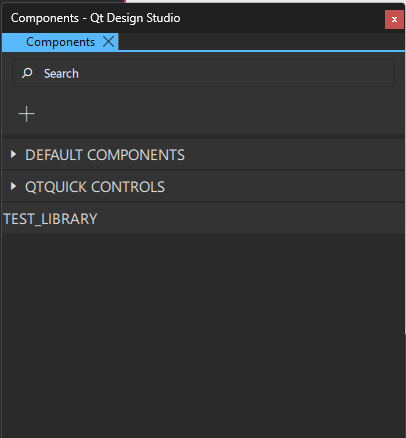
I have a small custom QML module that I want to appear as drag-and-drop items in the Components panel. The module resolves and runs, but its section in the Components panel has no arrow and no items. I have followed the documented steps and compared my files against Qt's own, and I am out of ideas. Any pointers would be appreciated.
Environment
- Qt Design Studio 4.8 (qmlpuppet 4.8.3); kit in the status bar shows "Designer Qt 6.8.7"
- Windows, MSVC 2022 (x64), CMake with Ninja
- Module built with Qt 6.8.3 for MSVC 2022 64-bit (the only 6.8 kit the maintenance tool offered)
- Project file has enableCMakeGeneration: true
The module (dummy names)
A module "MyModule" with three plain QML types: ItemA, ItemB and ItemC (QtQuick only, no C++ code of my own).
Folder form:
MyModule/
  qmldir
  ItemA.qml, ItemB.qml, ItemC.qml
  designer/
    plugin.metainfo
    images/*.png      (16px and 24px icons)
qmldir:
module MyModule
typeinfo plugins.qmltypes
ItemA 1.0 ItemA.qml
ItemB 1.0 ItemB.qml
ItemC 1.0 ItemC.qml
designersupported
plugin.metainfo (one Type shown, the others are the same shape): MetaInfo { Type { name: "MyModule.ItemA" icon: "images/itema-16px.png" Hints { visibleInNavigator: true; canBeDroppedInNavigator: true; canBeDroppedInFormEditor: true; canBeContainer: false; visibleInLibrary: true } ItemLibraryEntry { name: "ItemA" category: "My Category" libraryIcon: "images/itema-24px.png" version: "1.0" requiredImport: "MyModule" toolTip: qsTr("A sample item.") } } }I also built it as a module with qt_add_qml_module (URI MyModule, version 1.0, SHARED, DESIGNER_SUPPORTED, PLUGIN_TARGET set to the module's own target so that it is a single DLL) and copied the designer folder next to the generated qmldir.
What happens
- "Add a Module" in the Components panel does not list MyModule. If I type "import MyModule" in the .ui.qml file, a "MyModule" section appears in the panel, but it cannot be expanded and has no items.
- importPaths in the .qmlproject: if the module sits outside the project folder (absolute path), the canvas and Navigator cannot resolve its types (no warning), although the app runs. If the module is inside the project ("imports" and "." in importPaths), the types resolve, appear in the Navigator and canvas, and their properties are editable. The Components panel stays empty in both cases.
- Built module with the .qml files present: same as 2 (types resolve, panel empty). Built module with the .qml files removed and a single DLL: the Run button works, but the types disappear from the canvas and Navigator. So the editor seems to need the .qml source, while the runtime can use the compiled module.
- The Issues and Output panels show no errors after I declared the module's folder in the project file (QmlFiles, ImageFiles, and Files for qmldir and *.metainfo).
- Design Studio's own qml.exe and Qt 6.8.3's qml.exe both load the built module and show the types, so the module itself is valid.
What I have tried (no change in the Components panel)
- Icon references as :/qtquickplugin/..., :/ItemLibrary/..., and relative paths to PNGs next to the metainfo file; with and without libraryIcon, Hints and toolTip
- One metainfo file per type, then a single plugin.metainfo
- A stub plugins.qmltypes with a typeinfo line
- Keeping two copies of the module identical, in case a stale one was being read
- Closing and reopening the project after every change
- Comparing against Design Studio's built-in itemLibrary/*.metainfo files and Qt's QtQuick/Controls/designer/qtquickcontrols2.metainfo: the structure of mine is the same
- Following the six documented steps, including building the module with a Qt of the same minor version as Design Studio (6.8.3 against 6.8.7)
Questions
- Is a QML-only module with designer/*.metainfo supposed to populate the Components panel in 4.8, or does it need a C++ plugin type or some other structure?
- Is there a log or environment variable that shows whether and why a metainfo file is rejected? I see nothing in Output or Issues.
- Is there a cache for item-library entries that needs clearing, and where is it stored?
- Does the editor really need the .qml source of a custom module to show its types, or is there a way to give it a compiled-only module?
I can attach the module folder and the .qmlproject if that helps. Thanks in advance.