Unsolved Qt widget and menu bar on ubuntu
-
Hello.
I'm big newbie in Qt i would like to manage a laser and a temperature sensor.
I created a widget with the menu bar but i dont' know how to do two another widgets by clicking laser or temperature sensor in my menu bar.
Of course in the widget i would like to specify functions like start, stop, etc... Do i have to create a new.h like "laser.h" and "temperature sensor .h" to specify new functions on each .h and 2 new .cpp also?
another things is how to recognize automatically by serial port my instruments. i tried by hyperterminal in ubuntu and its works but how to manage this in Qt?
if somebody know a tuto for this
thanks a lot for the help. -
Hi And welcome to the forums
For Serial port.
This sample is a good start
https://doc.qt.io/qt-5/qtserialport-terminal-example.htmlFor your laser and a temperature sensor.
If they can do stuff on their own, a normal c++ class should be good
to handle its functions.
and yes, you would create new .h and .cpp for each.
QtCreator can make this for you if you use
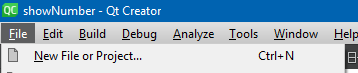
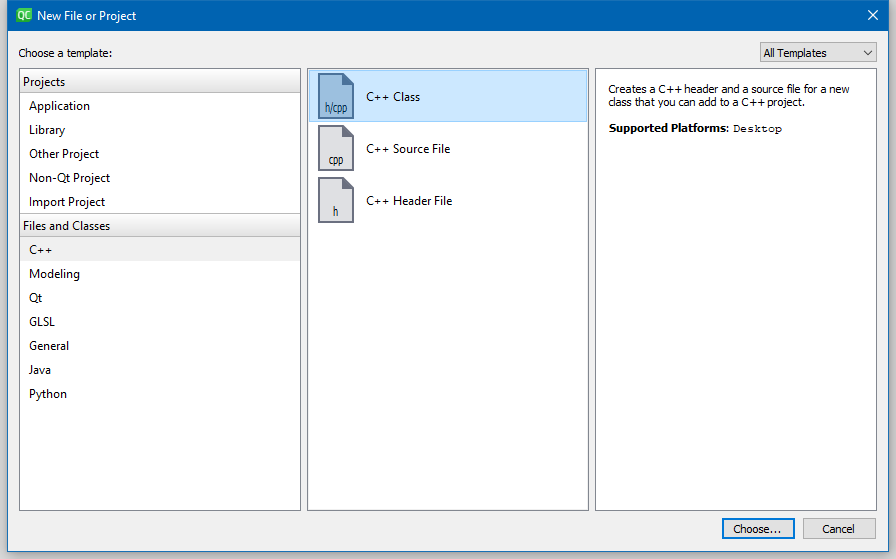
and fill out classname and base class
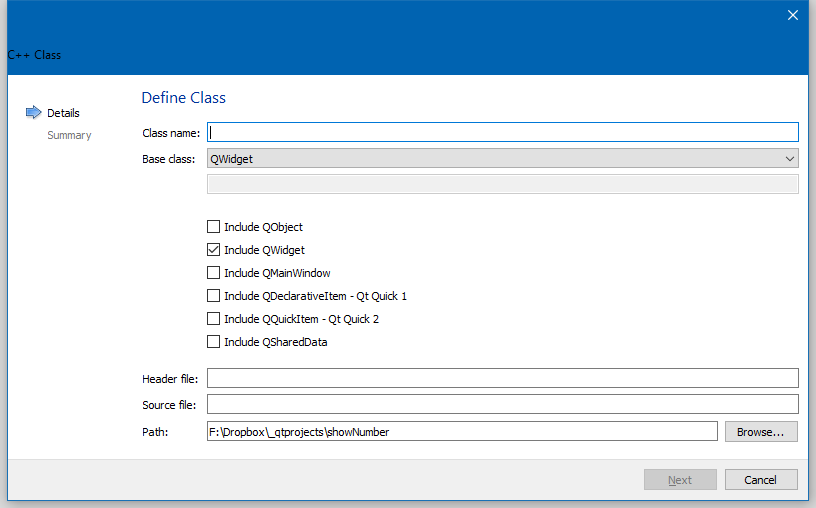
then it will create both .h and .cpp and add to project.
-
thank you for all, i found something to create a new window when i clicked a button created on my main window (new Qt designer form class-->dialog without buttons), but my new problem is creating a new window when i clicked "Laser" on my menu bar.
i can't get a slot like a press button when i right click on my menu bar.Do you have an idea for this?
thank you -
Ok i found it.
Just put "void(...)::on_actionConfiguration_triggered() and .setModal(true) and.exec() with my new.h in my main window.cpp and its works! now i can configure in my new window in my new cpp.
Thank you!
Bye.
