Unsolved QOpcUa (open62541) automatic connection establishment after termination
-
Hi,
I've set up a client and I want the client to automatically reconnect when the connection is terminated.
Can someone give me an idea how to do that?
Thats my code:
#include "dataCollector.h"
#include "QDebug"

dataCollector::dataCollector(QObject *parent)
    : QObject(parent)
    , m_consumableReplenishment{0}
    , m_connected(false)
    , m_successfullyCreated(false)
{

}

dataCollector::~dataCollector()
{
    if (m_client)
        m_client->disconnectFromEndpoint();
}

void dataCollector::clientStateHandler(QOpcUaClient::ClientState state)
{

    m_connected = (state == QOpcUaClient::ClientState::Connected);

    emit connectedChanged(m_connected);

    if (state == QOpcUaClient::ClientState::Connected)
    {
        m_consumableReplenishmentNode.reset(m_client->node("ns=7;s=S7_MC_01.CBCom_Consumable"));

        connect(m_consumableReplenishmentNode.data(), &QOpcUaNode::dataChangeOccurred, this, &dataCollector::consumableReplenishmentUpdated);

        m_consumableReplenishmentNode->enableMonitoring(QOpcUa::NodeAttribute::Value, QOpcUaMonitoringParameters(100));

        connect(m_consumableReplenishmentNode.data(), &QOpcUaNode::enableMonitoringFinished, this, &dataCollector::enableMonitoringFinished);
    }
    if (state == QOpcUaClient::ClientState::Connecting)
        qDebug()<<(QStringLiteral("Connecting"));

    if (state == QOpcUaClient::ClientState::Disconnected)
        qDebug()<<(QString("Disconnected: %1").arg(QMetaEnum::fromType<QOpcUaClient::ClientError>().valueToKey(static_cast<int>(m_client->error()))));

}

void dataCollector::enableMonitoringFinished(QOpcUa::NodeAttribute attr, QOpcUa::UaStatusCode status)
{

    Q_UNUSED(attr);
    if (!sender())
        return;

    if (status == QOpcUa::UaStatusCode::Good)
        qDebug() << "Monitoring successfully enabled for" << qobject_cast<QOpcUaNode *>(sender())->nodeId();
    else {
        qDebug() << "Failed to enable monitoring for" << qobject_cast<QOpcUaNode *>(sender())->nodeId() << ":" << status;
    }
}

void dataCollector::consumableReplenishmentUpdated(QOpcUa::NodeAttribute attr, const QVariant &value)
{
    Q_UNUSED(attr);
    QVariantList werte = value.toList();

    for (int i = 0; i < 12; i++)
    {
        m_consumableReplenishment[i] = werte[i].toInt();
        qDebug()<<"m_consumableReplenishment["<< i <<"] :"<<m_consumableReplenishment[i];
    }
}

void dataCollector::connectToEndpoint()
{
    if (m_connected)
    {
        return;
    }
    QOpcUaProvider provider;


    if (!m_client)
    {
        m_client.reset(provider.createClient(m_backends = "open62541"));

     if (m_client)
        {
            connect(m_client.data(), &QOpcUaClient::stateChanged, this, &dataCollector::clientStateHandler);
        }
    }

    if (!m_client) {
        qWarning() << "Could not create client";
        return;
    }

    m_client->connectToEndpoint(QUrl("opc.tcp://WIN-B39D138RQ4S:55101"));
}
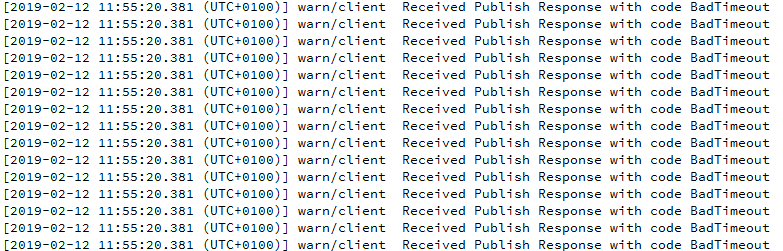
If I terminate the server the following message is on the console :
...
...
and sometimes the program crashes after terminatingI have an additional question.
What means the following output?
This output is output only once after the start of the qt project on the console.
Thank you very much in advance
Regards