Solved Moving all my buttons to a frame?
-
In order to learn Qt I have created an application using the GUI wizard from Qt Creator. That is, I have a QMainWindow and a *Ui::MainWindow ui; object that were automatically added for me. A header, source and designer files have been created as well.
I've been working on my application for a while, added 12 buttons that I manually set up in a grid-style (I mean, I manually dragged & dropped the QPushButtons and created a sort of 3x4 buttons matrix).
Since my application is a (very simple) game, I enable and disable some of the buttons as the game progresses. But now I found out that at at specific point in the execution I need to disable all 12 buttons and then re-enable only the ones that were enabled before I disabled all of them.
I was told that, instead of keeping track of each button state, I could create a QFrame to contain all buttons and then disable the QFrame when needed, and after reenabling the QFrame my buttons would retain their original state.
However, I'm struggling really hard to do this. I thought I should just add a QFrame, somehow add the buttons to it and then call frame.setEnable(false) and frame.setEnable(true). This seems not to be the case.
I think I need some sort of layout and a central widget. But I think I already have those, having created my application through the IDE wizard?
I tried adding this to the header file:QGridLayout* layout();Then on the designer I dropped a QFrame on my form (my main window, as my application only has one window).
Then on the source file I added my 12 buttons to the layout:layout->addWidget(btn01); layout->addWidget(btn02); etcAnd set the layout to the frame:
ui->frame->setLayout(layout);However, this doesn't even compile. I get these errors:
invalid use of member (did you forget the '&' ?)
     layout->addWidget(btn01);
           ^
base operand of '->' is not a pointer'btn01' was not declared in this scope layout->addWidget(btn01); ^I've spent quite a few hours trying to understand how to do it, with no luck. All I want is to add my buttons to a container with the ability to be enabled/disabled (along with its contained widgets) and that the widgets within it retain their individual state. Is there a simpler way to achieve this?
Thanks!
-
Hi
You say you added
QGridLayout* layout();
to the .h file but that would be a function returning a QGridLayout pointer.
did you mean
QGridLayout* layout;
with
layout = new QGridLayout()
?Anyway,
no need to add layout from code.
On the ui->frame, in Designer, place one button on the frame. Right click outside
button and select a layout. Then delete button. Frame will keep its layout.
However, the one should think that ui->frame->layout() would
be the way to address the layout but Creator do add
a direct variable. so its ui->verticalLayout or similar.
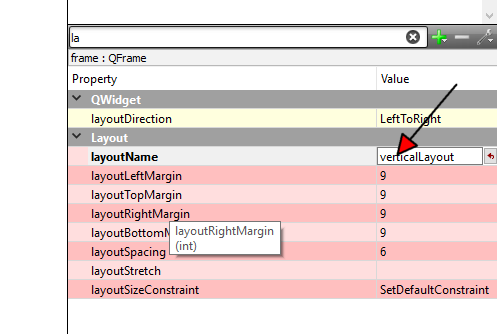
So now from code simply add to this layout.
Im not sure with the errors as you are not showing the full source.
"'btn01' was not declared in this scope" means it dont know the button.
maybe its ui->btn01 but its hard to guess at. -
@anarelle said in Moving all my buttons to a frame?:
layout->addWidget(btn01);
syntax error..
use of gridlayout: SYNTAX
layout->addWidget(btn01,0,0);
layout->addWidget(btn02,0,1); -
@anarelle can you paste your ui_MainWindow.h code?
-
Thanks for your answers :)
I have my game almost ready, so I'll post the relevant parts of the code.It's memory game where 12 tiles display on screen, then you click on two and try to match the images they show. My tiles are implemented as QPushButtons. Each one is clicked, an image is displayed (by calling a showImage() method that changes the button background). When a second tile is clicked, if there is a match the two buttons are disabled so user can't click on them again (and score increases). If there was no match, the two tiles go back to their initial state (no background) after 1 second.
Also, when the first "tile" (button) is clicked I set enabled to false until a second button is clicked. If there is no match, then both buttons get their blank background again and they are setEnabled(true). I'm using a single shot QTimer to reset both tiles after a no-match.
There is also a countdown for 1 minute, implemented as another QTimer. If the countdown reaches 0, then a message is displayed saying game is over. If after matching 2 tiles the match count is 6 (as there are 12 tiles), then a message shows saying the total score reached.
This is what I have on mainwindow.h:
namespace Ui {
    class MainWindow;
}

class MainWindow : public QMainWindow{
    Q_OBJECT


public:
    explicit MainWindow(QWidget *parent = nullptr);
    ~MainWindow();
    QTimer *timer=new QTimer();
    QTime time{0,1,0};
    QVector<QString> tiles{"btn01", "btn02", "btn03", "btn04",
                              "btn05", "btn06", "btn07", "btn08",
                              "btn09", "btn10", "btn11", "btn12"};
    QHash<QString, QString> hash;
    int score=0;
    bool turnStarted=false;
    QPushButton* previousTile;
    QPushButton* currentTile;
    int pairsLeft=6;
    QMessageBox msgBox;


private slots:
    void updateCountDown();
    void tileClicked();
    void randomize(QVector<QString> &tiles);
    void bind(QVector<QString> &tiles, QHash<QString, QString> &hash);
    void checkPartialResult();
    void turnTilesBack();
    void showBackground();
    void checkFinalResult();
    void updateCountDown();

private:
    Ui::MainWindow *ui;
};
And this is part of mainwindow.cpp:
MainWindow::MainWindow(QWidget *parent) : QMainWindow(parent), ui(new Ui::MainWindow){
    ui->setupUi(this);

    //Set up countdown
    connect(timer, SIGNAL(timeout()), this, SLOT(updateCountDown()));
    timer->start(1000);
    ui->countdown->setText(time.toString("m:ss"));

    //Button names are stored in a QVector, so they need to be sort randomly. After that, grab pairs of tiles and bind the name of an image file to each pair. Store this in a QHash where each key is a button name and its value is the image it should show when that button is clicked.
    randomize(tiles);
    bind(tiles, hash);

    //Connect each button to the same slot, which will figure out which button was pressed and show its associated image file accordingly
    connect(ui->btn01, SIGNAL(clicked()), this, SLOT(tileClicked()));
    connect(ui->btn02, SIGNAL(clicked()), this, SLOT(tileClicked()));
    //etc (all 12 tiles are set the same way)
I won't post all my methods as it would be too long, but this is where I'm trying to make changes: this is the method called every time a second tile is clicked, to find out if there was a match:
void MainWindow::definirResultadoParcial(){
    //check if there is a match (the current tile matches the previous tile in the turn)
    if (hash[currentTile->objectName()]==hash[previousTile->objectName()]){
        score+=15;
        pairsLeft--;

        //if there is a match, find out if all 12 tiles have been matched.
        checkFinalResult();
    }
    else{
        score-=5;

        //if there is no match, after 1 second turn back both tiles from current turn so they can be used in future turns
        QTimer::singleShot(1000, this, SLOT(turnTilesBack()));
    }
}
When there is no match, I need the mis-matched tiles to remain on screen for 1 second and then turn them back (remove their backgrounds). However, as the QTimer seems to be running on a different thread, this makes it possible for the user to continue clicking on tiles, before the singleShot timer has timed out.
So, when a second button is clicked and there is no match, I need to disable all my buttons for 1 second and then re-enable only the ones that hadn't been matched yet. That's why I'm trying to set up my buttons inside some sort of container that I can disable and re-enable without losing my buttons state.
However, I didn't use any layouts or anything. I only dragged & dropped buttons on my form. So I don't have any layouts. Are they absolutely necessary? I'd actually like to avoid messing with my buttons if possible. What's the simplest way to achieve what I'm trying to do?
Thanks again :)
-
Hi
Fist of all, layouts are only needed if you wish/need your tile area to be able to follow size of the Mainwindow so
if user resize it, it can use more or less space. If a fixed size is ok, you dont need layout as such.
However, its very common to do as screen can have many different resolutions. Especially laptops.Regarding, preventing clicking while 1 sec "timeout". The QTimer do not block the GUI tread and hence
user can still click stuff.But you dont really need container to disable them.
Just add a QList<QPushButtons *> buttonsList; to mainwindow.h
then when you connect them, also append to this list.
buttonsList.append(ui->btn01) etc.Then before
QTimer::singleShot(1000, this, SLOT(turnTilesBack()));
you simply loop over the buttonsList and disable each of them.
Using a function like
setEnableForAll(bool state)
that loops the list, allows you to easy call with true or false to enable or disable on when needed. -
@mrjj Thanks :) maybe that's the best way to go, as I don't need to support different resolutions. I thought adding widgets to a container and then enabling/disabling the container would be easier, but it would actually require too many changes.
-
@anarelle
well it should not BE super complicated to place QFrame on the form
and select all buttons and drag to the QFrame. and then let it handle enable/disable
for its children.
However, i do wonder how you reset the images on the buttons.
Dont you loop the buttons somehow there too ? -
@mrjj As for your question, I only have to reset 2 images on each turn (when the user unveils the second image, if it doesn't match with the first image then I remove the background on both):
void MainWindow::turnTilesBack(){
    //return tiles from current turn to the default state (remove backgrounds)
    previousTile->setStyleSheet("#" + previousTile->objectName() + "{ }");
    currentTile->setStyleSheet("#" + currentTile->objectName() + "{ }");

    //re-enable both tiles so they can be used on another turn
    currentTile->setEnabled(true);
    previousTile->setEnabled(true);
}
This only happens when there's no match. If there's a match then I only disable the buttons but the backgrounds are not changed, so the user can clearly see which tiles are left. So I don't have to keep the state of each button. I manage it on each turn. I was trying to avoid having to keep the state of the buttons (although I could do that by just adding the disabled ones to a vector), that's why I was trying to add the QFrame.
So in order to add a QFrame and add the buttons to it I shouldn't need a layout at all? That's where I was getting confused. I'll try adding the buttons to the QFrame directly and let you know how it turns out :)
-
@anarelle
Hi
Ah, so its only currentTile, previousTile you change image on so no loop.
Yes, you can also add buttons to a QFrame without a layout.
Its only required to use a layout if size of container changes and you wants its sub widgets to adjust to new size.
For your use case (disable all with parent/container) a layout is not needed. -
@mrjj Yup, it was definitely easier without a layout. I just added a QFrame using the designer, selected all my buttons and dragged them onto the QFrame, then called frame->setEnabled(false) and frame->setEnabled(true) when needed and that was it. My individual buttons state isn't affected every time the frame state changes.
Thanks so much for everyone's help!
-
@anarelle
Hi if issue is resolved, please mark the post Solved.

